11 min to read
Upgrading a Kubernetes Cluster with Kubespray (2026V.)
A complete guide to upgrading Kubernetes v1.33 to v1.34 using Kubespray with etcd backup, certificate renewal, and rollback strategies
Overview
Operating a Kubernetes cluster requires periodic upgrades for security patches, new features, and certificate renewal.
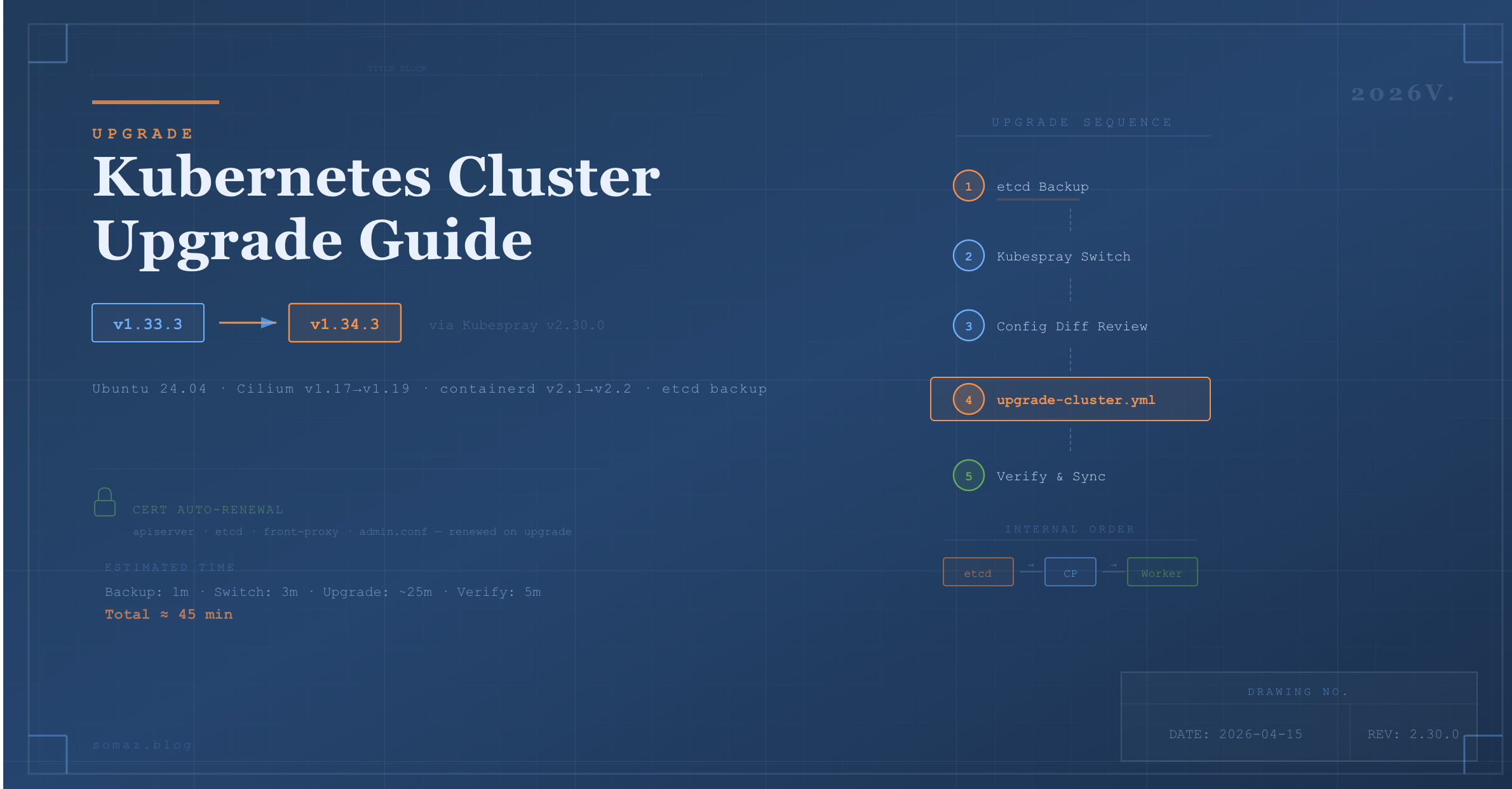
Kubespray supports automated upgrades through the upgrade-cluster.yml playbook, following the order of etcd → Control Plane → Worker. Instead of manually connecting to each node and running kubeadm upgrade, you can upgrade the entire cluster with a single Ansible command.
This guide covers the following key areas:
- Kubespray ↔ Kubernetes version mapping
- etcd backup and restore
- Kubespray version transition (v2.28.0 → v2.30.0)
- Kubernetes upgrade using
upgrade-cluster.yml(v1.33.3 → v1.34.3) - Certificate auto-renewal
- Errors encountered during upgrade and recovery strategies
- Post-upgrade verification and inventory synchronization
For cluster installation, refer to the previous post.
Upgrade Principles
There are critical rules that must be followed when upgrading Kubernetes through Kubespray.
| Principle | Description |
|---|---|
| One minor version at a time | v1.33 → v1.34 ✅, v1.33 → v1.35 ❌ |
| Patch versions are free | v1.33.3 → v1.33.5 ✅ |
| Upgrade order | etcd → Control Plane → Worker (handled automatically by Kubespray) |
| Worker upgrade method | drain (Pod eviction) → upgrade → uncordon (restore) |
| etcd backup required | Always create a snapshot before upgrading |
| Staging first | Validate in a test environment before applying to production if possible |
Kubespray ↔ Kubernetes Version Mapping
Each Kubespray version supports a specific range of Kubernetes versions. Always verify before upgrading.
| Kubespray | K8s Support Range |
|---|---|
| v2.25.x | v1.29.x ~ v1.31.x |
| v2.26.x | v1.30.x ~ v1.32.x |
| v2.27.x | v1.31.x ~ v1.33.x |
| v2.28.x | v1.32.x ~ v1.34.x |
| v2.30.0 | v1.32.x ~ v1.34.x |
For exact mappings, check Kubespray Releases. You can also verify the supported versions for a specific tag with:
git show <tag>:roles/kubespray_defaults/defaults/main/main.yml | head -5
Upgrade Procedure
Step 1. Pre-check — Verify Current Versions
ssh somaz@10.10.10.17
cd ~/kubespray

# Check current Kubespray version
git describe --tags

# Check current K8s version
kubectl get nodes -o wide

# Check certificate expiration
sudo kubeadm certs check-expiration
Step 2. etcd Backup (Required)
Always create an etcd snapshot before upgrading. This is the only rollback mechanism if something goes wrong.
Step 3. Switch Kubespray Version
To upgrade Kubernetes, you must first switch Kubespray itself to a tag that supports the target K8s version.
# Activate venv
source ~/kubespray/venv/bin/activate
cd ~/kubespray

# Fetch latest tags
git fetch --tags
git tag -l | sort -V | tail -20

# Stash any local changes
git stash

# Checkout desired version
git checkout v2.30.0

# Update dependencies
pip install -r requirements.txt
Step 4. Review Configuration Changes (Diff)
When the Kubespray version changes, default configuration values may also change. Compare the sample inventory with your inventory.
# Compare k8s-cluster.yml
diff ~/kubespray/inventory/sample/group_vars/k8s_cluster/k8s-cluster.yml ~/kubespray/inventory/somaz-cluster/group_vars/k8s_cluster/k8s-cluster.yml

# Compare containerd.yml
diff ~/kubespray/inventory/sample/group_vars/all/containerd.yml ~/kubespray/inventory/somaz-cluster/group_vars/all/containerd.yml
Key Changes from v2.28.0 → v2.30.0
| File | Change | Impact |
|---|---|---|
| etcd.yml | Removed (etcd settings moved elsewhere) | No impact if no custom etcd settings |
| k8s-net-weave.yml | Removed (Weave CNI deprecated) | No impact when using Cilium |
| k8s-net-cilium.yml | kube_proxy_replacement: partial → false, cilium_extra_values added |
No impact (default values) |
| k8s-cluster.yml | Cilium-related note added to kube_owner comment |
Minor change |
| containerd.yml | engine/root → options.Root structure change |
Comments only (examples) |
| addons.yml | local_path_provisioner_image_tag removed |
Now auto-managed |
Step 5. Set kube_version (Optional)
To specify a particular K8s version, modify the following file. If not set, the default latest version for the Kubespray tag will be used.
vi ~/kubespray/inventory/somaz-cluster/group_vars/k8s_cluster/k8s-cluster.yml
# Add or modify
kube_version: v1.34.3
Step 6. Run the Upgrade
Use upgrade-cluster.yml, not cluster.yml. The latter is for fresh installations only.
The upgrade typically takes 20–40 minutes. Expect API server downtime of 10–30 seconds, and services with only 1 replica may experience brief interruptions during Worker drain.
Step 7. Verify the Upgrade
# Check all node versions
kubectl get nodes -o wide

# Check for unhealthy Pods
kubectl get pods -A | grep -v Running | grep -v Completed

# Cluster info
kubectl cluster-info

# Component status
kubectl get --raw='/readyz?verbose'

# Verify containerd insecure registry configuration is preserved
ssh somaz@10.10.10.18 "cat /etc/containerd/certs.d/harbor.example.com/hosts.toml"
Upgrade Automation Script
The following GitHub repository contains automation scripts that cover the above steps:
somaz94/script-collection - kubespray
Certificate Auto-Renewal
When you run upgrade-cluster.yml with Kubespray, kubeadm automatically renews certificates.
Auto-Renewed Certificates
| Certificate | Purpose | Renewal |
|---|---|---|
| apiserver.crt | API Server TLS | Automatic |
| apiserver-kubelet-client.crt | API → kubelet communication | Automatic |
| front-proxy-client.crt | API aggregation | Automatic |
| etcd/server.crt | etcd TLS | Automatic |
| etcd/peer.crt | etcd peer communication | Automatic |
| admin.conf | kubectl access | Automatic |
kubeadm automatically renews certificates with less than 1 year remaining during upgrades. The default validity period is 1 year.
Check Current Certificate Expiration
sudo kubeadm certs check-expiration
What Happens If You Skip Upgrades for Over 1 Year?
Certificates will expire and the cluster will become unresponsive. In that case, manual renewal is required:
sudo kubeadm certs renew all
sudo systemctl restart kubelet
Recommendation: Performing at least one upgrade within a year automatically renews certificates, eliminating the need for separate maintenance.
You can also use the following script: k8s_certs_renew.sh
Upgrade Error Recovery
health-check Job Failure
[ERROR CreateJob]: Job "upgrade-health-check-xxxxx" in the namespace "kube-system"
did not complete in 15s: no condition of type Complete
This occurs when the health check Job created by kubeadm upgrade does not complete within 15 seconds. It is typically caused by the image being pulled for the first time. Re-running usually resolves the issue since the image will be cached.
Diagnosis
# Check failed Jobs
kubectl get jobs -n kube-system | grep upgrade-health
kubectl describe job <job-name> -n kube-system

# Check Pod status
kubectl get pods -n kube-system | grep upgrade-health
Resolution
# Control Plane may be in SchedulingDisabled state — uncordon first
kubectl uncordon k8s-control-01

# Re-run upgrade
ansible-playbook -i inventory/somaz-cluster/inventory.ini upgrade-cluster.yml -b --become-user=root
containerd Insecure Registry Reset
During upgrades, containerd may be reconfigured and manually modified hosts.toml files can be overwritten. If the configuration is included in the Kubespray inventory’s containerd.yml, it will be automatically preserved.
# Verify configuration is preserved after upgrade
for node in 10.10.10.17 10.10.10.18 10.10.10.19 10.10.10.22; do
  echo "=== $node ==="
  ssh somaz@$node "cat /etc/containerd/certs.d/harbor.example.com/hosts.toml 2>/dev/null || echo 'NOT FOUND'"
  echo ""
done
If the configuration was lost, re-run the containerd tag to restore it:
ansible-playbook -i inventory/somaz-cluster/inventory.ini cluster.yml --tags containerd -b --become-user=root
Important: Never modify insecure registry settings directly on servers. Always manage them through the Kubespray inventory (containerd.yml) to ensure they survive upgrades.
Rollback
Kubespray does not support automatic rollback. If an upgrade fails, you must restore from the etcd backup created in Step 2.
# Restore etcd
sudo ETCDCTL_API=3 etcdctl snapshot restore /tmp/etcd-backup-YYYYMMDD.db --data-dir=/var/lib/etcd-restore

# Manual etcd data directory replacement is required afterward
# Reference: https://kubernetes.io/docs/tasks/administer-cluster/configure-upgrade-etcd/#restoring-an-etcd-cluster
Rollback is a complex and risky operation. Always create an etcd backup before upgrading, and test in a staging environment whenever possible.
Post-Upgrade Inventory Synchronization
After the upgrade is complete, back up the Control Plane’s inventory to your local machine (GitLab, etc.).
# Run from local machine
scp -r somaz@10.10.10.17:~/kubespray/inventory/somaz-cluster ~/my-project/kubespray/inventory-somaz-cluster
Version Check Script
Create a script for quick before/after comparison.
#!/bin/bash
# check-version.sh

echo "=== K8s Version ==="
kubectl get nodes -o wide

echo ""
echo "=== Kubespray Version ==="
cd ~/kubespray && git describe --tags

echo ""
echo "=== Containerd Version ==="
containerd --version

echo ""
echo "=== Cilium Version ==="
kubectl get ds cilium -n kube-system -o=jsonpath='{.spec.template.spec.containers[0].image}'
echo ""

echo ""
echo "=== Certificate Expiration ==="
sudo kubeadm certs check-expiration 2>/dev/null | head -15
Real-World Upgrade Case: v1.33.3 → v1.34.3
The following documents an actual upgrade performed on April 7, 2026.
Environment
| Component | Before | After |
|---|---|---|
| Kubespray | v2.28.0 | v2.30.0 |
| Kubernetes | v1.33.3 | v1.34.3 |
| Cilium | v1.17.3 | v1.19.1 |
| containerd | v2.1.3 | v2.2.1 |
Process
- Created etcd backup
- Reviewed configuration changes with
upgrade-kubespray.sh --diff-only - Switched Kubespray with
upgrade-kubespray.sh --target v2.30.0 - Ran
upgrade-cluster.yml - Re-ran once due to health-check Job failure
- Verified all nodes upgraded to v1.34.3
- Confirmed containerd insecure registry settings preserved
- Synchronized inventory to local backup
Issue Encountered
health-check Job 15-second timeout
[ERROR CreateJob]: Job "upgrade-health-check-1775526129268" in the namespace "kube-system"
did not complete in 15s
The Control Plane was already upgraded to v1.34.3 but remained in SchedulingDisabled state. Resolved by running kubectl uncordon k8s-control-01 and re-executing the playbook.
Time Breakdown
| Phase | Duration |
|---|---|
| etcd backup | 1 min |
| Kubespray switch (git checkout + pip install) | 3 min |
| upgrade-cluster.yml 1st run (failed) | 11 min |
| upgrade-cluster.yml 2nd run (success) | ~25 min |
| Verification | 5 min |
| Total | ~45 min |
Post-Upgrade Verification
k get nodes
NAME             STATUS   ROLES           AGE    VERSION
k8s-compute-01   Ready    <none>          252d   v1.34.3
k8s-compute-02   Ready    <none>          252d   v1.34.3
k8s-compute-03   Ready    <none>          245d   v1.34.3
k8s-control-01   Ready    control-plane   252d   v1.34.3
Important Notes Summary
| Item | Description |
|---|---|
| etcd Backup | Always create a snapshot before upgrading — the only rollback mechanism |
| Minor Version | Only one minor version upgrade at a time |
| Playbook | Use upgrade-cluster.yml, not cluster.yml |
| venv | Always ensure Kubespray's Python venv is activated (source venv/bin/activate) |
| StatefulSet | Verify data for DB and other StatefulSet Pods before draining |
| PDB | Check PodDisruptionBudget settings — drain may be blocked |
| Replicas | Maintain at least 2 Deployment replicas for zero-downtime services |
| Insecure Registry | Manage through inventory to survive upgrades safely |
| Certificates | At least one upgrade per year ensures auto-renewal |
| Off-Peak Timing | Perform upgrades during low-traffic periods when possible |
Conclusion
Kubernetes cluster upgrades may seem like a burden, but with Kubespray, you can upgrade the entire cluster with a single Ansible command.
Key takeaways:
- etcd backup is insurance. Always create one before upgrading, and familiarize yourself with the restore procedure.
- Certificates last 1 year. Skipping upgrades for over a year will cause certificate expiration and cluster failure.
- Check the diff. Default configuration values change between Kubespray versions. Always review with
--diff-onlyfirst. - Manage containerd settings in inventory. Direct server modifications are lost during upgrades.
Building a habit of regular upgrades lets you simultaneously address security patches, certificate renewal, and new feature adoption.

Comments