13 min to read
AWS Load Balancer Complete Comparison Guide
Comprehensive analysis of ALB, NLB, CLB, and Gateway Load Balancer with practical implementation strategies
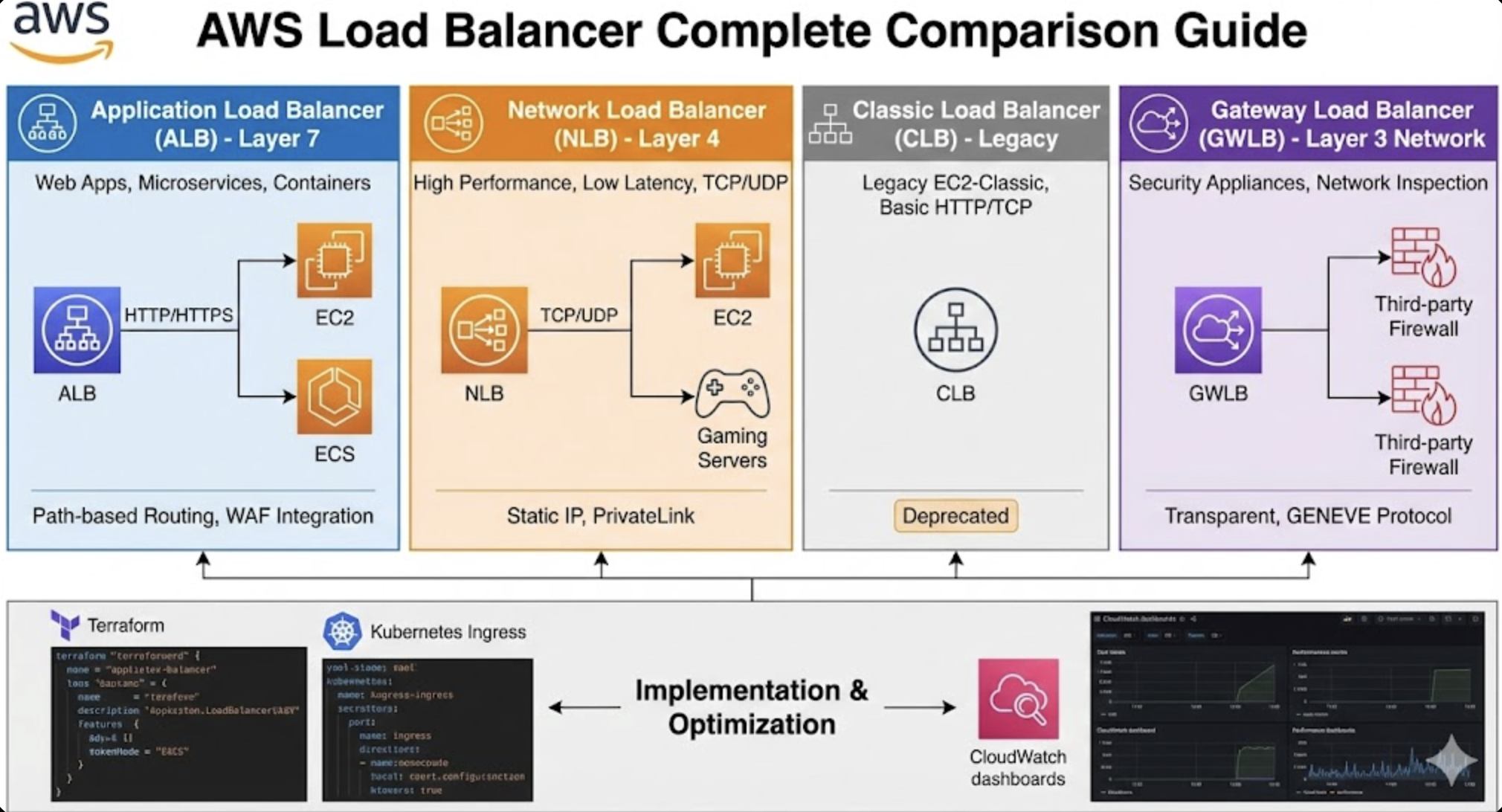
Overview
AWS provides various types of load balancers to enhance application availability, scalability, and security. Each load balancer has unique characteristics and optimized use cases, making the right choice significantly impact system performance and costs.
This guide provides an in-depth analysis of AWS’s four major load balancers (ALB, NLB, CLB, Gateway Load Balancer), covering their features, performance, use cases, practical implementation with Terraform, and cost optimization strategies.
Through this, I’ll provide practical knowledge to help you select the most suitable load balancer for your architecture and operate it efficiently.
1. AWS Load Balancer Types and Features
Application Load Balancer (ALB)
Layer 7 advanced load balancer for HTTP/HTTPS traffic
Core Features:
- HTTP/HTTPS protocol support (Layer 7)
- Path-based and host-based routing
- WebSocket and HTTP/2 support
- Container and Lambda function support
- SSL/TLS termination
- WAF integration capability
- Advanced health check options
Performance Characteristics:
- Throughput: Handles hundreds of thousands of requests per second
- Latency: Average 1-5ms additional latency
- Auto Scaling: Dynamic scaling based on traffic
Network Load Balancer (NLB)
Layer 4 high-performance TCP/UDP traffic load balancer
Core Features:
- TCP, UDP, TLS protocol support (Layer 4)
- Ultra-high performance and ultra-low latency
- Static IP address support
- Preserve client IP
- Cross-zone load balancing
- PrivateLink endpoint support
Performance Characteristics:
- Throughput: Handles millions of requests per second
- Latency: Less than 100 microseconds
- Connection Handling: Millions of concurrent connections per second
Classic Load Balancer (CLB)
Basic load balancer for legacy EC2-Classic
Core Features:
- Layer 4 (TCP) and Layer 7 (HTTP/HTTPS) support
- EC2-Classic and VPC support
- Basic health checks
- SSL termination
- Limited routing capabilities
Current Status:
- AWS recommends deprecation
- Use only for existing workload maintenance
- ALB or NLB recommended for new projects
Gateway Load Balancer (GWLB)
Transparent load balancer for network security appliances
Core Features:
- Operates at Layer 3 (IP) level
- Uses GENEVE protocol
- Transparent network gateway
- Third-party security appliance integration
- VPC endpoint service support
Performance Characteristics:
- Throughput: Handles millions of packets
- Latency: Extremely low latency
- Scalability: Auto scaling and high availability
2. Optimal Selection Guide by Use Case
ALB Optimal Use Cases
- Web applications and API services
- Microservices architecture
- Container-based applications (ECS, EKS)
- Serverless architecture (Lambda)
- Cases requiring path-based routing
- Advanced security feature integration (WAF)
- A/B testing and canary deployments
Real Scenario Examples:
- E-commerce: route
/api/productsto product service,/api/usersto user service - Load balancing between React frontend and Node.js API server
- Exposing Kubernetes cluster services
NLB Optimal Use Cases
- Applications requiring ultra-high performance
- Game servers and real-time streaming
- IoT and sensor data processing
- Services requiring static IP
- TCP/UDP-based applications
- VPN/DirectConnect connections with on-premises
- Services requiring extremely low latency
Real Scenario Examples:
- Game server clusters for online games
- Real-time data processing in financial trading systems
- Media streaming servers for video conferencing systems
Gateway Load Balancer Optimal Use Cases
- Firewall appliance deployment
- IDS/IPS system integration
- DDoS protection solutions
- Network monitoring and analysis
- Third-party security tool integration
- Network virtualization environments
Real Scenario Examples:
- Traffic inspection through Palo Alto Networks firewalls
- Operating Fortinet security appliance clusters
- Network packet analysis and logging systems
3. Terraform Implementation Examples and Kubernetes Usage
ALB Terraform Implementation
NLB Terraform Implementation
Gateway Load Balancer Terraform Implementation
Advanced ALB Configuration (Container Environment)
Kubernetes Ingress Implementation
Installing AWS Load Balancer Controller:
Basic Ingress Configuration:
apiVersion: networking.k8s.io/v1
kind: Ingress
metadata:
  name: web-app-ingress
  namespace: default
  annotations:
    # Specify ALB creation
    kubernetes.io/ingress.class: alb
    alb.ingress.kubernetes.io/scheme: internet-facing
    alb.ingress.kubernetes.io/target-type: ip

    # SSL/HTTPS configuration
    alb.ingress.kubernetes.io/certificate-arn: arn:aws:acm:us-west-2:123456789012:certificate/your-cert-arn
    alb.ingress.kubernetes.io/listen-ports: '[{"HTTP": 80}, {"HTTPS": 443}]'
    alb.ingress.kubernetes.io/ssl-redirect: "443"

    # Load balancer name
    alb.ingress.kubernetes.io/load-balancer-name: web-app-alb

    # Health check configuration
    alb.ingress.kubernetes.io/healthcheck-path: /health
    alb.ingress.kubernetes.io/healthcheck-interval-seconds: "30"
    alb.ingress.kubernetes.io/healthcheck-timeout-seconds: "5"
    alb.ingress.kubernetes.io/healthy-threshold-count: "2"
    alb.ingress.kubernetes.io/unhealthy-threshold-count: "3"

    # External DNS integration
    external-dns.alpha.kubernetes.io/hostname: webapp.example.com
  labels:
    app: web-app
spec:
  ingressClassName: alb
  rules:
  - host: webapp.example.com
    http:
      paths:
      - path: /
        pathType: Prefix
        backend:
          service:
            name: web-app-service
            port:
              number: 80
---
apiVersion: v1
kind: Service
metadata:
  name: web-app-service
  namespace: default
spec:
  selector:
    app: web-app
  ports:
  - port: 80
    targetPort: 8080
  type: ClusterIP
Multi-Service Routing Example:
apiVersion: networking.k8s.io/v1
kind: Ingress
metadata:
  name: microservices-ingress
  namespace: production
  annotations:
    alb.ingress.kubernetes.io/scheme: internet-facing
    alb.ingress.kubernetes.io/target-type: ip
    alb.ingress.kubernetes.io/certificate-arn: arn:aws:acm:us-west-2:123456789012:certificate/your-cert-arn
    alb.ingress.kubernetes.io/listen-ports: '[{"HTTP": 80}, {"HTTPS": 443}]'
    alb.ingress.kubernetes.io/ssl-redirect: "443"
    alb.ingress.kubernetes.io/load-balancer-name: microservices-alb

    # WAF integration
    alb.ingress.kubernetes.io/wafv2-acl-arn: arn:aws:wafv2:us-west-2:123456789012:regional/webacl/your-waf/12345

    # Tagging
    alb.ingress.kubernetes.io/tags: Environment=production,Team=backend
  labels:
    app: microservices
spec:
  ingressClassName: alb
  rules:
  - host: api.example.com
    http:
      paths:
      # User service
      - path: /api/users
        pathType: Prefix
        backend:
          service:
            name: user-service
            port:
              number: 80
      # Product service
      - path: /api/products
        pathType: Prefix
        backend:
          service:
            name: product-service
            port:
              number: 80
      # Order service
      - path: /api/orders
        pathType: Prefix
        backend:
          service:
            name: order-service
            port:
              number: 80
      # Default path
      - path: /
        pathType: Prefix
        backend:
          service:
            name: frontend-service
            port:
              number: 80
Shared ALB Usage Example:
# First application
apiVersion: networking.k8s.io/v1
kind: Ingress
metadata:
  name: alpha-game-app
  namespace: gameservice
  annotations:
    # Shared ALB group configuration
    alb.ingress.kubernetes.io/group.name: shared-alb
    alb.ingress.kubernetes.io/group.order: "10"

    # Basic ALB configuration
    alb.ingress.kubernetes.io/scheme: internet-facing
    alb.ingress.kubernetes.io/target-type: ip
    alb.ingress.kubernetes.io/load-balancer-name: shared-alb-loadbalancer

    # SSL/HTTPS configuration
    alb.ingress.kubernetes.io/certificate-arn: arn:aws:acm:region:account:certificate/cert-id
    alb.ingress.kubernetes.io/listen-ports: '[{"HTTP": 80}, {"HTTPS": 443}]'
    alb.ingress.kubernetes.io/ssl-redirect: "443"

    # External DNS
    external-dns.alpha.kubernetes.io/hostname: alpha-game.example.com
  labels:
    app: alpha-game
spec:
  ingressClassName: alb
  rules:
  - host: alpha-game.example.com
    http:
      paths:
      - path: /
        pathType: Prefix
        backend:
          service:
            name: alpha-game-service
            port:
              number: 80

---
# Second application (sharing same ALB)
apiVersion: networking.k8s.io/v1
kind: Ingress
metadata:
  name: beta-game-app
  namespace: gameservice
  annotations:
    # Use same ALB group
    alb.ingress.kubernetes.io/group.name: shared-alb
    alb.ingress.kubernetes.io/group.order: "20"

    alb.ingress.kubernetes.io/scheme: internet-facing
    alb.ingress.kubernetes.io/target-type: ip
    alb.ingress.kubernetes.io/load-balancer-name: shared-alb-loadbalancer

    alb.ingress.kubernetes.io/certificate-arn: arn:aws:acm:region:account:certificate/cert-id
    alb.ingress.kubernetes.io/listen-ports: '[{"HTTP": 80}, {"HTTPS": 443}]'
    alb.ingress.kubernetes.io/ssl-redirect: "443"

    external-dns.alpha.kubernetes.io/hostname: beta-game.example.com
spec:
  ingressClassName: alb
  rules:
  - host: beta-game.example.com
    http:
      paths:
      - path: /
        pathType: Prefix
        backend:
          service:
            name: beta-game-service
            port:
              number: 80
Advanced Production Configuration:
apiVersion: networking.k8s.io/v1
kind: Ingress
metadata:
  name: production-app-ingress
  namespace: production
  annotations:
    # Basic ALB configuration
    alb.ingress.kubernetes.io/scheme: internet-facing
    alb.ingress.kubernetes.io/target-type: ip
    alb.ingress.kubernetes.io/load-balancer-name: production-app-alb

    # SSL/Security configuration
    alb.ingress.kubernetes.io/certificate-arn: arn:aws:acm:us-west-2:123456789012:certificate/your-cert-arn
    alb.ingress.kubernetes.io/listen-ports: '[{"HTTP": 80}, {"HTTPS": 443}]'
    alb.ingress.kubernetes.io/ssl-redirect: "443"
    alb.ingress.kubernetes.io/ssl-policy: ELBSecurityPolicy-TLS-1-2-2017-01

    # Health check customization
    alb.ingress.kubernetes.io/healthcheck-path: /api/health
    alb.ingress.kubernetes.io/healthcheck-protocol: HTTPS
    alb.ingress.kubernetes.io/healthcheck-interval-seconds: "15"
    alb.ingress.kubernetes.io/healthcheck-timeout-seconds: "5"
    alb.ingress.kubernetes.io/healthy-threshold-count: "2"
    alb.ingress.kubernetes.io/unhealthy-threshold-count: "3"

    # Performance and connection settings
    alb.ingress.kubernetes.io/target-group-attributes: |
      deregistration_delay.timeout_seconds=30,
      slow_start.duration_seconds=60,
      stickiness.enabled=true,
      stickiness.lb_cookie.duration_seconds=86400

    # WAF and security
    alb.ingress.kubernetes.io/wafv2-acl-arn: arn:aws:wafv2:us-west-2:123456789012:regional/webacl/production-waf/12345
    alb.ingress.kubernetes.io/security-groups: sg-12345678,sg-87654321

    # Subnet and network configuration
    alb.ingress.kubernetes.io/subnets: subnet-12345678,subnet-87654321

    # Logging and monitoring
    alb.ingress.kubernetes.io/load-balancer-attributes: |
      access_logs.s3.enabled=true,
      access_logs.s3.bucket=my-alb-logs-bucket,
      access_logs.s3.prefix=production-app,
      deletion_protection.enabled=true

    # Tagging
    alb.ingress.kubernetes.io/tags: |
      Environment=production,
      Application=main-app,
      Team=platform,
      CostCenter=engineering

    # External DNS
    external-dns.alpha.kubernetes.io/hostname: app.example.com,www.example.com
  labels:
    app: production-app
    environment: production
spec:
  ingressClassName: alb
  rules:
  - host: app.example.com
    http:
      paths:
      - path: /
        pathType: Prefix
        backend:
          service:
            name: production-app-service
            port:
              number: 80
  - host: www.example.com
    http:
      paths:
      - path: /
        pathType: Prefix
        backend:
          service:
            name: production-app-service
            port:
              number: 80
4. Performance Comparison and Benchmarks
Throughput Comparison
| Load Balancer | Max RPS | Concurrent Connections | Bandwidth |
|---|---|---|---|
| ALB | ~100,000 RPS | ~25,000 | ~25 Gbps |
| NLB | ~3,000,000 RPS | Millions | ~100 Gbps |
| CLB | ~10,000 RPS | ~55,000 | ~10 Gbps |
| GWLB | Packet-based | Millions | ~100 Gbps |
Latency Comparison
| Load Balancer | P50 Latency | P99 Latency | Additional Hops |
|---|---|---|---|
| ALB | 1-3ms | 5-10ms | 1 hop |
| NLB | 0.1ms | 0.5ms | Transparent |
| CLB | 2-5ms | 10-15ms | 1 hop |
| GWLB | 0.1ms | 0.3ms | Transparent |
Feature Comparison Matrix
| Feature | ALB | NLB | CLB | GWLB |
|---|---|---|---|---|
| Layer 7 Routing | ✓ | ✗ | ✓ | ✗ |
| Static IP | ✗ | ✓ | ✗ | ✓ |
| WebSocket | ✓ | ✓ | ✓ | ✗ |
| HTTP/2 | ✓ | ✗ | ✗ | ✗ |
| SNI | ✓ | ✓ | ✗ | ✗ |
| WAF Integration | ✓ | ✗ | ✗ | ✗ |
| Lambda Support | ✓ | ✗ | ✗ | ✗ |
| Cross-zone LB | Default | Optional | Optional | Default |
5. Cost Optimization Strategies
5.1 Understanding Cost Structure
ALB Cost Components:
- Hourly charge: $0.0225/hour
- LCU (Load Balancer Capacity Unit): $0.008/LCU
- Data transfer: Standard EC2 pricing
NLB Cost Components:
- Hourly charge: $0.0225/hour
- NLCU (Network Load Balancer Capacity Unit): $0.006/NLCU
- Data transfer: Standard EC2 pricing
GWLB Cost Components:
- Hourly charge: $0.0225/hour
- GWLCU (Gateway Load Balancer Capacity Unit): $0.004/GWLCU
- VPC Endpoint: $0.01/hour
5.2 Cost Optimization Techniques
1. Selecting Appropriate Load Balancer:
2. Cross-Zone Load Balancing Optimization:
3. Target Group Optimization:
4. Logging and Monitoring Optimization:
5.3 Cost Monitoring and Alarms
5.4 Estimated Cost Calculator
6. Monitoring and Troubleshooting
6.1 Key Metrics Monitoring
Conclusion
Key Selection Criteria Summary
Application Load Balancer (ALB) is optimized for HTTP/HTTPS-based web applications and microservices, making it the best choice when path-based routing and advanced security features are needed. Integration through Ingress Controller in Kubernetes environments is also very smooth.
Network Load Balancer (NLB) is ideal for TCP/UDP applications requiring extreme performance and low latency. It delivers exceptional performance in game servers, real-time streaming, and IoT environments.
Gateway Load Balancer (GWLB) is a special-purpose load balancer for transparent integration of network security appliances, playing an essential role in enterprise security environments.
Recommendations for Successful Implementation
In the architecture design phase, thoroughly analyze traffic patterns, performance requirements, and security policies to select the appropriate load balancer, and build consistent and reproducible infrastructure using IaC tools like Terraform.
Cost optimization can be achieved through continuous monitoring and adjustments. Regularly review LCU/NLCU usage, disable unnecessary features, and configure appropriate health check intervals to reduce costs.
In operations management, establish proactive monitoring through CloudWatch metrics and alarms, understand traffic patterns through access log analysis, and continuously optimize through regular performance reviews.
AWS Load Balancers are more than simple traffic distribution tools—they are core components of modern application architectures. Apply the best practices from this guide to build stable and scalable systems.
References
- AWS Application Load Balancer User Guide
- AWS Network Load Balancer User Guide
- AWS Gateway Load Balancer User Guide
- Elastic Load Balancing Pricing
- AWS Load Balancer Controller Official Guide
- EKS User Guide - Application Load Balancing
- AWS Load Balancer Controller Annotations
- Terraform AWS Provider - ALB Resource
- Terraform AWS Provider - ALB Target Group
- Terraform AWS Load Balancer Examples
- CloudWatch Metrics - Application Load Balancer
- ALB Access Logs
- Load Balancer Performance Optimization Guide
- WAF and ALB Integration
- ALB Security Policies

Comments