22 min to read
Helm values.schema.json Complete Guide: Schema Validation for Production-Ready Charts
Preventing deployment errors with automated validation using JSON Schema in Helm Charts
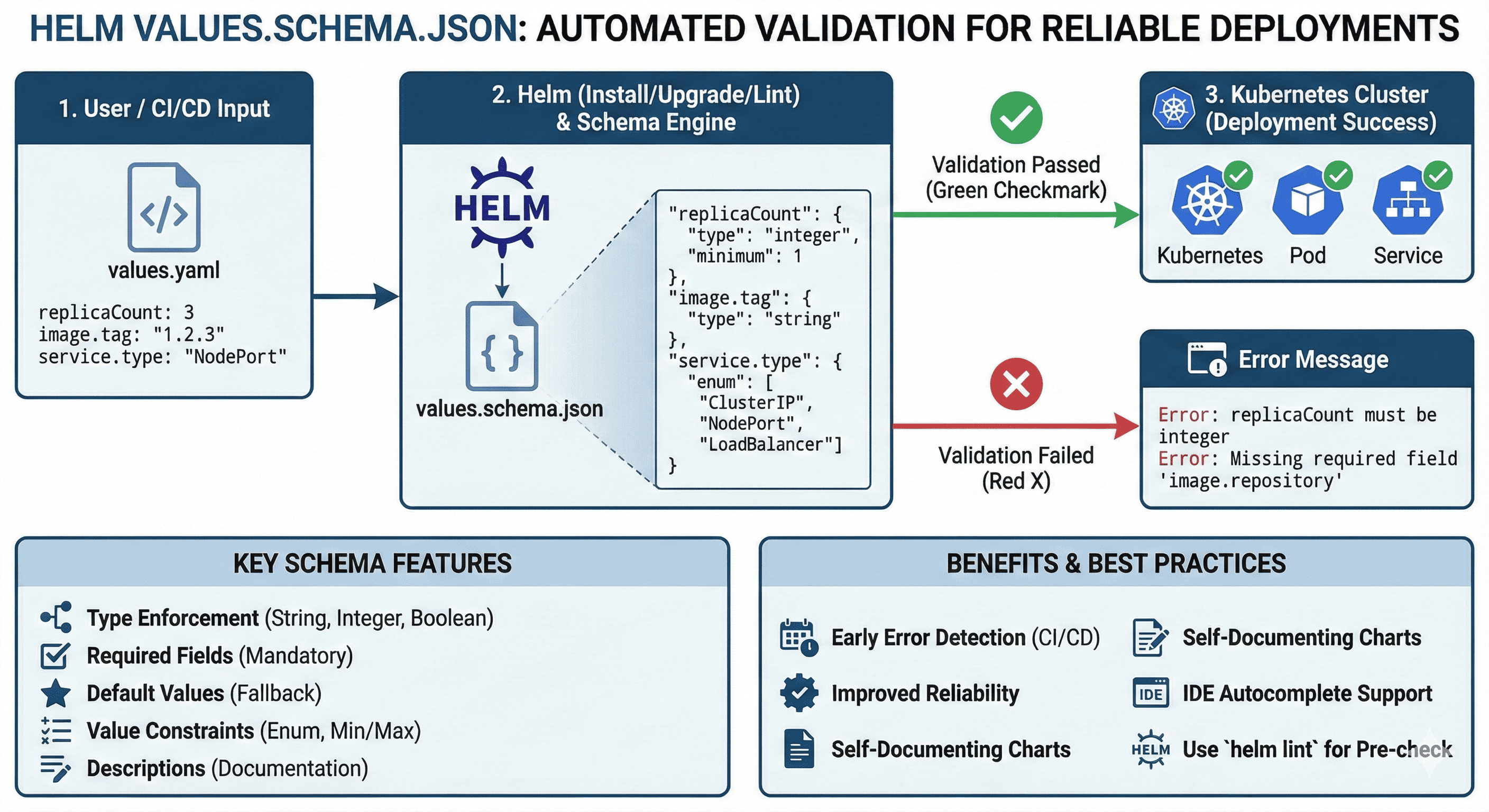
Overview
Today we’ll explore a useful feature in Helm Chart development: values.schema.json.
Helm typically uses the values.yaml file for custom value configuration. When you want to automate validation of these values, you can use values.schema.json.
Helm values.schema.json is a standard JSON Schema file that defines the schema for values (values.yaml) provided in a Helm Chart.
Through this schema, you can validate in advance whether user-provided values have the correct format and type.
Related Articles
For more information about Helm, refer to previous posts:
- What is Helm? (Kubernetes Package Manager)
- How to Write Helm Charts
- Helm Chart Template Syntax
- Helm Chart Creation and Packaging (gh-pages)
- Creating Helm Base App Chart (With ArgoCD)
Why is Schema Validation Needed?
As Helm Charts grow larger and more complex, deployment errors caused by incorrect or missing values become increasingly common.
The feature that prevents these issues in advance and enforces value types, required fields, and defaults is values.schema.json.
Especially useful when performing automated validation in CI/CD pipelines.
Common Problems Without Schema
# values.yaml - User input
replicaCount: "three"  # Should be integer, not string
image:
  repository: nginx
  # Missing 'tag' field - will use 'latest' by default (risky!)
service:
  type: ClusterIps  # Typo! Should be 'ClusterIP'
  port: 99999  # Invalid port number
Result: Deployment fails at runtime, wasting time and resources.
Basic Structure
File Location
The filename is fixed and must be placed at the chart root:
charts/mychart/
├── Chart.yaml
├── values.yaml
├── values.schema.json  ← Must be this exact name
└── templates/
Basic Example
{
    "$schema": "https://json-schema.org/draft-07/schema",
    "type": "object",
    "properties": {
        "replicaCount": {
            "type": "integer",
            "minimum": 1,
            "maximum": 10,
            "default": 1,
            "description": "Number of pod replicas to deploy"
        },
        "image": {
            "type": "object",
            "properties": {
                "repository": {
                    "type": "string",
                    "description": "Container image repository"
                },
                "tag": {
                    "type": "string",
                    "description": "Container image tag"
                }
            },
            "required": ["repository", "tag"]
        },
        "service": {
            "type": "object",
            "properties": {
                "type": {
                    "type": "string",
                    "enum": ["ClusterIP", "NodePort", "LoadBalancer"],
                    "description": "Kubernetes service type"
                },
                "port": {
                    "type": "integer",
                    "minimum": 1,
                    "maximum": 65535,
                    "description": "Service port number"
                }
            },
            "required": ["type", "port"]
        }
    },
    "required": ["replicaCount", "image", "service"]
}
Key Features
Feature Summary Table
| Feature | Description | Example |
|---|---|---|
| Type Specification | Enforce value types | "type": "string" |
| Default Values | Set default values | "default": 1 |
| Descriptions | Provide documentation | "description": "Number of replicas" |
| Value Range Constraints | Set min/max values | "minimum": 1, "maximum": 10 |
| Required Fields | Define mandatory values | "required": ["replicaCount"] |
| Enum Values | Allow only specific values | "enum": ["ClusterIP", "NodePort"] |
How Schema Validation Works
Starting with Helm 3.7, helm install and helm upgrade automatically reference values.schema.json for validation.
Example Validation Error
values.yaml (incorrect):
replicaCount: "three" # String instead of integer
helm install output:
Error: values don't meet the schema requirements:
- (root): replicaCount must be of type integer
Advantages of Schema Validation
✅ Prevent Incorrect Configurations: Catch errors before deployment
✅ Prevent Missing Required Values: Enforce mandatory fields
✅ Clear Type and Range Definition: Document expected values
✅ Early Detection in CI/CD: Find issues in automated pipelines
✅ Built-in Documentation: Descriptions serve as inline docs
Real-World Implementation
Example 1: Basic Service Configuration
values.schema.json:
{
    "type": "object",
    "properties": {
        "service": {
            "type": "object",
            "properties": {
                "type": {
                    "type": "string",
                    "enum": ["ClusterIP", "NodePort", "LoadBalancer"],
                    "description": "Kubernetes service type"
                },
                "port": {
                    "type": "integer",
                    "minimum": 1,
                    "maximum": 65535,
                    "description": "Service port number"
                }
            },
            "required": ["type", "port"]
        }
    }
}
values.yaml (correct):
service:
  type: ClusterIP
  port: 80
Example 2: Complex Ingress Configuration
Example 3: Resource Limits with Patterns
{
    "type": "object",
    "properties": {
        "resources": {
            "type": "object",
            "properties": {
                "limits": {
                    "type": "object",
                    "properties": {
                        "cpu": {
                            "type": "string",
                            "pattern": "^[0-9]+(m|[0-9]+)?$",
                            "description": "CPU limit (e.g., '100m', '1', '2')"
                        },
                        "memory": {
                            "type": "string",
                            "pattern": "^[0-9]+(Mi|Gi|M|G)?$",
                            "description": "Memory limit (e.g., '128Mi', '1Gi')"
                        }
                    }
                },
                "requests": {
                    "type": "object",
                    "properties": {
                        "cpu": {
                            "type": "string",
                            "pattern": "^[0-9]+(m|[0-9]+)?$",
                            "description": "CPU request"
                        },
                        "memory": {
                            "type": "string",
                            "pattern": "^[0-9]+(Mi|Gi|M|G)?$",
                            "description": "Memory request"
                        }
                    }
                }
            }
        }
    }
}
Automated Validation with helm lint
Helm provides helm lint command for schema-based validation. This is highly effective as a pre-check in CI/CD pipelines.
Basic Linting
CI/CD Integration
GitLab CI Example:
stages:
  - validate
  - deploy

validate-chart:
  stage: validate
  image: alpine/helm:latest
  script:
    - helm lint ./charts/myapp
    - helm lint ./charts/myapp -f ./environments/dev-values.yaml
    - helm lint ./charts/myapp -f ./environments/prod-values.yaml
  only:
    - merge_requests
GitHub Actions Example:
name: Helm Chart Validation

on:
  pull_request:
    paths:
      - 'charts/**'

jobs:
  lint:
    runs-on: ubuntu-latest
    steps:
      - uses: actions/checkout@v3

      - name: Set up Helm
        uses: azure/setup-helm@v3
        with:
          version: '3.13.0'

      - name: Lint Helm Charts
        run: |
          for chart in charts/*/; do
            echo "Linting $chart"
            helm lint "$chart"
          done
Mistake Prevention Checklist
Common Issues
| Checkpoint | Description |
|---|---|
| Missing Schema | No validation without values.schema.json |
| Schema Version | Must use Draft 7 or Draft 4 |
| Add Descriptions | Include description whenever possible |
| Clarify Required Fields | Prevent missing mandatory values |
| Use Enum Aggressively | Prevent incorrect value input |
FAQ
Q: Is values.schema.json mandatory?
A: No, it’s optional. However, it’s recommended in official Helm Best Practices.
Q: Can I write the schema in YAML instead of JSON?
A: No. Currently, Helm only supports JSON Schema format.
Q: Does this work in Helm 2?
A: No. Schema validation is supported only from Helm 3 onwards.
Q: Do IDEs support autocomplete?
A: Yes. If the schema is correctly written, some IDEs (like VSCode) can provide autocomplete support with proper extensions.
Q: What JSON Schema version should I use?
A: Helm supports Draft 4 and Draft 7. Draft 7 is recommended for newer features.
Advanced Schema Patterns
Pattern 1: Conditional Requirements
{
    "type": "object",
    "properties": {
        "persistence": {
            "type": "object",
            "properties": {
                "enabled": {
                    "type": "boolean"
                },
                "storageClass": {
                    "type": "string"
                },
                "size": {
                    "type": "string"
                }
            },
            "if": {
                "properties": {
                    "enabled": { "const": true }
                }
            },
            "then": {
                "required": ["storageClass", "size"]
            }
        }
    }
}
Pattern 2: OneOf for Alternative Configurations
{
    "type": "object",
    "properties": {
        "authentication": {
            "type": "object",
            "oneOf": [
                {
                    "properties": {
                        "type": { "const": "basic" },
                        "username": { "type": "string" },
                        "password": { "type": "string" }
                    },
                    "required": ["type", "username", "password"]
                },
                {
                    "properties": {
                        "type": { "const": "oauth" },
                        "clientId": { "type": "string" },
                        "clientSecret": { "type": "string" }
                    },
                    "required": ["type", "clientId", "clientSecret"]
                }
            ]
        }
    }
}
Pattern 3: Dependencies
{
    "type": "object",
    "properties": {
        "autoscaling": {
            "type": "object",
            "properties": {
                "enabled": { "type": "boolean" },
                "minReplicas": { "type": "integer" },
                "maxReplicas": { "type": "integer" },
                "targetCPUUtilizationPercentage": { "type": "integer" }
            }
        },
        "replicaCount": { "type": "integer" }
    },
    "dependencies": {
        "autoscaling": {
            "properties": {
                "autoscaling": {
                    "properties": {
                        "enabled": { "const": false }
                    }
                }
            },
            "required": ["replicaCount"]
        }
    }
}
Practical Tips
Tip 1: IDE Plugin Utilization
Install JSON Schema plugins in VSCode for autocomplete and syntax validation during schema development:
{
    "$schema": "https://json-schema.org/draft-07/schema",
    // VSCode will now provide autocomplete for JSON Schema keywords
}
Tip 2: GitHub Actions Integration
Add schema validation to PR checks:
Tip 3: Combine with Helm Unit Tests
Use with helm-unittest for comprehensive testing:
# tests/deployment_test.yaml
suite: test deployment
templates:
  - deployment.yaml
tests:
  - it: should work with valid values
    set:
      replicaCount: 3
      image:
        repository: nginx
        tag: "1.16.0"
    asserts:
      - isKind:
          of: Deployment
Tip 4: Team Conventions
Establish team rules for schema creation and add to code review checklist:
- Schema exists for all new charts
- All required fields documented
- Descriptions added for complex fields
- Enum used for fixed value sets
- Examples provided in comments
Common Mistakes
Mistake Examples
| Mistake | Cause | Example |
|---|---|---|
| Type Mismatch | String when integer expected | replicaCount: "3" |
| Missing Required Values | Mandatory field not provided | Missing image.repository |
| Typo in Field Name | Mismatch between values.yaml and schema | ingresss (typo of ingress) |
| Invalid Enum Value | Value not in allowed list | service.type: ClusterIps |
| Pattern Mismatch | String doesn’t match regex | memory: "100" (missing unit) |
Production Best Practices
✅ Best Practice Checklist
1. Write Schema Early
- Create schema during initial chart development
- Update schema with every values.yaml change
2. Document Everything
- Use
descriptionfields extensively - Include examples in descriptions
3. Use Required Fields
- Mark critical configurations as required
- Prevent accidental omissions
4. Standardize Naming
- Establish team naming conventions
- Use consistent field names across charts
5. Leverage Enums
- Prevent unintended value input
- Make valid options explicit
6. Include in Review Culture
- Add schema validation to PR templates
- Require schema updates for value changes
7. Version Your Schemas
- Track schema changes
- Maintain backward compatibility
8. Test Thoroughly
- Test with valid values
- Test with invalid values to verify errors
- Include edge cases
Real-World Case Studies
Case Study 1: Microservices Platform
Problem: 50+ microservices with inconsistent configurations
Solution: Standardized base schema inherited by all services
{
    "$schema": "https://json-schema.org/draft-07/schema",
    "definitions": {
        "baseService": {
            "type": "object",
            "properties": {
                "replicaCount": {
                    "type": "integer",
                    "minimum": 1,
                    "maximum": 50
                },
                "image": {
                    "$ref": "#/definitions/image"
                },
                "service": {
                    "$ref": "#/definitions/service"
                }
            },
            "required": ["replicaCount", "image", "service"]
        },
        "image": {
            "type": "object",
            "properties": {
                "repository": { "type": "string" },
                "tag": { "type": "string" },
                "pullPolicy": {
                    "enum": ["Always", "IfNotPresent", "Never"]
                }
            },
            "required": ["repository", "tag"]
        },
        "service": {
            "type": "object",
            "properties": {
                "type": {
                    "enum": ["ClusterIP", "NodePort", "LoadBalancer"]
                },
                "port": {
                    "type": "integer",
                    "minimum": 1,
                    "maximum": 65535
                }
            },
            "required": ["type", "port"]
        }
    },
    "allOf": [
        { "$ref": "#/definitions/baseService" }
    ]
}
Result: 90% reduction in deployment failures due to configuration errors
Case Study 2: Multi-Environment Deployment
Problem: Different validation rules for dev vs prod
Solution: Environment-specific schemas
charts/
├── myapp/
│   ├── values.schema.json          # Base schema
│   ├── values.yaml                 # Default values
│   ├── environments/
│   │   ├── dev-values.yaml
│   │   ├── dev-values.schema.json  # Relaxed rules
│   │   ├── prod-values.yaml
│   │   └── prod-values.schema.json # Strict rules
Troubleshooting
Issue 1: Schema Not Being Applied
Symptom: Invalid values pass validation
Causes:
- Helm version < 3.7
- Schema file not named exactly
values.schema.json - Schema file not at chart root
Solution:
# Check Helm version
helm version

# Verify file location
ls -la charts/mychart/values.schema.json

# Verify schema syntax
cat charts/mychart/values.schema.json | jq .
Issue 2: Too Strict Validation
Symptom: Valid configurations being rejected
Solution: Use additionalProperties:
{
    "type": "object",
    "properties": {
        "knownField": { "type": "string" }
    },
    "additionalProperties": true  // Allow unknown fields
}
Issue 3: Complex Nested Validations
Symptom: Difficult to validate deeply nested structures
Solution: Use $ref and definitions:
{
    "$schema": "https://json-schema.org/draft-07/schema",
    "definitions": {
        "containerPort": {
            "type": "object",
            "properties": {
                "name": { "type": "string" },
                "containerPort": {
                    "type": "integer",
                    "minimum": 1,
                    "maximum": 65535
                },
                "protocol": {
                    "enum": ["TCP", "UDP", "SCTP"]
                }
            },
            "required": ["containerPort"]
        }
    },
    "type": "object",
    "properties": {
        "ports": {
            "type": "array",
            "items": {
                "$ref": "#/definitions/containerPort"
            }
        }
    }
}
Schema Generation Tools
Tool 1: Generate Schema from Values
# Using helm-schema
helm plugin install https://github.com/dadav/helm-schema

# Generate schema
helm schema generate values.yaml
Tool 2: Validate Existing Schema
# Using ajv-cli
npm install -g ajv-cli

# Validate schema syntax
ajv compile -s values.schema.json

# Validate values against schema
ajv validate -s values.schema.json -d values.yaml
Conclusion
values.schema.json is a powerful tool for making Helm Charts safer and more reliable packages.
Especially for Helm Charts used by multiple teams, schema definition is practically essential.
The easiest way to validate Helm Charts before deployment and prevent users from accidentally entering incorrect configurations is through values.schema.json.
Key Takeaways:
✅ Essential for Production: Schema validation prevents costly runtime errors
✅ Documentation Built-in: Descriptions serve as inline documentation
✅ CI/CD Integration: Automated validation in pipelines
✅ Type Safety: Catch type mismatches early
✅ Team Standards: Enforce consistent configurations
Getting Started:
- Start with basic schema for new charts
- Add schema to existing charts iteratively
- Include in CI/CD validation
- Expand with advanced patterns as needed
Schema validation transforms Helm Charts from configuration files into validated, type-safe deployment specifications—bringing software engineering best practices to infrastructure as code.

Comments