14 min to read
Deploy Static File Server on Kubernetes: Complete Guide
Simple HTTP file server deployment with NFS storage and Ingress configuration
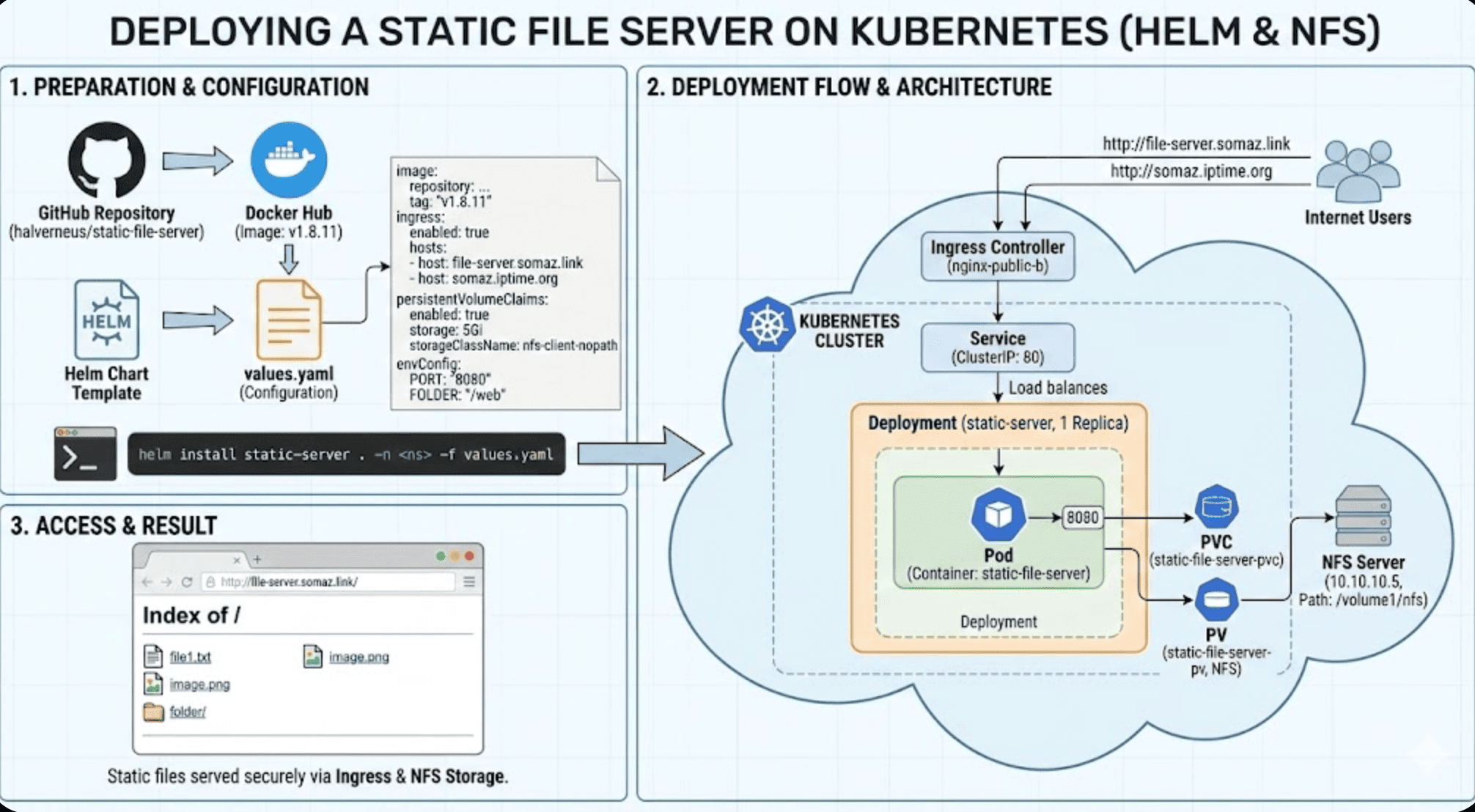
Overview
This post covers how to easily create a static file server in Kubernetes. We’ll use Helm charts, NFS storage, and Ingress to provide HTTP access to files stored in the cluster.
What is a Static File Server?
A static file server is a simple HTTP server that serves files from a directory without any dynamic processing. It’s perfect for:
- Sharing build artifacts across teams
- Hosting static assets (images, CSS, JS)
- Distributing installation packages
- Development file sharing
- Documentation hosting
Why Use Kubernetes?
Benefits of deploying on Kubernetes:
- ✅ High Availability: Automatic pod restarts and self-healing
- ✅ Scalability: Easy horizontal scaling
- ✅ Persistent Storage: NFS integration for shared file access
- ✅ Access Control: Ingress-based routing and authentication
- ✅ Declarative Configuration: GitOps-friendly Helm charts
Architecture Overview
External User
    ↓
Ingress Controller (NGINX)
    ↓
Static File Server Pod
    ↓
NFS Persistent Volume
    ↓
NFS Server (Synology/FreeNAS/etc.)
Components
| Component | Purpose |
|---|---|
| static-file-server | HTTP server serving files from mounted volume |
| NFS PV/PVC | Persistent storage for file content |
| Ingress | External HTTP/HTTPS access |
| Service | Internal cluster networking |
Prerequisites
Required Resources
- Kubernetes cluster (v1.19+)
- Helm 3.x installed
- NFS server or compatible storage
- Ingress controller (NGINX recommended)
- Base Helm chart template
Helm Base Chart Template
If you need help creating the base Helm chart template, refer to:
Static File Server Introduction
Official Repository
Key Features
- Lightweight: Minimal resource footprint (~10MB Docker image)
- Fast: Optimized for serving static content
- Directory Listing: Optional file browsing
- Docker Ready: Official Docker images available
- Configurable: Environment variables or YAML config
Configuration Methods
The server supports two configuration approaches:
- Environment Variables
PORT=8080 FOLDER=/web SHOW_LISTING=true - YAML Configuration File
port: 8080
folder: /web
show-listing: true
Helm Values Configuration
Complete values.yaml
# Default values for static-file-server
replicaCount: 1

image:
  repository: halverneus/static-file-server
  pullPolicy: IfNotPresent
  tag: "v1.8.11"

nameOverride: ""
fullnameOverride: ""

serviceAccount:
  create: true
  annotations: {}
  name: ""

podAnnotations: {}

podSecurityContext: {}

securityContext: {}

service:
  type: ClusterIP
  port: 80
  targetPort: 8080

ingress:
  enabled: true
  className: "nginx-public-b"
  annotations:
    nginx.ingress.kubernetes.io/force-ssl-redirect: "false"
    nginx.ingress.kubernetes.io/ssl-passthrough: "false"
    nginx.ingress.kubernetes.io/rewrite-target: /
  hosts:
    - host: file-server.somaz.link
      paths:
        - path: /
          pathType: ImplementationSpecific
    - host: somaz.iptime.org
      paths:
        - path: /
          pathType: ImplementationSpecific

livenessProbe:
  httpGet:
    path: /
    port: 8080
  initialDelaySeconds: 10
  periodSeconds: 10

readinessProbe:
  httpGet:
    path: /
    port: 8080
  initialDelaySeconds: 5
  periodSeconds: 10

resources: {}

autoscaling:
  enabled: false
  minReplicas: 1
  maxReplicas: 100
  targetCPUUtilizationPercentage: 80

rbac:
  enabled: false

nodeSelector: {}

tolerations: []

affinity: {}

revisionHistoryLimit: 1

# Static File Server Configuration
envConfig:
  PORT: "8080"
  FOLDER: "/web"
  SHOW_LISTING: "true"
  ALLOW_INDEX: "true"

# Persistent Storage Configuration
persistentVolumeClaims:
  enabled: true
  items:
    - name: static-file-server-pvc
      accessModes:
        - ReadWriteMany
      storageClassName: nfs-client-nopath
      storage: 5Gi
      mountPath: /web
      selector:
        volumeName: static-file-server-pv

persistentVolumes:
  enabled: true
  items:
    - name: static-file-server-pv
      storage: 5Gi
      volumeMode: Filesystem
      accessModes:
        - ReadWriteMany
      reclaimPolicy: Retain
      storageClassName: nfs-client-nopath
      path: /volume1/nfs
      server: 10.10.10.5

extraVolumes: []
extraVolumeMounts: []

certificate:
  enabled: false

certCleanup:
  enabled: false
Key Configuration Sections
1. Image Configuration
image:
  repository: halverneus/static-file-server
  pullPolicy: IfNotPresent
  tag: "v1.8.11"
Image versions:
latest: Latest release (not recommended for production)v1.8.11: Stable version with all featuresv1.8.x: Version 1.8 series
2. Service Configuration
service:
  type: ClusterIP
  port: 80
  targetPort: 8080
Service types:
ClusterIP: Internal cluster access only (default)NodePort: Access via node IP and portLoadBalancer: External load balancer (cloud providers)
3. Ingress Configuration
ingress:
  enabled: true
  className: "nginx-public-b"
  annotations:
    nginx.ingress.kubernetes.io/force-ssl-redirect: "false"
    nginx.ingress.kubernetes.io/ssl-passthrough: "false"
    nginx.ingress.kubernetes.io/rewrite-target: /
  hosts:
    - host: file-server.somaz.link
      paths:
        - path: /
          pathType: ImplementationSpecific
Important annotations:
force-ssl-redirect: "false": Allow HTTP (disable for development)ssl-passthrough: "false": Terminate SSL at Ingressrewrite-target: /: URL rewriting for path-based routing
4. Environment Variables
envConfig:
  PORT: "8080"
  FOLDER: "/web"
  SHOW_LISTING: "true"
  ALLOW_INDEX: "true"
Configuration options:
| Variable | Description | Values |
|---|---|---|
PORT |
HTTP server port | 8080 (default) |
FOLDER |
Root directory to serve | /web |
SHOW_LISTING |
Enable directory browsing | true/false |
ALLOW_INDEX |
Serve index.html if present | true/false |
5. Storage Configuration
persistentVolumeClaims:
  enabled: true
  items:
    - name: static-file-server-pvc
      accessModes:
        - ReadWriteMany
      storageClassName: nfs-client-nopath
      storage: 5Gi
      mountPath: /web

persistentVolumes:
  enabled: true
  items:
    - name: static-file-server-pv
      storage: 5Gi
      accessModes:
        - ReadWriteMany
      reclaimPolicy: Retain
      path: /volume1/nfs
      server: 10.10.10.5
Storage classes:
nfs-client: Dynamic NFS provisionernfs-client-nopath: NFS without subdirectory creationlocal-path: Local node storage
Installation Steps
Step 1: Prepare Helm Chart
# Create chart directory
mkdir static-file-server-chart
cd static-file-server-chart

# Create values directory
mkdir -p values
Step 2: Create Override Values
Create values/mgmt.yaml with your custom configuration:
# values/mgmt.yaml
image:
  tag: "v1.8.11"

ingress:
  hosts:
    - host: files.yourdomain.com
      paths:
        - path: /
          pathType: Prefix

persistentVolumes:
  items:
    - name: static-file-server-pv
      server: 192.168.1.100  # Your NFS server IP
      path: /mnt/shared-files
Step 3: Dry Run Installation
Step 4: Install
Step 5: Verify Installation
# Check pod status
kubectl get pods -n file-server

# Check service
kubectl get svc -n file-server

# Check ingress
kubectl get ingress -n file-server

# Check PVC
kubectl get pvc -n file-server

# Check logs
kubectl logs -n file-server deployment/static-server
Upgrade Existing Installation
Advanced Configuration
1. HTTPS with TLS
ingress:
  enabled: true
  className: "nginx"
  annotations:
    cert-manager.io/cluster-issuer: "letsencrypt-prod"
    nginx.ingress.kubernetes.io/force-ssl-redirect: "true"
  hosts:
    - host: files.example.com
      paths:
        - path: /
          pathType: Prefix
  tls:
    - secretName: files-tls-secret
      hosts:
        - files.example.com

certificate:
  enabled: true
  secretName: files-tls-secret
  commonName: files.example.com
  dnsNames:
    - files.example.com
  issuerName: letsencrypt-prod
  issuerKind: ClusterIssuer
2. Basic Authentication
ingress:
  annotations:
    nginx.ingress.kubernetes.io/auth-type: basic
    nginx.ingress.kubernetes.io/auth-secret: basic-auth
    nginx.ingress.kubernetes.io/auth-realm: "Authentication Required"
Create auth secret:
3. Resource Limits
resources:
  limits:
    cpu: 500m
    memory: 512Mi
  requests:
    cpu: 100m
    memory: 128Mi
4. Multiple Replicas with HPA
replicaCount: 2

autoscaling:
  enabled: true
  minReplicas: 2
  maxReplicas: 10
  targetCPUUtilizationPercentage: 80
  targetMemoryUtilizationPercentage: 80
5. Node Affinity
affinity:
  nodeAffinity:
    requiredDuringSchedulingIgnoredDuringExecution:
      nodeSelectorTerms:
      - matchExpressions:
        - key: node-role.kubernetes.io/worker
          operator: In
          values:
          - "true"
Usage Examples
Uploading Files
Via kubectl:
Accessing Files
Web browser:
http://file-server.somaz.link/
http://file-server.somaz.link/path/to/file.pdf
wget/curl:
Directory Listing
With SHOW_LISTING: "true", browsing directories shows:
Index of /downloads/

[DIR] software/
[DIR] documents/
[FILE] readme.txt          2.4 KB
[FILE] installer.exe       124 MB
Troubleshooting
Issue 1: Pod Not Starting
Symptoms:
kubectl get pods -n file-server
NAME                            READY   STATUS    RESTARTS   AGE
static-server-5d7c8f9b4-xyz     0/1     Pending   0          2m
Diagnosis:
kubectl describe pod -n file-server static-server-5d7c8f9b4-xyz
Common causes:
- PVC not bound
- Insufficient cluster resources
- Node affinity/taint issues
Solutions:
# Check PVC status
kubectl get pvc -n file-server

# Check PV
kubectl get pv

# Check events
kubectl get events -n file-server --sort-by='.lastTimestamp'
Issue 2: Cannot Access Files
Symptoms:
- HTTP 404 errors
- Empty directory listing
Diagnosis:
Issue 3: Ingress Not Working
Symptoms:
- DNS resolves but connection times out
- HTTP 502/503 errors
Diagnosis:
Issue 4: Performance Problems
Symptoms:
- Slow file downloads
- High pod CPU/memory usage
Diagnosis:
Solutions:
- Increase resources:
resources: limits: cpu: 1000m memory: 1Gi - Enable horizontal scaling:
autoscaling: enabled: true minReplicas: 3 -
Use CDN for frequently accessed files
- Optimize NFS settings on server
Security Best Practices
1. Enable HTTPS
Always use TLS in production:
ingress:
  annotations:
    cert-manager.io/cluster-issuer: "letsencrypt-prod"
  tls:
    - secretName: files-tls
      hosts:
        - files.example.com
2. Implement Authentication
Use basic auth or OAuth:
ingress:
  annotations:
    nginx.ingress.kubernetes.io/auth-type: basic
    nginx.ingress.kubernetes.io/auth-secret: basic-auth
3. Restrict Network Access
Use NetworkPolicy:
apiVersion: networking.k8s.io/v1
kind: NetworkPolicy
metadata:
  name: static-server-policy
  namespace: file-server
spec:
  podSelector:
    matchLabels:
      app: static-server
  policyTypes:
  - Ingress
  ingress:
  - from:
    - namespaceSelector:
        matchLabels:
          name: ingress-nginx
    ports:
    - protocol: TCP
      port: 8080
4. Limit File Upload Size
Configure in Ingress:
ingress:
  annotations:
    nginx.ingress.kubernetes.io/proxy-body-size: "100m"
5. Regular Security Updates
Monitoring and Logging
Prometheus Metrics
Add ServiceMonitor:
apiVersion: monitoring.coreos.com/v1
kind: ServiceMonitor
metadata:
  name: static-server
  namespace: file-server
spec:
  selector:
    matchLabels:
      app: static-server
  endpoints:
  - port: http
    path: /metrics
Access Logs
View logs in real-time:
# Follow logs
kubectl logs -n file-server deployment/static-server -f

# Search logs
kubectl logs -n file-server deployment/static-server | grep "GET"

# Export logs
kubectl logs -n file-server deployment/static-server > access.log
Cleanup
Uninstall
# Delete Helm release
helm delete static-server -n file-server

# Delete namespace
kubectl delete namespace file-server

# Delete PV (if needed)
kubectl delete pv static-file-server-pv
Conclusion
We’ve created a simple static file server accessible via web. For development environments with low traffic, this is a practical solution for quick file sharing.
Key Benefits
✅ Simple Setup: Deploy in minutes with Helm
✅ Persistent Storage: NFS integration for reliable file storage
✅ External Access: Ingress-based HTTP/HTTPS access
✅ Production Ready: Health checks, resource limits, auto-scaling
✅ Secure: HTTPS and authentication support
Use Cases
- Development teams: Share build artifacts
- Documentation: Host static documentation sites
- Asset hosting: Serve images, CSS, JavaScript
- Package distribution: Internal software repository
- File sharing: Simple file exchange platform


Comments