12 min to read
Kubernetes Gateway API Complete Guide: The Future of Ingress
Next-generation network API supporting L4-L7 traffic with flexible routing and multi-protocol support
Overview
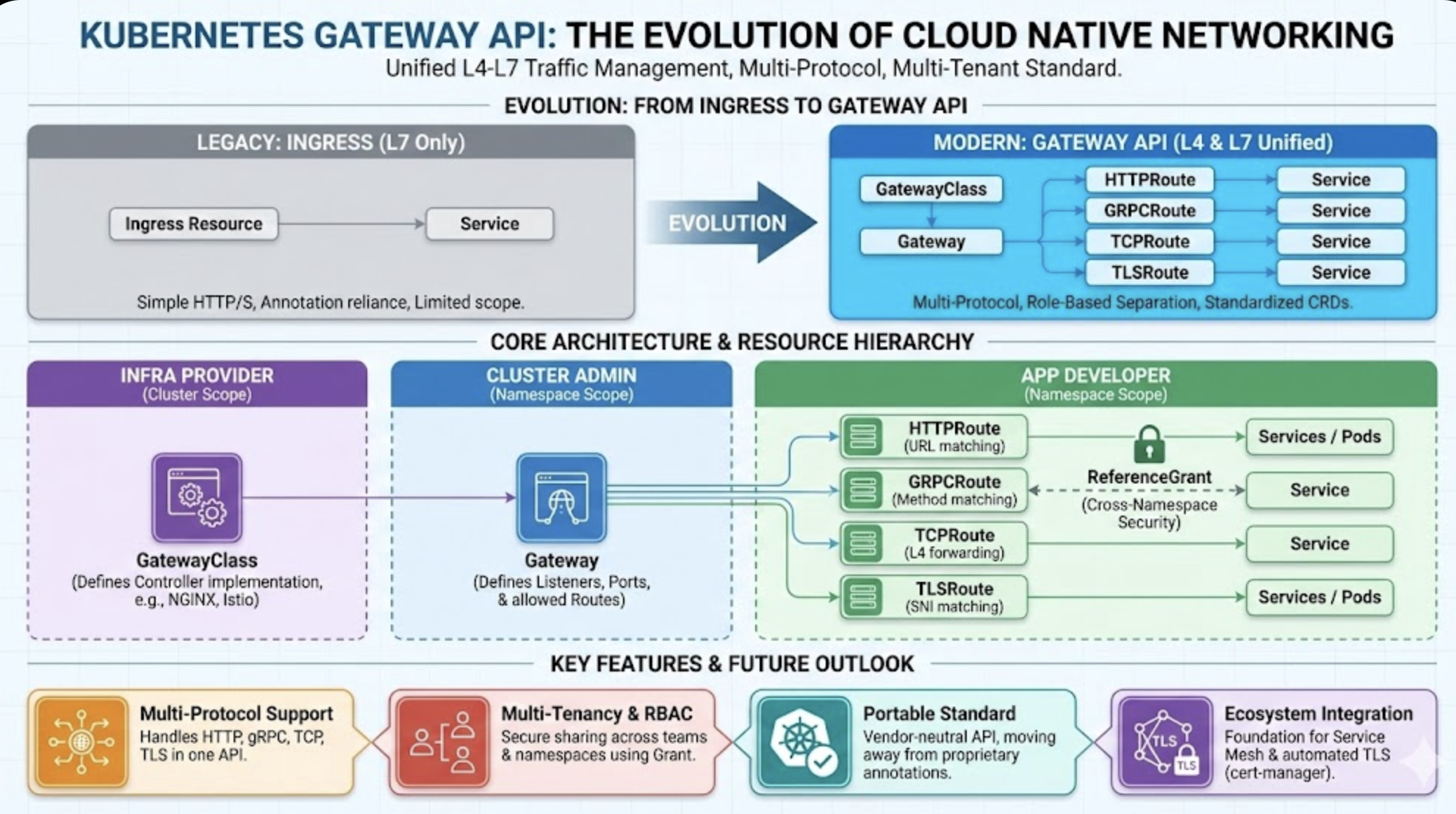
Kubernetes traditionally handles L7 (HTTP/HTTPS) traffic through Ingress resources, but this approach has limitations when it comes to Layer 4 (L4) traffic control, multi-protocol support, and complex authentication handling.
Kubernetes Gateway API emerged to solve these problems—it’s a new network model that can flexibly handle L4 through L7 traffic.
This isn’t just an extension of Ingress, but an evolved standard for modern cloud networks, enabling unified management of service meshes, API gateways, and load balancers through a common structure.
Related Articles
Gateway API Timeline
| Period | Event |
|---|---|
| Late 2019 | SIG-Network begins discussing new API design to overcome Ingress limitations |
| April 2020 | First alpha release of Gateway API (v1alpha1) announced |
| 2021-2022 | Various controllers (Envoy, Istio, NGINX, GKE, etc.) start supporting Gateway API |
| 2023 | Some resources (Gateway, HTTPRoute) prepared for v1beta1 or v1 stabilization |
| 2024+ | Many cloud/service mesh vendors officially support, production deployments increase |
What is Gateway API?
Gateway API is a new set of standard API resources in Kubernetes for safely and flexibly routing network traffic from outside to services inside the cluster.
Traditionally, Ingress resources routed HTTP/HTTPS requests to cluster services, but Ingress had limitations in feature expansion and struggled to support L4 (Transport Layer) traffic, multi-protocol, and advanced routing control.
Gateway API emerged from this background.
Why Was It Created?
Existing Ingress resources were too simple with limited extensibility. All controllers relied on annotations, causing confusion and making standardization difficult.
👉 Gateway API was created as an evolution of Ingress and as a next-generation standard for L4-L7 integration.
Purpose of Gateway API
Gateway API isn’t simply replacing Ingress—it was designed with these goals:
- Flexible architecture supporting both L4-L7 traffic
- Multi-tenancy and security isolation structure support
- Standardized API independent of controller vendors
- Integration across Cloud Provider, Service Mesh, API Gateway environments
- Declarative configuration suitable for Helm/Kustomize
Core Resource Structure
| Resource | Description |
|---|---|
| GatewayClass | Gateway implementation class defined by infrastructure provider |
| Gateway | Resource that receives actual L4/L7 traffic |
| Route (HTTPRoute, TLSRoute, TCPRoute, GRPCRoute) | Rules for routing traffic to services |
| ReferenceGrant, BackendPolicy | Advanced permission and policy control resources |
Problems Gateway API Solves
✅ Handle various protocols beyond simple HTTP traffic—TCP, TLS, gRPC—all in one Gateway
✅ Safely share Gateway resources between different teams/services
✅ Simplify TLS automation and security configuration by integrating with cert-manager, Service Mesh
✅ Abstract Gateway as unified API in multi-cluster environments for external entry point management
Why L4/L7 Mixed Scenarios Are Needed
Real-world services don’t operate with a single protocol. For example:
- HTTP API → handled by HTTPRoute
- gRPC server → routed by GRPCRoute
- Game server uses TCP → needs TCPRoute
- TLS termination → handled by TLSRoute
The strength of Gateway API is configuring these mixed requirements with a single Gateway resource.
Gateway API vs Ingress Comparison
| Aspect | Ingress | Gateway API |
|---|---|---|
| API Stability | v1 (Stable) | v1 / v1alpha2 (some features) |
| Supported Protocols | HTTP/HTTPS (L7 only) | HTTP, HTTPS, gRPC, TCP, TLS (L4-L7 mixed) |
| Routing Resources | Single resource (Ingress) | Multiple resources (HTTPRoute, TCPRoute, TLSRoute, GRPCRoute) |
| TLS Handling | Secret reference (simple config) | certificateRefs with granular control, various modes (Terminate, Passthrough) |
| Role Separation | None (Ingress only) | Clearly separated by GatewayClass/Gateway/Route |
| Multi-tenancy | Limited (namespace-based sharing unclear) | Control namespace/permission scope with AllowedRoutes |
| Custom Extensibility | Limited (annotation-based) | Highly flexible (CRD-based extension and standardization) |
| Controller Independence | Mostly tied to NGINX (Ingress Controller) | Controller choice available (NGINX, Istio, Envoy, GKE, AWS, etc.) |
| gRPC Support | Incomplete (path-based routing only) | Complete GRPCRoute support (service/method basis) |
| L4 Support (TCP, etc.) | Not supported | Possible with TCPRoute |
| Helm/Kustomize Compatibility | Limited structure | Declarative structure suitable for automation |
| Future Extensibility | Not discontinued but limited | Expanding as Kubernetes official next-gen network standard |
Key Takeaway
- Ingress: Simple and quick to set up, but lacks feature extensibility and role separation
- Gateway API: May seem more complex, but systematically supports various functions (L4-L7, TLS automation, multi-tenancy) required in production environments
- Especially fits modern trends like Service Mesh, Multi-cluster, TLS management, gRPC
Can Ingress NGINX and Gateway API Coexist?
Yes, no problem.
- Gateway API operates completely separately from Ingress Controller
- They watch different resources (Ingress vs HTTPRoute, Gateway)
- Managed by different controllers
- Just be careful about port conflicts (when both controllers try to use LoadBalancer 80/443 ports)
Tip
- Ingress NGINX: Usually installed in
ingress-nginxnamespace, watches Ingress resources - NGINX Gateway Controller: Installed in
nginx-gatewaynamespace, watches Gateway, HTTPRoute, etc.
Conclusion Table
| Item | Possible? | Explanation |
|---|---|---|
| Helm install NGINX Gateway | ✅ Yes | Use nginx-stable/kubernetes-gateway Chart |
| Simultaneous operation with Ingress NGINX Controller | ✅ Yes | Resources/controllers are separate, no conflict |
| Port conflict possibility | ⚠️ Caution | ❌ No conflict if LoadBalancer IPs are different |
Where Should Gateway Resources Be Created?
| Resource | Location Criteria | Description |
|---|---|---|
| GatewayClass | Cluster-wide | Specifies which Gateway controller to use |
| Gateway | Namespace where application (Service) exists | Actual entry point receiving traffic |
| Route (HTTPRoute, etc.) | Application namespace | Defines routing by referencing Gateway |
Understanding Points
- GatewayClass: Global resource, so no namespace (cluster-scoped)
- Gateway: Created in specific namespace, by default only accepts Routes in that namespace
- Can allow other namespaces with
allowedRoutesconfiguration
- Can allow other namespaces with
- Route: References Gateway via
parentRefsfrom its own namespace
Advanced: Want to Separate Namespaces?
For example, Gateway in ingress-system namespace, application in app-namespace:
# In Gateway
allowedRoutes:
  namespaces:
    from: All
Or more safely:
allowedRoutes:
  namespaces:
    from: Selector
    selector:
      matchLabels:
        route-allowed: "true"
Then add label to app-namespace:
kubectl label namespace app-namespace route-allowed=true
What is ReferenceGrant?
ReferenceGrant is a security resource that allows referencing resources in other namespaces.
Gateway API, following security principles, requires explicit permission for Route resources (HTTPRoute, TCPRoute, etc.) to reference Services in other namespaces.
When Is It Needed?
- Gateway is in
defaultnamespace - Actual applications are in different namespaces like
mario-ns,tetris-ns - HTTPRoute wants to specify these services as routing targets
→ Must declare ReferenceGrant in the namespace where the service is located
Why Is It Needed?
Ingress freely allowed cross-namespace references, but Gateway API is designed more security-sensitively, not allowing references to resources in other namespaces without explicit permission.
This provides strong security benefits in multi-tenancy environments or when separating resources between teams.
Example
# Created in mario-ns
apiVersion: gateway.networking.k8s.io/v1beta1
kind: ReferenceGrant
metadata:
  name: allow-mario-service
  namespace: mario-ns
spec:
  from:
    - group: gateway.networking.k8s.io
      kind: HTTPRoute
      namespace: default
  to:
    - group: ""
      kind: Service
This allows HTTPRoute in default namespace to reference Services in mario-ns namespace.
Lab 1: HTTPRoute + TLSRoute + GRPCRoute + TCPRoute
Lab Environment: Kind or Minikube + NGINX Gateway Controller
Install CRDs
kubectl kustomize https://github.com/nginx/nginx-gateway-fabric/config/crd/gateway-api/standard | kubectl apply -f -
Install NGINX Gateway Controller - Helm Method
GatewayClass and Gateway Configuration
apiVersion: gateway.networking.k8s.io/v1
kind: GatewayClass
metadata:
  name: nginx-gateway
spec:
  controllerName: nginx.org/gateway-controller
---
apiVersion: gateway.networking.k8s.io/v1
kind: Gateway
metadata:
  name: mixed-gateway
  namespace: default
spec:
  gatewayClassName: nginx-gateway
  listeners:
    - name: http
      port: 80
      protocol: HTTP
      allowedRoutes:
        namespaces:
          from: Same
    - name: tls
      port: 443
      protocol: HTTPS
      tls:
        mode: Terminate
        certificateRefs:
          - name: my-cert
            kind: Secret
      allowedRoutes:
        namespaces:
          from: Same
    - name: grpc
      port: 50051
      protocol: HTTP
      allowedRoutes:
        namespaces:
          from: Same
    - name: tcp
      port: 3306
      protocol: TCP
      allowedRoutes:
        namespaces:
          from: Same
Understanding allowedRoutes
| Setting | Meaning | Characteristics |
|---|---|---|
| Same | Only Routes in same namespace as Gateway | Good security, simple |
| All | Allow Routes from all namespaces | Flexible but broad permissions |
| Selector | Only allow namespaces with specific labels | Balance of flexibility + safety |
Lab 6: Complete Example with Path-Based Routing
Configuration Summary
- GatewayClass name:
nginx-gateway - Domain:
game.example.com - Path-based routing:
/mario→ mario service/tetris→ tetris service
- 2 Pods: mario, tetris apps
- External access: LoadBalancer type
Installation Steps
# 1. Install CRDs
kubectl kustomize https://github.com/nginx/nginx-gateway-fabric/config/crd/gateway-api/standard | kubectl apply -f -

# 2. Install Helm chart
helm install ngf . --create-namespace -n nginx-gateway -f mgmt.yaml

# 3. Deploy resources
kubectl apply -f gateway.yaml
kubectl apply -f httproute.yaml
kubectl apply -f mario-refer.yaml
kubectl apply -f tetris-refer.yaml
kubectl apply -f mario-deployment.yaml
kubectl apply -f tetris-deployment.yaml
Values Configuration (mgmt.yaml)
Gateway and GatewayClass
apiVersion: gateway.networking.k8s.io/v1
kind: GatewayClass
metadata:
  name: nginx-gateway
spec:
  controllerName: gateway.nginx.org/nginx-gateway-controller
---
apiVersion: gateway.networking.k8s.io/v1
kind: Gateway
metadata:
  name: game-gateway
  namespace: default
spec:
  gatewayClassName: nginx-gateway
  listeners:
    - name: http
      port: 80
      protocol: HTTP
      allowedRoutes:
        namespaces:
          from: Selector
          selector:
            matchLabels:
              allow-gateway: "true"
HTTPRoute with Path Rewriting
apiVersion: gateway.networking.k8s.io/v1
kind: HTTPRoute
metadata:
  name: game-route
  namespace: default
spec:
  parentRefs:
    - name: game-gateway
  hostnames:
    - game.example.com
  rules:
    - matches:
        - path:
            type: PathPrefix
            value: /mario
      filters:
        - type: URLRewrite
          urlRewrite:
            path:
              type: ReplaceFullPath
              replaceFullPath: /
      backendRefs:
        - name: mario
          namespace: mario-ns
          port: 80
    - matches:
        - path:
            type: PathPrefix
            value: /tetris
      filters:
        - type: URLRewrite
          urlRewrite:
            path:
              type: ReplaceFullPath
              replaceFullPath: /
      backendRefs:
        - name: tetris
          namespace: tetris-ns
          port: 80
Troubleshooting
Check HTTPRoute Status
kubectl get httproute -n default game-route -o yaml | grep conditions -A12
All status should be True.
Check NGINX Gateway Controller Logs
# Data plane (handles requests)
kubectl logs -n nginx-gateway deployment/ngf-nginx-gateway-fabric -c nginx

# Control plane
kubectl logs -n nginx-gateway deployment/ngf-nginx-gateway-fabric -c nginx-gateway
Conclusion
Gateway API isn’t simply replacing Ingress. It’s establishing itself as a core network standard for modern cloud architectures with these features:
- Multi-protocol support (HTTP/gRPC/TCP/TLS)
- Multi-tenancy and RBAC-based traffic control
- Controller-vendor-independent standardization
- Declarative configuration that works well with Helm/Kustomize
In the future, Gateway API will become the center of integration strategies for service mesh + API gateway + load balancer across various environments like Istio, Envoy, GKE Gateway, AWS VPC Lattice.

Comments