20 min to read
Kagent: Bringing AI Agents to Kubernetes!
An autonomous AI agent framework that runs inside your Kubernetes cluster to diagnose, plan, and execute solutions
Overview
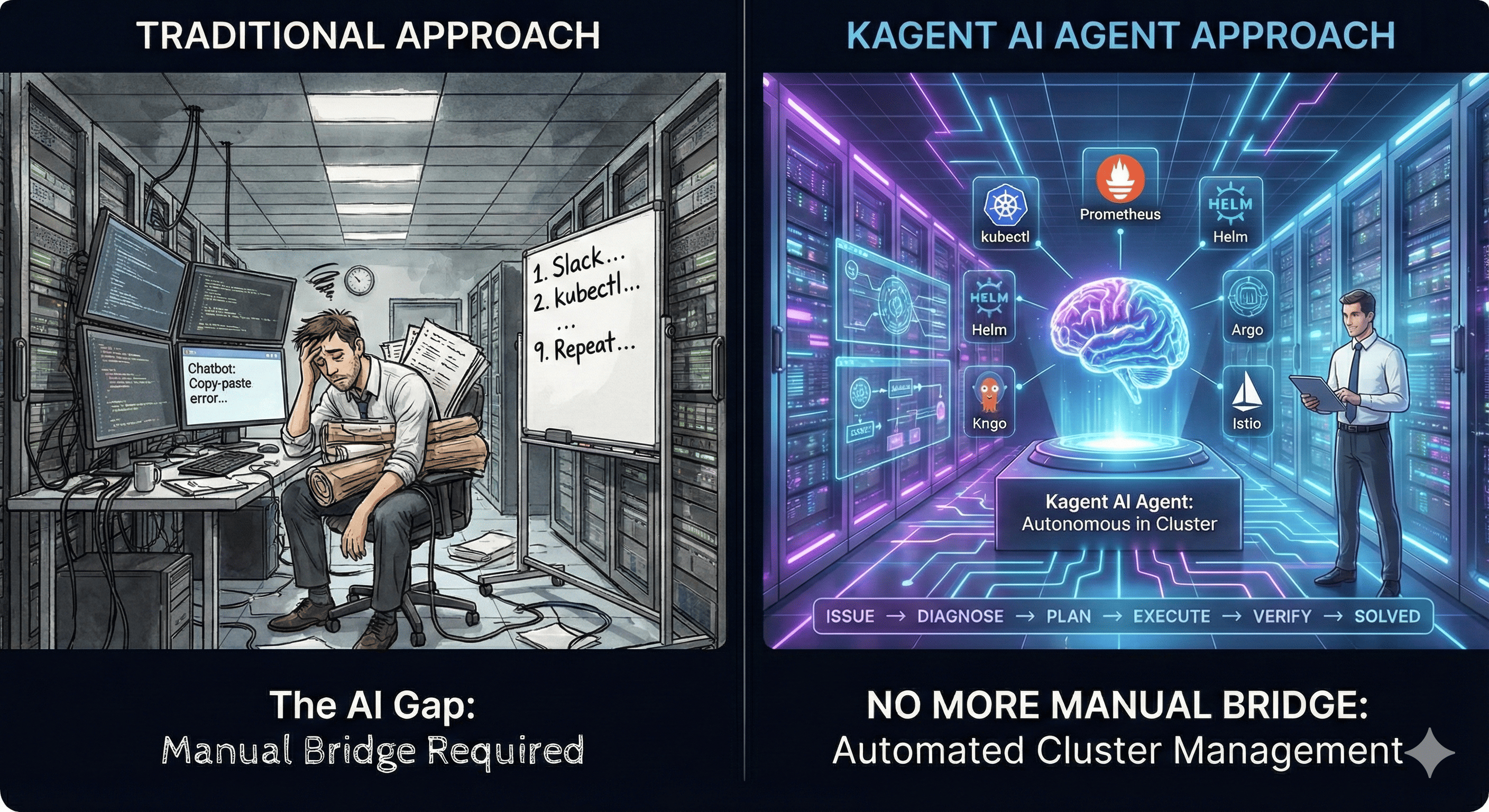
When a failure occurs in your Kubernetes cluster, how do you typically respond?
1. Check Slack alert
2. Check pod status with kubectl
3. Review logs
4. Check Prometheus metrics
5. Copy/paste error message to ChatGPT
6. Try ChatGPT's suggestion
7. Another error occurs
8. Back to ChatGPT...
9. Repeat... 😫
Does this process sound familiar? We receive help from AI, but we constantly have to act as the bridge between AI and our infrastructure. AI cannot see our cluster, and we have to manually execute what AI suggests.
Kagent solves this problem. An AI Agent runs directly inside your Kubernetes cluster, autonomously diagnosing problems, planning solutions, and taking actual actions. No more need for us to be the middleman.
This guide covers what Kagent is, how it works, and practical steps to install and use it.
What is Kagent?
One-Line Summary
“An autonomous AI Agent framework that runs inside your Kubernetes cluster”
Basic Information
| Attribute | Details |
|---|---|
| Developer | Solo.io |
| Release Date | March 17, 2025 |
| License | Apache 2.0 (Open Source) |
| Status | CNCF Sandbox Project |
| Foundation | Microsoft AutoGen Framework |
| GitHub | https://github.com/kagent-dev/kagent |
Why Was It Created?
Kagent originated from Solo.io’s customer problem-solving process. Complex Kubernetes environments required too much manual work for troubleshooting, configuration management, and deployment automation. It was developed to automate these tasks using AI.
Kagent Core Architecture
Kagent consists of three layers:
Layer 1: Tools
MCP (Model Context Protocol) style functions that AI Agents can use.
Built-in Tools
Tool Categories Summary
| Category | Tools | Purpose |
|---|---|---|
| Kubernetes | GetResources, DescribeResource, GetPodLogs, GetEvents, ApplyManifest, CreateResource | Core K8s operations |
| Helm | GetRepositories, GetCharts, InstallChart, UpgradeRelease | Package management |
| Prometheus | QueryMetrics, GetAlerts | Monitoring & alerting |
| Argo | GetApplications, SyncApplication, GetRollouts | GitOps & deployments |
| Istio | GetVirtualServices, GetDestinationRules, GetGateways | Service mesh |
| Custom | HTTP API, Database, Slack, External Systems | Extensibility |
Layer 2: Agents
Autonomous AI systems that operate independently. Not just chatbots—they plan, execute, analyze results, and decide next actions.
Agent Configuration Example
apiVersion: kagent.dev/v1alpha1
kind: Agent
metadata:
  name: kubernetes-expert
spec:
  # System prompt (defines Agent's role)
  systemPrompt: |
    You are a Kubernetes expert specializing in troubleshooting.
    You help diagnose issues, analyze logs, and suggest fixes.

  # LLM configuration
  modelConfig:
    name: gpt-4
    provider: openai

  # Available tools
  tools:
    - name: kubectl-tools
    - name: prometheus-tools

  # Can collaborate with other Agents
  agents:
    - name: helm-agent
Agent Characteristics
Layer 3: Framework
The interface for managing and executing Agents.
Three Management Methods
| Method | Description | Best For |
|---|---|---|
| CLI | Command line interface for quick interactions | Developers, scripting |
| Web UI | Browser-based dashboard for visual management | Teams, monitoring |
| Declarative YAML | GitOps-friendly configuration files | Production, automation |
# CLI example
kagent list agents
kagent run kubernetes-expert "Check if all pods are running"
kagent logs kubernetes-expert
What Kagent Can Do
1. Automated Troubleshooting
Scenario: Pod in CrashLoopBackOff
Example Conversation
User: "A failure occurred in the production namespace. Please check."

Kagent Agent:
1. [Auto] Check pod status in production namespace
2. [Auto] CrashLoopBackOff pod found: payment-api
3. [Auto] Analyze pod logs
   → "Error: Cannot connect to database: connection refused"
4. [Auto] Check Service status
   → database-service is normal
5. [Auto] Check NetworkPolicy
   → Traffic blocked between payment-api → database!
6. [Suggest] Propose NetworkPolicy modification
7. [After approval] Apply NetworkPolicy
8. [Auto] Confirm pod is running normally ✓

Total time: 2 minutes (Previous 30 min → 2 min)
2. Canary Deployment Automation
User: "Please deploy payment-api v2 with Canary. Start with 10% traffic,
      and gradually increase if error rate is below 1%."

Kagent Agent:
1. [Plan] Establish Canary deployment strategy
   - 10% → 25% → 50% → 100%
   - Wait 5 minutes at each stage
   - Verify error rate < 1%

2. [Execute] Create Argo Rollout
   - Deploy payment-api v2 (10% traffic)

3. [Monitor] Check Prometheus metrics
   - Error rate: 0.3% ✓
   - Response time: avg 120ms ✓

4. [Progress] Increase to 25%

5. [Monitor] Continue...

6. [Complete] 100% deployment finished
   - Total time: 20 minutes
   - Safely deployed without errors
3. Zero Trust Security Policy Application
Hands-On: Installing and Using Kagent
Prerequisites
| Requirement | Details |
|---|---|
| Kubernetes Cluster | Minikube, Kind, EKS, GKE, etc. |
| Helm | Version 3.x |
| kubectl | Configured for your cluster |
| LLM API Key | OpenAI, Anthropic, or Ollama (free) |
Step 1: Start Minikube Cluster
# Start Minikube
minikube start --cpus=4 --memory=8192

# Verify cluster status
kubectl get nodes
Step 2: Install Kagent
Install with Helm
Verify Installation
# Check Kagent pods
kubectl get pods -n kagent-system

# Expected output:
# NAME                                READY   STATUS    RESTARTS   AGE
# kagent-controller-7d8f9c5d4-xk2m9   1/1     Running   0          2m
# kagent-ui-5f9b8d7c6-p4n8k          1/1     Running   0          2m
# kagent-engine-6c8d7b5f4-q3m7n      1/1     Running   0          2m
Step 3: Access Web UI
# Port-forward to access UI
kubectl port-forward -n kagent-system svc/kagent-ui 8080:80

# Access in browser: http://localhost:8080
Step 4: Create Your First Agent
Agent YAML Configuration
# k8s-expert-agent.yaml
apiVersion: kagent.dev/v1alpha1
kind: Agent
metadata:
  name: k8s-expert
  namespace: kagent-system
spec:
  description: "Kubernetes troubleshooting expert"

  systemPrompt: |
    You are KubeExpert, a Kubernetes specialist.
    Your role is to help diagnose and resolve Kubernetes issues.

    When analyzing problems:
    1. Check pod status first
    2. Review logs for errors
    3. Verify service connectivity
    4. Check resource constraints
    5. Suggest actionable fixes

    Always explain your reasoning and provide clear solutions.

  modelConfig:
    name: gpt-4
    provider: openai
    temperature: 0.3  # Lower temperature = more consistent answers

  tools:
    - name: kubectl
      type: kubernetes
      permissions:
        - get
        - list
        - describe
      resources:
        - pods
        - services
        - deployments
        - events

    - name: logs
      type: kubernetes
      permissions:
        - logs
Deploy Agent
kubectl apply -f k8s-expert-agent.yaml

# Verify Agent
kubectl get agents -n kagent-system
Step 5: Chat with Your Agent
# Install Kagent CLI
curl -sL https://kagent.dev/install.sh | bash

# Start conversation
kagent chat k8s-expert

# Enter your question:
> Show me all pods in default namespace

Agent response:
[Thinking] I'll check the pods in the default namespace...
[Action] Running: kubectl get pods -n default
[Result]
NAME                     READY   STATUS    RESTARTS   AGE
nginx-7d8f5c8b9-2xk4m   1/1     Running   0          5h
redis-6c7f8d9b8-9pm3n   1/1     Running   1          3h

[Summary] There are 2 pods in the default namespace:
- nginx: Running normally
- redis: Running with 1 restart (check logs if concerned)
Running Kagent for Free with Ollama
Cost Comparison
| Method | Cost | Performance | Setup Time |
|---|---|---|---|
| OpenAI API | $0.03/1K tokens | Excellent | 5 min |
| Anthropic API | $0.025/1K tokens | Excellent | 5 min |
| Ollama (Local) | Completely Free | Medium | 10 min |
Step 1: Install Ollama
# macOS
brew install ollama

# Linux
curl -fsSL https://ollama.com/install.sh | sh

# Start Ollama server
ollama serve

# Download model (in another terminal)
ollama pull llama3.2:3b  # 3B parameter model (lightweight)
Step 2: Deploy Ollama to Kubernetes
# ollama-deployment.yaml
apiVersion: v1
kind: Namespace
metadata:
  name: ollama

---
apiVersion: apps/v1
kind: Deployment
metadata:
  name: ollama
  namespace: ollama
spec:
  replicas: 1
  selector:
    matchLabels:
      app: ollama
  template:
    metadata:
      labels:
        app: ollama
    spec:
      initContainers:
      - name: model-puller
        image: ollama/ollama:latest
        command: ["/bin/sh", "-c"]
        args:
        - |
          ollama serve &
          sleep 10
          ollama pull llama3.2:3b
          pkill ollama
        volumeMounts:
        - name: ollama-data
          mountPath: /root/.ollama
        resources:
          requests:
            memory: "4Gi"
            cpu: "2"
          limits:
            memory: "8Gi"
            cpu: "4"

      containers:
      - name: ollama
        image: ollama/ollama:latest
        ports:
        - name: http
          containerPort: 11434
        volumeMounts:
        - name: ollama-data
          mountPath: /root/.ollama
        resources:
          requests:
            memory: "4Gi"
            cpu: "2"
          limits:
            memory: "8Gi"
            cpu: "4"

      volumes:
      - name: ollama-data
        emptyDir: {}

---
apiVersion: v1
kind: Service
metadata:
  name: ollama
  namespace: ollama
spec:
  type: ClusterIP
  selector:
    app: ollama
  ports:
  - port: 80
    targetPort: http
kubectl apply -f ollama-deployment.yaml

# Wait for model download (2-5 minutes)
kubectl logs -n ollama -f deployment/ollama -c model-puller
Step 3: Connect Kagent to Ollama
Create Ollama ModelConfig
# ollama-modelconfig.yaml
apiVersion: kagent.dev/v1alpha2
kind: ModelConfig
metadata:
  name: llama3-local
  namespace: kagent
spec:
  model: llama3.2:3b
  provider: Ollama
  ollama:
    host: http://ollama.ollama.svc.cluster.local:80
kubectl apply -f ollama-modelconfig.yaml
Recommended Ollama Models
| RAM Requirement | Model | Size | Notes |
|---|---|---|---|
| ≤4GB RAM | llama3.2:1b | 1.3GB | Lightest option |
| ≤4GB RAM | phi3:mini | 2.3GB | Microsoft model |
| ≤4GB RAM | gemma2:2b | 1.6GB | Google model |
| 8GB RAM | llama3.2:3b | 2GB | Recommended! |
| 8GB RAM | mistral:7b | 4.1GB | Good performance |
| 16GB+ RAM | llama3.1:8b | 4.7GB | Best local option |
Multi-Agent Collaboration
Scenario: Helm Deployment + Monitoring Setup
Coordinator Agent Configuration
# deployment-coordinator.yaml
apiVersion: kagent.dev/v1alpha1
kind: Agent
metadata:
  name: deployment-coordinator
  namespace: kagent-system
spec:
  description: "Coordinates deployment and monitoring setup"

  systemPrompt: |
    You coordinate between helm-agent and prometheus-agent to:
    1. Deploy applications via Helm
    2. Verify deployment success
    3. Setup monitoring and alerts
    4. Run smoke tests

  # Can call other Agents
  agents:
    - name: helm-agent
      role: deployment
    - name: metrics-analyzer
      role: monitoring

  tools:
    - name: kubectl
Best Practices
1. Security
API Key Management
RBAC Configuration
# Grant minimum permissions to Agent
apiVersion: rbac.authorization.k8s.io/v1
kind: Role
metadata:
  name: kagent-readonly
  namespace: production
rules:
- apiGroups: [""]
  resources: ["pods", "services"]
  verbs: ["get", "list"]  # No write permissions
- apiGroups: [""]
  resources: ["pods/log"]
  verbs: ["get"]
2. Cost Management
spec:
  modelConfig:
    maxTokens: 4000  # Limit response tokens
    budget:
      daily: 1000000  # Daily token limit
      perQuery: 10000  # Per-query token limit

  cache:
    enabled: true
    ttl: 3600  # Cache same queries for 1 hour
3. Observability
# Check Agent logs
kubectl logs -n kagent-system deployment/kagent-engine -f

# View specific Agent history
kagent history k8s-expert

# Check metrics
kubectl port-forward -n kagent-system svc/kagent-metrics 9090:9090
Troubleshooting
Problem 1: Agent Not Responding
# 1. Check Engine pod status
kubectl get pods -n kagent-system -l app=kagent-engine

# 2. Check logs
kubectl logs -n kagent-system deployment/kagent-engine

# 3. Verify API key
kubectl get secret openai-secret -n kagent-system -o yaml

# 4. Check network
kubectl exec -it -n kagent-system deployment/kagent-engine -- curl -I https://api.openai.com
Problem 2: Permission Error
Cleanup Resources
#!/bin/bash
# cleanup-kagent.sh

echo "🧹 Starting Kagent resource cleanup..."

# Remove Helm releases
helm uninstall kagent -n kagent-system 2>/dev/null
helm uninstall kagent-crds -n kagent 2>/dev/null

# Remove Ollama
kubectl delete namespace ollama --grace-period=0 --force 2>/dev/null

# Remove Kagent namespaces
kubectl delete namespace kagent-system --grace-period=0 --force 2>/dev/null
kubectl delete namespace kagent --grace-period=0 --force 2>/dev/null

# Remove RBAC
kubectl delete clusterrole kagent-reader 2>/dev/null
kubectl delete clusterrolebinding kagent-reader-binding 2>/dev/null

# Stop Minikube
minikube stop

echo "✅ Cleanup complete!"
Real-World Use Cases
Case 1: Automated Nighttime Incident Response
Situation:
- Production failure at 3 AM
- On-call engineer is sleeping
Kagent Configuration:
apiVersion: kagent.dev/v1alpha1
kind: Agent
metadata:
  name: incident-responder
spec:
  triggers:
    - type: prometheus-alert
      severity: critical

  automation:
    enabled: true
    requireApproval: false  # No approval needed for emergencies

  actions:
    - diagnose: true
    - attempt-fix: true
    - notify-on-call: true
    - create-incident-report: true
Result:
- Agent automatically diagnoses problem
- Restarts memory-exhausted pod
- Recovery in 5 minutes
- Engineer reviews report in the morning
Case 2: Developer Onboarding Acceleration
Problem: New developer doesn’t know Kubernetes
Solution:
apiVersion: kagent.dev/v1alpha1
kind: Agent
metadata:
  name: newbie-helper
spec:
  systemPrompt: |
    You are a friendly Kubernetes tutor for new developers.
    Explain concepts simply and provide step-by-step guidance.
    Always include educational context with your answers.
Future Roadmap
Conclusion
The paradigm of Kubernetes operations is changing.
Key Benefits by Role
| Role | Benefits |
|---|---|
| DevOps Engineers | Freedom from repetitive troubleshooting, complex deployment automation, reduced 24/7 on-call burden |
| Platform Teams | Enhanced developer self-service, standardized operations, democratized knowledge |
| Organizations | Faster incident response, reduced operational costs, engineers focus on higher-value work |
Kagent is still in its early stages, but the possibilities are endless. Whether you’re looking to reduce operational toil, accelerate incident response, or democratize Kubernetes expertise across your organization, Kagent provides a compelling path forward for AI-augmented infrastructure operations.
Reference
- Kagent Official Website
- Kagent GitHub Repository
- Kagent Documentation
- CNCF Announcement - Kagent
- Solo.io Blog - Bringing Agentic AI to Kubernetes
- The New Stack - Meet Kagent
- InfraCloud - AI Agents for Kubernetes
- Model Context Protocol (MCP) - Anthropic
- Microsoft AutoGen Framework
- Kagent Discord Community
- Ollama Documentation

Comments