12 min to read
GitLab 18.0 Upgrade: Resolving git_data_dirs Configuration Changes
Successfully migrating from GitLab 17.x to 18.0+ by updating deprecated storage configurations
Overview
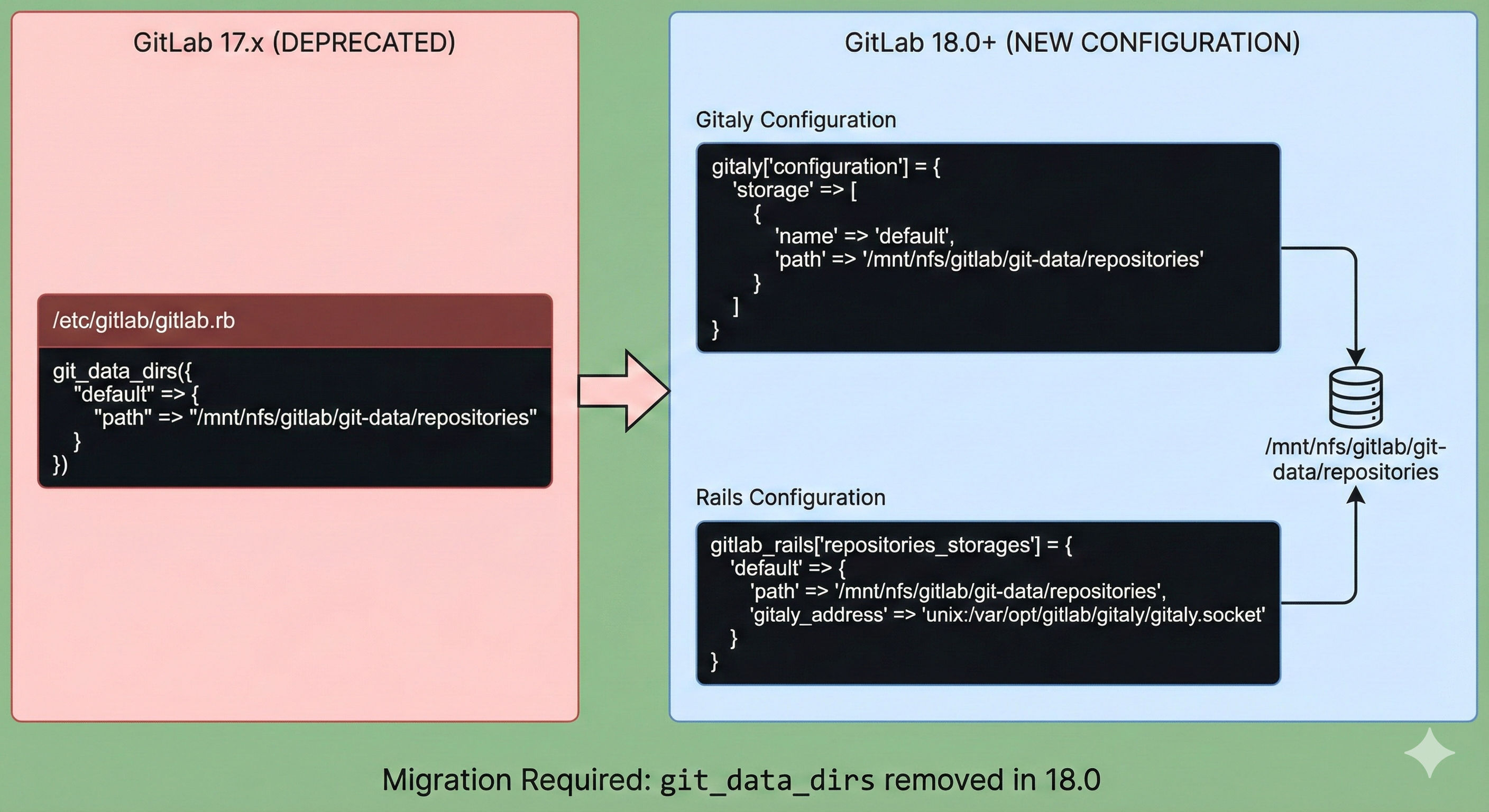
Starting with GitLab 18.0, the legacy git_data_dirs configuration has been completely removed. This means that upgrading from GitLab 17.x to 18.0 or later will fail if you don’t update your configuration file first.
This article covers how to resolve git_data_dirs related errors encountered when upgrading from GitLab 17.11.5 to 18.1, and provides guidance for a smooth migration path.
Problem Description
During the GitLab 18.1 upgrade process, the following error occurred:
* git_data_dirs has been deprecated since 17.8 and was removed in 18.0.
  See https://docs.gitlab.com/omnibus/settings/configuration.html#migrating-from-git_data_dirs
  for migration instructions.
Deprecations found. Please correct them and try again.
dpkg: error processing archive /var/cache/apt/archives/gitlab-ce_18.1.1-ce.0_amd64.deb (--unpack):
 new gitlab-ce package pre-installation script subprocess returned error exit status 1
This error occurs because the git_data_dirs configuration, which was deprecated in GitLab 17.8, has been completely removed in GitLab 18.0.
Solution
1. Check Existing Configuration
First, check the git_data_dirs setting in your current GitLab configuration file (/etc/gitlab/gitlab.rb):
# Old configuration (Not supported in GitLab 18.0+)
git_data_dirs({
  "default" => {
    "path" => "/mnt/nfs/gitlab/git-data/repositories"
  }
})
In my case, I’m using an NFS mount as the git-data storage location.
2. Update to New Configuration
Starting with GitLab 18.0, you need to configure Gitaly and Rails settings separately.
Gitaly Configuration:
# GitLab 18.0+ New Gitaly Configuration
gitaly['configuration'] = {
  'storage' => [
    {
      'name' => 'default',
      'path' => '/mnt/nfs/gitlab/git-data/repositories'
    }
  ]
}
Rails Configuration:
# Rails Repository Storage Configuration
gitlab_rails['repositories_storages'] = {
  'default' => {
    'path' => '/mnt/nfs/gitlab/git-data/repositories',
    'gitaly_address' => 'unix:/var/opt/gitlab/gitaly/gitaly.socket'
  }
}
3. Apply Configuration and Upgrade
Remove Old git_data_dirs Configuration:
sudo vi /etc/gitlab/gitlab.rb
# Comment out or delete all git_data_dirs related settings
Add New Configuration:
Add the new configuration shown above to the /etc/gitlab/gitlab.rb file:
# GitLab 18.0+ New Gitaly Configuration
gitaly['configuration'] = {
  'storage' => [
    {
      'name' => 'default',
      'path' => '/mnt/nfs/gitlab/git-data/repositories'
    }
  ]
}

# Rails Repository Storage Configuration
gitlab_rails['repositories_storages'] = {
  'default' => {
    'path' => '/mnt/nfs/gitlab/git-data/repositories',
    'gitaly_address' => 'unix:/var/opt/gitlab/gitaly/gitaly.socket'
  }
}
Retry Upgrade:
Check the upgrade path at: GitLab Upgrade Path Tool
sudo apt update

# Specify the version to upgrade to (example below)
version=18.2.8-ce.0
apt-get install -y gitlab-ce=$version
Apply GitLab Configuration:
sudo gitlab-ctl reconfigure
Key Changes
Configuration Structure Evolution
Before (GitLab 17.x): Unified management with git_data_dirs
After (GitLab 18.0+): Separate Gitaly and Rails configurations
Advantages of New Configuration
- Clear Role Separation: Gitaly server and Rails application settings are clearly distinguished
- Enhanced Scalability: More flexible configuration in multi-Gitaly environments
- Future-Oriented: Better suited for GitLab’s microservices architecture
Additional Considerations
Multiple Storage Configuration
If you’re using multiple Git storage locations:
gitaly['configuration'] = {
  'storage' => [
    {
      'name' => 'default',
      'path' => '/mnt/nfs/gitlab/git-data/repositories'
    },
    {
      'name' => 'storage1',
      'path' => '/mnt/nfs/gitlab/git-data/repositories-1'
    }
  ]
}

gitlab_rails['repositories_storages'] = {
  'default' => {
    'path' => '/mnt/nfs/gitlab/git-data/repositories',
    'gitaly_address' => 'unix:/var/opt/gitlab/gitaly/gitaly.socket'
  },
  'storage1' => {
    'path' => '/mnt/nfs/gitlab/git-data/repositories-1',
    'gitaly_address' => 'unix:/var/opt/gitlab/gitaly/gitaly.socket'
  }
}
Permission Verification
After changing the configuration, verify the permissions of the storage path:
sudo chown -R git:git /mnt/nfs/gitlab/git-data/repositories
sudo chmod -R 755 /mnt/nfs/gitlab/git-data/repositories
Understanding the Migration Context
Why the Change?
GitLab’s move away from git_data_dirs is part of a larger architectural evolution:
- Microservices Architecture: Separating Gitaly as an independent service
- Horizontal Scaling: Better support for distributed Git storage
- Improved Maintainability: Clearer configuration boundaries between components
Deprecation Timeline
- GitLab 17.8:
git_data_dirsmarked as deprecated - GitLab 18.0:
git_data_dirscompletely removed - Migration Period: Users had approximately 3-4 versions to migrate
Advanced Configuration Scenarios
1. External Gitaly Server
If you’re running Gitaly on a separate server:
gitlab_rails['repositories_storages'] = {
  'default' => {
    'gitaly_address' => 'tcp://gitaly-server.example.com:8075',
    'gitaly_token' => 'your-secret-token-here'
  }
}
2. Mixed Storage Types
Combining local and NFS storage:
gitaly['configuration'] = {
  'storage' => [
    {
      'name' => 'default',
      'path' => '/var/opt/gitlab/git-data/repositories'
    },
    {
      'name' => 'nfs-storage',
      'path' => '/mnt/nfs/gitlab/git-data/repositories'
    }
  ]
}

gitlab_rails['repositories_storages'] = {
  'default' => {
    'path' => '/var/opt/gitlab/git-data/repositories',
    'gitaly_address' => 'unix:/var/opt/gitlab/gitaly/gitaly.socket'
  },
  'nfs-storage' => {
    'path' => '/mnt/nfs/gitlab/git-data/repositories',
    'gitaly_address' => 'unix:/var/opt/gitlab/gitaly/gitaly.socket'
  }
}
3. High Availability Setup
For clustered Gitaly configurations:
Troubleshooting Common Issues
1. Configuration Syntax Errors
Error: There was an error parsing the configuration
Solutions:
- Verify Ruby hash syntax (commas, brackets, quotes)
- Check for trailing commas in arrays
- Ensure proper indentation
- Validate with:
sudo gitlab-ctl show-config
2. Storage Path Not Accessible
Error: Failed to connect to Gitaly at unix:/var/opt/gitlab/gitaly/gitaly.socket
Solutions:
- Verify storage path exists:
ls -la /mnt/nfs/gitlab/git-data/repositories - Check mount point:
df -h | grep gitlab - Verify git user ownership:
stat /mnt/nfs/gitlab/git-data/repositories - Check Gitaly logs:
sudo gitlab-ctl tail gitaly
3. Permission Denied Errors
Error: Permission denied @ dir_s_mkdir
Solutions:
# Fix ownership
sudo chown -R git:git /mnt/nfs/gitlab/git-data

# Fix permissions
sudo chmod -R 2770 /mnt/nfs/gitlab/git-data/repositories

# Verify SELinux context (if applicable)
sudo ls -Z /mnt/nfs/gitlab/git-data
4. NFS Mount Issues
Error: Stale file handle or Transport endpoint is not connected
Solutions:
# Remount NFS
sudo umount /mnt/nfs/gitlab
sudo mount -a

# Check NFS server connectivity
showmount -e nfs-server.example.com

# Verify /etc/fstab entry
cat /etc/fstab | grep gitlab
5. Upgrade Still Fails After Configuration Change
Error: Package installation errors persist
Solutions:
# Clear package cache
sudo apt clean
sudo apt update

# Remove partially installed package
sudo dpkg --remove --force-remove-reinstreq gitlab-ce

# Retry installation
sudo apt install gitlab-ce=18.1.1-ce.0
Pre-Upgrade Checklist
Before upgrading to GitLab 18.0+, ensure you:
- Backup Everything: Database, repositories, configuration files
- Review Deprecation Warnings: Check GitLab admin panel for warnings
- Test in Staging: Perform upgrade on test environment first
- Document Current Config: Save a copy of
/etc/gitlab/gitlab.rb - Check Upgrade Path: Verify you’re following the correct upgrade sequence
- Review Storage Usage: Ensure adequate disk space for upgrade
- Plan Maintenance Window: Expect 30-60 minutes of downtime
- Notify Users: Inform team about scheduled maintenance
Post-Upgrade Verification
After completing the upgrade, verify everything is working:
1. Check GitLab Services
sudo gitlab-ctl status
All services should show run: servicename: status.
2. Verify Gitaly Connection
sudo gitlab-rake gitlab:gitaly:check
3. Test Repository Access
# Clone a test repository
git clone http://gitlab.example.com/test/project.git

# Push a test commit
cd project
echo "test" > test.txt
git add test.txt
git commit -m "Post-upgrade test"
git push
4. Check Storage Configuration
sudo gitlab-rake gitlab:storage:check
5. Review Logs for Errors
sudo gitlab-ctl tail
Look for any error messages related to Gitaly or storage.
Backup and Rollback Strategy
Create Full Backup Before Upgrade
# Create GitLab backup
sudo gitlab-backup create

# Backup configuration
sudo cp -r /etc/gitlab /etc/gitlab.backup.$(date +%Y%m%d)

# List backups
sudo ls -la /var/opt/gitlab/backups/
Rollback Procedure (If Needed)
If the upgrade fails and you need to rollback:
# 1. Reinstall previous version
version=17.11.5-ce.0
sudo apt install gitlab-ce=$version

# 2. Restore configuration
sudo cp /etc/gitlab.backup.YYYYMMDD/gitlab.rb /etc/gitlab/

# 3. Reconfigure
sudo gitlab-ctl reconfigure

# 4. Restore data (if necessary)
sudo gitlab-backup restore BACKUP=timestamp_of_backup
Performance Considerations
NFS Performance Tuning
For NFS-backed Git storage, optimize performance:
# /etc/gitlab/gitlab.rb
gitaly['configuration'] = {
  'storage' => [
    {
      'name' => 'default',
      'path' => '/mnt/nfs/gitlab/git-data/repositories'
    }
  ],
  'git' => {
    'catfile_cache_size' => 100
  },
  'ruby' => {
    'rugged_git_config_search_path' => '/opt/gitlab/embedded/etc'
  }
}
NFS Mount Options
Ensure optimal NFS mount options in /etc/fstab:
nfs-server:/export/gitlab /mnt/nfs/gitlab nfs4 defaults,soft,rsize=1048576,wsize=1048576,noatime,vers=4.1,tcp 0 0
Migration Impact Assessment
Configuration Complexity
| Aspect | git_data_dirs | New Configuration |
|---|---|---|
| Syntax Complexity | Low | Medium |
| Flexibility | Limited | High |
| Multi-Gitaly Support | No | Yes |
| Future-Proof | No | Yes |
Downtime Estimation
| Environment Size | Estimated Downtime |
|---|---|
| Small (<100 projects) | 15-30 minutes |
| Medium (100-1000 projects) | 30-60 minutes |
| Large (>1000 projects) | 1-2 hours |
Conclusion
Upgrading to GitLab 18.0 is more than a simple version update—it represents an architectural evolution. The removal of git_data_dirs demonstrates GitLab’s progression toward a more modular structure.
While the initial configuration process may seem more complex, this change ultimately enables a more stable and scalable GitLab environment in the long run.
Key Takeaways:
- Plan Ahead: Review deprecation warnings before major upgrades
- Test First: Always test upgrades in staging environments
- Backup Everything: Maintain comprehensive backups before any changes
- Follow Documentation: Consult official GitLab upgrade guides
- Monitor Closely: Watch logs and metrics after upgrade completion
Future Considerations:
As GitLab continues to evolve toward microservices architecture, expect more configuration changes that improve scalability and maintainability. Staying informed about deprecation notices and planning upgrades carefully will ensure smooth operations.
The new Gitaly configuration format, while initially appearing more verbose, provides the foundation for advanced features like:
- Praefect: GitLab’s built-in Gitaly cluster manager
- Geo Replication: Multi-site repository synchronization
- Performance Optimization: Fine-grained control over Git operations
Before any production upgrade, always perform comprehensive backups and validate changes in a test environment. Understanding these architectural changes is key to maintaining a stable GitLab instance.


Comments