21 min to read
Preserving Source IP in Kubernetes: A Complete Guide
Maintaining client IP addresses through Services and Ingress for logging, security, and access control
Overview
In Kubernetes clusters, accurately identifying the Source IP (client IP) of incoming external requests is crucial for various operational and security purposes including logging, security analysis, auditing, and access control.
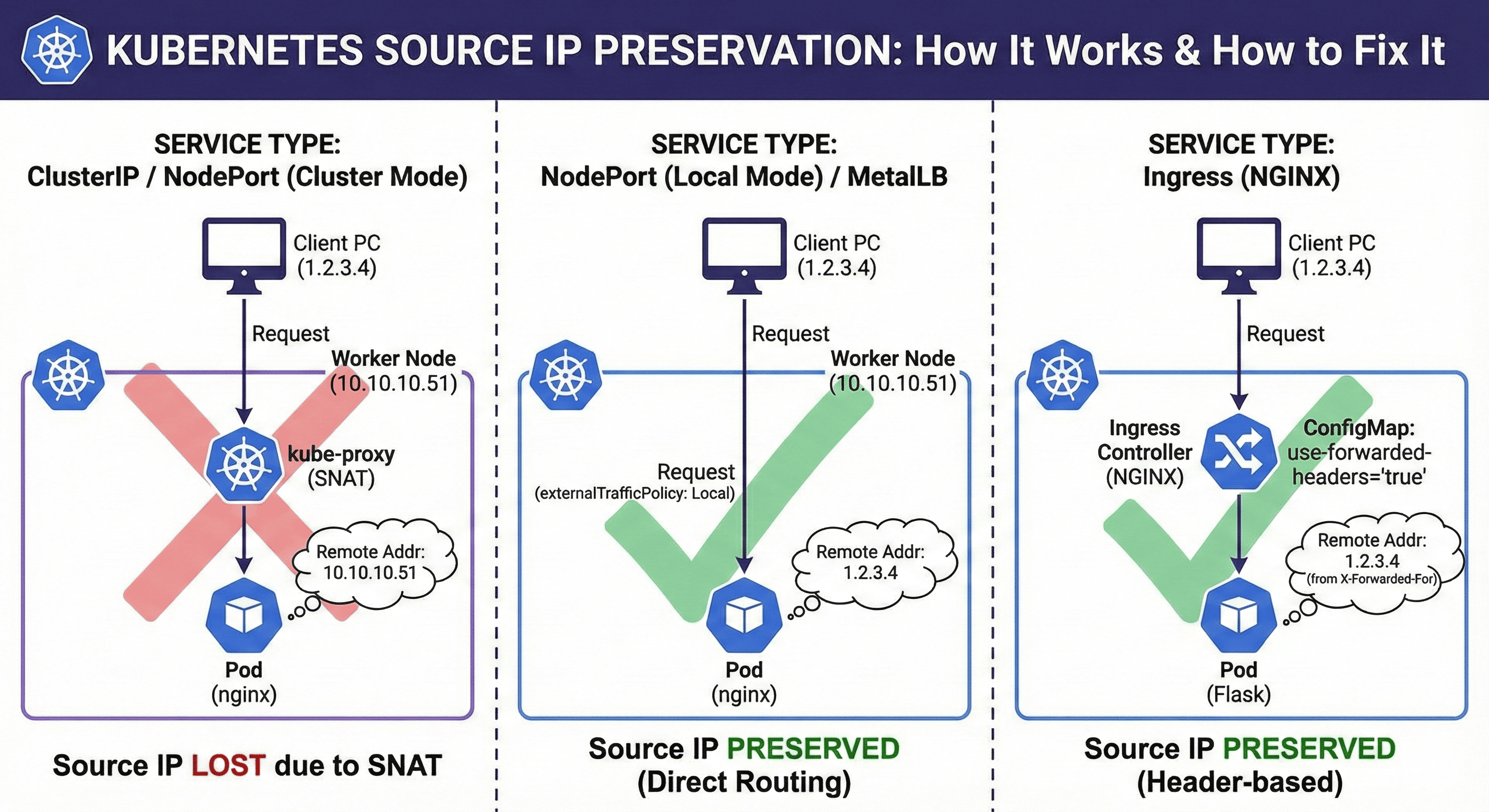
However, in Kubernetes’ default network configuration, depending on the service type, requests pass through kube-proxy, NAT, ingress proxies, etc., causing the Source IP to be changed or lost.
This article explains why Source IP disappears in Kubernetes environments and what configuration to apply to preserve it, organized by Service type and Ingress method.
We’ll also cover practical labs using a Flask app with MetalLB + Ingress-NGINX to see how IPs appear in actual requests and how to preserve them.
Source IP Preservation by Service Type
Comparison Table
| Service Type | Configuration Required | Request Flow | Source IP Preserved |
|---|---|---|---|
| ClusterIP | Not possible | Internal cluster via kube-proxy | ❌ No |
| NodePort / LoadBalancer | Requires externalTrafficPolicy: Local |
Client → Node IP:Port → Direct Pod | ✅ Yes |
| Ingress | Requires X-Forwarded-For header | Client → Ingress Controller → Pod | ✅ Yes (header-based) |
| MetalLB (LoadBalancer) | Requires externalTrafficPolicy: Local |
External IP → Direct node routing (L2/BGP) | ✅ Yes |
Important Note: With Ingress, the actual IP doesn’t reach the pod directly but is transmitted via headers (X-Forwarded-For), requiring header parsing in the application.
Why Does Source IP Disappear in Cluster Mode?
Understanding SNAT
Cluster Mode (default):
- kube-proxy performs SNAT (Source NAT) when forwarding traffic via iptables or ipvs
- Requester’s IP is replaced with the node’s IP
- Result: Node IP is recorded instead of client IP
Local Mode:
- No SNAT processing
- Traffic forwarded directly to pods on local node
- Result: Original IP preserved
Traffic Flow Comparison
Cluster Mode (externalTrafficPolicy: Cluster)
────────────────────────────────────────────
Client (1.2.3.4)
    ↓
LoadBalancer/NodePort
    ↓
Node-1 (kube-proxy SNAT)
    ↓ (Source becomes Node-1 IP)
Pod on Node-2
    ↓
Application sees: Node-1 IP ❌


Local Mode (externalTrafficPolicy: Local)
──────────────────────────────────────────
Client (1.2.3.4)
    ↓
LoadBalancer/NodePort
    ↓
Node-1 (NO SNAT)
    ↓ (Source remains 1.2.3.4)
Pod on Node-1 (must exist!)
    ↓
Application sees: 1.2.3.4 ✅
Using externalTrafficPolicy: Local
Configuration
For LoadBalancer or NodePort services, configure as follows to maintain original client IP:
apiVersion: v1
kind: Service
metadata:
  name: my-service
spec:
  type: LoadBalancer
  externalTrafficPolicy: Local  # Key setting
  selector:
    app: my-app
  ports:
    - port: 80
      targetPort: 8080
Behavior Differences
Local:
- Preserves client’s original IP
- Only forwards to pods on the receiving node
- Caveat: If no pod exists on that node, request fails
Cluster (default):
- Request is NAT processed within cluster
- Source IP becomes node IP
- Load balances across all cluster pods
Best Practices with Local Mode
# Use DaemonSet to ensure pod on every node
apiVersion: apps/v1
kind: DaemonSet
metadata:
  name: my-app
spec:
  selector:
    matchLabels:
      app: my-app
  template:
    metadata:
      labels:
        app: my-app
    spec:
      containers:
      - name: my-app
        image: my-app:latest
Preserving Source IP with Ingress (NGINX)
Required Configuration
Two essential settings are needed:
| Component | Setting | Description |
|---|---|---|
| Service | externalTrafficPolicy: Local |
Prevents client IP from being SNATed |
| ConfigMap | use-forwarded-headers: "true"proxy-real-ip-cidr: "0.0.0.0/0" |
Trust X-Forwarded-For and X-Real-IP headers for logs and backend |
1. ConfigMap Configuration
Ingress controllers (like NGINX) operate as L7 proxies by default, changing the Source IP. Preserve it with this configuration:
apiVersion: v1
kind: ConfigMap
metadata:
  name: nginx-ingress-controller
  namespace: ingress-nginx
data:
  use-forwarded-headers: "true"
  proxy-real-ip-cidr: "0.0.0.0/0"
Configuration Keys Explained
| Key | Description |
|---|---|
use-forwarded-headers: "true" |
Trust and use X-Forwarded-For, X-Real-IP HTTP headers |
proxy-real-ip-cidr: "0.0.0.0/0" |
Trust any client IP. For security, limit to internal network ranges like 10.0.0.0/8, 192.168.0.0/16 |
This allows NGINX to correctly parse $proxy_protocol_addr, $remote_addr, etc.
2. Service Configuration
apiVersion: v1
kind: Service
metadata:
  name: ingress-nginx-controller
  namespace: ingress-nginx
spec:
  type: LoadBalancer  # or NodePort
  externalTrafficPolicy: Local  # Critical!
  ports:
    - port: 80
      targetPort: http
    - port: 443
      targetPort: https
  selector:
    app.kubernetes.io/name: ingress-nginx
    app.kubernetes.io/component: controller
Lab 1: Verifying Source IP
Architecture
External Client
    ↓
NodePort Service (externalTrafficPolicy: Local)
    ↓
Flask Pod (logs request headers)
1. Flask Application ConfigMap
apiVersion: v1
kind: ConfigMap
metadata:
  name: flask-app-config
data:
  app.py: |
    from flask import Flask, request
    import os

    app = Flask(__name__)

    @app.route('/')
    def hello():
        client_ip = request.remote_addr
        x_forwarded_for = request.headers.get('X-Forwarded-For', '')
        x_real_ip = request.headers.get('X-Real-IP', '')
        all_headers = dict(request.headers)

        response = f"""
    Hello from Flask!

    Client Info:
    ------------
    Remote Addr: {client_ip}
    X-Forwarded-For: {x_forwarded_for}
    X-Real-IP: {x_real_ip}

    All Request Headers:
    -------------------
    {all_headers}
    """
        return response

    if __name__ == '__main__':
        app.run(host='0.0.0.0', port=int(os.environ.get('PORT', 8080)))
2. Flask Pod Definition
apiVersion: v1
kind: Pod
metadata:
  name: flask-app
  labels:
    app: flask-app
spec:
  containers:
    - name: flask-app
      image: python:3.9-slim
      ports:
        - containerPort: 8080
      env:
        - name: PORT
          value: "8080"
      command: ["/bin/sh", "-c"]
      args:
        - |
          pip install flask
          mkdir -p /app
          cp /config/app.py /app/
          cd /app
          python app.py
      volumeMounts:
        - name: flask-app-config
          mountPath: /config
  volumes:
    - name: flask-app-config
      configMap:
        name: flask-app-config
3. Service Configuration
apiVersion: v1
kind: Service
metadata:
  name: flask-app-service
spec:
  type: NodePort
  externalTrafficPolicy: Local  # Preserves source IP
  selector:
    app: flask-app
  ports:
    - port: 8080
      targetPort: 8080
4. Complete Manifest
5. Testing from External Client
curl http://<NodeIP>:<NodePort>
6. Lab Results
Same Network Segment:
curl 10.10.10.51:30378

Hello from Flask!

Client Info:
------------
Remote Addr: 10.10.10.50
X-Forwarded-For:
X-Real-IP:

All Request Headers:
-------------------
{'Host': '10.10.10.51:30378', 'User-Agent': 'curl/7.81.0', 'Accept': '*/*'}
✅ Source IP preserved correctly
Different Network Segment:
curl 10.10.10.51:30378

Hello from Flask!

Client Info:
------------
Remote Addr: 10.10.10.251  # Gateway IP, not actual client!
X-Forwarded-For:
X-Real-IP:

All Request Headers:
-------------------
{'Host': '10.10.10.51:30378', 'User-Agent': 'curl/7.81.0', 'Accept': '*/*'}
❌ Shows gateway IP instead of actual external IP
Understanding the Results
Current Situation:
externalTrafficPolicy: Localconfigured ✅- NodePort direct connection to worker node ✅
- Flask shows
$remote_addr✅ - Same network: Source IP preserved ✅
- Different network: Shows gateway IP (e.g., 10.10.10.251) instead of real external IP ❌
Root Cause: kube-proxy + NAT + Gateway
When requests traverse physical routers or virtual gateways, the Flask pod sees the gateway/NAT IP instead of the actual external client IP:
[Your MacBook]
     ↓ (request)
[Gateway/NAT (10.10.10.251)]
     ↓ (SNAT applied)
[Worker Node (10.10.10.51):32440]
     ↓
[Flask Pod]

Result: Flask receives SNATed IP (gateway IP), not direct client IP
Lab 2: MetalLB + Ingress-NGINX with Source IP
Architecture
External Client
    ↓
MetalLB LoadBalancer (10.10.10.63)
    ↓
Ingress-NGINX Controller (externalTrafficPolicy: Local)
    ↓
NGINX Pod (configured with real_ip_header)
1. MetalLB Setup
First, install MetalLB. For installation guide, see: What is MetalLB?
kubectl get ipaddresspools.metallb.io -n metallb

NAME      AUTO ASSIGN   AVOID BUGGY IPS   ADDRESSES
ip-pool   true          false             ["10.10.10.55-10.10.10.58","10.10.10.62-10.10.10.65"]
2. Ingress-NGINX Controller Configuration
Create test Ingress NGINX Controller with Helm:
# values/mgmt-test.yaml
global:
  image:
    registry: registry.k8s.io

controller:
  ingressClassResource:
    name: nginx-test  # Unique name for distinction
    enabled: true
    default: false  # Not the default controller
    controllerValue: "k8s.io/ingress-nginx-test"

  service:
    enabled: true
    type: LoadBalancer
    loadBalancerIP: "10.10.10.63"
    externalTrafficPolicy: "Local"  # Critical!

  config:
    use-forwarded-headers: "true"
    real-ip-header: "X-Forwarded-For"
    set-real-ip-from: "0.0.0.0/0"
    real-ip-recursive: "true"
Install
helm install ingress-nginx-test . -n ingress-nginx -f ./values/mgmt-test.yaml
Verify Configuration
# Check service
kubectl get svc -n ingress-nginx ingress-nginx-test-controller -o yaml | grep external
  externalTrafficPolicy: Local

# Check configmap
kubectl get cm -n ingress-nginx ingress-nginx-test-controller -o yaml
apiVersion: v1
data:
  proxy-real-ip-cidr: 0.0.0.0/0
  use-forwarded-headers: "true"
  real-ip-header: X-Forwarded-For
  real-ip-recursive: "true"
3. NGINX Test Application
apiVersion: v1
kind: ConfigMap
metadata:
  name: nginx-config
  namespace: default
data:
  nginx.conf: |
    events {}
    http {
      log_format main '$http_x_forwarded_for - $remote_user [$time_local] "$request" '
                      '$status $body_bytes_sent "$http_referer" '
                      '"$http_user_agent" "$http_x_forwarded_for"';
      access_log /var/log/nginx/access.log main;

      set_real_ip_from 0.0.0.0/0;
      real_ip_header X-Forwarded-For;
      real_ip_recursive on;

      server {
        listen 80;
        location / {
          return 200 'Hello from NGINX! Remote Addr: $remote_addr X-Forwarded-For: $http_x_forwarded_for';
          add_header Content-Type text/plain;
        }
      }
    }
---
apiVersion: v1
kind: Pod
metadata:
  name: nginx
  labels:
    app: nginx
spec:
  containers:
    - name: nginx
      image: nginx:latest
      ports:
        - containerPort: 80
      volumeMounts:
        - name: config
          mountPath: /etc/nginx/nginx.conf
          subPath: nginx.conf
  volumes:
    - name: config
      configMap:
        name: nginx-config
---
apiVersion: v1
kind: Service
metadata:
  name: nginx-service
spec:
  selector:
    app: nginx
  ports:
    - port: 80
      targetPort: 80
---
apiVersion: networking.k8s.io/v1
kind: Ingress
metadata:
  name: nginx-ingress
spec:
  ingressClassName: nginx-test
  rules:
    - host: test.local
      http:
        paths:
          - path: /
            pathType: Prefix
            backend:
              service:
                name: nginx-service
                port:
                  number: 80
4. Testing
Add to /etc/hosts (for local environment):
echo "10.10.10.63 test.local" | sudo tee -a /etc/hosts
Test from External Network:
curl http://test.local

Hello from Nginx!
Remote Addr: 10.233.65.165
X-Forwarded-For: 10.10.10.251
Test from Internal Network:
curl http://test.local

Hello from Nginx!
Remote Addr: 10.233.65.165
X-Forwarded-For: 10.10.10.60
Test with Custom X-Forwarded-For:
curl -H "Host: test.local" -H "X-Forwarded-For: 1.2.3.4" http://10.10.10.63
If NGINX logs show 1.2.3.4, it confirms NGINX pod is correctly reading real_ip_header.
Advanced Source IP Scenarios
Scenario 1: Multi-Tier Architecture
Internet
    ↓
Cloud Load Balancer
    ↓ (X-Forwarded-For added)
MetalLB LoadBalancer
    ↓ (preserves X-Forwarded-For)
Ingress-NGINX
    ↓ (parses X-Forwarded-For)
Application Pod
Configuration:
# Ingress NGINX ConfigMap
data:
  use-forwarded-headers: "true"
  compute-full-forwarded-for: "true"  # Include all proxy IPs
  forwarded-for-header: "X-Forwarded-For"
  proxy-real-ip-cidr: "10.0.0.0/8"  # Trust internal network
Scenario 2: CDN + Kubernetes
When using CDN (CloudFlare, Akamai):
# Trust CDN IP ranges
data:
  proxy-real-ip-cidr: "173.245.48.0/20,103.21.244.0/22,..."
  real-ip-header: "CF-Connecting-IP"  # CloudFlare header
Scenario 3: Multiple Ingress Controllers
# Public ingress (strict checking)
controller-public:
  config:
    proxy-real-ip-cidr: "0.0.0.0/0"
    use-forwarded-headers: "true"

# Internal ingress (trust internal)
controller-internal:
  config:
    proxy-real-ip-cidr: "10.0.0.0/8,172.16.0.0/12"
    use-forwarded-headers: "false"
Troubleshooting Guide
Issue 1: Source IP Still Shows Node IP
Symptoms:
- externalTrafficPolicy: Local configured
- Still seeing node IP in logs
Diagnosis:
# Check service configuration
kubectl get svc my-service -o yaml | grep externalTrafficPolicy

# Check pod distribution
kubectl get pods -o wide

# Check if pod exists on target node
kubectl get pods -l app=my-app -o wide | grep <node-name>
Solutions:
- Ensure pods exist on nodes receiving traffic
- Use DaemonSet for guaranteed pod placement
- Verify no additional proxy layers
Issue 2: X-Forwarded-For Header Empty
Symptoms:
- Ingress configured correctly
- X-Forwarded-For header is empty or missing
Diagnosis:
# Check Ingress NGINX ConfigMap
kubectl get cm -n ingress-nginx ingress-nginx-controller -o yaml

# Check Ingress controller logs
kubectl logs -n ingress-nginx deployment/ingress-nginx-controller

# Test with curl verbose
curl -v -H "X-Forwarded-For: 1.2.3.4" http://test.local
Solutions:
# Ensure these settings in ConfigMap
data:
  use-forwarded-headers: "true"
  compute-full-forwarded-for: "true"
  forwarded-for-header: "X-Forwarded-For"
Issue 3: Gateway IP Instead of Client IP
Symptoms:
- External requests show gateway IP
- Internal requests work correctly
Root Cause:
- Network routing through gateway/NAT
- SNAT happens before reaching Kubernetes
Solutions:
- Use Ingress with X-Forwarded-For: Application must parse headers
- Configure upstream proxy: If possible, configure upstream to preserve IP
- Use Proxy Protocol: Enable at load balancer level
# Enable Proxy Protocol on ingress
controller:
  config:
    use-proxy-protocol: "true"
  service:
    annotations:
      service.beta.kubernetes.io/aws-load-balancer-proxy-protocol: "*"
Issue 4: Inconsistent IP Logging
Symptoms:
- Sometimes real IP, sometimes node IP
- Random behavior
Diagnosis:
# Check pod distribution
kubectl get pods -o wide

# Check service endpoints
kubectl get endpoints my-service

# Check node labels and taints
kubectl get nodes -o wide
Solutions:
# Use DaemonSet for consistent placement
apiVersion: apps/v1
kind: DaemonSet
metadata:
  name: my-app
spec:
  selector:
    matchLabels:
      app: my-app
  template:
    spec:
      nodeSelector:
        node-role.kubernetes.io/worker: ""
      containers:
      - name: my-app
        image: my-app:latest
Security Considerations
1. Trust Boundaries
# Don't trust all IPs in production
proxy-real-ip-cidr: "10.0.0.0/8,172.16.0.0/12,192.168.0.0/16"  # Internal only

# For public ingress, be more restrictive
proxy-real-ip-cidr: "<known-lb-cidrs>"
2. Header Validation
# Application-level validation
def get_client_ip(request):
    # Check X-Forwarded-For
    forwarded_for = request.headers.get('X-Forwarded-For', '')
    if forwarded_for:
        # Get first IP (original client)
        client_ip = forwarded_for.split(',')[0].strip()

        # Validate IP format
        try:
            ipaddress.ip_address(client_ip)
            return client_ip
        except ValueError:
            pass

    # Fallback to remote_addr
    return request.remote_addr
3. Rate Limiting by IP
# NGINX Ingress rate limiting by real IP
apiVersion: networking.k8s.io/v1
kind: Ingress
metadata:
  name: rate-limited-ingress
  annotations:
    nginx.ingress.kubernetes.io/limit-rps: "10"
    nginx.ingress.kubernetes.io/limit-rpm: "100"
spec:
  rules:
  - host: api.example.com
    http:
      paths:
      - path: /
        pathType: Prefix
        backend:
          service:
            name: api-service
            port:
              number: 80
Best Practices
✅ Production Checklist
1. Service Configuration
- Use
externalTrafficPolicy: Localfor LoadBalancer/NodePort - Deploy with DaemonSet for guaranteed pod placement
- Test failover scenarios
2. Ingress Configuration
- Enable
use-forwarded-headers - Configure
proxy-real-ip-cidrappropriately - Set
real-ip-recursivefor multi-proxy scenarios
3. Application Configuration
- Parse X-Forwarded-For headers correctly
- Validate IP addresses
- Log both remote_addr and X-Forwarded-For
4. Monitoring
- Track source IP in logs
- Alert on anomalous IP patterns
- Monitor header tampering attempts
5. Security
- Restrict trusted CIDR ranges
- Implement rate limiting by IP
- Regular security audits of IP-based rules
Monitoring and Logging
Structured Logging Example
import logging
import json

def log_request(request):
    log_data = {
        'timestamp': datetime.now().isoformat(),
        'remote_addr': request.remote_addr,
        'x_forwarded_for': request.headers.get('X-Forwarded-For', ''),
        'x_real_ip': request.headers.get('X-Real-IP', ''),
        'method': request.method,
        'path': request.path,
        'user_agent': request.headers.get('User-Agent', ''),
    }

    logging.info(json.dumps(log_data))
Prometheus Metrics
# Monitor requests by source IP
- record: http_requests_by_source_ip
  expr: |
    sum(rate(http_requests_total[5m])) by (source_ip)
Conclusion
Preserving Source IP in Kubernetes goes beyond simple client location identification—it’s essential for security policy establishment, attacker tracking, service optimization, access control, and traffic analysis.
Key Takeaways:
✅ externalTrafficPolicy: Local is the most critical setting for avoiding SNAT and preserving original IP in Kubernetes services
✅ In Ingress environments, original IP is transmitted indirectly through X-Forwarded-For and real_ip_header configuration
✅ Infrastructure like MetalLB, Cilium should be configured to accurately transmit Source IP at L2/L3 level
Production Considerations:
In actual production environments, you should design:
- DaemonSet for pod distribution
- IP trust range restrictions (CIDR filtering)
- Security considerations
- Minimize unnecessary SNAT processing
- Ensure reliability of client identification
The ability to accurately identify and log client source IPs is fundamental to operating secure, auditable, and compliant Kubernetes services.

Comments