16 min to read
Helmfile Complete Guide: Declarative Helm Management in Production
Managing multiple Helm charts and environments declaratively for scalable Kubernetes deployments
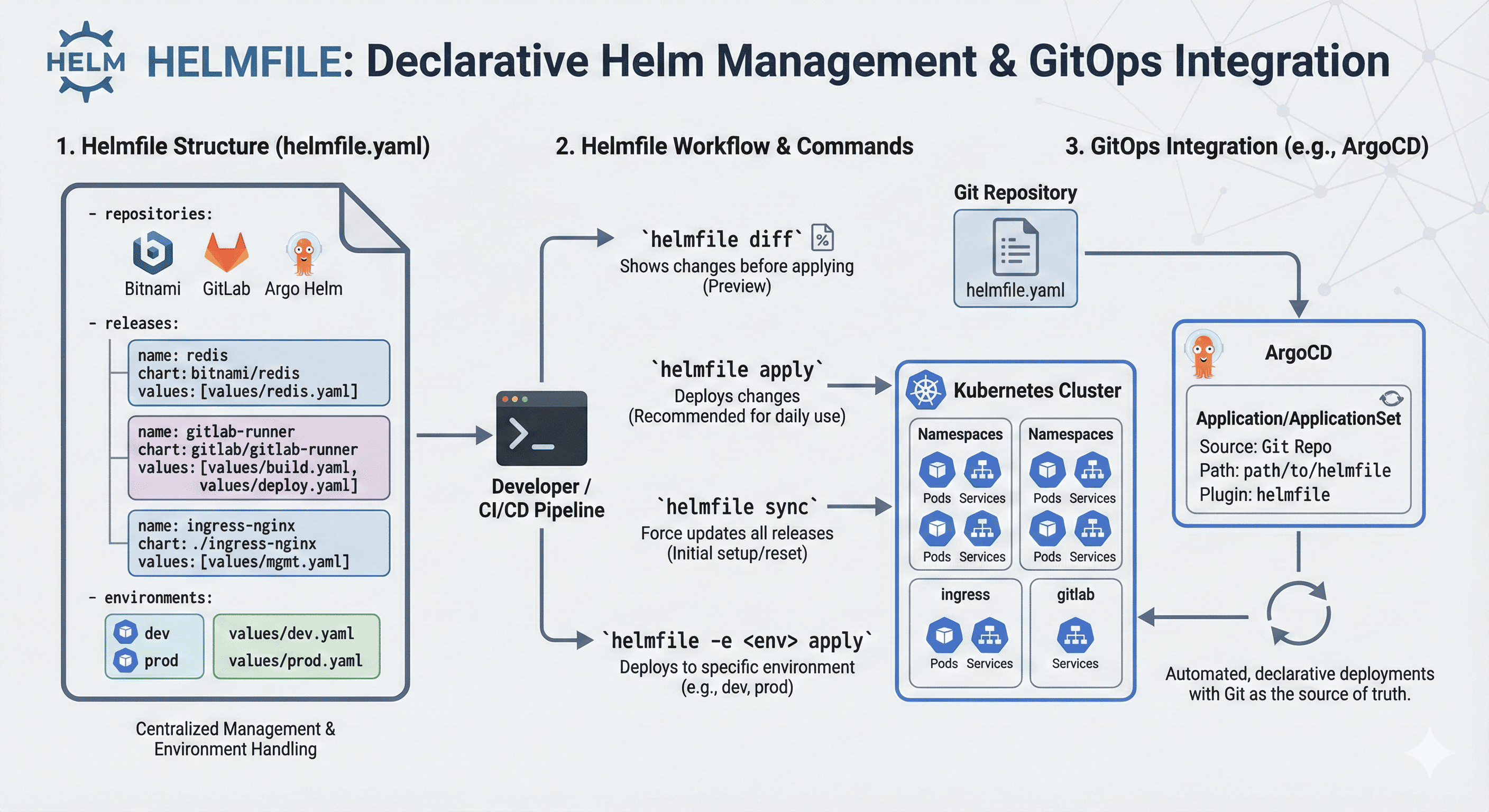
Overview
When deploying applications in Kubernetes environments, Helm is the most widely used package manager. However, when managing multiple Helm charts simultaneously or handling environment-specific variables systematically, Helm alone becomes insufficient.
This is where Helmfile comes in.
Helmfile is a tool that enables declarative, code-like definition of Helm-based deployments and batch management of multiple charts.
What Helmfile Solves
Using Helmfile, you can handle the following scenarios concisely:
- Deploy multiple Helm charts simultaneously
- Separate dev/staging/prod environments and reuse values
- Integrate with GitOps/CD tools
- Ensure consistency in chart versions, image tags, and registry management
Installing Helmfile
macOS
brew install helmfile
Linux
curl -Lo helmfile https://github.com/helmfile/helmfile/releases/latest/download/helmfile_linux_amd64
chmod +x helmfile
sudo mv helmfile /usr/local/bin/
Verify Installation
helmfile version
Understanding Helmfile Structure
Basic Structure
# helmfile.yaml
repositories:
  - name: bitnami
    url: https://charts.bitnami.com/bitnami

releases:
  - name: redis
    namespace: default
    chart: bitnami/redis
    version: 17.1.3
    values:
      - values/redis-values.yaml
Environment Separation
helmfile -e dev apply
helmfile -e prod apply
helmfile.yaml with Environments
Essential Commands
Command Reference Table
| Command | Description |
|---|---|
helmfile sync |
Actually install or update Helm charts |
helmfile apply |
Apply only when there are changes after diff (recommended) |
helmfile diff |
Check changes before actual application |
helmfile template |
Only render Helm templates |
helmfile destroy |
Delete deployed Helm resources |
helmfile -l name=build-image sync |
Deploy only specific release |
helmfile -l name=old-build-deploy-image destroy |
Delete only specific release |
helmfile -e dev apply |
Deploy to specific environment (dev) when using environments |
sync vs apply: Detailed Comparison
Understanding the difference between these two commands is crucial for production use.
Comparison Table
| Aspect | helmfile sync | helmfile apply |
|---|---|---|
| Execution Method | Force synchronize all releases | Deploy only releases with changes |
| Revision Increment | Always increments (helm upgrade forced) | Maintained if no changes |
| Example Situation | revision 1 → 2 even if config is same | revision 1 maintained if config is same |
| Recommended Use | Force redeploy, initial installation | Daily deployments, after checking changes |
Recommendation
For daily deployments, use helmfile apply! It’s efficient and safe as it only updates releases with changes.
Use helmfile sync only when you need to force redeploy all releases.
Real-World Examples
Example 1: GitLab Runner
Managing multiple GitLab Runner configurations:
repositories:
  - name: gitlab
    url: https://charts.gitlab.io

releases:
  - name: build-image
    namespace: gitlab-runner
    chart: gitlab/gitlab-runner
    version: 0.71.0
    values:
      - values/build.yaml

  - name: deploy-image
    namespace: gitlab-runner
    chart: gitlab/gitlab-runner
    version: 0.71.0
    values:
      - values/deploy.yaml

  - name: old-build-deploy-image
    namespace: gitlab-runner
    chart: gitlab/gitlab-runner
    version: 0.70.3
    values:
      - values/old-gitlab-runner.yaml
Deploy Specific Runner
# Deploy only build-image runner
helmfile -l name=build-image apply

# Remove old runner
helmfile -l name=old-build-deploy-image destroy
Example 2: Ingress NGINX
Managing multiple ingress controllers for different services:
repositories:
  - name: ingress-nginx
    url: https://kubernetes.github.io/ingress-nginx

releases:
  - name: ingress-nginx
    namespace: ingress-nginx
    chart: . # Use external directory (ingress-nginx/ingress-nginx)
    version: 4.12.0-beta.0 # Chart.yaml version reference
    values:
      - values/mgmt.yaml

  - name: ingress-nginx-public
    namespace: ingress-nginx
    chart: .
    version: 4.12.0-beta.0
    values:
      - values/mgmt-public.yaml

  - name: ingress-nginx-public-b
    namespace: ingress-nginx
    chart: .
    version: 4.12.0-beta.0
    values:
      - values/mgmt-public-b.yaml

  - name: ingress-nginx-public-c
    namespace: ingress-nginx
    chart: .
    version: 4.12.0-beta.0
    values:
      - values/mgmt-public-c.yaml

  - name: ingress-nginx-public-d
    namespace: ingress-nginx
    chart: .
    version: 4.12.0-beta.0
    values:
      - values/mgmt-public-d.yaml
Example 3: NGINX + MariaDB
Simple multi-chart deployment:
repositories:
  - name: bitnami
    url: https://charts.bitnami.com/bitnami

releases:
  - name: nginx
    namespace: web
    chart: bitnami/nginx
    version: 13.2.19
    values:
      - values/nginx.yaml

  - name: mariadb
    namespace: db
    chart: bitnami/mariadb
    version: 11.1.4
    values:
      - values/mariadb.yaml
Example 4: ArgoCD with Advanced Configuration
Production-ready ArgoCD deployment:
repositories:
  - name: argo
    url: https://argoproj.github.io/argo-helm
  - name: dandydeveloper
    url: https://dandydeveloper.github.io/charts/

releases:
  - name: argocd
    namespace: argocd
    createNamespace: true
    chart: ./
    version: 7.7.0
    values:
      - values/mgmt.yaml

helmDefaults:
  wait: true
  timeout: 600
  atomic: true
  cleanupOnFail: true

# Hooks to ensure proper installation and upgrades
hooks:
  - events: ["presync"]
    showlogs: true
    command: "helm"
    args:
      - "dependency"
      - "update"
      - "."

  - events: ["presync"]
    showlogs: true
    command: "kubectl"
    args:
      - "create"
      - "namespace"
      - "argocd"
      - "--dry-run=client"
      - "-o"
      - "yaml"
      - "||"
      - "true"
Configuration Breakdown
Repository Configuration:
- Add Argo Helm repository
- Add dandydeveloper repository for redis-ha dependency
Release Configuration:
- Name: argocd
- Namespace: argocd (automatically created)
- Chart: Local directory (./)
- Version: 7.7.0 (matches Chart.yaml)
- Values: Uses values/mgmt.yaml
Helm Defaults:
- wait: Wait until installation completes
- timeout: 600 seconds (10 minutes)
- atomic: Rollback on failure
- cleanupOnFail: Clean up on failure
Hooks:
- Update dependencies before installation
- Verify namespace creation
Chart.yaml Reference
apiVersion: v2
appVersion: v2.13.0
kubeVersion: ">=1.25.0-0"
description: A Helm chart for Argo CD, a declarative, GitOps continuous delivery tool for Kubernetes.
name: argo-cd
version: 7.7.0
home: https://github.com/argoproj/argo-helm
icon: https://argo-cd.readthedocs.io/en/stable/assets/logo.png
sources:
  - https://github.com/argoproj/argo-helm/tree/main/charts/argo-cd
  - https://github.com/argoproj/argo-cd
keywords:
  - argoproj
  - argocd
  - gitops
maintainers:
  - name: argoproj
    url: https://argoproj.github.io/
dependencies:
  - name: redis-ha
    version: 4.27.6
    repository: https://dandydeveloper.github.io/charts/
    condition: redis-ha.enabled
annotations:
  artifacthub.io/signKey: |
    fingerprint: 2B8F22F57260EFA67BE1C5824B11F800CD9D2252
    url: https://argoproj.github.io/argo-helm/pgp_keys.asc
  artifacthub.io/changes: |
    - kind: changed
      description: Bump argo-cd to v2.13.0
Helmfile + GitOps Integration
Helmfile pairs perfectly with GitOps practices. Here’s how to integrate it:
Integration Options
- Execute
helmfile applyin CI/CD pipelines - Monitor Helmfile-based directories in ArgoCD
- Combine with kustomize + helmfile + sealed-secrets
ArgoCD Application Example
apiVersion: argoproj.io/v1alpha1
kind: Application
metadata:
  name: gitlab-runners
spec:
  source:
    repoURL: git@gitlab.somaz.link:server/argocd-applicationset.git
    path: kubernetes-infra/cicd/gitlab-runner  # Directory with helmfile.yaml
    plugin:
      name: helmfile  # Requires ArgoCD helmfile plugin installation
  destination:
    server: https://kubernetes.default.svc
    namespace: gitlab-runner
  syncPolicy:
    automated:
      prune: true
      selfHeal: true
ArgoCD ApplicationSet Example
For managing multiple related applications:
Advanced Helmfile Features
1. Environment-Specific Values
2. Templating and Variables
3. Conditional Releases
releases:
  - name: monitoring
    namespace: monitoring
    chart: prometheus-community/kube-prometheus-stack
    condition: monitoring.enabled
    values:
      - values/monitoring.yaml

  - name: logging
    namespace: logging
    chart: elastic/elasticsearch
    condition: logging.enabled
    values:
      - values/logging.yaml
4. Secrets Management
5. Dependencies Between Releases
releases:
  - name: cert-manager
    namespace: cert-manager
    chart: jetstack/cert-manager
    version: v1.13.0

  - name: ingress-nginx
    namespace: ingress-nginx
    chart: ingress-nginx/ingress-nginx
    version: 4.8.0
    needs:
      - cert-manager  # Wait for cert-manager to be ready
Directory Structure Best Practices
Recommended Structure
helmfiles/
├── helmfile.yaml              # Main helmfile
├── environments/
│   ├── dev.yaml              # Dev environment values
│   ├── staging.yaml          # Staging environment values
│   └── prod.yaml             # Production environment values
├── releases/
│   ├── monitoring/
│   │   ├── helmfile.yaml
│   │   └── values/
│   ├── ingress/
│   │   ├── helmfile.yaml
│   │   └── values/
│   └── applications/
│       ├── helmfile.yaml
│       └── values/
└── values/
    ├── common.yaml           # Shared values
    └── secrets.yaml.enc      # Encrypted secrets
Main helmfile.yaml
helmfiles:
  - releases/monitoring/helmfile.yaml
  - releases/ingress/helmfile.yaml
  - releases/applications/helmfile.yaml

environments:
  dev:
    values:
      - environments/dev.yaml
  staging:
    values:
      - environments/staging.yaml
  prod:
    values:
      - environments/prod.yaml
CI/CD Integration
GitLab CI Example
stages:
  - validate
  - plan
  - apply

variables:
  HELMFILE_VERSION: "0.157.0"

.helmfile_base:
  image: alpine/helm:latest
  before_script:
    - apk add --no-cache curl bash
    - curl -Lo helmfile https://github.com/helmfile/helmfile/releases/download/v${HELMFILE_VERSION}/helmfile_linux_amd64
    - chmod +x helmfile && mv helmfile /usr/local/bin/

validate:
  extends: .helmfile_base
  stage: validate
  script:
    - helmfile -e ${CI_ENVIRONMENT_NAME} lint
    - helmfile -e ${CI_ENVIRONMENT_NAME} template

plan:
  extends: .helmfile_base
  stage: plan
  script:
    - helmfile -e ${CI_ENVIRONMENT_NAME} diff
  when: manual

apply:dev:
  extends: .helmfile_base
  stage: apply
  environment:
    name: dev
  script:
    - helmfile -e dev apply
  only:
    - develop

apply:prod:
  extends: .helmfile_base
  stage: apply
  environment:
    name: prod
  script:
    - helmfile -e prod apply
  only:
    - main
  when: manual
GitHub Actions Example
name: Helmfile Deploy

on:
  push:
    branches: [main, develop]
  pull_request:
    branches: [main]

jobs:
  helmfile-deploy:
    runs-on: ubuntu-latest
    steps:
      - uses: actions/checkout@v3

      - name: Install Helmfile
        run: |
          wget https://github.com/helmfile/helmfile/releases/latest/download/helmfile_linux_amd64
          chmod +x helmfile_linux_amd64
          sudo mv helmfile_linux_amd64 /usr/local/bin/helmfile

      - name: Setup kubectl
        uses: azure/setup-kubectl@v3

      - name: Configure kubeconfig
        run: |
          echo "$" | base64 -d > kubeconfig
          export KUBECONFIG=./kubeconfig

      - name: Helmfile Diff
        if: github.event_name == 'pull_request'
        run: helmfile -e dev diff

      - name: Helmfile Apply
        if: github.event_name == 'push'
        run: |
          if [[ "$" == "refs/heads/main" ]]; then
            helmfile -e prod apply
          else
            helmfile -e dev apply
          fi
Troubleshooting
Issue 1: Chart Not Found
Error: Error: chart not found
Solutions:
# Update repository cache
helm repo update

# Or in helmfile
helmfile repos
Issue 2: Version Conflicts
Error: Error: chart version not found
Solutions:
# Check available versions
helm search repo <chart-name> --versions

# Update helmfile.yaml with correct version
version: "1.2.3"  # Use exact version
Issue 3: Values Override Not Working
Problem: Values not being applied correctly
Solutions:
Issue 4: Slow Deployments
Problem: Helmfile takes too long to deploy
Solutions:
# Enable concurrency
helmDefaults:
  wait: false  # Don't wait for all resources

# Or parallelize releases
releases:
  - name: app1
    # ...
  - name: app2
    # ...

# Deploy in parallel
$ helmfile apply --concurrency 5
Performance Optimization
1. Use Local Chart Cache
releases:
  - name: myapp
    chart: ./charts/myapp  # Local chart is faster
    # instead of remote: some-repo/myapp
2. Selective Syncing
# Only sync releases that changed
helmfile apply --selector name=myapp

# Or by label
helmfile apply --selector tier=frontend
3. Skip Dependencies
helmDefaults:
  skipDeps: true  # Skip dependency updates if not needed
Best Practices
1. Version Everything
releases:
  - name: myapp
    chart: stable/myapp
    version: "1.2.3"  # Always pin versions!
2. Use Environments Properly
3. Keep Values DRY
4. Document Your Helmfiles
# helmfile.yaml
# Purpose: Manages production infrastructure
# Owner: Platform Team
# Last Updated: 2025-01-08

repositories:
  # Official Helm charts
  - name: stable
    url: https://charts.helm.sh/stable
Conclusion
Helm is an excellent tool for declaratively deploying applications in Kubernetes environments. However, as scale grows, Helmfile’s advantages in environment separation, batch deployment, and declarative configuration shine even brighter.
Key Benefits:
✅ Entire teams can work from common Helmfile configurations
✅ Deployment history can be tracked as code
✅ Complex Helm chart combinations can be managed clearly
Why Helmfile Matters:
Adopting Helmfile makes Kubernetes deployment strategies:
- More predictable
- Safer
- Easier to maintain
Getting Started:
- Start with a simple helmfile.yaml
- Add environment separation as needed
- Integrate with CI/CD pipelines
- Expand to GitOps with ArgoCD
Helmfile transforms Helm from a package manager into a complete infrastructure-as-code solution, bringing consistency, repeatability, and safety to Kubernetes deployments.

Comments