52 min to read
GKE Autopilot vs Standard vs Cloud Run Container Strategy Guide - Complete Implementation and Optimization
Master Google Cloud container platforms with comprehensive analysis and practical deployment strategies
Overview
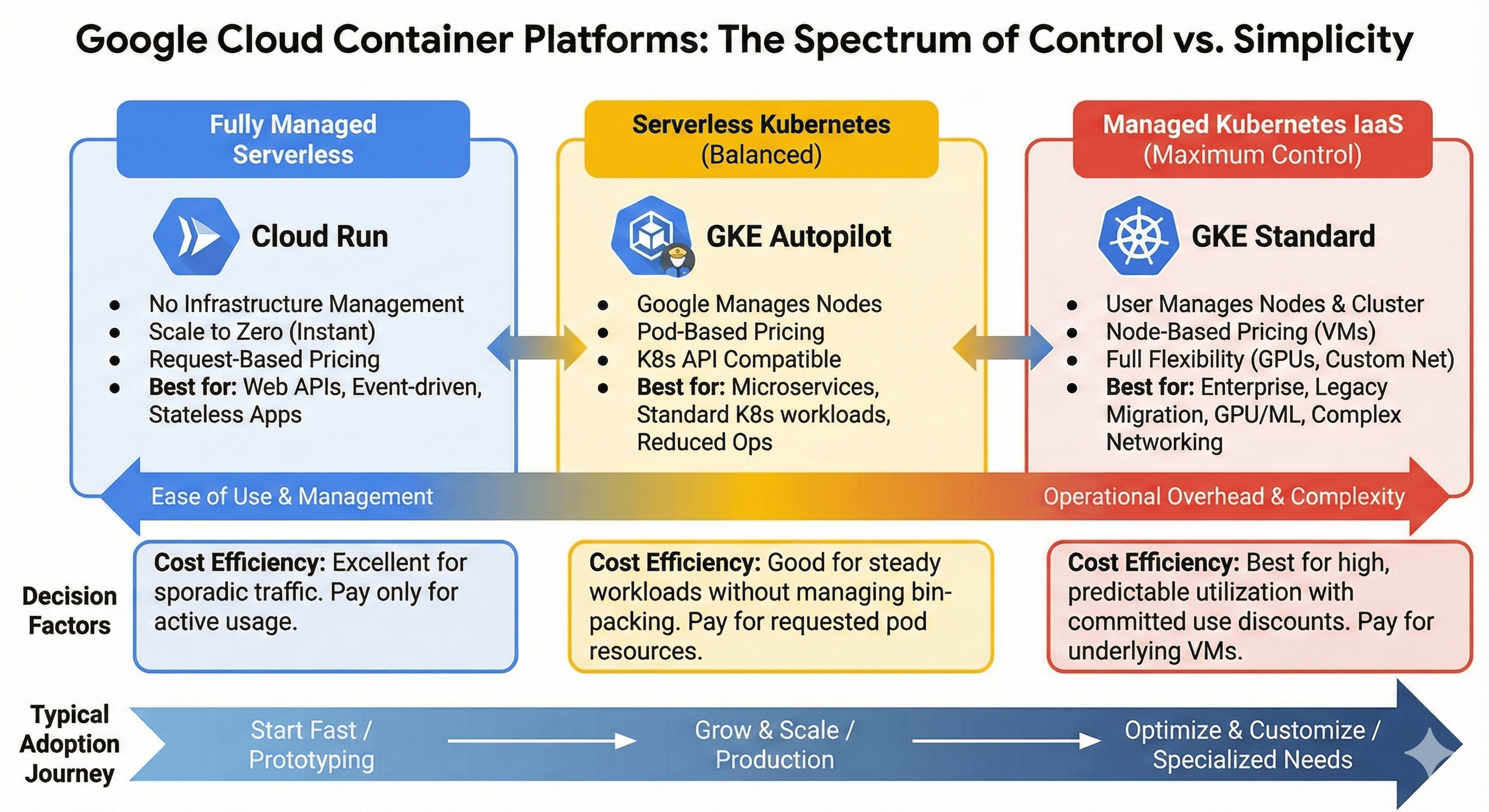
When operating container-based applications on Google Cloud, the main platforms available are GKE Standard, GKE Autopilot, and Cloud Run. Each has different operational complexity and cost structures, with the optimal choice varying based on workload characteristics.
GKE Standard is a traditional Kubernetes cluster providing maximum control but with significant operational overhead. GKE Autopilot is a serverless Kubernetes solution where Google manages node operations, while Cloud Run is a fully managed serverless container platform. This guide analyzes the characteristics and appropriate use cases of each platform to help establish optimal container strategies.
Modern container orchestration has evolved beyond simple deployment mechanisms. GKE Standard offers comprehensive Kubernetes features with full cluster control, enabling complex enterprise workloads with custom networking and specialized hardware requirements. GKE Autopilot provides Kubernetes flexibility with reduced operational burden through Google’s automated node management and built-in security best practices.
Cloud Run represents the pinnacle of serverless container platforms, automatically scaling from zero to handle traffic spikes while maintaining cost efficiency through pay-per-use pricing. Each platform addresses specific operational requirements, from legacy application migrations to cloud-native microservices architectures.
This comprehensive analysis examines platform selection criteria, implementation strategies, cost optimization approaches, and real-world deployment scenarios with practical Terraform configurations and performance tuning recommendations.
Platform Comparison Overview
Fully Managed] D --> G[GKE Autopilot
Serverless K8s] E --> H[GKE Standard
Maximum Control] F --> I[Operational Complexity: Low
Cost: Usage-based] G --> J[Operational Complexity: Medium
Cost: Pod resource-based] H --> K[Operational Complexity: High
Cost: Node-based] style F fill:#4285f4,color:#fff style G fill:#34a853,color:#fff style H fill:#ea4335,color:#fff
| Platform | Management Level | Operational Complexity | Cost Model | Optimal Use Cases |
|---|---|---|---|---|
| Cloud Run | Fully Managed | Low | Usage-based | Web APIs, Stateless Apps |
| GKE Autopilot | Node Managed | Medium | Pod resource-based | Microservices, General Apps |
| GKE Standard | User Managed | High | Node-based | Enterprise, GPU Workloads |
GKE Standard: Maximum Control and Flexibility
Features and Advantages
GKE Standard provides a complete Kubernetes environment as a managed service. Users can directly configure node pools and control all aspects of the cluster. Fine-grained adjustments to node types, scaling policies, and networking configurations make it suitable for complex enterprise workloads.
This platform is particularly valuable for GPU workloads, specialized hardware requirements, and complex networking configurations where GKE Standard may be the only viable option. Additionally, it maintains full compatibility with the existing Kubernetes ecosystem and enables standard Kubernetes API usage for multi-cloud strategies.
Operational Complexity and Cost Structure
GKE Standard requires the highest operational complexity. Users must directly manage cluster upgrades, node patches, security configurations, and monitoring setups. Additionally, since nodes must always be running, continuous costs occur even with low resource utilization.
The cost structure is based on computing resources of utilized nodes. While cluster management fees are free, efficient resource utilization requires appropriate node scaling and pod scheduling strategies. With sustained high utilization over extended periods, this can become the most cost-effective choice.
GKE Standard Terraform Implementation
# GKE Standard Cluster Creation
resource "google_container_cluster" "standard" {
  name     = "standard-cluster"
  location = "asia-northeast3-a"

  # Remove default node pool and manage separately
  remove_default_node_pool = true
  initial_node_count       = 1

  # Network configuration
  network    = google_compute_network.vpc.self_link
  subnetwork = google_compute_subnetwork.subnet.self_link

  # IP allocation policy for VPC-native networking
  ip_allocation_policy {
    cluster_secondary_range_name  = "pods"
    services_secondary_range_name = "services"
  }

  # Master authorized networks
  master_authorized_networks_config {
    cidr_blocks {
      cidr_block   = "10.0.0.0/8"
      display_name = "private-network"
    }
  }

  # Workload Identity activation
  workload_identity_config {
    workload_pool = "${var.project_id}.svc.id.goog"
  }

  # Private cluster configuration
  private_cluster_config {
    enable_private_nodes    = true
    enable_private_endpoint = false
    master_ipv4_cidr_block  = "172.16.0.0/28"
  }

  # Logging and monitoring
  logging_service    = "logging.googleapis.com/kubernetes"
  monitoring_service = "monitoring.googleapis.com/kubernetes"

  # Network policy
  network_policy {
    enabled = true
  }

  # Addons configuration
  addons_config {
    horizontal_pod_autoscaling {
      disabled = false
    }

    network_policy_config {
      disabled = false
    }

    istio_config {
      disabled = false
    }
  }
}

# Primary node pool creation
resource "google_container_node_pool" "standard_pool" {
  name       = "standard-node-pool"
  location   = "asia-northeast3-a"
  cluster    = google_container_cluster.standard.name
  node_count = 3

  node_config {
    preemptible  = false
    machine_type = "e2-standard-4"
    disk_type    = "pd-ssd"
    disk_size_gb = 100

    # Service account configuration
    service_account = google_service_account.gke_sa.email
    oauth_scopes = [
      "https://www.googleapis.com/auth/cloud-platform"
    ]

    # Metadata configuration
    metadata = {
      disable-legacy-endpoints = "true"
    }

    # Shielded instance configuration
    shielded_instance_config {
      enable_secure_boot          = true
      enable_integrity_monitoring = true
    }

    # Labels and taints
    labels = {
      environment = "production"
      node-pool   = "standard"
    }
  }

  # Auto-scaling configuration
  autoscaling {
    min_node_count = 1
    max_node_count = 10
  }

  # Node management policies
  management {
    auto_repair  = true
    auto_upgrade = true
  }

  # Upgrade settings
  upgrade_settings {
    max_surge       = 1
    max_unavailable = 0
  }
}

# GPU node pool for specialized workloads
resource "google_container_node_pool" "gpu_pool" {
  name       = "gpu-node-pool"
  location   = "asia-northeast3-a"
  cluster    = google_container_cluster.standard.name
  node_count = 0

  node_config {
    machine_type = "n1-standard-4"
    disk_type    = "pd-ssd"
    disk_size_gb = 100

    # GPU configuration
    guest_accelerator {
      type  = "nvidia-tesla-k80"
      count = 1
    }

    service_account = google_service_account.gke_sa.email
    oauth_scopes = [
      "https://www.googleapis.com/auth/cloud-platform"
    ]

    metadata = {
      disable-legacy-endpoints = "true"
    }

    labels = {
      workload-type = "gpu"
    }

    taint {
      key    = "nvidia.com/gpu"
      value  = "present"
      effect = "NO_SCHEDULE"
    }
  }

  autoscaling {
    min_node_count = 0
    max_node_count = 5
  }

  management {
    auto_repair  = true
    auto_upgrade = false  # Disable for GPU drivers stability
  }
}

# VPC Network
resource "google_compute_network" "vpc" {
  name                    = "gke-vpc"
  auto_create_subnetworks = false
}

# Subnet configuration
resource "google_compute_subnetwork" "subnet" {
  name          = "gke-subnet"
  ip_cidr_range = "10.0.0.0/16"
  region        = "asia-northeast3"
  network       = google_compute_network.vpc.id

  secondary_ip_range {
    range_name    = "pods"
    ip_cidr_range = "192.168.0.0/18"
  }

  secondary_ip_range {
    range_name    = "services"
    ip_cidr_range = "192.168.64.0/18"
  }

  private_ip_google_access = true
}

# Firewall rules for node communication
resource "google_compute_firewall" "gke_firewall" {
  name    = "gke-firewall"
  network = google_compute_network.vpc.name

  allow {
    protocol = "tcp"
    ports    = ["443", "80", "8080", "10250"]
  }

  allow {
    protocol = "udp"
    ports    = ["53"]
  }

  source_ranges = ["10.0.0.0/8"]
  target_tags   = ["gke-node"]
}
GKE Autopilot: Serverless Kubernetes Balance
Serverless Kubernetes Concept
GKE Autopilot is a serverless Kubernetes platform where Google completely handles node management. Users pay only for pod resource requests, with Google automatically handling node provisioning, scaling, and upgrades.
This approach combines Kubernetes flexibility with serverless convenience. Standard Kubernetes APIs can be used while significantly reducing infrastructure management burden. Security best practices are applied by default, reducing security configuration concerns.
Constraints and Application Scenarios
Autopilot implements certain constraints for security and stability. Privileged container execution is limited, specific volume type usage is restricted, and direct node access is not possible. Additionally, DaemonSet usage has limitations, making it unsuitable for all workloads.
However, it’s very suitable for general web applications, microservices, batch processing, and CI/CD pipelines. It’s particularly ideal when development teams are familiar with Kubernetes but want to reduce infrastructure operational burden. Cost efficiency is high for workloads with irregular traffic patterns or intermittent usage like development environments.
| Feature | GKE Standard | GKE Autopilot | Constraints |
|---|---|---|---|
| Privileged Containers | Supported | Limited | Security policies applied |
| DaemonSets | Full support | Limited | Excluding Google-managed |
| Node Access | SSH available | Not available | Fully managed |
| Volume Types | All types | Limited | Approved types only |
| GPU Support | Full support | Supported | Specific types only |
| Custom Networking | Full control | Limited | Google-managed policies |
GKE Autopilot Terraform Implementation
# GKE Autopilot Cluster Creation
resource "google_container_cluster" "autopilot" {
  name     = "autopilot-cluster"
  location = "asia-northeast3"

  # Autopilot mode activation
  enable_autopilot = true

  # Network configuration
  network    = google_compute_network.autopilot_vpc.self_link
  subnetwork = google_compute_subnetwork.autopilot_subnet.self_link

  # IP allocation policy
  ip_allocation_policy {
    cluster_secondary_range_name  = "pods"
    services_secondary_range_name = "services"
  }

  # Workload Identity configuration
  workload_identity_config {
    workload_pool = "${var.project_id}.svc.id.goog"
  }

  # Private cluster configuration
  private_cluster_config {
    enable_private_nodes    = true
    enable_private_endpoint = false
    master_ipv4_cidr_block  = "172.16.0.0/28"
  }

  # Release channel configuration
  release_channel {
    channel = "REGULAR"
  }

  # Vertical Pod Autoscaling
  vertical_pod_autoscaling {
    enabled = true
  }

  # DNS configuration
  dns_config {
    cluster_dns        = "CLOUD_DNS"
    cluster_dns_scope  = "VPC_SCOPE"
    cluster_dns_domain = "cluster.local"
  }

  # Network policy (enabled by default in Autopilot)
  network_policy {
    enabled = true
  }

  # Binary authorization configuration
  binary_authorization {
    evaluation_mode = "PROJECT_SINGLETON_POLICY_ENFORCE"
  }

  # Cluster autoscaling configuration
  cluster_autoscaling {
    enabled = true

    resource_limits {
      resource_type = "cpu"
      minimum       = 1
      maximum       = 1000
    }

    resource_limits {
      resource_type = "memory"
      minimum       = 1
      maximum       = 1000
    }

    auto_provisioning_defaults {
      oauth_scopes = [
        "https://www.googleapis.com/auth/cloud-platform"
      ]

      management {
        auto_repair  = true
        auto_upgrade = true
      }
    }
  }
}

# VPC Network for Autopilot
resource "google_compute_network" "autopilot_vpc" {
  name                    = "autopilot-vpc"
  auto_create_subnetworks = false
  mtu                     = 1460
}

# Subnet configuration
resource "google_compute_subnetwork" "autopilot_subnet" {
  name          = "autopilot-subnet"
  ip_cidr_range = "10.1.0.0/16"
  region        = "asia-northeast3"
  network       = google_compute_network.autopilot_vpc.id

  secondary_ip_range {
    range_name    = "pods"
    ip_cidr_range = "192.168.0.0/18"
  }

  secondary_ip_range {
    range_name    = "services"
    ip_cidr_range = "192.168.64.0/18"
  }

  private_ip_google_access = true
}

# Cloud NAT for outbound internet access
resource "google_compute_router" "autopilot_router" {
  name    = "autopilot-router"
  region  = "asia-northeast3"
  network = google_compute_network.autopilot_vpc.id
}

resource "google_compute_router_nat" "autopilot_nat" {
  name                               = "autopilot-nat"
  router                             = google_compute_router.autopilot_router.name
  region                             = "asia-northeast3"
  nat_ip_allocate_option             = "AUTO_ONLY"
  source_subnetwork_ip_ranges_to_nat = "ALL_SUBNETWORKS_ALL_IP_RANGES"

  log_config {
    enable = true
    filter = "ERRORS_ONLY"
  }
}

# Service account for workloads
resource "google_service_account" "autopilot_workload" {
  account_id   = "autopilot-workload"
  display_name = "Autopilot Workload Service Account"
}

# IAM binding for Workload Identity
resource "google_service_account_iam_binding" "workload_identity_binding" {
  service_account_id = google_service_account.autopilot_workload.name
  role               = "roles/iam.workloadIdentityUser"

  members = [
    "serviceAccount:${var.project_id}.svc.id.goog[default/autopilot-app]"
  ]
}
Cloud Run: Fully Managed Serverless Containers
Serverless Container Platform Advantages
Cloud Run is a fully managed serverless container platform where packaging code into containers and deploying allows Google to manage everything else. When there are no requests, instances scale down to zero incurring no costs, and automatically scale up during traffic increases.
It’s optimized for HTTP/gRPC-based stateless applications with very fast cold start times. Developers can focus solely on application logic without any infrastructure management needs. CI/CD pipeline integration is simple, enabling quick deployments and rollbacks.
Constraints and Use Cases
Cloud Run is specialized for request-response pattern workloads, making it unsuitable for long-running background tasks or applications requiring complex state management. Additionally, there’s a 15-minute maximum execution time limit, making it inappropriate for long-duration processing tasks.
It’s ideal for REST APIs, web applications, microservices, and event-driven processing. Cost efficiency is excellent for workloads with irregular traffic or spikes. It’s also a good choice for startups or side projects wanting to minimize operational complexity in early stages.
| Constraint | Value | Description |
|---|---|---|
| Maximum Execution Time | 15 minutes | Long-running batch jobs not supported |
| Maximum Memory | 32GB | Memory-intensive workloads limited |
| Maximum CPU | 8 vCPU | High-performance computing limited |
| Concurrent Requests | 1000 per instance | High concurrency limitations |
| File System | Read-only | Only temporary files in /tmp |
| Network Protocols | HTTP/HTTPS, gRPC | TCP/UDP not supported |
Cloud Run Terraform Implementation
# Cloud Run Service Deployment
resource "google_cloud_run_v2_service" "api_service" {
  name     = "api-service"
  location = "asia-northeast3"

  template {
    # Scaling configuration
    scaling {
      min_instance_count = 0
      max_instance_count = 100
    }

    # Execution environment
    execution_environment = "EXECUTION_ENVIRONMENT_GEN2"

    # Service account
    service_account = google_service_account.cloud_run_sa.email

    # Container configuration
    containers {
      image = "gcr.io/${var.project_id}/api-service:latest"

      # Resource limits
      resources {
        limits = {
          cpu    = "2"
          memory = "4Gi"
        }

        cpu_idle = true
        startup_cpu_boost = true
      }

      # Environment variables
      env {
        name  = "DATABASE_URL"
        value = var.database_url
      }

      env {
        name = "SECRET_KEY"
        value_source {
          secret_key_ref {
            secret  = google_secret_manager_secret.api_secret.secret_id
            version = "latest"
          }
        }
      }

      env {
        name  = "PROJECT_ID"
        value = var.project_id
      }

      # Port configuration
      ports {
        name           = "http1"
        container_port = 8080
      }

      # Health checks
      startup_probe {
        initial_delay_seconds = 10
        timeout_seconds       = 5
        period_seconds        = 3
        failure_threshold     = 3

        http_get {
          path = "/health"
        }
      }

      liveness_probe {
        timeout_seconds   = 5
        period_seconds    = 30
        failure_threshold = 3

        http_get {
          path = "/health"
        }
      }
    }

    # VPC access configuration
    vpc_access {
      connector = google_vpc_access_connector.connector.id
      egress    = "ALL_TRAFFIC"
    }

    # Annotations for configuration
    annotations = {
      "autoscaling.knative.dev/maxScale"        = "100"
      "autoscaling.knative.dev/minScale"        = "0"
      "run.googleapis.com/cpu-throttling"       = "false"
      "run.googleapis.com/execution-environment" = "gen2"
    }
  }

  # Traffic configuration
  traffic {
    percent = 100
    type    = "TRAFFIC_TARGET_ALLOCATION_TYPE_LATEST"
  }

  depends_on = [google_project_service.run_api]
}

# Cloud Run Jobs for batch processing
resource "google_cloud_run_v2_job" "batch_job" {
  name     = "batch-processor"
  location = "asia-northeast3"

  template {
    # Task configuration
    task_count          = 1
    parallelism         = 1
    task_timeout        = "600s"

    template {
      # Service account
      service_account = google_service_account.cloud_run_sa.email

      containers {
        image = "gcr.io/${var.project_id}/batch-processor:latest"

        resources {
          limits = {
            cpu    = "4"
            memory = "8Gi"
          }
        }

        env {
          name  = "BATCH_SIZE"
          value = "1000"
        }

        env {
          name = "DATABASE_CONNECTION"
          value_source {
            secret_key_ref {
              secret  = google_secret_manager_secret.db_secret.secret_id
              version = "latest"
            }
          }
        }
      }

      # VPC access
      vpc_access {
        connector = google_vpc_access_connector.connector.id
        egress    = "ALL_TRAFFIC"
      }
    }
  }
}

# IAM configurations
resource "google_cloud_run_service_iam_member" "public_access" {
  service  = google_cloud_run_v2_service.api_service.name
  location = google_cloud_run_v2_service.api_service.location
  role     = "roles/run.invoker"
  member   = "allUsers"
}

# Service account for Cloud Run
resource "google_service_account" "cloud_run_sa" {
  account_id   = "cloud-run-service"
  display_name = "Cloud Run Service Account"
}

# VPC Connector for private network access
resource "google_vpc_access_connector" "connector" {
  name          = "api-connector"
  region        = "asia-northeast3"
  ip_cidr_range = "10.8.0.0/28"
  network       = "default"

  min_throughput = 200
  max_throughput = 1000
}

# Secret Manager for sensitive data
resource "google_secret_manager_secret" "api_secret" {
  secret_id = "api-secret-key"

  replication {
    user_managed {
      replicas {
        location = "asia-northeast3"
      }
    }
  }
}

resource "google_secret_manager_secret_version" "api_secret_version" {
  secret      = google_secret_manager_secret.api_secret.id
  secret_data = var.api_secret_key
}

# Enable required APIs
resource "google_project_service" "run_api" {
  service = "run.googleapis.com"
}

resource "google_project_service" "vpcaccess_api" {
  service = "vpcaccess.googleapis.com"
}
Workload-Based Optimal Platform Selection Guide
Decision Flow for Platform Selection
The decision flow for optimal platform selection based on workload characteristics is as follows:
or Standard] E -->|No| G[Cloud Run Recommended] E -->|Yes| H[GKE Autopilot Recommended] D -->|Yes| I{Special Hardware/Privileges Required?} D -->|No| J[Cloud Run Jobs
or GKE] I -->|Yes| K[GKE Standard Required] I -->|No| L[GKE Autopilot Recommended] G --> M[Cost Efficient
Easy Operations] H --> N[K8s Flexibility
Managed Infrastructure] K --> O[Maximum Control
High Operational Complexity] L --> N style G fill:#4285f4,color:#fff style H fill:#34a853,color:#fff style K fill:#ea4335,color:#fff
Platform-Specific Suitable Workloads
| Workload Type | Cloud Run | GKE Autopilot | GKE Standard | Recommendation Reason |
|---|---|---|---|---|
| REST API | ⭐⭐⭐ | ⭐⭐ | ⭐ | Simple deployment and auto-scaling |
| Web Applications | ⭐⭐⭐ | ⭐⭐ | ⭐ | Optimal for traffic-based scaling |
| Microservices | ⭐⭐ | ⭐⭐⭐ | ⭐⭐ | Service-to-service communication and networking |
| Batch Processing | ⭐ | ⭐⭐⭐ | ⭐⭐⭐ | Long-running execution and resource control |
| Real-time Processing | ❌ | ⭐⭐ | ⭐⭐⭐ | WebSocket, streaming support |
| GPU Workloads | ❌ | ⭐ | ⭐⭐⭐ | Specialized hardware requirements |
| Legacy Applications | ❌ | ⭐ | ⭐⭐⭐ | Need to maintain existing configurations |
| Development/Testing | ⭐⭐⭐ | ⭐⭐ | ⭐ | Low cost and fast deployment |
Knative and Cloud Run Serverless Patterns
Knative Serverless Framework
Knative is an open-source serverless framework that operates on Kubernetes. Using Knative on GKE enables implementing serverless patterns in Kubernetes environments. This is useful as an alternative when you want to run complex workloads serverless but encounter Cloud Run’s constraints.
Knative Serving provides auto-scaling and traffic-based routing, while Knative Eventing enables event-driven architecture implementation. However, configuration and management are complex, requiring significant Kubernetes expertise.
# Knative installation on GKE
resource "kubernetes_namespace" "knative_serving" {
  metadata {
    name = "knative-serving"
  }

  depends_on = [google_container_cluster.standard]
}

resource "kubernetes_namespace" "knative_eventing" {
  metadata {
    name = "knative-eventing"
  }

  depends_on = [google_container_cluster.standard]
}

# Knative Serving CRDs installation
resource "kubectl_manifest" "knative_serving_crds" {
  yaml_body = file("${path.module}/manifests/knative-serving-crds.yaml")

  depends_on = [kubernetes_namespace.knative_serving]
}

# Knative Service example
resource "kubectl_manifest" "knative_service" {
  yaml_body = <<YAML
apiVersion: serving.knative.dev/v1
kind: Service
metadata:
  name: hello-world
  namespace: default
spec:
  template:
    metadata:
      annotations:
        autoscaling.knative.dev/minScale: "0"
        autoscaling.knative.dev/maxScale: "100"
        autoscaling.knative.dev/target: "70"
    spec:
      containers:
      - image: gcr.io/${var.project_id}/hello-world:latest
        ports:
        - containerPort: 8080
        env:
        - name: TARGET
          value: "Knative"
        resources:
          requests:
            memory: "128Mi"
            cpu: "100m"
          limits:
            memory: "256Mi"
            cpu: "200m"
YAML

  depends_on = [kubectl_manifest.knative_serving_crds]
}
Comparison with Cloud Run and Selection Criteria
Cloud Run is a fully managed service built on Knative. Therefore, Knative’s core features can be used more simply, but customization options are limited. For standard HTTP/gRPC workloads, Cloud Run is much more convenient, while complex event processing or custom scaling logic may require using Knative directly on GKE.
Additionally, for multi-cloud or on-premises environment portability considerations, Knative may be a better choice. Cloud Run is Google Cloud-specific, but Knative can run in standard Kubernetes environments.
Cost Optimization Strategies
Cost Structure Understanding by Platform
Maximizing cost efficiency requires platform-specific strategies and comparative analysis:
| Cost Factor | Cloud Run | GKE Autopilot | GKE Standard |
|---|---|---|---|
| Base Billing | Usage time-based | Pod resource requests | Node time-based |
| Management Fee | None | None | None (fee for 100+ nodes) |
| Minimum Cost | $0 (no requests) | $0 (no pods) | Minimum nodes × time |
| Scaling | Auto (down to 0) | Auto (pod-level) | Manual/Auto (node-level) |
| Reserved Discounts | Not supported | Not supported | Supported (1-3 years) |
| Spot/Preemptible | Not supported | Not supported | Supported (up to 80% discount) |
Cost-Optimized Configuration Implementation
Performance Tuning and Monitoring
Container Performance Optimization
Comprehensive Monitoring Implementation
Security and Compliance
Container Security Best Practices
Security Implementation
# Binary Authorization policy
resource "google_binary_authorization_policy" "policy" {
  admission_whitelist_patterns {
    name_pattern = "gcr.io/${var.project_id}/*"
  }

  default_admission_rule {
    evaluation_mode         = "REQUIRE_ATTESTATION"
    enforcement_mode       = "ENFORCED_BLOCK_AND_AUDIT_LOG"
    require_attestations_by = [google_binary_authorization_attestor.attestor.name]
  }

  cluster_admission_rules {
    cluster                = "${var.region}.${google_container_cluster.standard.name}"
    evaluation_mode        = "REQUIRE_ATTESTATION"
    enforcement_mode      = "ENFORCED_BLOCK_AND_AUDIT_LOG"
    require_attestations_by = [google_binary_authorization_attestor.attestor.name]
  }
}

# Security scanning with Container Analysis
resource "google_project_service" "containeranalysis" {
  service = "containeranalysis.googleapis.com"
}

# Pod Security Policy (Kubernetes < 1.25)
resource "kubernetes_pod_security_policy" "restricted" {
  metadata {
    name = "restricted-psp"
  }

  spec {
    privileged                 = false
    allow_privilege_escalation = false
    required_drop_capabilities = ["ALL"]
    allowed_capabilities       = []

    volumes = [
      "configMap",
      "emptyDir",
      "projected",
      "secret",
      "downwardAPI",
      "persistentVolumeClaim"
    ]

    run_as_user {
      rule = "MustRunAsNonRoot"
    }

    run_as_group {
      rule = "RunAsAny"
    }

    fs_group {
      rule = "RunAsAny"
    }

    se_linux {
      rule = "RunAsAny"
    }
  }
}

# Network Policies for micro-segmentation
resource "kubernetes_network_policy" "default_deny" {
  metadata {
    name = "default-deny-all"
  }

  spec {
    pod_selector {}
    policy_types = ["Ingress", "Egress"]
  }
}

resource "kubernetes_network_policy" "allow_app_to_db" {
  metadata {
    name = "allow-app-to-database"
  }

  spec {
    pod_selector {
      match_labels = {
        app = "web-application"
      }
    }

    policy_types = ["Egress"]

    egress {
      to {
        pod_selector {
          match_labels = {
            app = "database"
          }
        }
      }

      ports {
        protocol = "TCP"
        port     = "5432"
      }
    }
  }
}

# Workload Identity for secure GCP access
resource "google_service_account" "workload_identity" {
  account_id   = "workload-identity-sa"
  display_name = "Workload Identity Service Account"
}

resource "google_service_account_iam_binding" "workload_identity_binding" {
  service_account_id = google_service_account.workload_identity.name
  role               = "roles/iam.workloadIdentityUser"

  members = [
    "serviceAccount:${var.project_id}.svc.id.goog[production/api-service]"
  ]
}

# Secret management with Secret Manager
resource "google_secret_manager_secret" "app_secrets" {
  for_each = toset(["database-password", "api-key", "jwt-secret"])

  secret_id = each.key

  replication {
    user_managed {
      replicas {
        location = var.region
      }
    }
  }
}

# CSI Secret Store driver configuration
resource "kubernetes_secret" "secret_provider_class" {
  metadata {
    name = "app-secrets-spc"
  }

  data = {
    "secret-provider-class.yaml" = yamlencode({
      apiVersion = "secrets-store.csi.x-k8s.io/v1"
      kind       = "SecretProviderClass"
      metadata = {
        name = "app-secrets"
      }
      spec = {
        provider = "gcp"
        parameters = {
          secrets = jsonencode([
            {
              resourceName = "projects/${var.project_id}/secrets/database-password/versions/latest"
              path         = "database-password"
            }
          ])
        }
      }
    })
  }
}
Migration Strategies and Best Practices
Container Migration Planning Framework
VM to Container Migration
# Migration planning with Migrate for Anthos
resource "google_project_service" "migrate_for_anthos" {
  service = "anthosmigration.googleapis.com"
}

# Processing cluster for migration
resource "google_container_cluster" "migration_processing" {
  name     = "migration-processing-cluster"
  location = var.region

  # Autopilot for simplified management during migration
  enable_autopilot = true

  private_cluster_config {
    enable_private_nodes    = true
    enable_private_endpoint = false
    master_ipv4_cidr_block  = "172.16.0.0/28"
  }

  workload_identity_config {
    workload_pool = "${var.project_id}.svc.id.goog"
  }
}

# Migration source configuration
resource "kubernetes_manifest" "migration_source" {
  manifest = {
    apiVersion = "anthosmigration.gke.io/v1beta2"
    kind       = "MigrationSource"
    metadata = {
      name      = "vm-source"
      namespace = "migrate-system"
    }
    spec = {
      type = "vsphere"
      vsphere = {
        vcenterEndpoint = var.vcenter_endpoint
        datacenter      = var.datacenter
        credentials = {
          username = var.vcenter_username
          password = var.vcenter_password
        }
      }
    }
  }

  depends_on = [google_container_cluster.migration_processing]
}

# Migration plan configuration
resource "kubernetes_manifest" "migration_plan" {
  manifest = {
    apiVersion = "anthosmigration.gke.io/v1beta2"
    kind       = "MigrationPlan"
    metadata = {
      name = "web-app-migration"
    }
    spec = {
      sourceRef = {
        name = "vm-source"
      }
      vms = [
        {
          id = var.source_vm_id
        }
      ]
      intent = {
        images = {
          registry = "gcr.io/${var.project_id}"
        }
      }
    }
  }

  depends_on = [kubernetes_manifest.migration_source]
}

# Target deployment configuration
resource "kubernetes_deployment" "migrated_app" {
  metadata {
    name = "migrated-web-app"
    labels = {
      app     = "web-app"
      version = "migrated"
    }
  }

  spec {
    replicas = 3

    selector {
      match_labels = {
        app = "web-app"
      }
    }

    template {
      metadata {
        labels = {
          app = "web-app"
        }
      }

      spec {
        container {
          name  = "web-app"
          image = "gcr.io/${var.project_id}/migrated-web-app:latest"

          port {
            container_port = 8080
          }

          resources {
            requests = {
              memory = "512Mi"
              cpu    = "250m"
            }
            limits = {
              memory = "1Gi"
              cpu    = "500m"
            }
          }

          env {
            name  = "PORT"
            value = "8080"
          }

          liveness_probe {
            http_get {
              path = "/health"
              port = 8080
            }
            initial_delay_seconds = 30
            period_seconds        = 10
          }

          readiness_probe {
            http_get {
              path = "/ready"
              port = 8080
            }
            initial_delay_seconds = 5
            period_seconds        = 5
          }
        }
      }
    }
  }

  depends_on = [google_container_cluster.migration_processing]
}
Blue-Green Deployment Strategy
# Blue-Green deployment with traffic splitting
resource "google_cloud_run_v2_service" "blue_green_app" {
  name     = "blue-green-service"
  location = var.region

  template {
    revision = "${var.app_name}-blue-${var.blue_version}"

    containers {
      image = "gcr.io/${var.project_id}/${var.app_name}:${var.blue_version}"

      resources {
        limits = {
          cpu    = "2"
          memory = "4Gi"
        }
      }
    }

    annotations = {
      "autoscaling.knative.dev/maxScale" = "100"
    }
  }

  traffic {
    percent  = 100
    revision = "${var.app_name}-blue-${var.blue_version}"
  }

  lifecycle {
    ignore_changes = [
      template[0].revision,
      traffic
    ]
  }
}

# Green version deployment
resource "google_cloud_run_v2_service" "green_deployment" {
  count = var.deploy_green ? 1 : 0

  name     = "blue-green-service"
  location = var.region

  template {
    revision = "${var.app_name}-green-${var.green_version}"

    containers {
      image = "gcr.io/${var.project_id}/${var.app_name}:${var.green_version}"

      resources {
        limits = {
          cpu    = "2"
          memory = "4Gi"
        }
      }
    }

    annotations = {
      "autoscaling.knative.dev/maxScale" = "100"
    }
  }

  traffic {
    percent  = 100 - var.blue_traffic_percent
    revision = "${var.app_name}-blue-${var.blue_version}"
  }

  traffic {
    percent  = var.blue_traffic_percent
    revision = "${var.app_name}-green-${var.green_version}"
  }
}

# Canary deployment automation
resource "kubernetes_deployment" "canary_deployment" {
  metadata {
    name = "${var.app_name}-canary"
    labels = {
      app     = var.app_name
      version = "canary"
    }
  }

  spec {
    replicas = var.canary_replicas

    selector {
      match_labels = {
        app     = var.app_name
        version = "canary"
      }
    }

    template {
      metadata {
        labels = {
          app     = var.app_name
          version = "canary"
        }
      }

      spec {
        container {
          name  = var.app_name
          image = "gcr.io/${var.project_id}/${var.app_name}:${var.canary_version}"

          resources {
            requests = {
              memory = "256Mi"
              cpu    = "100m"
            }
            limits = {
              memory = "512Mi"
              cpu    = "200m"
            }
          }
        }
      }
    }
  }
}

# Istio VirtualService for traffic management
resource "kubernetes_manifest" "traffic_split" {
  manifest = {
    apiVersion = "networking.istio.io/v1beta1"
    kind       = "VirtualService"
    metadata = {
      name = "${var.app_name}-traffic-split"
    }
    spec = {
      hosts = [var.app_hostname]
      http = [
        {
          match = [
            {
              headers = {
                "x-canary-user" = {
                  exact = "true"
                }
              }
            }
          ]
          route = [
            {
              destination = {
                host   = var.app_name
                subset = "canary"
              }
            }
          ]
        },
        {
          route = [
            {
              destination = {
                host   = var.app_name
                subset = "stable"
              }
              weight = var.stable_traffic_weight
            },
            {
              destination = {
                host   = var.app_name
                subset = "canary"
              }
              weight = var.canary_traffic_weight
            }
          ]
        }
      ]
    }
  }
}
Advanced Networking and Service Mesh
Istio Service Mesh Implementation
# Istio installation on GKE
resource "kubernetes_namespace" "istio_system" {
  metadata {
    name = "istio-system"
  }
}

# Istio control plane installation
resource "helm_release" "istio_base" {
  name       = "istio-base"
  repository = "https://istio-release.storage.googleapis.com/charts"
  chart      = "base"
  namespace  = kubernetes_namespace.istio_system.metadata[0].name
  version    = "1.19.0"
}

resource "helm_release" "istiod" {
  name       = "istiod"
  repository = "https://istio-release.storage.googleapis.com/charts"
  chart      = "istiod"
  namespace  = kubernetes_namespace.istio_system.metadata[0].name
  version    = "1.19.0"

  values = [
    yamlencode({
      pilot = {
        resources = {
          requests = {
            cpu    = "100m"
            memory = "128Mi"
          }
          limits = {
            cpu    = "500m"
            memory = "512Mi"
          }
        }
      }

      global = {
        meshID = "mesh1"
        cluster = "cluster1"
        network = "network1"
      }
    })
  ]

  depends_on = [helm_release.istio_base]
}

# Istio Gateway configuration
resource "kubernetes_manifest" "istio_gateway" {
  manifest = {
    apiVersion = "networking.istio.io/v1beta1"
    kind       = "Gateway"
    metadata = {
      name      = "main-gateway"
      namespace = "istio-system"
    }
    spec = {
      selector = {
        istio = "ingressgateway"
      }
      servers = [
        {
          port = {
            number   = 80
            name     = "http"
            protocol = "HTTP"
          }
          hosts = ["*"]
          tls = {
            httpsRedirect = true
          }
        },
        {
          port = {
            number   = 443
            name     = "https"
            protocol = "HTTPS"
          }
          hosts = ["*"]
          tls = {
            mode           = "SIMPLE"
            credentialName = "main-gateway-tls"
          }
        }
      ]
    }
  }

  depends_on = [helm_release.istiod]
}

# mTLS policy for secure service communication
resource "kubernetes_manifest" "mtls_policy" {
  manifest = {
    apiVersion = "security.istio.io/v1beta1"
    kind       = "PeerAuthentication"
    metadata = {
      name = "default-mtls"
    }
    spec = {
      mtls = {
        mode = "STRICT"
      }
    }
  }

  depends_on = [helm_release.istiod]
}

# Authorization policy for service access control
resource "kubernetes_manifest" "authz_policy" {
  manifest = {
    apiVersion = "security.istio.io/v1beta1"
    kind       = "AuthorizationPolicy"
    metadata = {
      name = "frontend-authz"
    }
    spec = {
      selector = {
        matchLabels = {
          app = "frontend"
        }
      }
      rules = [
        {
          from = [
            {
              source = {
                principals = ["cluster.local/ns/default/sa/backend"]
              }
            }
          ]
          to = [
            {
              operation = {
                methods = ["GET", "POST"]
              }
            }
          ]
        }
      ]
    }
  }

  depends_on = [helm_release.istiod]
}
Disaster Recovery and Business Continuity
Multi-Region Disaster Recovery Strategy
# Multi-region cluster configuration
module "primary_cluster" {
  source = "./modules/gke-cluster"

  name     = "primary-cluster"
  location = var.primary_region

  node_config = {
    machine_type = "n2-standard-4"
    disk_size    = 100
    preemptible  = false
  }

  enable_backup = true
  backup_region = var.backup_region
}

module "backup_cluster" {
  source = "./modules/gke-cluster"

  name     = "backup-cluster"
  location = var.backup_region

  node_config = {
    machine_type = "n2-standard-2"  # Smaller backup cluster
    disk_size    = 50
    preemptible  = true
  }

  enable_backup = false
}

# Cross-region database replication
resource "google_sql_database_instance" "primary" {
  name             = "primary-database"
  database_version = "POSTGRES_14"
  region          = var.primary_region

  settings {
    tier = "db-n1-standard-4"

    backup_configuration {
      enabled = true
      start_time = "02:00"
      location = var.backup_region
      point_in_time_recovery_enabled = true
    }
  }
}

resource "google_sql_database_instance" "backup" {
  name                 = "backup-database"
  database_version     = "POSTGRES_14"
  region              = var.backup_region
  master_instance_name = google_sql_database_instance.primary.name

  replica_configuration {
    failover_target = true
  }

  settings {
    tier = "db-n1-standard-2"

    availability_type = "REGIONAL"
  }
}

# Global Load Balancer with health checks
resource "google_compute_global_address" "main" {
  name = "main-global-ip"
}

resource "google_compute_health_check" "main" {
  name = "main-health-check"

  http_health_check {
    port         = 80
    request_path = "/health"
  }

  check_interval_sec  = 5
  timeout_sec        = 3
  healthy_threshold   = 2
  unhealthy_threshold = 3
}

resource "google_compute_backend_service" "main" {
  name        = "main-backend-service"
  protocol    = "HTTP"
  timeout_sec = 30

  backend {
    group           = module.primary_cluster.instance_group
    balancing_mode  = "UTILIZATION"
    max_utilization = 0.8
  }

  backend {
    group           = module.backup_cluster.instance_group
    balancing_mode  = "UTILIZATION"
    max_utilization = 0.8
    capacity_scaler = 0.0  # Start with 0 traffic to backup
  }

  health_checks = [google_compute_health_check.main.id]
}

# DNS-based failover
resource "google_dns_managed_zone" "main" {
  name     = "main-zone"
  dns_name = "${var.domain_name}."
}

resource "google_dns_record_set" "main" {
  name = google_dns_managed_zone.main.dns_name
  type = "A"
  ttl  = 60  # Low TTL for faster failover

  managed_zone = google_dns_managed_zone.main.name

  rrdatas = [google_compute_global_address.main.address]
}

# Disaster recovery automation
resource "google_cloud_scheduler_job" "dr_test" {
  name      = "disaster-recovery-test"
  schedule  = "0 2 * * 0"  # Weekly on Sunday at 2 AM
  time_zone = "UTC"

  http_target {
    http_method = "POST"
    uri         = "https://cloudbuild.googleapis.com/v1/projects/${var.project_id}/triggers/${google_cloudbuild_trigger.dr_test.trigger_id}:run"

    oauth_token {
      service_account_email = google_service_account.dr_automation.email
    }
  }
}

resource "google_cloudbuild_trigger" "dr_test" {
  name = "disaster-recovery-test"

  source_to_build {
    uri       = var.repository_url
    ref       = "refs/heads/main"
    repo_type = "GITHUB"
  }

  build {
    step {
      name = "gcr.io/cloud-builders/kubectl"
      env  = ["CLOUDSDK_COMPUTE_REGION=${var.backup_region}"]
      args = [
        "get", "nodes",
        "--kubeconfig", "/workspace/kubeconfig-backup"
      ]
    }

    step {
      name = "gcr.io/cloud-builders/gcloud"
      args = [
        "sql", "instances", "promote-replica",
        google_sql_database_instance.backup.name,
        "--async"
      ]
    }

    # Rollback step
    step {
      name = "gcr.io/cloud-builders/gcloud"
      args = [
        "sql", "instances", "stop-replica",
        google_sql_database_instance.backup.name,
        "--async"
      ]
    }
  }
}
Conclusion
Google Cloud Platform’s container services provide comprehensive solutions for modern application deployment and management. Each platform - GKE Standard, GKE Autopilot, and Cloud Run - addresses specific operational requirements and offers unique advantages based on workload characteristics.
GKE Standard delivers maximum control and flexibility for complex enterprise workloads requiring specialized hardware, custom networking configurations, or complete Kubernetes ecosystem integration. While operational complexity is highest, it provides unmatched customization capabilities for demanding production environments.
GKE Autopilot strikes an optimal balance between Kubernetes flexibility and serverless convenience through Google-managed node operations. This serverless Kubernetes approach significantly reduces operational overhead while maintaining compatibility with standard Kubernetes APIs and workflows.
Cloud Run excels in simplifying container deployment for HTTP/gRPC-based applications through its fully managed serverless platform. Auto-scaling capabilities, pay-per-use pricing, and minimal operational requirements make it ideal for web applications, APIs, and microservices with variable traffic patterns.
Decision Matrix Summary
| Decision Factor | Cloud Run | GKE Autopilot | GKE Standard |
|---|---|---|---|
| Operational Simplicity | Highest - Zero infrastructure management | High - Node management automated | Lowest - Full cluster management required |
| Cost Efficiency | Excellent for variable workloads | Good for steady-state workloads | Best for consistent high utilization |
| Scalability | Automatic scale-to-zero | Automatic pod-level scaling | Manual/automatic node-level scaling |
| Flexibility | Limited to HTTP/gRPC patterns | Standard Kubernetes with constraints | Complete Kubernetes flexibility |
| Time to Market | Fastest deployment | Fast with K8s knowledge | Longer setup and configuration |
Implementation Best Practices
-
Start Simple, Scale Complexity: Begin with Cloud Run for new projects, migrate to GKE Autopilot as requirements grow, and move to GKE Standard only when specific constraints require it.
-
Hybrid Approach: Use multiple platforms within the same architecture - Cloud Run for public APIs, GKE Autopilot for internal services, and GKE Standard for specialized workloads.
-
Cost Optimization: Implement environment-based configurations, utilize auto-scaling policies, and monitor resource usage continuously.
-
Security First: Apply security best practices including Workload Identity, Binary Authorization, Network Policies, and regular security scanning.
-
Observability: Establish comprehensive monitoring, logging, and tracing across all platforms using Cloud Operations Suite.
-
Disaster Recovery: Design for resilience with multi-region deployments, automated backups, and tested failover procedures.
The evolution toward serverless and managed services continues accelerating, with each platform serving distinct but complementary roles in modern container strategy. Success lies in understanding these differences and selecting the appropriate platform for each specific use case while maintaining operational excellence across the entire stack.
References
- Google Kubernetes Engine Documentation - Comprehensive GKE platform documentation
- Cloud Run Documentation - Serverless container platform guide
- GKE Autopilot Overview - Serverless Kubernetes concepts
- Container Security Best Practices - Security hardening guide
- Kubernetes Patterns - Container orchestration patterns
- Istio Service Mesh - Service mesh implementation
- Cloud Operations Suite - Monitoring and observability
- Terraform GCP Provider - Infrastructure as Code documentation
- Migration Strategies - VM to container migration
- Cost Optimization Guide - GCP cost management principles

Comments