10 min to read
Claude Code Command vs Skill vs Agent vs Plugin — Untangling the Four Concepts
What each one actually is, which one wins when names collide, and why Plugin skills coexist instead of competing for precedence
Overview
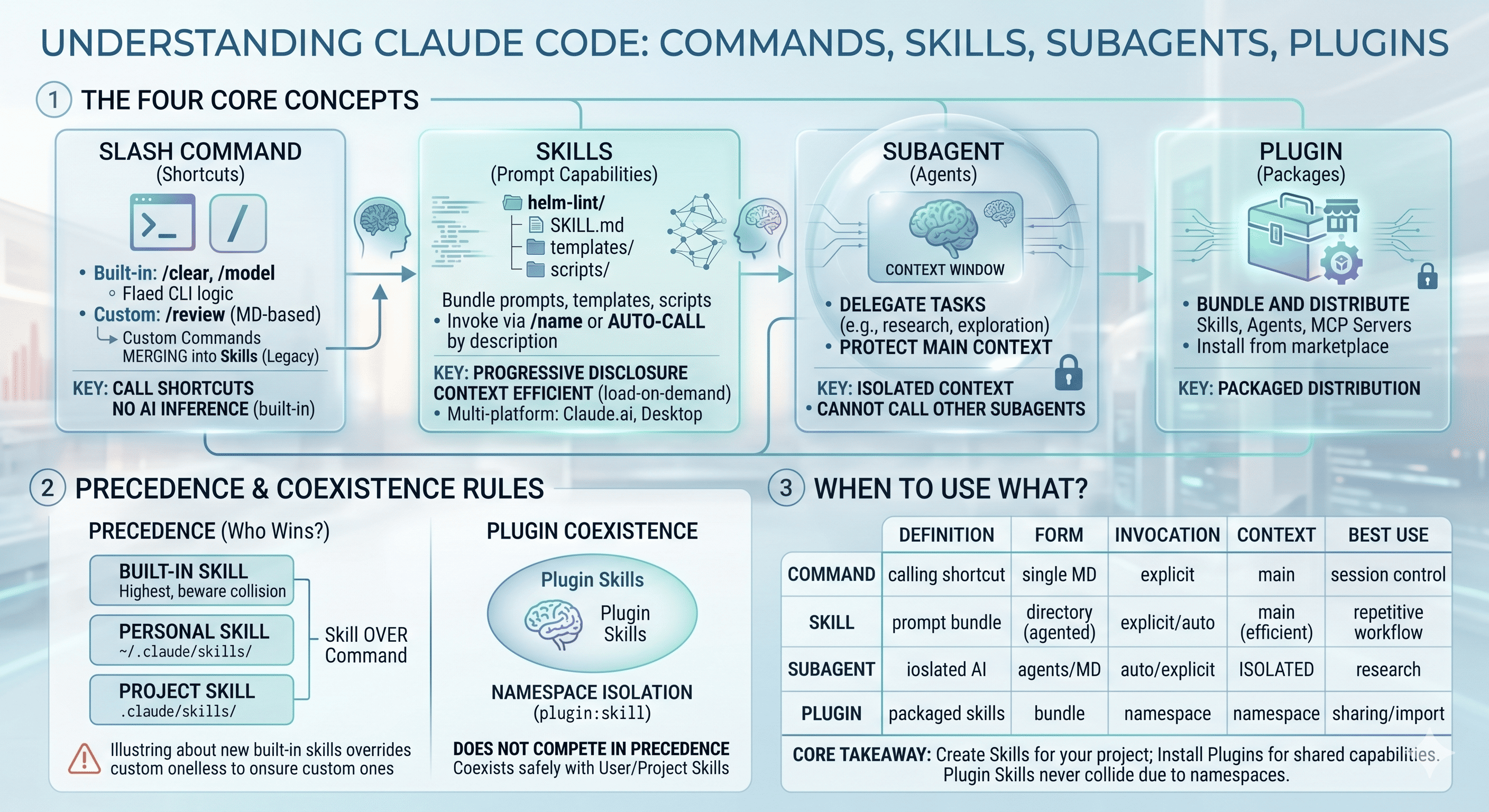
When you use Claude Code long enough, four concepts keep showing up: Slash Command, Skill, Subagent (Agents), and Plugin. The names look alike, the roles overlap, and at first it’s genuinely hard to tell them apart — especially now that custom slash commands and skills have been unified into one mechanism.
This post answers three questions:
- What Command, Skill, and Agent each are, and how they differ
- Which one wins when names collide — the precedence rules
- How a Plugin-installed skill behaves alongside the ones you already have
Bottom line up front:
- Command — a call shortcut.
- Skill — a bundleable prompt capability.
- Agent — a separate instance with an isolated context.
- Plugin — a package that bundles those for distribution.
Related Articles
- Claude Code Sub-agents — How to Build a Multi-Agent DevOps Workflow
- Claude 4.5 Sonnet vs Gemini 3 Pro — Developer-Focused Comparison
- Running LLMs On-Prem with Ollama + Open WebUI
1. Slash Command
Slash commands split into two kinds.
Built-in commands
/clear, /compact, /model, /cost, /help — these are hardcoded, fixed logic inside the Claude Code CLI. No AI inference runs, and you can’t customize them. Think of them as plain CLI shortcuts that happen to start with /.
Custom commands
These are slash commands you create yourself. Originally each one was a single Markdown file:
.claude/commands/review.md      # project-only
~/.claude/commands/review.md    # available in every project
The defining trait is explicit invocation — you type /review to run it.
Custom slash commands have been unified into Skills. The
.claude/commands/ directory is now the legacy format; the recommended format is .claude/skills/<name>/SKILL.md. Existing .claude/commands/ files still work, but new ones should be written as Skills.
2. Skills
A Skill is a prompt-based capability. When invoked, its defined instructions (Markdown) are loaded into context and Claude executes them. Two differences set it apart from a plain slash command.
Difference 1 — Directory structure (you can bundle scripts)
A Skill is defined as a directory, not a single file. The name comes from the directory name, and the actual definition lives in SKILL.md inside it. In the same directory you can bundle templates, examples, and even deterministic scripts:
.claude/skills/
└── helm-lint/
    ├── SKILL.md          # skill definition (required)
    ├── templates/        # bundled resources
    └── scripts/lint.sh   # deterministic code can ride along too
Behavior is controlled from the SKILL.md frontmatter:
---
name: helm-lint
description: Validates Helm chart values and templates. Use when chart linting is needed.
allowed-tools: Bash, Read       # restrict available tools (optional)
model: claude-opus-4-8          # pin a model (optional)
disable-model-invocation: true  # turn off auto-invocation (optional)
---
name and description are required. description matters most — it’s the criterion Claude uses to decide when to reach for this skill.
Difference 2 — Auto-invocation + context efficiency
A Skill can be called directly with /name, or Claude auto-invokes it when the description matches the task at hand. That’s the contrast with slash commands, which are mostly explicit.
Skills also use progressive disclosure: metadata → SKILL.md body → resources, each layer loaded only when needed. The context efficiency is excellent — a skill carrying 50K tokens of reference material costs roughly 100 tokens when it isn’t invoked, and around 3K tokens when only the body is used. That’s the opposite of an MCP server, which tends to claim its full context at session start.
One more thing: Skills work not only in Claude Code but also in Claude.ai web and Claude Desktop. Define once, use across environments.
3. Subagent (Agents)
A Subagent is a separate AI instance. Its defining trait is an isolated context window of its own.
.claude/agents/
└── doc-researcher.md
That isolation lets you delegate work without polluting the main conversation. It’s the right tool for doc fetching, large-codebase exploration, and research — token-heavy work you want kept off the main flow. Claude can auto-delegate, or you can name the agent explicitly.
One constraint to remember: a Subagent cannot call another Subagent. A Skill, by contrast, can compose other Skills, MCP servers, and even Subagents.
- Subagent — isolated context, but cannot nest another subagent.
- Skill — can chain Skills + MCP servers + Subagents together.
4. Command vs Skill vs Subagent — At a Glance
| Aspect | Definition form | Invocation | Context | Typical use |
|---|---|---|---|---|
| Command | single .md (.claude/commands/, legacy) |
mostly explicit / typed | runs in the main context | session control, simple shortcuts |
| Skill | directory + SKILL.md (bundles scripts) |
explicit / + auto-invoke |
progressive disclosure, efficient | repeated structured work, packaging domain knowledge |
| Subagent | .md in .claude/agents/ |
auto-delegate + explicit | isolated in its own context | research, exploration, context protection |
The practical read:
- Repeated structured work (manifest validation, Helm lint workflows) → a Skill with a script bundle is the most flexible.
- Token-heavy investigation / exploration → a Subagent protects the main context.
- Built-in slash commands → use them only as session-control shortcuts.
5. Precedence Rules
The core question: when the same name exists in more than one place, which one wins?
Across skill levels
When a skill shares a name across levels, the higher one wins:
Enterprise  >  Personal (~/.claude/skills/)  >  Project (.claude/skills/)
(managed settings)     (all my projects)            (this repo only)
Enterprise overrides personal, and personal overrides project.
Skill vs Command
If a skill and a command share the same name, the skill wins. So if both .claude/commands/review.md and .claude/skills/review/SKILL.md exist, the skill is the one that runs.
Caution — built-in collisions
If a Claude Code update introduces a built-in skill with the same name (say, /review), the built-in takes precedence and your custom skill can be silently shadowed. The safe habit is to name custom skills so they don’t collide with built-ins.
The whole decision flow, end to end:
Plugin Skill?"} Q1 -->|Yes| Plugin["Isolated by namespace
plugin-name : skill-name
Coexists without precedence conflict"] Q1 -->|No| Q2{"Skill and Command
share the same name?"} Q2 -->|Yes| SkillWin["Skill takes precedence over Command"] Q2 -->|No| Level SkillWin --> Level Level{"Which level is it
defined at?"} Level --> Chain subgraph Chain["Precedence across levels · higher wins"] direction LR Ent["Enterprise
managed settings"] -->|overrides| Per["Personal
~/.claude/skills/"] Per -->|overrides| Prj["Project
.claude/skills/"] end classDef plugin fill:#e8f0fe,stroke:#4285f4,stroke-width:2px,color:#1a3a6b; classDef win fill:#e6f4ea,stroke:#34a853,stroke-width:2px,color:#1e4620; classDef level fill:#fef7e0,stroke:#f9ab00,stroke-width:1.5px,color:#5c4400; class Plugin plugin; class SkillWin win; class Ent,Per,Prj level;
6. Plugin — Coexistence, Not Competition
A Plugin is a package that bundles Skills, Agents, Hooks, and MCP servers for distribution. You add a marketplace, then install:
/plugin marketplace add <owner>/<repo>
/plugin install <plugin-name>@<marketplace>
Here’s the part that matters most:
A Plugin Skill uses a
plugin-name:skill-name namespace, so it can't collide with any other level. It lives outside the Enterprise > Personal > Project ordering — it neither overrides your project/user skills by name nor gets overridden by them. This is coexistence, not a precedence contest.
A real-world example — the karpathy skill
# the general plugin install pattern
/plugin marketplace add <owner>/<repo>
/plugin install <plugin-name>@<marketplace>
Once installed as a packaged plugin skill, a capability comes in isolated as something like marketplace-name:skill-name, so it never clashes with the skills and commands you already use.
A concrete repo worth a look is multica-ai/andrej-karpathy-skills (formerly published under a different owner). It’s a useful example precisely because it illustrates the distinction in the next section: it currently ships its guidance as a single CLAUDE.md file rather than as a namespaced plugin skill. Which delivery mechanism a repo chooses — Plugin vs CLAUDE.md — changes how it behaves, and that’s exactly the trap below.
The CLAUDE.md case is a different mechanism
You can attach the same kind of content through CLAUDE.md instead of a Plugin — but the mechanics differ. Unlike a lazy-loaded skill, CLAUDE.md is always injected into context wholesale. It’s less “which one wins” and more “multiple CLAUDE.md files merge.”
There’s one rough edge worth knowing: when a marketplace plugin skill is invoked directly, the plugin’s SKILL.md can take precedence and override patterns you wrote in a project CLAUDE.md. A clean official override syntax (extends / overrides) for resolving that is still under discussion.
7. When to Use What
| Situation | Choice |
|---|---|
| Simple control (cleanup, model change) | built-in Command |
| Repeated structured work + scripts | Skill |
| Want auto-invocation off, explicit only | Skill + disable-model-invocation: true |
| Token-heavy research / exploration, context protection | Subagent |
| Safely import an externally-built capability bundle | Plugin (namespace-isolated) |
| Coding principles applied across the whole project | CLAUDE.md merge |
Wrap-up
The cleanest mental model is this: a Skill is something you write, a Plugin is something you install. A Command is the typed shortcut, and a Subagent is the isolated instance you delegate noisy work to.
Once you internalize that, the confusing parts settle down. Commands fold into Skills, so reach for the Skill format on anything new. Precedence only matters inside the Enterprise > Personal > Project ladder — and Plugin Skills sidestep that ladder entirely thanks to namespacing.
So when you pull in an externally-built plugin, you don’t have to worry about it stomping on your carefully-tuned project or user skills. They simply coexist — import them with confidence.

Comments