15 min to read
Deploying and Operating Rook-Ceph on Kubernetes: Complete Implementation Guide
A comprehensive guide to deploying Ceph storage on Kubernetes using Rook operator with Helm charts and operational best practices
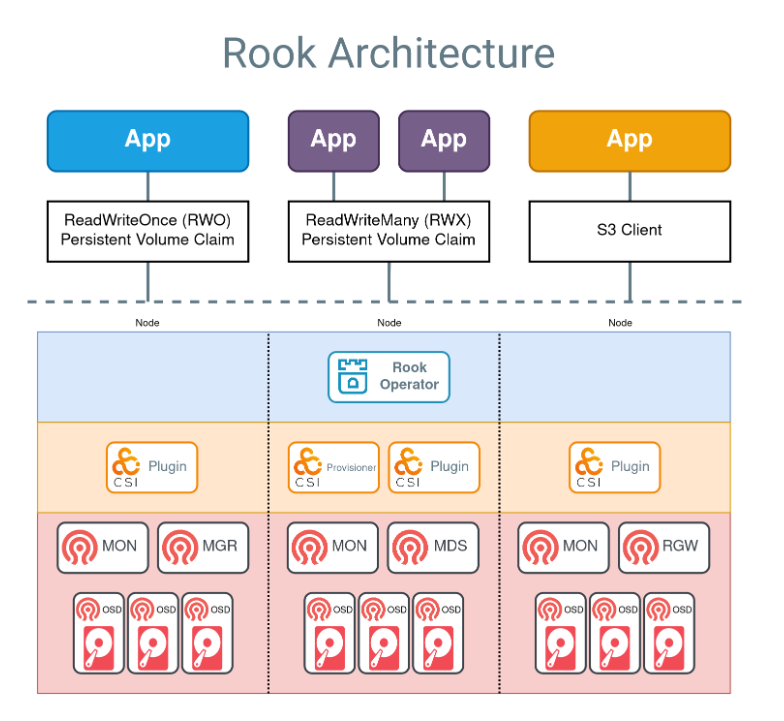
Overview
In this article, we’ll cover the complete process of deploying and operating Ceph storage in a Kubernetes cluster using Rook-Ceph.
Rook is an open-source orchestration tool that manages Ceph in a Kubernetes-native way, abstracting complex distributed storage systems into Kubernetes resources for easy installation and operation. It helps simplify the deployment and management of sophisticated storage infrastructure.
In this implementation, we built a Kubernetes cluster using Kubespray on Google Cloud VM environment, then installed the Rook Operator and Rook-Ceph cluster using Helm Charts. We configured dedicated storage nodes for Ceph OSDs and properly customized Rook’s values.yaml to set up MON/MGR/OSD/MDS/Object Store components.
Subsequently, we configured RBD-based StorageClass to enable Pods to use Ceph block storage, and finally activated the Ceph Dashboard for web UI-based cluster monitoring capabilities.
What is Cephadm?
Cephadm is Ceph’s latest deployment and management tool, introduced starting with the Ceph Octopus release.
It’s designed to simplify deploying, configuring, managing, and scaling Ceph clusters. It can bootstrap a cluster with a single command and deploys Ceph services using container technology.
Cephadm doesn’t rely on external configuration tools like Ansible, Rook, or Salt. However, these external configuration tools can be used to automate tasks not performed by cephadm itself.
Related Resources:
What is Rook-Ceph?
Ceph is a scalable distributed storage solution for block storage, object storage, and shared file systems, proven through years of production deployments.
Rook is an open-source orchestration framework for deploying, operating, and managing distributed storage systems on Kubernetes. It focuses on automatically managing Ceph within Kubernetes clusters and integrating storage solutions into cloud-native environments.
Using Rook, you can easily deploy and manage complex distributed storage systems like Ceph while leveraging Kubernetes’ automation and management capabilities.
Kubernetes Installation
Refer to the linked article for Kubernetes installation.
Important note: Storage nodes must have at least 32GB of memory.
Infrastructure Requirements
Master Node (Control Plane)
| Component | IP | CPU | Memory |
|---|---|---|---|
| test-server | 10.77.101.18 | 16 | 32G |
Worker Nodes
| Component | IP | CPU | Memory |
|---|---|---|---|
| test-server-agent | 10.77.101.12 | 16 | 32G |
| test-server-storage | 10.77.101.16 | 16 | 32G |
Additional Storage Node Configuration
Add the following configuration for the storage node:
Verify Installation
kubectl get nodes
NAME                  STATUS   ROLES           AGE   VERSION
test-server           Ready    control-plane   55s   v1.29.1
test-server-agent     Ready    <none>          55s   v1.29.1
test-server-storage   Ready    <none>          55s   v1.29.1
Rook-Ceph Operator Installation
Clone Repository and Prepare Values
git clone https://github.com/rook/rook.git
cd ~/rook/deploy/charts/rook-ceph
cp values.yaml somaz-values.yaml
Install Rook Operator using Helm
# Add Rook Helm repository
helm repo add rook-release https://charts.rook.io/release
helm repo update

# Install using local git repository
helm install --create-namespace --namespace rook-ceph rook-ceph . -f somaz-values.yaml

# Upgrade (if needed)
helm upgrade --create-namespace --namespace rook-ceph rook-ceph . -f somaz-values.yaml
Verify Operator Installation
# Check Custom Resource Definitions
kubectl get crd | grep ceph

# Verify operator pod
kubectl get pods -n rook-ceph
NAME                                 READY   STATUS    RESTARTS   AGE
rook-ceph-operator-799cf9f45-946r6   1/1     Running   0          28s
Rook-Ceph Cluster Installation
Prepare Storage Disks
First, verify and initialize disks on the test-server-storage node:
# Check available disks
lsblk
NAME    MAJ:MIN RM   SIZE RO TYPE MOUNTPOINT
loop0     7:0    0  63.9M  1 loop /snap/core20/2105
loop1     7:1    0 368.2M  1 loop /snap/google-cloud-cli/207
loop2     7:2    0  40.4M  1 loop /snap/snapd/20671
loop3     7:3    0  91.9M  1 loop /snap/lxd/24061
sda       8:0    0    50G  0 disk
├─sda1    8:1    0  49.9G  0 part /
├─sda14   8:14   0     4M  0 part
└─sda15   8:15   0   106M  0 part /boot/efi
sdb       8:16   0    50G  0 disk
sdc       8:32   0    50G  0 disk
sdd       8:48   0    50G  0 disk

# Initialize disks
sudo wipefs -a /dev/sdb
sudo wipefs -a /dev/sdc
sudo wipefs -a /dev/sdd
Configure Cluster Values
cd ~/rook/deploy/charts/rook-ceph-cluster
cp values.yaml somaz-values.yaml
Edit the somaz-values.yaml file with the following key configurations:
configOverride: |
  [global]
  mon_allow_pool_delete = true
  osd_pool_default_size = 1
  osd_pool_default_min_size = 1

# Enable debugging toolbox
toolbox:
  enabled: true

cephClusterSpec:
  mon:
    count: 1
    allowMultiplePerNode: false

  mgr:
    count: 1
    allowMultiplePerNode: false
    modules:
      - name: pg_autoscaler
        enabled: true

  storage:
    useAllNodes: false
    useAllDevices: false
    nodes:
      - name: "test-server-storage"
        devices:
          - name: "sdb"
          - name: "sdc"
          - name: "sdd"

cephBlockPools:
  - name: ceph-blockpool
    spec:
      failureDomain: host
      replicated:
        size: 1

cephFileSystems:
  - name: ceph-filesystem
    spec:
      metadataPool:
        replicated:
          size: 1
      dataPools:
        - failureDomain: host
          replicated:
            size: 1
    storageClass:
      enabled: false
      isDefault: false
      name: ceph-filesystem

cephObjectStores:
  - name: ceph-objectstore
    spec:
      metadataPool:
        failureDomain: host
        replicated:
          size: 1
      dataPool:
        failureDomain: host
        erasureCoded:
          dataChunks: 2
          codingChunks: 1
      preservePoolsOnDelete: true
      gateway:
        port: 80
        instances: 1
        priorityClassName: system-cluster-critical
    storageClass:
      enabled: false
      name: ceph-bucket
      reclaimPolicy: Delete
      volumeBindingMode: "Immediate"
      parameters:
        region: us-east-1
Install Ceph Cluster
# Install Ceph cluster using Helm
helm install --create-namespace --namespace rook-ceph rook-ceph-cluster --set operatorNamespace=rook-ceph . -f somaz-values.yaml

# Upgrade (if needed)
helm upgrade --create-namespace --namespace rook-ceph rook-ceph-cluster --set operatorNamespace=rook-ceph . -f somaz-values.yaml
Troubleshooting Installation Issues
If installation fails, clean up and restart:
# Delete Ceph cluster
helm delete -n rook-ceph rook-ceph-cluster

# Delete resources
kubectl delete cephblockpool -n rook-ceph ceph-blockpool
kubectl delete cephobjectstore -n rook-ceph ceph-objectstore
kubectl delete cephfilesystem -n rook-ceph ceph-filesystem
kubectl delete cephfilesystemsubvolumegroups.ceph.rook.io -n rook-ceph ceph-filesystem-csi

# Delete Ceph CRDs
kubectl get crd -o name | grep 'ceph.' | xargs kubectl delete
kubectl get crd -o name | grep 'objectbucket.' | xargs kubectl delete

# Delete operator
helm delete -n rook-ceph rook-ceph

# Verify cleanup
kubectl get all -n rook-ceph

# Reinitialize disks
sudo wipefs -a /dev/sdb
sudo wipefs -a /dev/sdc
sudo wipefs -a /dev/sdd

# Reinstall
cd ~/rook/deploy/charts/rook-ceph
helm install --create-namespace --namespace rook-ceph rook-ceph \
  . -f somaz-values.yaml

cd ~/rook/deploy/charts/rook-ceph-cluster
helm install --create-namespace --namespace rook-ceph rook-ceph-cluster \
  --set operatorNamespace=rook-ceph . -f somaz-values.yaml
Monitor Installation Progress
Check operator logs for troubleshooting:
kubectl logs -n rook-ceph rook-ceph-operator-799cf9f45-wbxk5 | less
Verification and Testing
Verify Installation
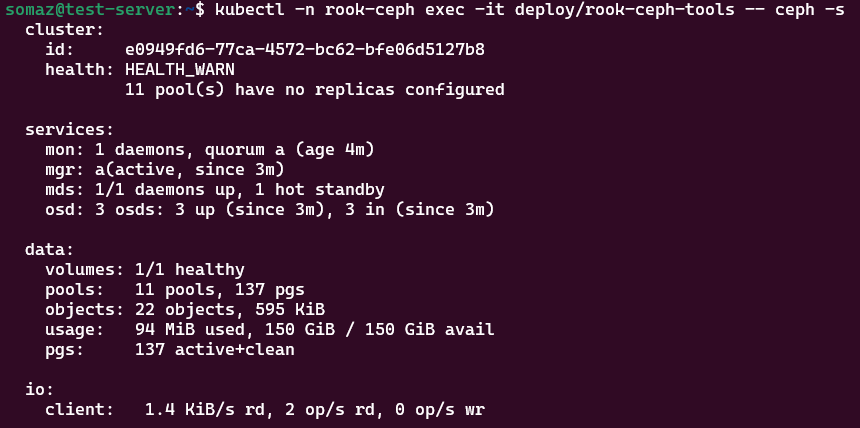
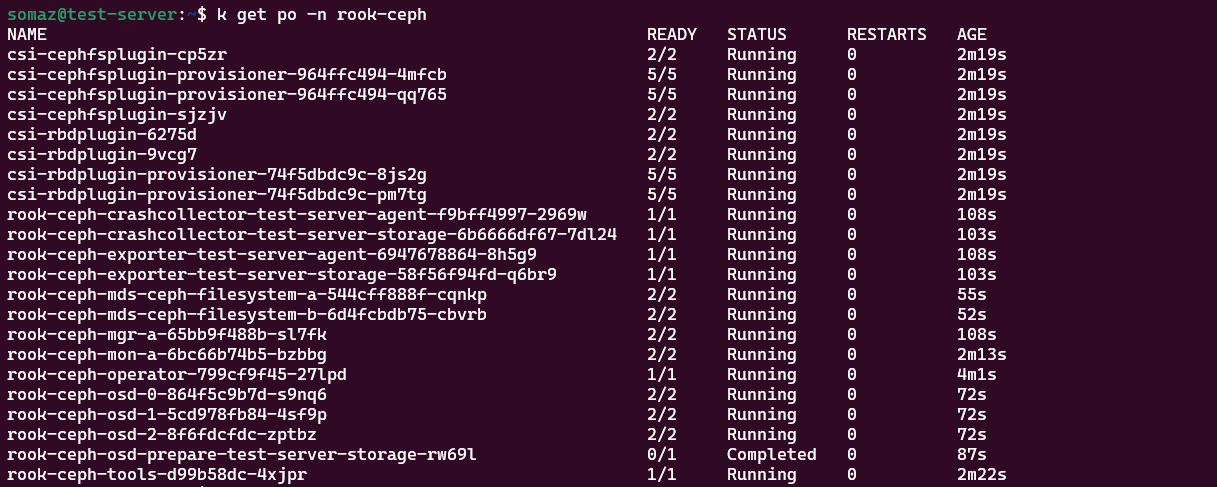
Installation takes approximately 10 minutes. The warning “1 pool(s) have no replicas configured” is expected due to replica=1 configuration.
# Check all pods
kubectl get pods -n rook-ceph
NAME                                                            READY   STATUS      RESTARTS        AGE
csi-cephfsplugin-7ldgx                                          2/2     Running     1 (2m39s ago)   3m26s
csi-cephfsplugin-ffmgn                                          2/2     Running     0               3m26s
csi-cephfsplugin-provisioner-67b5c7f475-5s659                   5/5     Running     1 (2m32s ago)   3m26s
csi-cephfsplugin-provisioner-67b5c7f475-lrkpm                   5/5     Running     0               3m26s
# ... additional pods

# Check storage classes
kubectl get storageclass
NAME                   PROVISIONER                     RECLAIMPOLICY   VOLUMEBINDINGMODE   ALLOWVOLUMEEXPANSION   AGE
ceph-block (default)   rook-ceph.rbd.csi.ceph.com      Delete          Immediate           true                   3m13s

# Check Ceph version
kubectl -n rook-ceph exec -it deploy/rook-ceph-tools -- ceph version
ceph version 18.2.1 (7fe91d5d5842e04be3b4f514d6dd990c54b29c76) reef (stable)

# Check Ceph cluster status
kubectl -n rook-ceph exec -it deploy/rook-ceph-tools -- ceph -s
  cluster:
    id:     e0949fd6-77ca-4572-bc62-bfe06d5127b8
    health: HEALTH_WARN
            11 pool(s) have no replicas configured

  services:
    mon: 1 daemons, quorum a (age 4m)
    mgr: a(active, since 3m)
    osd: 3 osds: 3 up (since 3m), 3 in (since 3m)

  data:
    volumes: 1/1 healthy
    pools:   11 pools, 137 pgs
    objects: 22 objects, 595 KiB
    usage:   94 MiB used, 150 GiB / 150 GiB avail
    pgs:     137 active+clean
Advanced Ceph Commands
# Check health details (HEALTH_WARN can be ignored for replica=1)
kubectl -n rook-ceph exec -it deploy/rook-ceph-tools -- ceph health detail

# Check placement group status
kubectl -n rook-ceph exec -it deploy/rook-ceph-tools -- ceph pg dump_stuck

# Check OSD status
kubectl -n rook-ceph exec -it deploy/rook-ceph-tools -- ceph osd status
ID  HOST                  USED  AVAIL  WR OPS  WR DATA  RD OPS  RD DATA  STATE
 0  test-server-storage  34.6M  49.9G      0        0       0        0   exists,up
 1  test-server-storage  38.6M  49.9G      0        0       2      106   exists,up
 2  test-server-storage  34.6M  49.9G      0        0       0        0   exists,up

# Check OSD tree
kubectl -n rook-ceph exec -it deploy/rook-ceph-tools -- ceph osd tree

# List OSD pools
kubectl -n rook-ceph exec -it deploy/rook-ceph-tools -- ceph osd lspools

# Check Ceph resources
kubectl get cephblockpool -n rook-ceph
kubectl get cephobjectstore -n rook-ceph
kubectl get cephfilesystem -n rook-ceph
kubectl get cephfilesystemsubvolumegroups.ceph.rook.io -n rook-ceph
Testing Storage Functionality
Create Test Pod with Persistent Volume
cat <<EOF > test-pod.yaml
apiVersion: v1
kind: PersistentVolumeClaim
metadata:
  name: ceph-rbd-pvc
spec:
  accessModes:
    - ReadWriteOnce
  storageClassName: ceph-block
  resources:
    requests:
      storage: 1Gi
---
apiVersion: v1
kind: Pod
metadata:
  name: pod-using-ceph-rbd
spec:
  containers:
  - name: my-container
    image: nginx
    volumeMounts:
    - mountPath: "/var/lib/www/html"
      name: mypd
  volumes:
  - name: mypd
    persistentVolumeClaim:
      claimName: ceph-rbd-pvc
EOF

kubectl apply -f test-pod.yaml
Verify Test Resources
kubectl get pv,pod,pvc
NAME                                                        CAPACITY   ACCESS MODES   RECLAIM POLICY   STATUS   CLAIM               STORAGECLASS   REASON   AGE
persistentvolume/pvc-27e58696-061e-40f3-afb4-f7c992179ffe   1Gi        RWO            Delete           Bound    default/ceph-rbd-pvc   ceph-block              25s

NAME                     READY   STATUS    RESTARTS   AGE
pod/pod-using-ceph-rbd   1/1     Running   0          25s

NAME                                 STATUS   VOLUME                                     CAPACITY   ACCESS MODES   STORAGECLASS   AGE
persistentvolumeclaim/ceph-rbd-pvc   Bound    pvc-27e58696-061e-40f3-afb4-f7c992179ffe   1Gi        RWO            ceph-block     25s
Ceph Dashboard Configuration
Create External Dashboard Service
cat <<EOF > rook-ceph-mgr-dashboard-external.yaml
apiVersion: v1
kind: Service
metadata:
  name: rook-ceph-mgr-dashboard-external-https
  namespace: rook-ceph
  labels:
    app: rook-ceph-mgr
    rook_cluster: rook-ceph
spec:
  ports:
  - name: dashboard
    port: 8443
    protocol: TCP
    targetPort: 8443
  selector:
    app: rook-ceph-mgr
    rook_cluster: rook-ceph
    mgr_role: active
  sessionAffinity: None
  type: NodePort
EOF

kubectl apply -f rook-ceph-mgr-dashboard-external.yaml
Configure Firewall Access
## Firewall ##
resource "google_compute_firewall" "nfs_server_ssh" {
  name    = "allow-ssh-nfs-server"
  network = var.shared_vpc

  allow {
    protocol = "tcp"
    ports    = ["22", "31571"]
  }

  source_ranges = ["${var.public_ip}/32"]
  target_tags   = [var.kubernetes_server, var.kubernetes_client]

  depends_on = [module.vpc]
}
Dashboard Access Configuration
Get Default Password
# Retrieve dashboard password
kubectl -n rook-ceph get secret rook-ceph-dashboard-password -o jsonpath="{['data']['password']}" | base64 --decode && echo
.BzmuOklD<D)~T_@7,pr
Reset Password (Optional)
# Create new password file
cat <<EOF > password.txt
somaz@2024
EOF

# Get tools pod name
kubectl get pods -n rook-ceph | grep tools
rook-ceph-tools-d99b58dc-4xjpr                                  1/1     Running     0          55m

# Copy password file to tools pod
kubectl -n rook-ceph cp password.txt rook-ceph-tools-d99b58dc-4xjpr:/tmp/password.txt

# Update dashboard credentials
kubectl -n rook-ceph exec -it deploy/rook-ceph-tools -- ceph dashboard set-login-credentials admin -i /tmp/password.txt
Access Dashboard
- URL:
https://[NODE-IP]:[NODE-PORT] - Username:
admin - Password: Retrieved from secret or reset password
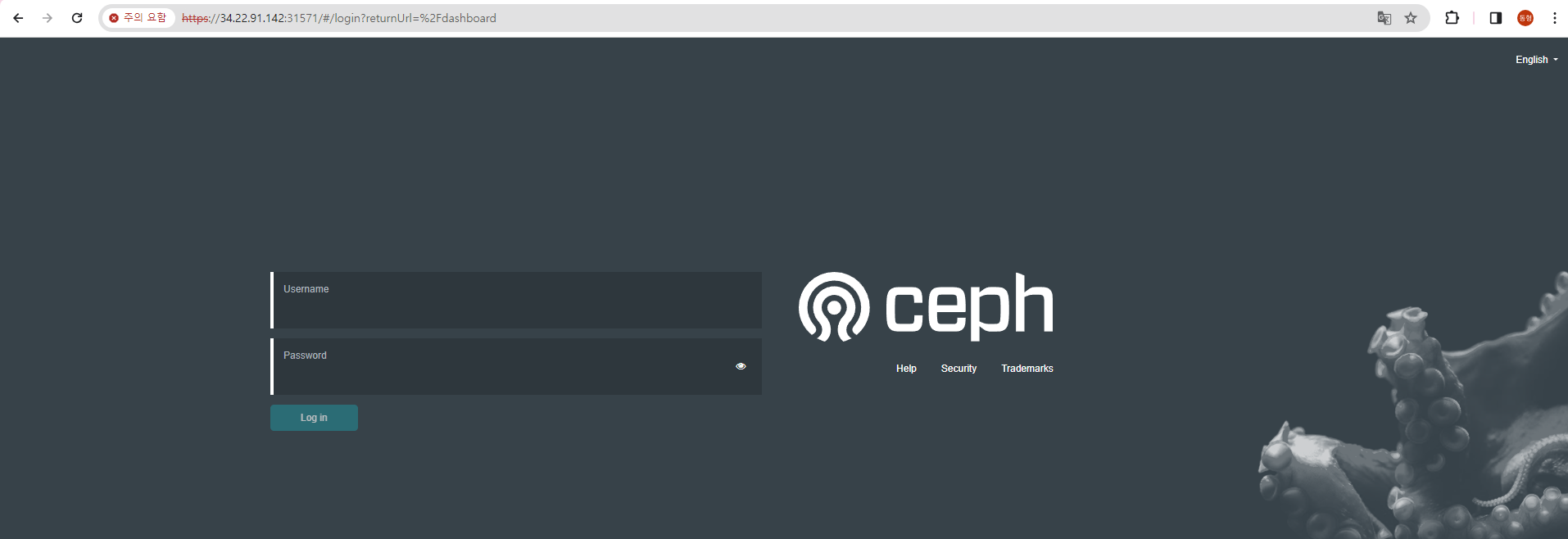
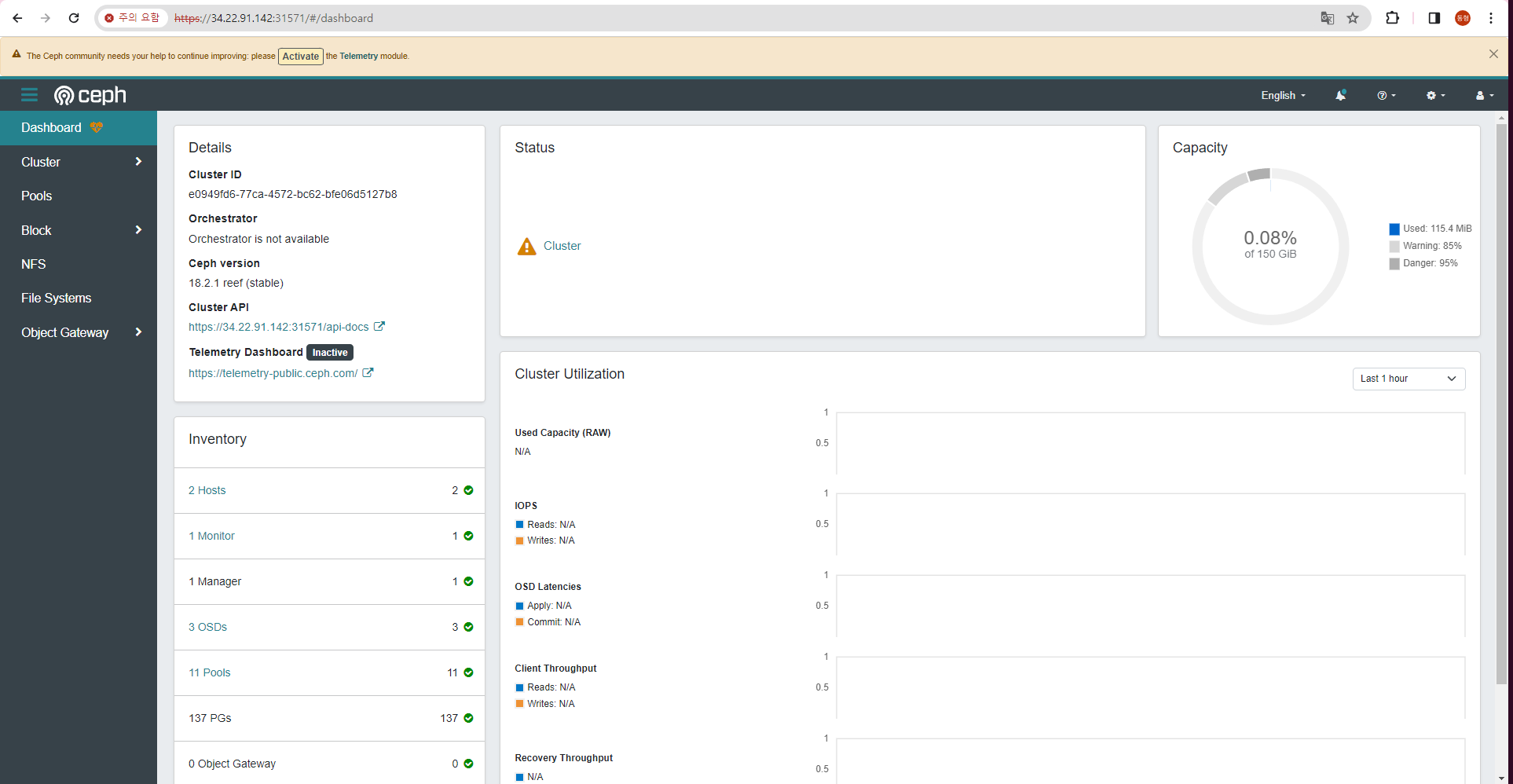
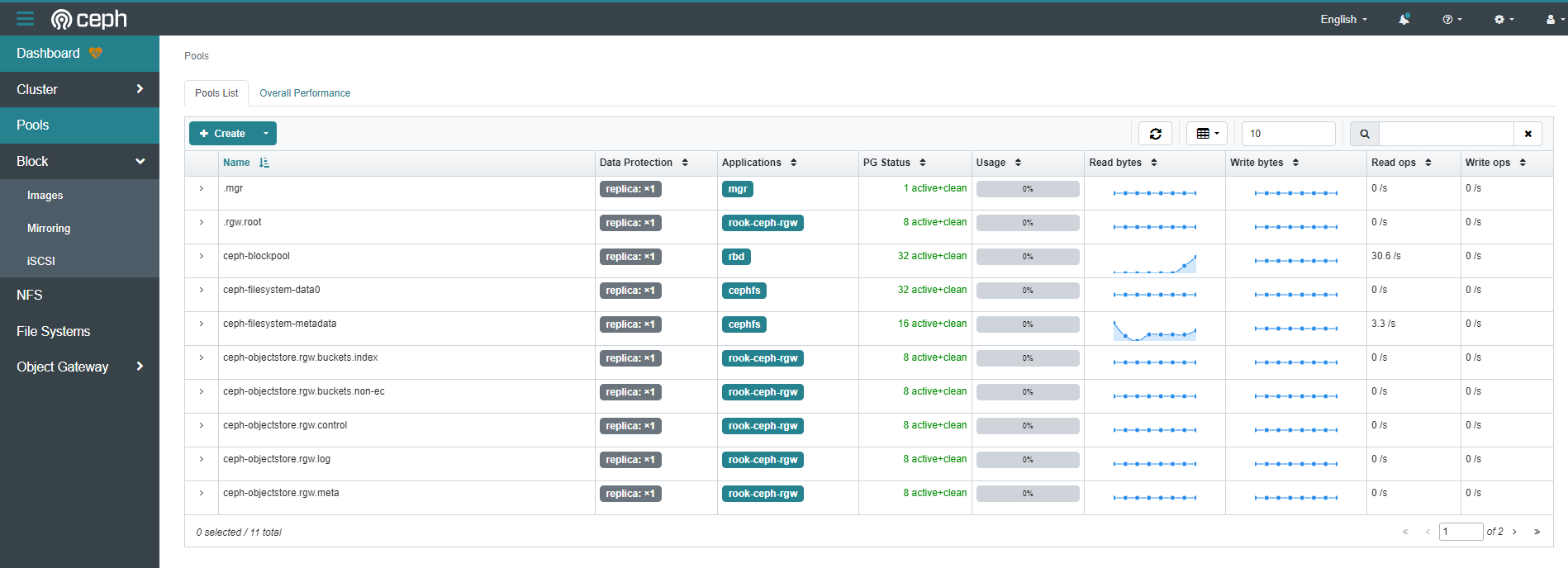
The dashboard provides comprehensive monitoring including:
- Cluster overview and health status
- OSD performance and utilization
- Pool statistics and configuration
- Physical disk visualization
- Performance metrics and graphs
Production Considerations
High Availability Configuration
For production deployments:
cephClusterSpec:
  mon:
    count: 3  # Odd number for quorum
    allowMultiplePerNode: false

  mgr:
    count: 2  # Active-standby configuration
    allowMultiplePerNode: false

  storage:
    config:
      osdsPerDevice: "1"
      metadataDevice: "md0"  # Use SSD for metadata
Resource Requirements
- Memory: Minimum 32GB per storage node
- CPU: 16+ cores recommended for storage nodes
- Network: 10Gbps+ for optimal performance
- Disks: Dedicated disks for OSDs, separate metadata devices
Security Best Practices
- Network Security: Configure proper firewall rules
- RBAC: Implement Kubernetes RBAC for Rook resources
- Encryption: Enable encryption at rest and in transit
- Dashboard Security: Use strong passwords and HTTPS
Monitoring and Alerting
- Prometheus Integration: Enable Ceph metrics collection
- Grafana Dashboards: Import Ceph-specific dashboards
- Alert Rules: Configure alerts for cluster health
- Log Aggregation: Centralize Ceph logs for analysis
Conclusion
This comprehensive guide covered the complete deployment and operation of Rook-Ceph on Kubernetes, from infrastructure preparation through dashboard configuration.
Key Achievements:
- Infrastructure Setup: Properly configured Kubernetes cluster with dedicated storage nodes
- Operator Deployment: Successfully installed Rook operator using Helm
- Cluster Configuration: Deployed Ceph cluster with proper resource allocation
- Storage Integration: Configured storage classes and tested persistent volumes
- Management Interface: Activated dashboard for monitoring and management
Best Practices Learned:
- Resource Planning: Adequate memory and CPU allocation is crucial
- Disk Management: Proper disk initialization and configuration
- Configuration Management: Using Helm charts for reproducible deployments
- Monitoring: Dashboard provides essential cluster visibility
- Troubleshooting: Systematic approach to problem resolution
Future Enhancements:
- Implement multi-node Ceph cluster for production
- Configure backup and disaster recovery procedures
- Integrate with monitoring stack (Prometheus/Grafana)
- Implement automated capacity management
- Set up cross-cluster replication for geo-redundancy
Rook-Ceph provides a powerful, Kubernetes-native solution for distributed storage, enabling organizations to run stateful applications with confidence in cloud-native environments.

Comments