50 min to read
Complete Guide to Kubernetes Storage Types: iSCSI, NFS, Ceph RBD, and Cloud Solutions
Comprehensive comparison and implementation guide for Kubernetes persistent storage with real-world scenarios and best practices
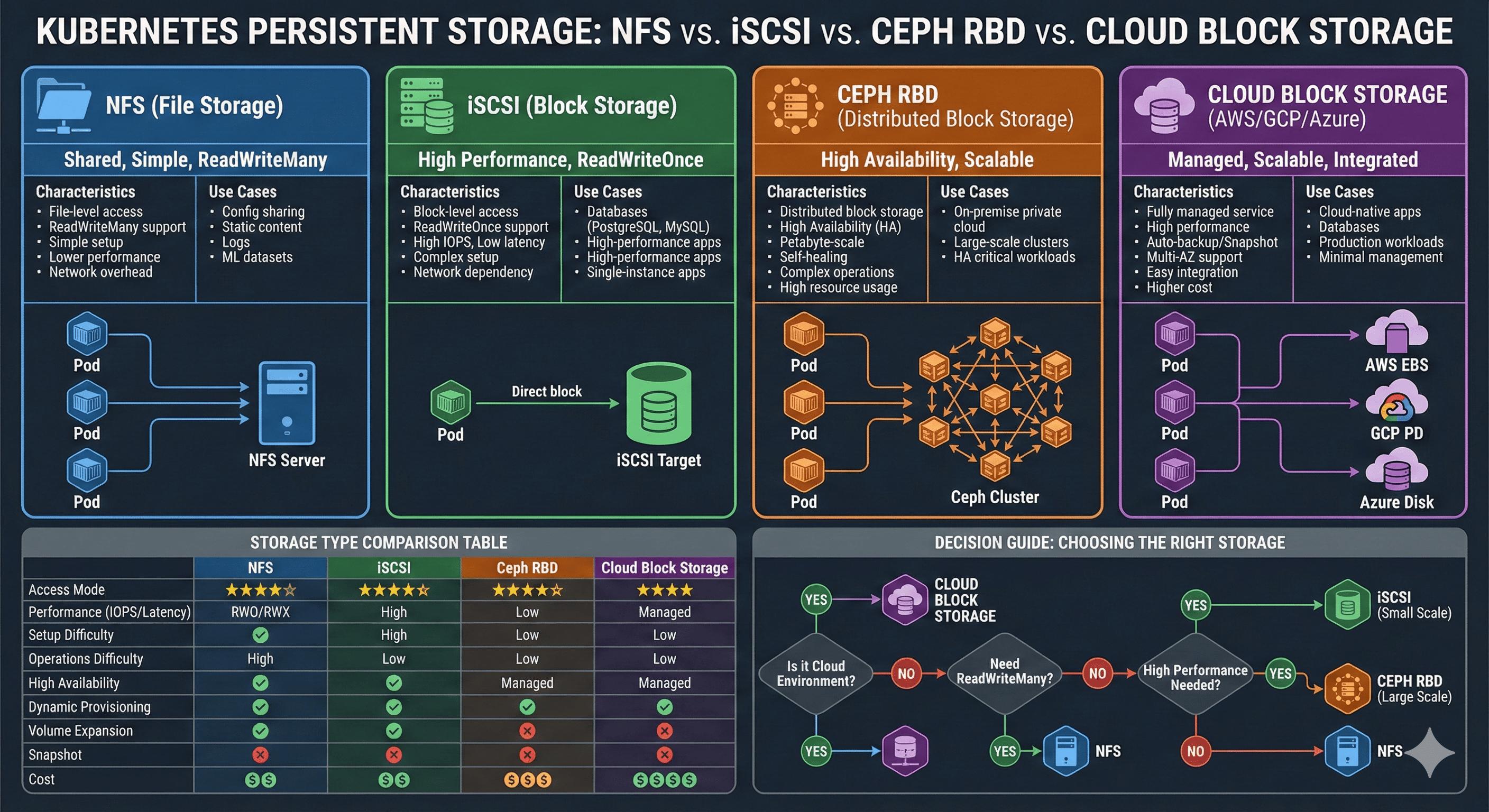
Overview
When configuring persistent storage in Kubernetes, the first question encountered is: “Which storage type should I choose?” NFS is simple but performance concerns arise. iSCSI is fast but setup appears complex. Cloud environments offer additional options to consider.
This comprehensive guide compares characteristics and trade-offs of major storage types used in Kubernetes environments, providing guidance for optimal selection based on specific situations. Drawing from practical experience, we’ll explore which storage type suits which workload with concrete examples.
Understanding the right storage solution requires analyzing multiple factors: performance requirements, access patterns, operational complexity, and cost considerations. Let’s systematically explore each option to make informed decisions for your Kubernetes infrastructure.
Storage Fundamentals
Block Storage vs File Storage
Understanding storage begins with two fundamental approaches to data management:
Block Storage Characteristics
Block storage divides data into fixed-size blocks, allowing direct OS-level filesystem management. This approach provides:
- Low Latency: Direct block-level access minimizes overhead
- High IOPS: Optimal for database workloads requiring frequent random I/O
- Direct Control: Operating system manages filesystem directly
- Examples: iSCSI, Ceph RBD, AWS EBS, Azure Managed Disks
File Storage Characteristics
File storage organizes data in hierarchical file and directory structures. Key features include:
- Network Sharing: Multiple clients access files over network protocols
- Concurrent Access: Several clients read/write simultaneously
- Simplified Management: File-level operations without block management
- Examples: NFS, SMB/CIFS, CephFS
NFS (Network File System)
Overview
NFS is a distributed filesystem protocol developed by Sun Microsystems in 1984. It enables mounting remote filesystems over the network as if they were local storage.
ReadWriteMany] style D fill:#4a90e2 style E fill:#7ed321
Configuration Example
# NFS PersistentVolume Example
apiVersion: v1
kind: PersistentVolume
metadata:
  name: nfs-pv
spec:
  capacity:
    storage: 100Gi
  accessModes:
    - ReadWriteMany  # Multiple pods concurrent access
  nfs:
    server: 192.168.1.100
    path: /data/k8s
  mountOptions:
    - nfsvers=4.1
    - hard
    - timeo=600
Advantages
Simple Setup
- No special client software installation required
- Most NAS devices support NFS out of the box
- Low barrier to entry for beginners
ReadWriteMany Support
- Multiple pods can read and write simultaneously
- Ideal for shared configuration files
- Perfect for content distribution scenarios
Operational Convenience
- Direct filesystem-level management
- Easy backup and recovery procedures
- Familiar tooling for administrators
Wide Compatibility
- Supported across Unix, Linux, and modern operating systems
- Standard protocol with extensive ecosystem support
Disadvantages
Performance Limitations
- Network overhead introduces latency (5-20ms typical)
- Limited IOPS compared to block storage
- Performance degrades with concurrent access
Single Point of Failure
- NFS server downtime affects all clients
- Requires HA configuration for production use
- No built-in replication in basic setup
File Locking Issues
- Potential data consistency problems with concurrent writes
- NLM (Network Lock Manager) can be complex
- Lock recovery can be slow after failures
Scalability Constraints
- Single server bottleneck limits throughput
- Difficult to scale horizontally
- Network bandwidth becomes limiting factor
Ideal Use Cases
| Workload Type | Description | Example |
|---|---|---|
| Shared Configuration | Large configuration files shared across pods | Application configs, environment settings |
| Static Content | Read-heavy content distribution | Images, CSS, JavaScript, media files |
| Log Aggregation | Centralized logging from multiple sources | Application logs, audit trails |
| ML Datasets | Training data shared across workers | Model training datasets, feature stores |
Performance Optimization
# Optimized NFS Mount Options
mountOptions:
  - nfsvers=4.1          # Use NFSv4.1 for better performance
  - hard                 # Retry on server failure (soft risks data loss)
  - timeo=600            # 60-second timeout
  - retrans=2            # Number of retransmissions
  - rsize=1048576        # 1MB read buffer
  - wsize=1048576        # 1MB write buffer
  - tcp                  # Use TCP (more reliable than UDP)
  - noatime              # Disable access time updates for performance
Real-World Tips
Network Optimization
- Use dedicated storage network (VLAN) when possible
- Ensure adequate bandwidth (1Gbps minimum, 10Gbps recommended)
- Monitor network latency and packet loss
Server Configuration
- Enable async mode for better write performance
- Configure appropriate thread pool size
- Monitor server CPU and memory usage
Security Considerations
- Use NFSv4 with Kerberos for authentication
- Implement proper export controls
- Consider encrypted connections for sensitive data
iSCSI (Internet Small Computer System Interface)
Overview
iSCSI transmits SCSI commands over IP networks, providing block-level storage access. It’s widely adopted as a cost-effective alternative to traditional SAN (Storage Area Network) solutions.
TCP/IP| B[iSCSI Target] B --> C[LUN 1
Block Device] B --> D[LUN 2
Block Device] B --> E[LUN 3
Block Device] A --> F[Local Filesystem
ext4/xfs] F --> G[Pod Storage] style A fill:#4a90e2 style B fill:#f5a623 style C fill:#7ed321 style D fill:#7ed321 style E fill:#7ed321
Configuration Example
# iSCSI PVC Example (using Synology CSI)
apiVersion: v1
kind: PersistentVolumeClaim
metadata:
  name: postgres-pvc
spec:
  accessModes:
    - ReadWriteOnce  # Single node access only
  storageClassName: synology-iscsi
  resources:
    requests:
      storage: 50Gi
Advantages
High Performance
- Block-level access provides low latency (1-5ms typical)
- Direct storage access without network filesystem overhead
- Optimal for I/O-intensive workloads
High IOPS Capability
- Suitable for database workloads requiring random I/O
- Consistent performance under load
- Predictable latency characteristics
Dynamic Provisioning
- CSI drivers enable automated volume creation
- Easy integration with Kubernetes storage classes
- Self-service storage for developers
Snapshot Support
- Built-in snapshot capabilities for backups
- Fast point-in-time recovery
- Clone volumes for testing environments
Disadvantages
Complex Setup
- Requires iSCSI initiator installation on all nodes
- Network configuration complexity
- Learning curve for administrators
ReadWriteOnce Limitation
- Single node mounting only
- Cannot share volumes across pods on different nodes
- Requires pod anti-affinity for HA applications
Network Dependency
- Performance directly tied to network quality
- Sensitive to network latency and jitter
- Requires reliable network infrastructure
Multipath Configuration
- HA setup requires multipath configuration
- Complex failover scenarios
- Additional operational overhead
Ideal Use Cases
| Workload Type | Characteristics | Examples |
|---|---|---|
| Databases | High IOPS, low latency required | PostgreSQL, MySQL, MongoDB |
| High-Performance Apps | Fast storage access critical | Elasticsearch, Redis, Cassandra |
| Stateful Applications | Single-instance persistence | Jenkins, GitLab, Nexus |
| Virtual Machines | Block device emulation | KubeVirt, VM disk images |
Installation and Configuration
# Install iSCSI initiator on nodes
# Ubuntu/Debian
apt-get install open-iscsi

# RHEL/CentOS
yum install iscsi-initiator-utils

# Verify initiator name
cat /etc/iscsi/initiatorname.iscsi

# Enable and start services
systemctl enable --now iscsid
systemctl enable --now open-iscsi

# Discover iSCSI targets
iscsiadm -m discovery -t st -p <target-ip>

# Login to target
iscsiadm -m node --login
Technical Deep Dive: Why ReadWriteOnce?
Understanding why iSCSI supports only ReadWriteOnce requires examining the fundamental nature of block devices:
sequenceDiagram
    participant N1 as Node 1
    participant N2 as Node 2
    participant BD as Block Device

    N1->>BD: Write Block A
    Note over N1: Cache in memory
    N2->>BD: Read Block A
    Note over N2: Gets old data!
    N1->>BD: Flush cache
    Note over BD: Data corruption risk
1. Filesystem Metadata Conflicts
Traditional filesystems (ext4, xfs) are designed for single-host usage:
- Node 1 creates a file, updating inode tables and block allocation maps
- Node 2 is unaware of these changes and may write to the same blocks
- Result: Filesystem corruption and data loss
2. Cache Coherency Issues
from cache] E[Node 2 overwrites
Node 1's changes] style A fill:#ff6b6b style B fill:#ff6b6b style C fill:#f5a623
Each node maintains its own write-back cache:
- Changes are cached in memory before flushing to disk
- No coordination between node caches
- Last writer wins, causing data loss
3. Lack of Distributed Locking
Unlike NFS with its Network Lock Manager (NLM), block devices have no built-in locking mechanism:
# NFS provides:
Client 1 → Lock File A → NFS Server [Lock Manager] → Grant Lock
Client 2 → Request File A → Wait for lock release

# iSCSI/Block Storage:
Client 1 → Write Block X → Direct write ┐
                                         ├→ COLLISION!
Client 2 → Write Block X → Direct write ┘
4. Solutions: Cluster Filesystems
To enable ReadWriteMany on block storage, specialized cluster filesystems are required:
GFS2 (Red Hat)
# Requires distributed lock manager
pacemaker + dlm + gfs2
OCFS2 (Oracle)
# Requires O2CB cluster stack
o2cb + ocfs2
These filesystems provide:
- Distributed lock management
- Cache coherency protocols
- Metadata synchronization
- But at the cost of complexity and overhead
Summary Table
| Feature | NFS (File-Level) | iSCSI (Block-Level) |
|---|---|---|
| Lock Management | ✅ Centralized by server | ❌ None |
| Metadata | ✅ Unified server management | ❌ Independent per client |
| Cache Synchronization | ✅ NFS protocol handles it | ❌ Impossible |
| Multi-Node Access | ✅ Safe | ❌ Dangerous |
Conclusion: iSCSI’s ReadWriteOnce limitation stems from exposing raw block devices directly. Standard filesystems cannot safely handle concurrent access from multiple nodes without specialized cluster filesystem support.
Ceph RBD (RADOS Block Device)
Overview
Ceph is an open-source distributed storage system providing block, file, and object storage. RBD (RADOS Block Device) is Ceph’s block storage interface, offering enterprise-grade distributed storage capabilities.
Monitor] D --> F[MGR
Manager] E --> G[OSD 1
Storage] E --> H[OSD 2
Storage] E --> I[OSD 3
Storage] G --> J[Replica 1] H --> K[Replica 2] I --> L[Replica 3] end style E fill:#4a90e2 style F fill:#4a90e2 style G fill:#7ed321 style H fill:#7ed321 style I fill:#7ed321
Configuration Example
# Ceph RBD StorageClass
apiVersion: storage.k8s.io/v1
kind: StorageClass
metadata:
  name: ceph-rbd
provisioner: rbd.csi.ceph.com
parameters:
  clusterID: your-cluster-id
  pool: kubernetes
  imageFeatures: layering
  csi.storage.k8s.io/provisioner-secret-name: csi-rbd-secret
  csi.storage.k8s.io/node-stage-secret-name: csi-rbd-secret
reclaimPolicy: Delete
allowVolumeExpansion: true
Advantages
High Availability
- Data replication across multiple nodes
- Automatic failover capabilities
- No single point of failure
Scalability
- Scale to petabyte capacity
- Add storage nodes dynamically
- Linear performance scaling
Self-Healing
- Automatic recovery from failures
- Background scrubbing for data integrity
- Proactive error detection
Advanced Features
- Online volume expansion
- Thin provisioning
- Snapshot and clone support
- Efficient space utilization
Disadvantages
Operational Complexity
- Requires specialized knowledge
- Complex cluster management
- Steep learning curve
Resource Requirements
- Minimum 3 nodes for production
- Substantial memory requirements (32GB+ per OSD node)
- Network bandwidth intensive
Troubleshooting Difficulty
- Complex distributed system
- Multiple components to debug
- Requires deep understanding of Ceph internals
Initial Setup Time
- Longer deployment process
- Careful planning required
- Extensive testing needed before production
Ideal Use Cases
| Scenario | Why Ceph? | Requirements |
|---|---|---|
| Private Cloud | On-premises distributed storage | OpenStack integration, large scale |
| Large Clusters | Hundreds of nodes | Scalability, performance |
| High Availability | Zero data loss tolerance | Replication, redundancy |
| Unified Storage | Block, file, object in one system | Diverse workload needs |
Architecture Components
Monitors] A --> C[MGR
Managers] A --> D[OSD
Object Storage Daemons] A --> E[MDS
Metadata Servers] B --> F[Cluster Map
Quorum] C --> G[Dashboard
Metrics] D --> H[Data Storage
Replication] E --> I[CephFS
Metadata] style A fill:#e1f5ff style B fill:#4a90e2 style C fill:#4a90e2 style D fill:#7ed321 style E fill:#f5a623
Cloud-Native Storage Solutions
AWS EBS (Elastic Block Store)
# AWS EBS StorageClass Configuration
apiVersion: storage.k8s.io/v1
kind: StorageClass
metadata:
  name: ebs-gp3
provisioner: ebs.csi.aws.com
parameters:
  type: gp3                # General Purpose SSD
  iops: "3000"            # Provisioned IOPS
  throughput: "125"       # MB/s
  encrypted: "true"       # Encryption at rest
  kmsKeyId: "arn:aws:kms:region:account:key/key-id"
allowVolumeExpansion: true
volumeBindingMode: WaitForFirstConsumer
Key Features
Volume Types
- gp3: General Purpose SSD (balanced price/performance)
- io2: Provisioned IOPS SSD (high performance)
- st1: Throughput Optimized HDD (big data)
- sc1: Cold HDD (infrequent access)
Performance Characteristics
- Up to 16,000 IOPS (io2 Block Express: 256,000 IOPS)
- Sub-millisecond latency
- Throughput up to 1,000 MB/s (io2 Block Express: 4,000 MB/s)
Availability
- Single AZ attachment
- Snapshot-based backup
- Cross-region replication via snapshots
GCP Persistent Disk
# GCP PD StorageClass Configuration
apiVersion: storage.k8s.io/v1
kind: StorageClass
metadata:
  name: pd-ssd
provisioner: pd.csi.storage.gke.io
parameters:
  type: pd-ssd                      # SSD persistent disk
  replication-type: regional-pd     # Regional replication
  disk-encryption-kms-key: "projects/PROJECT/locations/LOCATION/keyRings/RING/cryptoKeys/KEY"
allowVolumeExpansion: true
volumeBindingMode: WaitForFirstConsumer
Key Features
Disk Types
- pd-standard: Standard persistent disk (HDD)
- pd-balanced: Balanced persistent disk (cost-effective SSD)
- pd-ssd: SSD persistent disk (high performance)
- pd-extreme: Extreme persistent disk (highest IOPS)
Performance Characteristics
- Up to 100,000 IOPS (pd-extreme)
- Consistent performance
- Regional PD for multi-zone availability
Advanced Features
- Automatic encryption
- Regional persistent disks
- Volume snapshots
- Instant disk resizing
Azure Managed Disks
# Azure Disk StorageClass Configuration
apiVersion: storage.k8s.io/v1
kind: StorageClass
metadata:
  name: azure-disk-premium
provisioner: disk.csi.azure.com
parameters:
  storageaccounttype: Premium_LRS    # Premium SSD
  kind: Managed
  diskEncryptionSetID: "/subscriptions/{sub-id}/resourceGroups/{rg}/providers/Microsoft.Compute/diskEncryptionSets/{des-name}"
allowVolumeExpansion: true
volumeBindingMode: WaitForFirstConsumer
Key Features
Disk Types
- Standard HDD: Cost-effective for infrequent access
- Standard SSD: General purpose workloads
- Premium SSD: Production workloads
- Ultra Disk: Mission-critical workloads (160,000 IOPS)
Redundancy Options
- LRS: Locally redundant storage
- ZRS: Zone-redundant storage
- GRS: Geo-redundant storage (coming soon for managed disks)
Performance Capabilities
- Up to 160,000 IOPS (Ultra Disk)
- 2,000 MB/s throughput
- Sub-millisecond latency
Storage Comparison Matrix
Performance and Features
| Feature | NFS | iSCSI | Ceph RBD | Cloud Block |
|---|---|---|---|---|
| Access Modes | RWO, RWX, ROX | RWO | RWO | RWO |
| Performance (IOPS) | ⭐⭐ (1K-10K) | ⭐⭐⭐⭐ (10K-50K) | ⭐⭐⭐⭐ (10K-100K) | ⭐⭐⭐⭐⭐ (100K+) |
| Latency | 5-20ms | 1-5ms | 1-5ms | <1ms |
| Setup Complexity | ⭐ Low | ⭐⭐⭐ Medium | ⭐⭐⭐⭐⭐ High | ⭐⭐ Low |
| Operational Overhead | ⭐ Low | ⭐⭐ Medium | ⭐⭐⭐⭐⭐ High | ⭐ Low |
| High Availability | ❌ (single server) | △ (multipath) | ✅ Native | ✅ Native |
| Dynamic Provisioning | △ Limited | ✅ Yes | ✅ Yes | ✅ Yes |
| Volume Expansion | ❌ Manual | ✅ Online | ✅ Online | ✅ Online |
| Snapshots | △ Limited | ✅ Yes | ✅ Advanced | ✅ Native |
| Cost | 💰 Low | 💰💰 Medium | 💰💰💰 High | 💰💰💰💰 Premium |
Use Case Suitability
| Workload | Recommended Storage | Alternative | Not Recommended |
|---|---|---|---|
| Databases | iSCSI, Cloud Block | Ceph RBD | NFS |
| Shared Files | NFS | CephFS | iSCSI, Cloud Block |
| Container Images | Object Storage | NFS | iSCSI |
| Message Queues | iSCSI, Cloud Block | Ceph RBD | NFS |
| Web Content | NFS, Object Storage | CephFS | iSCSI |
| ML Training Data | NFS, Object Storage | CephFS | iSCSI |
| Log Aggregation | NFS, Object Storage | Cloud Block | iSCSI |
Decision Framework
Selection Flowchart
Scenario-Based Recommendations
“I need to share configuration files across multiple pods”
Recommendation: NFS
- ReadWriteMany support required
- Low performance requirements
- Simple setup and management
- Cost-effective solution
# Example configuration
apiVersion: v1
kind: PersistentVolume
metadata:
  name: shared-config
spec:
  capacity:
    storage: 10Gi
  accessModes:
    - ReadWriteMany
  nfs:
    server: nfs.example.com
    path: /shared/config
“I’m running a PostgreSQL database in production”
Recommendation: iSCSI or Cloud Block Storage
- High IOPS requirements
- Low latency critical
- Single instance workload
- Snapshot support for backups
# Example configuration
apiVersion: v1
kind: PersistentVolumeClaim
metadata:
  name: postgres-data
spec:
  accessModes:
    - ReadWriteOnce
  storageClassName: iscsi-fast
  resources:
    requests:
      storage: 100Gi
“Building an on-premises production cluster”
Recommendation: Ceph RBD (with proper planning)
- High availability essential
- Adequate hardware resources available
- Dedicated storage team
- Long-term investment
Prerequisites:
- Minimum 3 storage nodes
- 32GB+ RAM per OSD node
- 10Gbps network
- Experienced operations team
“Running in AWS/GCP/Azure”
Recommendation: Cloud-Native Storage (strongly recommended)
- Minimal operational overhead
- Automatic backups and snapshots
- Best performance guarantees
- Pay-as-you-go pricing
Benefits:
- No infrastructure management
- Built-in redundancy
- Seamless integration
- Enterprise SLAs
Synology CSI Integration
Overview
Many small to medium enterprises and homelab users leverage Synology NAS as Kubernetes storage backends. Synology supports both iSCSI and NFS, with the Synology CSI driver enabling dynamic provisioning through official Helm charts.
Key Features
Dynamic Provisioning
- Automatic LUN creation on PVC request
- No manual volume management
- Self-service storage for developers
Dual StorageClass Creation
synology-csi-delete: Deletes volume with PVCsynology-csi-retain: Preserves volume after PVC deletion
Snapshot Support
- VolumeSnapshot for backup and recovery
- Clone volumes for testing
- Fast restore capabilities
Customization Options
- Node affinity and selectors
- Tolerations for dedicated nodes
- Resource limits and requests
Installation Prerequisites
Node Preparation
Install iSCSI initiator on all nodes:
# Ubuntu/Debian
sudo apt-get update
sudo apt-get install open-iscsi -y

# RHEL/CentOS
sudo yum install iscsi-initiator-utils -y

# Enable and start services
sudo systemctl enable --now iscsid
sudo systemctl enable --now open-iscsi

# Verify installation
systemctl status iscsid
Synology NAS Configuration
DSM 7:
- Install
SAN Managerpackage - Create dedicated iSCSI targets
- Configure CHAP authentication (optional)
DSM 6:
- Install
iSCSI Managerpackage - Configure iSCSI targets
- Set up network interfaces
User Setup:
- Create dedicated service account
- Grant necessary permissions
- Avoid using admin account
Helm Installation
Add Repository
# Add Synology CSI Helm repository
helm repo add synology-csi-chart https://christian-schlichtherle.github.io/synology-csi-chart

# Update repository cache
helm repo update
Configure Values
Create custom-values.yaml:
# Synology NAS Connection
clientInfoSecret:
  clients:
    - host: 192.168.1.100          # Synology NAS IP
      port: 5000                   # DSM HTTP port (5001 for HTTPS)
      https: false                 # Use HTTPS
      username: k8s-csi-user       # Service account
      password: "SecurePassword123"

# Storage Class Definitions
storageClasses:
  # Delete policy - for ephemeral workloads
  - name: synology-iscsi-delete
    reclaimPolicy: Delete
    volumeBindingMode: Immediate
    parameters:
      protocol: iscsi              # iSCSI protocol
      fsType: ext4                 # Filesystem type
      dsm_snapshot_enabled: "true" # Enable snapshots
    # Performance test on creation
    test: true

  # Retain policy - for persistent data
  - name: synology-iscsi-retain
    reclaimPolicy: Retain
    volumeBindingMode: Immediate
    parameters:
      protocol: iscsi
      fsType: ext4
      dsm_snapshot_enabled: "true"

# Node Configuration
node:
  # Allow scheduling on control plane nodes (if needed)
  tolerations:
    - key: "node-role.kubernetes.io/control-plane"
      operator: "Exists"
      effect: "NoSchedule"

  # Resource limits
  resources:
    limits:
      cpu: 200m
      memory: 256Mi
    requests:
      cpu: 100m
      memory: 128Mi

# Controller Configuration
controller:
  replicas: 2                      # HA setup
  resources:
    limits:
      cpu: 400m
      memory: 512Mi
    requests:
      cpu: 200m
      memory: 256Mi
Deploy CSI Driver
# Install CSI driver
helm install synology-csi synology-csi-chart/synology-csi \
  --namespace synology-csi \
  --create-namespace \
  -f custom-values.yaml

# Verify installation
kubectl get pods -n synology-csi
kubectl get storageclass
Verification
# Check CSI Controller pods
kubectl get pods -n synology-csi -l app=synology-csi-controller
NAME                                      READY   STATUS    RESTARTS   AGE
synology-csi-controller-0                 4/4     Running   0          2m
synology-csi-controller-1                 4/4     Running   0          2m

# Check CSI Node pods (one per node)
kubectl get pods -n synology-csi -l app=synology-csi-node
NAME                          READY   STATUS    RESTARTS   AGE
synology-csi-node-abcd1       2/2     Running   0          2m
synology-csi-node-efgh2       2/2     Running   0          2m

# Verify StorageClasses
kubectl get storageclass
NAME                       PROVISIONER            RECLAIMPOLICY   VOLUMEBINDINGMODE
synology-iscsi-delete      csi.san.synology.com   Delete          Immediate
synology-iscsi-retain      csi.san.synology.com   Retain          Immediate
Usage Examples
PostgreSQL with Persistent Storage
apiVersion: v1
kind: PersistentVolumeClaim
metadata:
  name: postgres-data
  namespace: database
spec:
  accessModes:
    - ReadWriteOnce
  storageClassName: synology-iscsi-retain  # Data protection
  resources:
    requests:
      storage: 50Gi
---
apiVersion: apps/v1
kind: StatefulSet
metadata:
  name: postgres
  namespace: database
spec:
  serviceName: postgres
  replicas: 1
  selector:
    matchLabels:
      app: postgres
  template:
    metadata:
      labels:
        app: postgres
    spec:
      containers:
      - name: postgres
        image: postgres:16-alpine
        env:
        - name: POSTGRES_PASSWORD
          valueFrom:
            secretKeyRef:
              name: postgres-secret
              key: password
        - name: PGDATA
          value: /var/lib/postgresql/data/pgdata
        ports:
        - containerPort: 5432
          name: postgres
        volumeMounts:
        - name: data
          mountPath: /var/lib/postgresql/data
        resources:
          requests:
            cpu: 500m
            memory: 1Gi
          limits:
            cpu: 2000m
            memory: 4Gi
      volumes:
      - name: data
        persistentVolumeClaim:
          claimName: postgres-data
Snapshot and Recovery Workflow
# Create VolumeSnapshot
apiVersion: snapshot.storage.k8s.io/v1
kind: VolumeSnapshot
metadata:
  name: postgres-snapshot-20260317
  namespace: database
spec:
  volumeSnapshotClassName: synology-snapshotclass
  source:
    persistentVolumeClaimName: postgres-data
---
# Restore from snapshot
apiVersion: v1
kind: PersistentVolumeClaim
metadata:
  name: postgres-data-restored
  namespace: database
spec:
  accessModes:
    - ReadWriteOnce
  storageClassName: synology-iscsi-retain
  dataSource:
    name: postgres-snapshot-20260317
    kind: VolumeSnapshot
    apiGroup: snapshot.storage.k8s.io
  resources:
    requests:
      storage: 50Gi
Redis with Delete Policy
apiVersion: v1
kind: PersistentVolumeClaim
metadata:
  name: redis-data
  namespace: cache
spec:
  accessModes:
    - ReadWriteOnce
  storageClassName: synology-iscsi-delete  # Ephemeral cache
  resources:
    requests:
      storage: 10Gi
---
apiVersion: apps/v1
kind: StatefulSet
metadata:
  name: redis
  namespace: cache
spec:
  serviceName: redis
  replicas: 1
  selector:
    matchLabels:
      app: redis
  template:
    metadata:
      labels:
        app: redis
    spec:
      containers:
      - name: redis
        image: redis:7-alpine
        command:
          - redis-server
          - --appendonly yes
          - --dir /data
        ports:
        - containerPort: 6379
          name: redis
        volumeMounts:
        - name: data
          mountPath: /data
        resources:
          requests:
            cpu: 100m
            memory: 256Mi
          limits:
            cpu: 500m
            memory: 1Gi
      volumes:
      - name: data
        persistentVolumeClaim:
          claimName: redis-data
Synology CSI vs Pure NFS Comparison
| Feature | Synology CSI (iSCSI) | Pure NFS |
|---|---|---|
| Dynamic Provisioning | ✅ Automatic | ❌ Manual PV creation |
| Performance | ⭐⭐⭐⭐ High | ⭐⭐ Moderate |
| ReadWriteMany | ❌ (iSCSI mode) ✅ (NFS mode) |
✅ Native |
| Snapshots | ✅ VolumeSnapshot API | ❌ Manual via NAS UI |
| Volume Expansion | ✅ Online resize | ❌ Manual |
| Setup Complexity | Medium (initiator required) | Low (mount only) |
| Use Case | Databases, high-performance | Shared files, content |
Recommendations
Use Synology CSI (iSCSI mode) for:
- Database workloads (PostgreSQL, MySQL, MongoDB)
- High-performance applications (Redis, Elasticsearch)
- Stateful applications requiring low latency
- Environments needing snapshot capabilities
Use Pure NFS for:
- Shared configuration files
- Static web content
- Log aggregation
- ML training datasets
Consider Synology CSI (NFS mode) for:
- ReadWriteMany requirements
- Dynamic provisioning needed
- Integration with existing CSI ecosystem
Hybrid Storage Strategy
Real-World Architecture
Production environments rarely rely on a single storage type. Workload characteristics dictate storage selection, leading to hybrid approaches:
Database] B[Web Servers
Nginx] C[Redis
Cache] D[Elasticsearch
Search] E[ML Training
Jobs] end subgraph Storage Layer F[iSCSI
High Performance] G[NFS
Shared Files] H[Object Storage
S3/MinIO] end A -->|Low latency| F B -->|Static content| G C -->|Fast access| F D -->|Indices| F E -->|Datasets| H E -->|Logs| G style F fill:#ff6b6b style G fill:#4ecdc4 style H fill:#ffe66d
E-Commerce Platform Example
# Database - iSCSI for high performance
apiVersion: v1
kind: PersistentVolumeClaim
metadata:
  name: postgres-pvc
  namespace: database
spec:
  storageClassName: iscsi-high-performance
  accessModes: [ReadWriteOnce]
  resources:
    requests:
      storage: 100Gi
---
# Product images - NFS for sharing
apiVersion: v1
kind: PersistentVolumeClaim
metadata:
  name: product-images-pvc
  namespace: web
spec:
  storageClassName: nfs-shared
  accessModes: [ReadWriteMany]
  resources:
    requests:
      storage: 500Gi
---
# Log collection - NFS for centralization
apiVersion: v1
kind: PersistentVolumeClaim
metadata:
  name: logs-pvc
  namespace: logging
spec:
  storageClassName: nfs-logs
  accessModes: [ReadWriteMany]
  resources:
    requests:
      storage: 200Gi
---
# User uploads - Object storage
apiVersion: v1
kind: PersistentVolumeClaim
metadata:
  name: user-uploads-pvc
  namespace: storage
spec:
  storageClassName: s3-bucket
  accessModes: [ReadWriteMany]
  resources:
    requests:
      storage: 1Ti
Workload-Storage Mapping
| Workload Type | Primary Storage | Backup/Archive | Rationale |
|---|---|---|---|
| OLTP Database | iSCSI / Cloud Block | Object Storage | Low latency for transactions, cost-effective backups |
| Analytics Database | Cloud Block / Ceph | Object Storage | High throughput for scans, large backup volumes |
| Web Assets | NFS / Object Storage | Object Storage | Shared access, CDN integration |
| Container Registry | Object Storage | Object Storage | Highly available, scalable for images |
| ML Training | NFS / Object Storage | Object Storage | Large datasets, shared across GPUs |
| Message Queue | iSCSI / Cloud Block | Not required | Fast writes, ephemeral data |
| CI/CD Artifacts | Object Storage | Object Storage | Versioning, immutable artifacts |
Troubleshooting Guide
NFS Issues
Performance Problems
# Check NFS mount options
mount | grep nfs
# Look for: rsize, wsize, tcp/udp, version

# Test network latency to NFS server
ping -c 100 <nfs-server-ip>

# Monitor NFS statistics
nfsstat -c  # Client stats
nfsstat -m  # Per-mount stats

# Check for stale file handles
ls -la /mnt/nfs
# If hanging, remount the filesystem

# Performance testing
dd if=/dev/zero of=/mnt/nfs/testfile bs=1M count=1024
# Measure throughput

# IOPing for latency testing
ioping -c 100 /mnt/nfs
Connection Issues
# Verify NFS server exports
showmount -e <nfs-server-ip>

# Check NFS service status
systemctl status nfs-server  # On server
systemctl status rpcbind     # On server

# Test connectivity
telnet <nfs-server-ip> 2049

# Check firewall rules
iptables -L -n | grep 2049

# Review NFS logs
journalctl -u nfs-server -f
Kubernetes-Specific
# Check PV/PVC status
kubectl get pv,pvc -A

# Describe PVC for events
kubectl describe pvc <pvc-name> -n <namespace>

# Check NFS provisioner logs (if using)
kubectl logs -n kube-system -l app=nfs-provisioner

# Verify mount in pod
kubectl exec -it <pod-name> -- df -h
kubectl exec -it <pod-name> -- mount | grep nfs
iSCSI Issues
Initiator Problems
# Check iSCSI initiator status
systemctl status iscsid
systemctl status open-iscsi

# Verify initiator name
cat /etc/iscsi/initiatorname.iscsi

# List active sessions
iscsiadm -m session

# Discover targets
iscsiadm -m discovery -t st -p <target-ip>

# Login to specific target
iscsiadm -m node -T <target-iqn> -p <target-ip> --login

# Session information
iscsiadm -m session -P 3
Connection Failures
# Check iSCSI logs
journalctl -u iscsid -f
journalctl -u open-iscsi -f

# Network connectivity
ping <target-ip>
telnet <target-ip> 3260

# Rescan for new devices
iscsiadm -m node --rescan

# Force logout and login
iscsiadm -m node -T <target-iqn> -p <target-ip> --logout
iscsiadm -m node -T <target-iqn> -p <target-ip> --login

# Check multipath (if configured)
multipath -ll
multipathd show paths
Kubernetes iSCSI Troubleshooting
# Check CSI driver logs
kubectl logs -n kube-system -l app=csi-iscsi-plugin

# Describe PVC for events
kubectl describe pvc <pvc-name> -n <namespace>

# Check for attached volumes on node
lsblk
iscsiadm -m session -P 3

# Verify volume attachments
kubectl get volumeattachments

# Force detach (if stuck)
kubectl delete volumeattachment <attachment-name>
Ceph Cluster Issues
Health Checks
# Overall cluster status
kubectl -n rook-ceph exec -it deploy/rook-ceph-tools -- ceph -s

# Detailed health
kubectl -n rook-ceph exec -it deploy/rook-ceph-tools -- ceph health detail

# Check OSD status
kubectl -n rook-ceph exec -it deploy/rook-ceph-tools -- ceph osd tree
kubectl -n rook-ceph exec -it deploy/rook-ceph-tools -- ceph osd status

# Monitor operations
kubectl -n rook-ceph exec -it deploy/rook-ceph-tools -- ceph -w

# Check PG status
kubectl -n rook-ceph exec -it deploy/rook-ceph-tools -- ceph pg stat
kubectl -n rook-ceph exec -it deploy/rook-ceph-tools -- ceph pg dump
OSD Problems
# Find down OSDs
kubectl -n rook-ceph exec -it deploy/rook-ceph-tools -- ceph osd tree | grep down

# Check OSD logs
kubectl logs -n rook-ceph <osd-pod-name>

# Restart OSD pod
kubectl delete pod -n rook-ceph <osd-pod-name>

# Remove failed OSD
kubectl -n rook-ceph exec -it deploy/rook-ceph-tools -- ceph osd out <osd-id>
kubectl -n rook-ceph exec -it deploy/rook-ceph-tools -- ceph osd purge <osd-id> --yes-i-really-mean-it

# Check disk usage
kubectl -n rook-ceph exec -it deploy/rook-ceph-tools -- ceph osd df
Performance Troubleshooting
# Check slow requests
kubectl -n rook-ceph exec -it deploy/rook-ceph-tools -- ceph health detail | grep slow

# Pool statistics
kubectl -n rook-ceph exec -it deploy/rook-ceph-tools -- ceph osd pool stats

# Check IOPS and bandwidth
kubectl -n rook-ceph exec -it deploy/rook-ceph-tools -- ceph osd perf

# Identify hotspots
kubectl -n rook-ceph exec -it deploy/rook-ceph-tools -- ceph osd utilization
Cloud Storage Issues
AWS EBS
# Check volume status
aws ec2 describe-volumes --volume-ids <volume-id>

# Verify attachment state
aws ec2 describe-volume-status --volume-ids <volume-id>

# Check CSI driver logs
kubectl logs -n kube-system -l app=ebs-csi-controller

# Force volume detachment (if stuck)
aws ec2 detach-volume --volume-id <volume-id> --force

# Modify volume (increase IOPS)
aws ec2 modify-volume --volume-id <volume-id> --iops 3000
GCP Persistent Disk
# Describe disk
gcloud compute disks describe <disk-name> --zone <zone>

# Check disk operations
gcloud compute operations list --filter="targetLink:disks/<disk-name>"

# Force detach
gcloud compute instances detach-disk <instance-name> --disk <disk-name>

# Resize disk
gcloud compute disks resize <disk-name> --size 100GB
Azure Managed Disk
# Show disk details
az disk show --name <disk-name> --resource-group <rg-name>

# Check disk encryption status
az disk show --name <disk-name> --resource-group <rg-name> --query encryptionSettingsCollection

# Detach disk
az vm disk detach --resource-group <rg-name> --vm-name <vm-name> --name <disk-name>

# Update disk tier
az disk update --name <disk-name> --resource-group <rg-name> --sku Premium_LRS
Production Best Practices
Capacity Planning
Storage Requirements Calculation
Capacity Formula
Total Storage = (Raw Data × Replication Factor × (1 + Overhead)) × (1 + Growth)

Where:
- Raw Data: Actual data size
- Replication Factor: Number of copies (usually 3 for Ceph, 1 for cloud)
- Overhead: Metadata, journals, etc. (10-20%)
- Growth: Expected growth over planning period (30-50% per year)

Example:
Raw Data = 10TB
Replication = 3
Overhead = 15% (1.15)
Growth = 30% (1.30)

Total = 10TB × 3 × 1.15 × 1.30 = 44.85TB ≈ 45TB
Performance Optimization
Storage Class Tuning
# High-performance storage class
apiVersion: storage.k8s.io/v1
kind: StorageClass
metadata:
  name: fast-storage
provisioner: csi.storage.k8s.io
parameters:
  type: io2                        # Provisioned IOPS
  iops: "10000"                   # High IOPS
  throughput: "500"               # MB/s
  fsType: xfs                     # XFS for better performance

# Mount options for performance
mountOptions:
  - noatime                       # Disable access time updates
  - nodiratime                    # Disable directory access times
  - discard                       # Enable TRIM for SSDs

volumeBindingMode: WaitForFirstConsumer  # Topology-aware scheduling
allowVolumeExpansion: true
reclaimPolicy: Retain              # Prevent accidental deletion
Filesystem Selection
| Filesystem | Best For | Pros | Cons |
|---|---|---|---|
| ext4 | General purpose | Stable, widely supported, journaling | Lower max file size than XFS |
| XFS | Large files, databases | Excellent performance, scalable | Cannot shrink filesystems |
| Btrfs | Snapshots, CoW | Copy-on-write, built-in RAID | Less mature than ext4/XFS |
High Availability Configuration
Multi-Zone Storage Strategy
# Regional storage for HA (GCP example)
apiVersion: storage.k8s.io/v1
kind: StorageClass
metadata:
  name: regional-ssd
provisioner: pd.csi.storage.gke.io
parameters:
  type: pd-ssd
  replication-type: regional-pd    # Replicate across zones
allowVolumeExpansion: true
volumeBindingMode: WaitForFirstConsumer

# Pod with zone-aware scheduling
apiVersion: v1
kind: Pod
metadata:
  name: ha-database
spec:
  affinity:
    podAntiAffinity:
      requiredDuringSchedulingIgnoredDuringExecution:
      - labelSelector:
          matchExpressions:
          - key: app
            operator: In
            values:
            - database
        topologyKey: topology.kubernetes.io/zone
  volumes:
  - name: data
    persistentVolumeClaim:
      claimName: regional-storage-pvc
Backup and Disaster Recovery
# VolumeSnapshot schedule using CronJob
apiVersion: batch/v1
kind: CronJob
metadata:
  name: database-backup
spec:
  schedule: "0 2 * * *"  # Daily at 2 AM
  jobTemplate:
    spec:
      template:
        spec:
          serviceAccountName: snapshot-creator
          containers:
          - name: snapshot
            image: bitnami/kubectl:latest
            command:
            - /bin/sh
            - -c
            - |
              kubectl create -f - <<EOF
              apiVersion: snapshot.storage.k8s.io/v1
              kind: VolumeSnapshot
              metadata:
                name: postgres-backup-$(date +%Y%m%d-%H%M%S)
                namespace: database
              spec:
                volumeSnapshotClassName: csi-snapclass
                source:
                  persistentVolumeClaimName: postgres-data
              EOF
          restartPolicy: OnFailure
Monitoring and Alerting
Key Metrics to Monitor
# Prometheus recording rules for storage
apiVersion: v1
kind: ConfigMap
metadata:
  name: storage-rules
  namespace: monitoring
data:
  storage.rules: |
    groups:
    - name: storage
      interval: 30s
      rules:
      # Storage capacity utilization
      - record: storage:capacity:utilization
        expr: |
          (
            kubelet_volume_stats_used_bytes /
            kubelet_volume_stats_capacity_bytes
          ) * 100

      # IOPS per volume
      - record: storage:iops:total
        expr: |
          sum(rate(node_disk_reads_completed_total[5m])) +
          sum(rate(node_disk_writes_completed_total[5m]))

      # Latency
      - record: storage:latency:average
        expr: |
          rate(node_disk_read_time_seconds_total[5m]) /
          rate(node_disk_reads_completed_total[5m])
Alert Rules
Security Considerations
Encryption at Rest
# AWS EBS with encryption
apiVersion: storage.k8s.io/v1
kind: StorageClass
metadata:
  name: encrypted-gp3
provisioner: ebs.csi.aws.com
parameters:
  type: gp3
  encrypted: "true"
  kmsKeyId: "arn:aws:kms:us-east-1:123456789:key/abc-def-ghi"
RBAC for Storage
# Role for storage operations
apiVersion: rbac.authorization.k8s.io/v1
kind: Role
metadata:
  name: storage-admin
  namespace: production
rules:
- apiGroups: [""]
  resources: ["persistentvolumeclaims"]
  verbs: ["get", "list", "watch", "create", "update", "patch", "delete"]
- apiGroups: ["snapshot.storage.k8s.io"]
  resources: ["volumesnapshots"]
  verbs: ["get", "list", "watch", "create", "delete"]
---
# RoleBinding
apiVersion: rbac.authorization.k8s.io/v1
kind: RoleBinding
metadata:
  name: storage-admin-binding
  namespace: production
subjects:
- kind: User
  name: storage-operator
  apiGroup: rbac.authorization.k8s.io
roleRef:
  kind: Role
  name: storage-admin
  apiGroup: rbac.authorization.k8s.io
Network Policies for Storage
# Restrict storage access
apiVersion: networking.k8s.io/v1
kind: NetworkPolicy
metadata:
  name: allow-storage-access
  namespace: production
spec:
  podSelector:
    matchLabels:
      app: database
  policyTypes:
  - Egress
  egress:
  # Allow access to storage subnet
  - to:
    - ipBlock:
        cidr: 10.100.0.0/16  # Storage network
    ports:
    - protocol: TCP
      port: 3260  # iSCSI
    - protocol: TCP
      port: 2049  # NFS
Migration Strategies
Storage Migration Approaches
Minimize downtime] C --> C1[New cluster
Switch after validation] D --> D1[Gradual workload shift
Pod by pod] style A fill:#e1f5ff style B fill:#ffe1e1 style C fill:#e1ffe1 style D fill:#ffe1ff
NFS to iSCSI Migration
# Step 1: Create new iSCSI PVC
kubectl apply -f - <<EOF
apiVersion: v1
kind: PersistentVolumeClaim
metadata:
  name: app-data-iscsi
spec:
  accessModes:
    - ReadWriteOnce
  storageClassName: iscsi-fast
  resources:
    requests:
      storage: 100Gi
EOF

# Step 2: Create migration job
kubectl apply -f - <<EOF
apiVersion: batch/v1
kind: Job
metadata:
  name: storage-migration
spec:
  template:
    spec:
      containers:
      - name: migrator
        image: ubuntu:22.04
        command:
        - /bin/bash
        - -c
        - |
          apt-get update && apt-get install -y rsync
          rsync -av --progress /source/ /destination/
          echo "Migration complete"
        volumeMounts:
        - name: source
          mountPath: /source
          readOnly: true
        - name: destination
          mountPath: /destination
      volumes:
      - name: source
        persistentVolumeClaim:
          claimName: app-data-nfs
      - name: destination
        persistentVolumeClaim:
          claimName: app-data-iscsi
      restartPolicy: Never
EOF

# Step 3: Verify data integrity
kubectl logs job/storage-migration

# Step 4: Update application to use new PVC
kubectl patch deployment app-deployment -p '
{
  "spec": {
    "template": {
      "spec": {
        "volumes": [{
          "name": "data",
          "persistentVolumeClaim": {
            "claimName": "app-data-iscsi"
          }
        }]
      }
    }
  }
}'

# Step 5: Delete old NFS PVC (after validation)
kubectl delete pvc app-data-nfs
Cloud Migration Example
# Velero backup for cloud migration
apiVersion: velero.io/v1
kind: Backup
metadata:
  name: pre-migration-backup
  namespace: velero
spec:
  includedNamespaces:
  - production
  includedResources:
  - persistentvolumeclaims
  - persistentvolumes
  storageLocation: aws-s3-backup
  volumeSnapshotLocations:
  - aws-ebs-snapshots
  ttl: 720h  # 30 days
---
# Restore in new cloud
apiVersion: velero.io/v1
kind: Restore
metadata:
  name: migration-restore
  namespace: velero
spec:
  backupName: pre-migration-backup
  includedNamespaces:
  - production
  restorePVs: true
Cost Optimization
Storage Cost Comparison
| Storage Type | Initial Cost | Operational Cost | TCO (3 years) |
|---|---|---|---|
| NFS (On-prem NAS) | $15,000 - $50,000 | $2,000 - $5,000/year | $21,000 - $65,000 |
| iSCSI (SAN) | $30,000 - $100,000 | $5,000 - $10,000/year | $45,000 - $130,000 |
| Ceph (DIY) | $20,000 - $60,000 | $10,000 - $20,000/year | $50,000 - $120,000 |
| AWS EBS (gp3) | $0 | $1,024/TB/year | $3,072/TB (no upfront) |
| GCP PD (pd-ssd) | $0 | $2,040/TB/year | $6,120/TB (no upfront) |
Cost Optimization Strategies
# Use appropriate storage tiers
---
# Hot data - Fast storage
apiVersion: v1
kind: PersistentVolumeClaim
metadata:
  name: active-database
spec:
  storageClassName: premium-ssd
  resources:
    requests:
      storage: 100Gi
---
# Warm data - Standard storage
apiVersion: v1
kind: PersistentVolumeClaim
metadata:
  name: analytics-data
spec:
  storageClassName: standard-ssd
  resources:
    requests:
      storage: 500Gi
---
# Cold data - Object storage
apiVersion: v1
kind: PersistentVolumeClaim
metadata:
  name: archive-data
spec:
  storageClassName: s3-standard
  resources:
    requests:
      storage: 5Ti
Lifecycle Policies
# Automated data tiering policy
apiVersion: v1
kind: ConfigMap
metadata:
  name: storage-lifecycle-policy
data:
  policy.json: |
    {
      "rules": [
        {
          "name": "Tier to standard after 30 days",
          "conditions": {
            "age": 30,
            "accessFrequency": "low"
          },
          "actions": {
            "transition": "standard-storage"
          }
        },
        {
          "name": "Archive after 90 days",
          "conditions": {
            "age": 90
          },
          "actions": {
            "transition": "archive-storage"
          }
        },
        {
          "name": "Delete after 365 days",
          "conditions": {
            "age": 365,
            "type": "temporary"
          },
          "actions": {
            "delete": true
          }
        }
      ]
    }
Conclusion
Choosing the right storage solution for Kubernetes requires careful consideration of multiple factors beyond just technical specifications. The decision must balance performance requirements, operational complexity, team capabilities, budget constraints, and future growth plans.
Key Takeaways
Cloud Environments
- Default choice: Cloud-native storage (AWS EBS, GCP PD, Azure Managed Disk)
- Reasoning: Optimal performance, minimal operational overhead, enterprise SLAs
- Benefit: Focus on applications rather than storage infrastructure
On-Premises Environments
- Analyze workload requirements first
- For shared files: NFS provides simplicity and adequate performance
- For databases and high-performance: iSCSI for small scale, Ceph for large scale
- Consider hybrid approaches: Mix storage types based on workload characteristics
Migration Strategy
- Start small and iterate: Begin with simple solutions (NFS), migrate as needs grow
- Avoid premature optimization: Perfect storage architecture isn’t built on day one
- Plan for growth: Design with scalability in mind, but don’t over-engineer initially
Decision Matrix Summary
Best Practices Recap
- Match storage to workload: Database ≠ Web content ≠ Logs
- Plan for failure: Implement proper backup and disaster recovery
- Monitor continuously: Storage issues often manifest slowly
- Test performance: Validate storage meets SLAs before production
- Document decisions: Record why specific storage choices were made
- Review regularly: Reassess as workloads and technologies evolve
Looking Forward
Storage technology continues evolving rapidly:
- NVMe over Fabrics: Next-generation performance for distributed storage
- Persistent Memory: Blurring lines between memory and storage
- AI-Optimized Storage: Purpose-built for ML/AI workloads
- CSI Snapshots v2: Enhanced snapshot capabilities in Kubernetes
- Storage-as-a-Service: More managed storage offerings
The fundamental principles remain: understand your requirements, choose appropriate technology, implement proper operational practices, and continuously optimize.
Remember: There’s no perfect storage solution—only the best choice for your specific situation at this moment in time.
References
Official Documentation
- Kubernetes Persistent Volumes
- Kubernetes Storage Classes
- Container Storage Interface (CSI) Specification

Comments