10 min to read
Helm Base App Chart with ArgoCD: GitOps Deployment Strategy
Building reusable Helm templates for multi-environment deployment with ArgoCD ApplicationSet
Overview
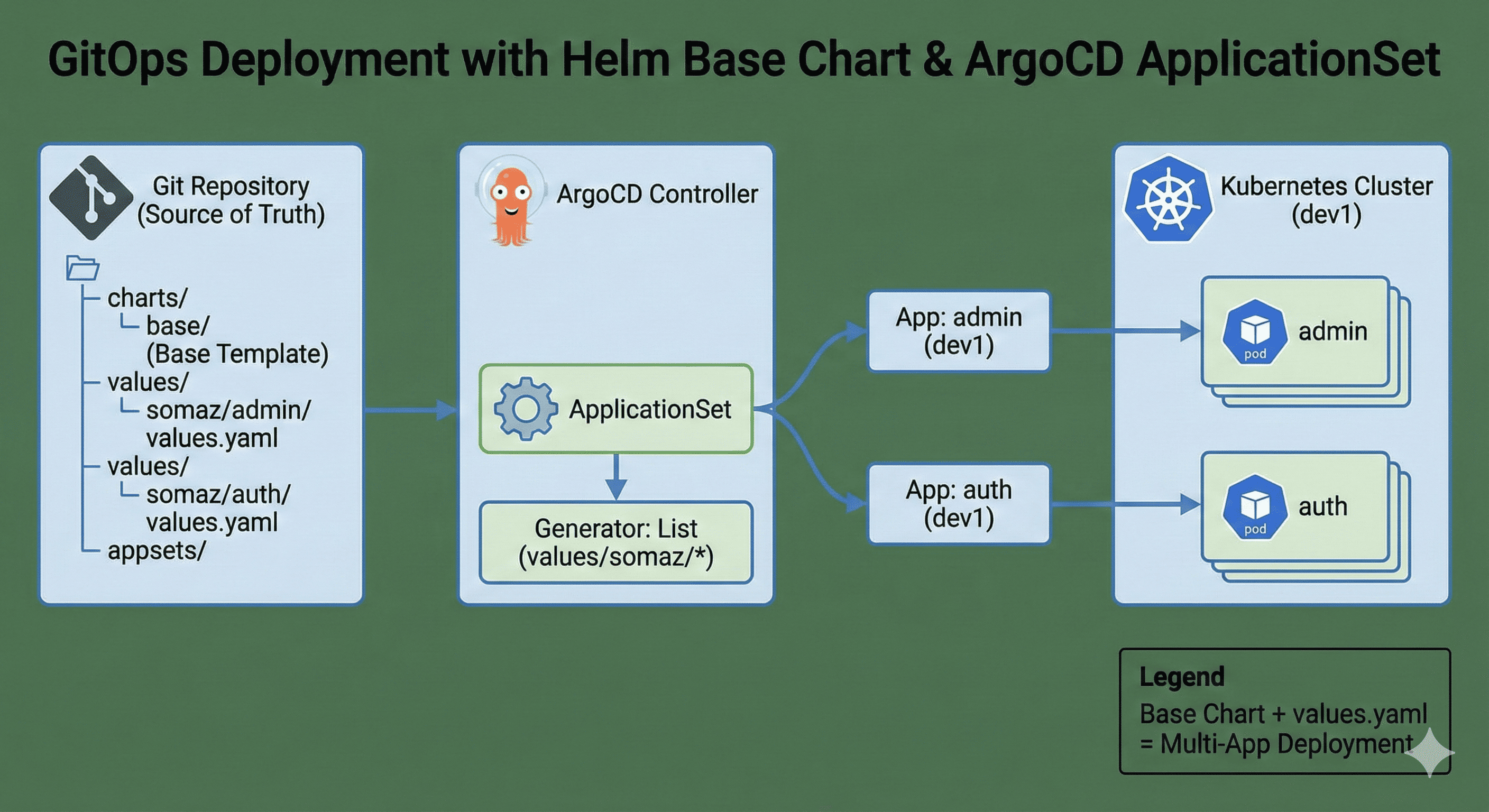
This article covers designing a Helm Base App Chart and automatically deploying various applications through ArgoCD.
We’ll design a structure where a single Helm Chart template (Base Template) serves as the foundation, with individual values.yaml files configured differently based on environment (dev1, dev2, etc.) and service (admin, auth, etc.).
This approach maintains a common chart structure while improving scalability and maintainability. Integration with ArgoCD ApplicationSet enables easy GitOps-based deployment across multiple environments and clusters.
What We’ll Cover
- Helm Base App Chart structure design
- ArgoCD ApplicationSet creation and Git integration
- Per-app values.yaml configuration methods
- Practical options: Filebeat, PVC, certificates
- Template tips applicable to both on-premise and cloud
Final Architecture
Base Template + Environment-specific values.yaml + ArgoCD ApplicationSet
= Efficient Helm-based deployment strategy for all applications across clusters
GitHub Repository: helm-base-app-template
Related Articles
Helm Articles
- What is Helm? (Kubernetes Package Manager)
- How to Write Helm Charts
- Helm Chart Template Syntax
- Helm Chart Creation and Packaging (gh-pages)
Argo Articles
- What is ArgoCD?
- ArgoCD Installation AWS & GCP
- What is ArgoCD ApplicationSet?
- Kustomize + ArgoCD ApplicationSet
- What is Argo Workflow?
- ArgoCD SSO Configuration (GCP OAuth)
- ArgoCD SSO Configuration (GitLab)
Prerequisites
1. ArgoCD Installation
Install ArgoCD in your Kubernetes cluster:
2. Register Kubernetes Cluster to ArgoCD
# List available clusters
argocd cluster list

# Add new cluster
argocd cluster add <context-name>
3. Register GitLab to ArgoCD
Configure GitLab repository access:
4. Storage Configuration (for PV/PVC)
Setup storage provisioner if using persistent volumes:
5. Certificate Manager (for TLS)
Install cert-manager for automated certificate management:
Base Template Structure
Directory Layout
helm-base-app-template/
├── appsets/                    # ArgoCD ApplicationSet definitions
│   └── dev-appsets.yaml
├── charts/                     # Helm charts
│   └── base/                   # Base template
│       ├── Chart.yaml
│       ├── values.yaml
│       └── templates/          # Kubernetes manifests
│           ├── deployment.yaml
│           ├── service.yaml
│           ├── ingress.yaml
│           ├── configmap.yaml
│           ├── pvc.yaml
│           └── certificate.yaml
└── values/                     # Environment-specific values
    └── somaz/                  # Project name
        ├── admin/              # Service name
        │   ├── dev1.values.yaml
        │   └── dev2.values.yaml
        ├── auth/
        │   ├── dev1.values.yaml
        │   └── dev2.values.yaml
        ├── backend/
        └── batch/
Creating Base Template
Chart.yaml
apiVersion: v2
name: base
description: A base Helm chart for Kubernetes applications
type: application
version: 1.0.0
appVersion: "1.0"
values.yaml (Base Configuration)
Key sections in base values.yaml:
# Image configuration
image:
  repository: harbor.somaz.link/somaz/app
  pullPolicy: IfNotPresent
  tag: ""

# Image pull secrets
imageCredentials:
  enabled: true
  registry: https://harbor.somaz.link
  username: robot$gitlab
  password: <token>

# Service configuration
service:
  type: ClusterIP
  port: 80
  targetPort: 8080

# Ingress configuration
ingress:
  enabled: false
  className: "nginx"

# Persistent volumes
persistentVolumes:
  enabled: false

# Persistent volume claims
persistentVolumeClaims:
  enabled: false

# ConfigMaps
configs:
  enabled: false

# Certificates (AWS Route53)
certificate:
  enabled: false
ArgoCD ApplicationSet Configuration
ApplicationSet YAML
Key Components Explained
| Component | Description |
|---|---|
| matrix generator | Combines cluster list with Git directories |
| list generator | Defines target clusters and environments |
| git generator | Discovers app directories automatically |
| template | Defines Application spec for each combination |
| valueFiles | Points to environment-specific values |
Application-Specific Values
Example: Admin Service (dev1.values.yaml)
replicaCount: 1

image:
  repository: harbor.somaz.link/somaz/admin
  pullPolicy: IfNotPresent
  tag: "44c37ad0"

imageCredentials:
  enabled: true
  registry: https://harbor.somaz.link
  username: robot$gitlab
  password: 8xxxxxxxxxxxxxxxxxxxIxxxx
  name: harbor-robot-secret

imagePullSecrets:
  - name: harbor-robot-secret

fullnameOverride: "dev1-somaz-admin"

serviceAccount:
  create: true
  automount: true

service:
  type: ClusterIP
  port: 80
  targetPort: 3000

ingress:
  enabled: true
  className: "nginx"
  annotations:
    nginx.ingress.kubernetes.io/force-ssl-redirect: "false"
    nginx.ingress.kubernetes.io/ssl-passthrough: "false"
  hosts:
    - host: dev1-admin.pm.somaz.link
      paths:
        - path: /
          pathType: ImplementationSpecific

livenessProbe:
  httpGet:
    path: /health
    port: http

readinessProbe:
  httpGet:
    path: /health
    port: http

configs:
  enabled: true
  items:
    - name: dev1-admin-app-config
      datas:
        NODE_ENV: dev1
        SERVER_PORT: "3000"
        REDIS_DB_HOST: dev1-cluster.somaz.link
        REDIS_DB_PORT: "30479"
        COMMON_DB_TYPE: mysql
        COMMON_DB_HOST: dev1-cluster.somaz.link
        COMMON_DB_PORT: "30636"
        COMMON_DB_NAME: common
        COMMON_DB_DATABASE: dev1_common
        COMMON_DB_USER: somaz
        COMMON_DB_PASSWORD: somaz123!

persistentVolumes:
  enabled: true
  items:
    - name: dev1-somaz-admin-app-data-pv
      storage: 5Gi
      volumeMode: Filesystem
      accessModes:
        - ReadWriteMany
      reclaimPolicy: Retain
      storageClassName: nfs-client-nopath
      path: /volume1/nfs/somaz/dev1/server/data
      server: 10.10.10.5

persistentVolumeClaims:
  enabled: true
  items:
    - name: dev1-somaz-admin-app-data-pvc
      accessModes:
        - ReadWriteMany
      storageClassName: nfs-client-nopath
      storage: 5Gi
      mountPath: /app/data
      selector:
        volumeName: dev1-somaz-admin-app-data-pv
Deployment Workflow
1. Developer Workflow
# 1. Update application code
git commit -m "feat: add new feature"
git push origin main

# 2. CI builds and pushes image
# GitLab CI or GitHub Actions builds Docker image
# Image tagged: harbor.somaz.link/somaz/admin:abc123

# 3. Update values.yaml
cd helm-base-app-template/values/somaz/admin
vim dev1.values.yaml
# Update image.tag: "abc123"

# 4. Commit and push
git add dev1.values.yaml
git commit -m "chore: update admin image to abc123"
git push origin main

# 5. ArgoCD automatically detects change and syncs
2. ArgoCD Sync Process
1. ArgoCD polls Git repository (default: 3 minutes)
2. Detects changes in values/somaz/admin/dev1.values.yaml
3. Renders Helm chart with new values
4. Compares with cluster state
5. Applies changes (automated if syncPolicy.automated enabled)
6. Verifies health of resources
7. Reports sync status
Advanced Configurations
1. With TLS Certificates
# In application values file
certificate:
  enabled: true
  secretName: admin-tls
  commonName: dev1-admin.pm.somaz.link
  duration: 2160h0m0s # 90 days
  renewBefore: 720h0m0s # 30 days
  dnsNames:
    - dev1-admin.pm.somaz.link
  issuerName: route53-issuer # AWS
  # issuerName: clouddns-issuer # GCP
  issuerKind: ClusterIssuer

ingress:
  tls:
    - secretName: admin-tls
      hosts:
        - dev1-admin.pm.somaz.link
2. With Sidecar Containers
extraVolumes:
  - name: shared-logs
    emptyDir: {}

extraVolumeMounts:
  - name: shared-logs
    mountPath: /var/log/app

# In deployment.yaml template, add sidecar
sidecars:
  - name: log-shipper
    image: fluent/fluent-bit:latest
    volumeMounts:
      - name: shared-logs
        mountPath: /var/log/app
3. With HPA
autoscaling:
  enabled: true
  minReplicas: 2
  maxReplicas: 10
  targetCPUUtilizationPercentage: 70
  targetMemoryUtilizationPercentage: 80

resources:
  requests:
    cpu: 100m
    memory: 128Mi
  limits:
    cpu: 500m
    memory: 512Mi
Best Practices
1. Naming Conventions
2. Environment Separation
# Directory structure
values/
  somaz/
    admin/
      dev1.values.yaml    # Development 1
      dev2.values.yaml    # Development 2
      staging.values.yaml # Staging
      prod.values.yaml    # Production
3. Secrets Management
# Don't commit secrets to Git
# Use Sealed Secrets or External Secrets Operator

# Example with Sealed Secrets
kubeseal --format yaml < secret.yaml > sealed-secret.yaml

# In values.yaml, reference sealed secret
imagePullSecrets:
  - name: harbor-robot-secret # Created by SealedSecret
4. Resource Limits
# Always set resource limits for production
resources:
  requests:
    cpu: 100m
    memory: 128Mi
  limits:
    cpu: 1000m
    memory: 1Gi
Troubleshooting
Issue 1: Application Not Syncing
Diagnosis:
# Check ApplicationSet
kubectl get applicationset -n argocd

# Check generated Applications
kubectl get applications -n argocd | grep somaz

# View specific Application
argocd app get dev1-somaz-admin
Common causes:
- Git repository not accessible
- Values file path incorrect
- Helm rendering errors
Issue 2: Helm Rendering Errors
Issue 3: Image Pull Errors
Conclusion
By understanding the structure of Base Template, ArgoCD ApplicationSet, and application-specific values files, you can create all applications using just one Base Template.
Key Benefits
✅ Single Source of Truth: One base template for all applications
✅ Environment Consistency: Same structure across dev/staging/prod
✅ GitOps Native: Declarative configuration in Git
✅ Automated Deployments: ArgoCD handles synchronization
✅ Scalable: Easily add new applications and environments
Use Cases
This approach works for:
- On-premise Kubernetes clusters
- Cloud providers (AWS, GCP, Azure)
- Multi-cluster deployments
- Multi-tenant environments
With Base Template + Environment Values + ArgoCD ApplicationSet, you can efficiently deploy all applications regardless of cluster configuration.

Comments