64 min to read
Pulumi: Modern Infrastructure as Code with Programming Languages
Build and manage cloud infrastructure using familiar programming languages with Pulumi's developer-first approach
Overview
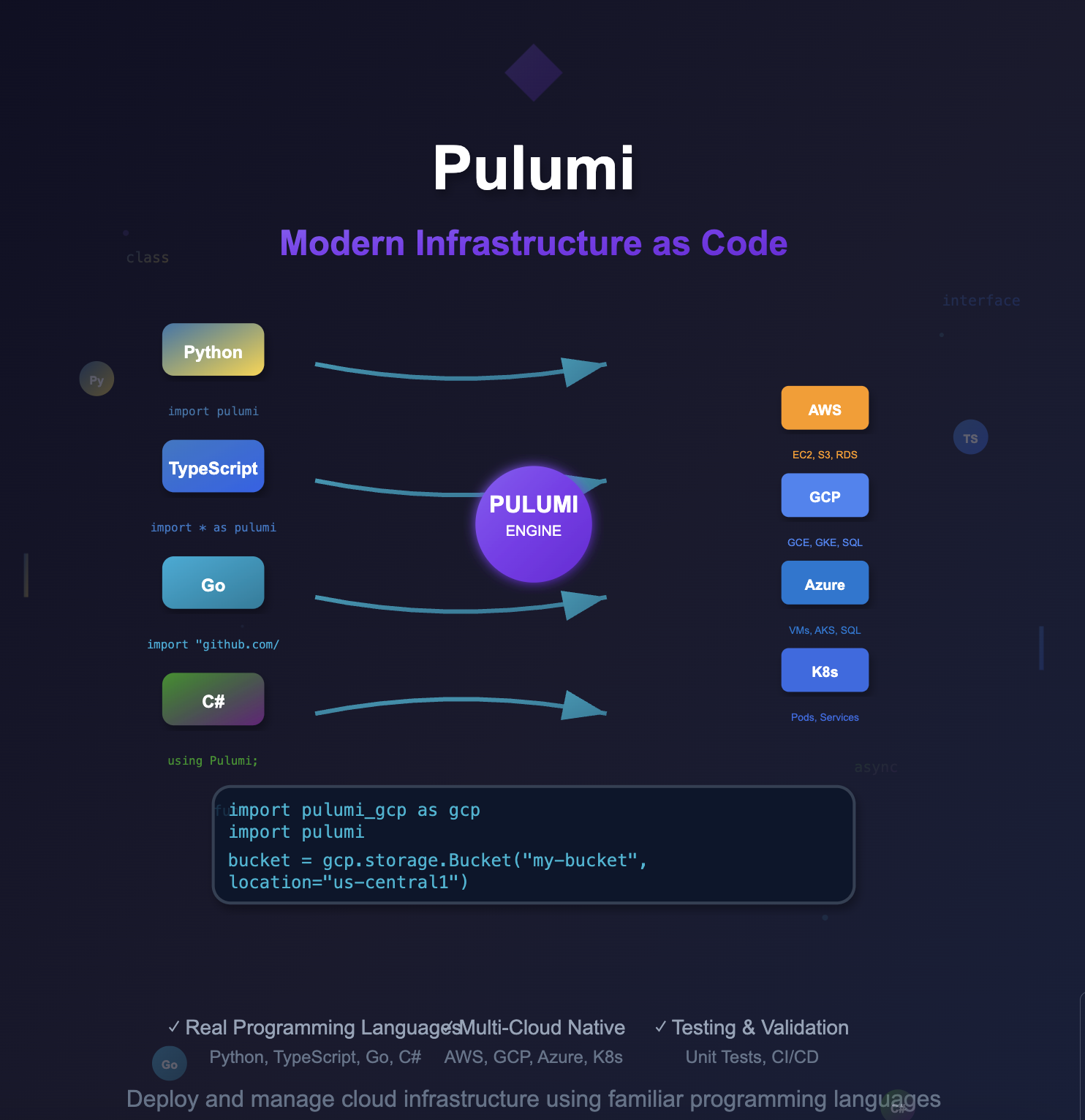
Pulumi is a revolutionary Infrastructure as Code (IaC) platform that enables developers to define, deploy, and manage cloud infrastructure using familiar programming languages like Python, TypeScript, Go, and C#.
Unlike traditional IaC tools that require learning domain-specific languages, Pulumi leverages the power of general-purpose programming languages, providing developers with IDE support, debugging capabilities, testing frameworks, and package management.
This comprehensive guide explores Pulumi’s architecture, installation procedures, state management strategies, and production implementation patterns. We’ll cover multi-cloud deployments, advanced configuration management, and enterprise-grade workflows that enable teams to scale infrastructure operations efficiently.
Pulumi bridges the gap between infrastructure and application development, enabling true Infrastructure as Software where infrastructure can be version controlled, tested, and deployed using the same tools and practices used for application development.
With support for major cloud providers including AWS, Google Cloud Platform, Azure, and Kubernetes, Pulumi has become the preferred choice for developer-centric organizations seeking to modernize their infrastructure management practices.
What is Pulumi?
Pulumi is a modern Infrastructure as Code platform that allows developers to build, deploy, and manage infrastructure using real programming languages instead of YAML or domain-specific configuration languages.
Key Differentiators from Traditional IaC:
# Traditional Terraform approach
resource "aws_s3_bucket" "example" {
  bucket = "my-bucket"

  website {
    index_document = "index.html"
  }
}

# Pulumi approach with Python
import pulumi
import pulumi_aws as aws

bucket = aws.s3.Bucket('my-bucket',
    website=aws.s3.BucketWebsiteArgs(
        index_document="index.html"
    ))

pulumi.export('bucket_url', bucket.bucket_domain_name)
Architecture and Core Concepts:
Pulumi Engine and Language SDKs:
- Declarative Infrastructure: Write imperative code that compiles to declarative graphs
- Idempotent Operations: Ensures consistent results across multiple deployments
- Resource Graph: Automatic dependency resolution and parallel execution
- State Management: Built-in state storage with encryption and backup capabilities
Multi-Language Support:
# Available SDKs
pulumi new aws-python          # Python
pulumi new aws-typescript      # TypeScript/JavaScript
pulumi new aws-go             # Go
pulumi new aws-csharp         # C#/.NET
pulumi new aws-java           # Java (Preview)
pulumi new aws-yaml           # YAML (for simple cases)
Pulumi vs Terraform Comparison:
| Feature | Pulumi | Terraform |
|---|---|---|
| Language | Python, TypeScript, Go, C#, Java | HCL (HashiCorp Configuration Language) |
| Approach | Imperative code → Declarative execution | Declarative configuration |
| IDE Support | Full IDE support, IntelliSense, debugging | Limited syntax highlighting |
| Testing | Unit testing, property testing, integration testing | Limited testing capabilities |
| Modularity | Native language packages and modules | Terraform modules |
| State Management | Managed service or self-hosted backends | Local or remote backends |
| Learning Curve | Familiar for developers | Easier for ops teams |
Installation and Environment Setup
1. System Requirements and Prerequisites
# Prerequisites
- Python 3.7+ / Node.js 14+ / Go 1.17+ / .NET 6.0+
- Cloud provider CLI tools (aws, gcloud, az)
- Git for version control
- Docker (optional, for containerized workflows)
2. Pulumi CLI Installation
Method 1: Native Installation (Recommended)
# Linux/macOS
curl -fsSL https://get.pulumi.com | sh

# macOS with Homebrew
brew install pulumi/tap/pulumi

# Windows with Chocolatey
choco install pulumi

# Verify installation
pulumi version
Method 2: Package Managers
# Ubuntu/Debian
curl -fsSL https://get.pulumi.com | sh
echo 'export PATH=$PATH:$HOME/.pulumi/bin' >> ~/.bashrc
source ~/.bashrc

# Alpine Linux
apk add pulumi

# Docker usage
docker run --rm -v $(pwd):/pulumi -w /pulumi pulumi/pulumi:latest pulumi --help
3. Development Environment Configuration
Python Environment Setup:
# Install Python dependencies
sudo apt-get update && sudo apt-get install -y \
    python3 python3-pip python3-venv \
    build-essential libssl-dev libffi-dev

# Set up pyenv for version management
curl https://pyenv.run | bash
echo 'export PATH="$HOME/.pyenv/bin:$PATH"' >> ~/.bashrc
echo 'eval "$(pyenv init -)"' >> ~/.bashrc
source ~/.bashrc

# Install and configure Python
pyenv install 3.9.16
pyenv global 3.9.16

# Verify setup
python3 --version
pip3 --version
Cloud Provider Authentication:
# AWS Configuration
aws configure --profile pulumi-dev
export AWS_PROFILE=pulumi-dev
export AWS_REGION=us-east-1

# Google Cloud Platform
gcloud auth login
gcloud config set project your-project-id
export GOOGLE_PROJECT=your-project-id
export GOOGLE_REGION=us-central1

# Alternative: Service Account
export GOOGLE_APPLICATION_CREDENTIALS="/path/to/service-account.json"

# Azure
az login
az account set --subscription="your-subscription-id"
Getting Started with Pulumi
1. Project Initialization and Structure
Creating Your First Project:
# Create new project directory
mkdir pulumi-quickstart && cd pulumi-quickstart

# Initialize Pulumi project
pulumi new gcp-python

# Project structure created
├── Pulumi.yaml          # Project metadata
├── Pulumi.dev.yaml      # Stack configuration
├── __main__.py          # Main program
├── requirements.txt     # Python dependencies
└── venv/               # Virtual environment
Project Configuration Files:
# Pulumi.yaml
name: pulumi-quickstart
runtime:
  name: python
  options:
    virtualenv: venv
description: A minimal Google Cloud Python Pulumi program
# Pulumi.dev.yaml
config:
  gcp:project: your-project-id
  gcp:region: us-central1
2. Basic Resource Management
Simple GCS Bucket Creation:
# __main__.py
"""Google Cloud Python Pulumi program for basic resource management"""

import pulumi
import pulumi_gcp as gcp

# Create a GCS bucket with basic configuration
bucket = gcp.storage.Bucket('pulumi-quickstart-bucket',
    location="US",
    uniform_bucket_level_access=True,
    versioning=gcp.storage.BucketVersioningArgs(enabled=True))

# Export bucket information
pulumi.export('bucket_name', bucket.name)
pulumi.export('bucket_url', bucket.url)
Deploy and Manage Resources:
# Install dependencies
pip install -r requirements.txt

# Preview changes
pulumi preview

# Deploy infrastructure
pulumi up

# View stack outputs
pulumi stack output

# Check deployment status
pulumi stack

# Destroy resources when done
pulumi destroy
3. Advanced Resource Configuration
Static Website Hosting Setup:
"""Advanced GCS bucket configuration for static website hosting"""

import pulumi
import pulumi_gcp as gcp

# Create bucket with custom configuration
bucket = gcp.storage.Bucket('static-website-bucket',
    name="my-static-website",
    location="asia-northeast3",
    website=gcp.storage.BucketWebsiteArgs(
        main_page_suffix="index.html",
        not_found_page="404.html"
    ),
    uniform_bucket_level_access=True,
    force_destroy=True)

# Upload website content
index_html = gcp.storage.BucketObject(
    "index.html",
    bucket=bucket.name,
    source=pulumi.FileAsset("index.html"),
    content_type="text/html")

# Configure public access
bucket_iam_binding = gcp.storage.BucketIAMBinding(
    "public-read-binding",
    bucket=bucket.name,
    role="roles/storage.objectViewer",
    members=["allUsers"])

# Export website endpoint
pulumi.export("bucket_name", bucket.name)
pulumi.export("website_url", pulumi.Output.concat(
    "https://storage.googleapis.com/", bucket.name, "/", index_html.name))
HTML Content Example:
<!-- index.html -->
<!DOCTYPE html>
<html lang="en">
<head>
    <meta charset="UTF-8">
    <meta name="viewport" content="width=device-width, initial-scale=1.0">
    <title>Pulumi Static Website</title>
    <style>
        body {
            font-family: Arial, sans-serif;
            max-width: 800px;
            margin: 0 auto;
            padding: 2rem;
            background: linear-gradient(135deg, #667eea 0%, #764ba2 100%);
            color: white;
        }
        .container {
            background: rgba(255, 255, 255, 0.1);
            padding: 2rem;
            border-radius: 10px;
            backdrop-filter: blur(10px);
        }
    </style>
</head>
<body>
    <div class="container">
        <h1>🚀 Hello, Pulumi!</h1>
        <p>This website was deployed using Pulumi Infrastructure as Code.</p>
        <p>Powered by Google Cloud Storage and managed with Python.</p>
    </div>
</body>
</html>
State Management and Backend Configuration
1. Understanding Pulumi State
Pulumi uses stacks to manage infrastructure state, with each stack representing a separate deployment environment (development, staging, production). State includes all managed resources and their current properties in a serialized format.
Backend Storage Options:
# Pulumi Service (Default - Managed)
pulumi login

# Self-managed Object Storage
pulumi login s3://my-pulumi-state-bucket
pulumi login gs://my-pulumi-state-bucket
pulumi login azblob://my-pulumi-state-container

# Local filesystem (Development only)
pulumi login file://~/.pulumi-local
2. Production State Management Setup
GCS Backend Configuration:
# Create dedicated state management bucket
"""State management infrastructure setup"""

import pulumi
import pulumi_gcp as gcp

# Create state storage bucket with versioning and encryption
state_bucket = gcp.storage.Bucket('pulumi-state-bucket',
    name="pulumi-state-production",
    location="us-central1",
    uniform_bucket_level_access=True,
    versioning=gcp.storage.BucketVersioningArgs(enabled=True),
    encryption=gcp.storage.BucketEncryptionArgs(
        default_kms_key_name="projects/PROJECT_ID/locations/LOCATION/keyRings/RING_NAME/cryptoKeys/KEY_NAME"
    ),
    lifecycle_rules=[gcp.storage.BucketLifecycleRuleArgs(
        condition=gcp.storage.BucketLifecycleRuleConditionArgs(
            age=90,
            with_state="ARCHIVED"
        ),
        action=gcp.storage.BucketLifecycleRuleActionArgs(
            type="Delete"
        )
    )])

pulumi.export('state_bucket_name', state_bucket.name)
pulumi.export('state_bucket_url', state_bucket.url)
State Backend Migration:
# Deploy state bucket first
pulumi up

# Export current state for backup
pulumi stack export > state-backup.json

# Login to GCS backend
pulumi login gs://pulumi-state-production

# Create new stack in GCS backend
pulumi stack init production

# Import previous state
pulumi stack import < state-backup.json

# Verify migration
pulumi preview

# Update backend URL for team
echo "Team members should run: pulumi login gs://pulumi-state-production"
3. Multi-Environment State Management
Environment-Specific Stack Configuration:
# Initialize multiple stacks
pulumi stack init development
pulumi stack init staging
pulumi stack init production

# Configure environment-specific settings
pulumi config set gcp:project dev-project-123 --stack development
pulumi config set gcp:region us-west1 --stack development

pulumi config set gcp:project staging-project-456 --stack staging
pulumi config set gcp:region us-central1 --stack staging

pulumi config set gcp:project prod-project-789 --stack production
pulumi config set gcp:region us-east1 --stack production

# Switch between stacks
pulumi stack select development
pulumi stack select staging
pulumi stack select production
Advanced Stack Management:
"""Multi-environment configuration with stack references"""

import pulumi
import pulumi_gcp as gcp

# Get current stack name
stack = pulumi.get_stack()

# Environment-specific configurations
config = pulumi.Config()
project_id = config.require("gcp:project")
region = config.get("gcp:region") or "us-central1"

# Environment-specific resource sizing
instance_types = {
    "development": "e2-micro",
    "staging": "e2-small",
    "production": "e2-standard-2"
}

# Create environment-specific resources
bucket = gcp.storage.Bucket(f'{stack}-app-bucket',
    name=f"{project_id}-{stack}-bucket",
    location=region.upper(),
    uniform_bucket_level_access=True,
    versioning=gcp.storage.BucketVersioningArgs(enabled=True))

# Reference resources from other stacks
if stack == "production":
    # Reference shared infrastructure stack
    shared_stack = pulumi.StackReference("organization/shared-infrastructure/production")
    vpc_id = shared_stack.get_output("vpc_id")
    subnet_id = shared_stack.get_output("subnet_id")

pulumi.export('environment', stack)
pulumi.export('bucket_name', bucket.name)
Infrastructure Deployment Patterns
1. VPC and Networking Infrastructure
Comprehensive VPC Setup:
"""Complete VPC and networking infrastructure"""

import pulumi
import pulumi_gcp as gcp

# Configuration
config = pulumi.Config()
project_id = config.require("gcp:project")
region = config.get("region") or "us-central1"
zone = f"{region}-a"

# Create VPC network
vpc = gcp.compute.Network("main-vpc",
    name=f"{project_id}-vpc",
    auto_create_subnetworks=False,
    description="Main VPC for application infrastructure")

# Create subnet
subnet = gcp.compute.Subnetwork("main-subnet",
    name=f"{project_id}-subnet",
    ip_cidr_range="10.0.1.0/24",
    region=region,
    network=vpc.id,
    description="Main subnet for application servers")

# Create Cloud Router for NAT
cloud_router = gcp.compute.Router("main-router",
    name=f"{project_id}-router",
    region=region,
    network=vpc.id,
    description="Router for NAT gateway")

# Create NAT Gateway
nat_gateway = gcp.compute.RouterNat("main-nat",
    name=f"{project_id}-nat",
    router=cloud_router.name,
    region=region,
    nat_ip_allocate_option="AUTO_ONLY",
    source_subnetwork_ip_ranges_to_nat="ALL_SUBNETWORKS_ALL_IP_RANGES")

# Create firewall rules
firewall_ssh = gcp.compute.Firewall("allow-ssh",
    name=f"{project_id}-allow-ssh",
    network=vpc.id,
    allows=[gcp.compute.FirewallAllowArgs(
        protocol="tcp",
        ports=["22"]
    )],
    source_ranges=["0.0.0.0/0"],
    target_tags=["ssh-allowed"])

firewall_http = gcp.compute.Firewall("allow-http",
    name=f"{project_id}-allow-http",
    network=vpc.id,
    allows=[gcp.compute.FirewallAllowArgs(
        protocol="tcp",
        ports=["80", "443"]
    )],
    source_ranges=["0.0.0.0/0"],
    target_tags=["http-allowed"])

# Export network information
pulumi.export("vpc_id", vpc.id)
pulumi.export("vpc_name", vpc.name)
pulumi.export("subnet_id", subnet.id)
pulumi.export("subnet_name", subnet.name)
2. Compute Engine Deployment
Production-Ready Compute Instance:
"""Production Compute Engine instance with best practices"""

import pulumi
import pulumi_gcp as gcp
import base64

# Instance configuration
config = pulumi.Config()
project_id = config.require("gcp:project")
region = config.get("region") or "us-central1"
zone = f"{region}-a"

# Create static IP address
static_ip = gcp.compute.Address("instance-ip",
    name=f"{project_id}-instance-ip",
    region=region,
    description="Static IP for main application server")

# Startup script for instance initialization
startup_script = """#!/bin/bash
apt-get update
apt-get install -y nginx docker.io
systemctl start nginx
systemctl enable nginx
systemctl start docker
systemctl enable docker

# Configure nginx
cat > /var/www/html/index.html << EOF
<!DOCTYPE html>
<html>
<head>
    <title>Pulumi Deployed Server</title>
    <style>
        body { font-family: Arial, sans-serif; margin: 40px; }
        .container { max-width: 800px; margin: 0 auto; }
        .status { color: #28a745; font-weight: bold; }
    </style>
</head>
<body>
    <div class="container">
        <h1>🚀 Server Deployed with Pulumi</h1>
        <p class="status">✅ Server is running successfully</p>
        <p>Instance ID: $(curl -H "Metadata-Flavor: Google" http://metadata.google.internal/computeMetadata/v1/instance/id)</p>
        <p>Zone: $(curl -H "Metadata-Flavor: Google" http://metadata.google.internal/computeMetadata/v1/instance/zone | cut -d/ -f4)</p>
        <p>Deployed at: $(date)</p>
    </div>
</body>
</html>
EOF

systemctl restart nginx
"""

# Create service account for instance
service_account = gcp.serviceaccount.Account("instance-sa",
    account_id=f"{project_id}-instance-sa",
    display_name="Compute Instance Service Account",
    description="Service account for Pulumi-managed compute instances")

# Create compute instance
instance = gcp.compute.Instance("main-instance",
    name=f"{project_id}-instance",
    machine_type="e2-medium",
    zone=zone,

    # Boot disk configuration
    boot_disk=gcp.compute.InstanceBootDiskArgs(
        initialize_params=gcp.compute.InstanceBootDiskInitializeParamsArgs(
            image="ubuntu-os-cloud/ubuntu-2004-lts",
            size=20,
            type="pd-ssd"
        )
    ),

    # Network configuration
    network_interfaces=[gcp.compute.InstanceNetworkInterfaceArgs(
        network="projects/{}/global/networks/{}".format(project_id, vpc.name),
        subnetwork="projects/{}/regions/{}/subnetworks/{}".format(project_id, region, subnet.name),
        access_configs=[gcp.compute.InstanceNetworkInterfaceAccessConfigArgs(
            nat_ip=static_ip.address
        )]
    )],

    # Service account and scopes
    service_account=gcp.compute.InstanceServiceAccountArgs(
        email=service_account.email,
        scopes=[
            "https://www.googleapis.com/auth/devstorage.read_only",
            "https://www.googleapis.com/auth/logging.write",
            "https://www.googleapis.com/auth/monitoring.write"
        ]
    ),

    # Instance metadata and startup script
    metadata={
        "startup-script": startup_script,
        "ssh-keys": f"pulumi-user:{config.get('ssh_public_key') or 'ssh-rsa AAAAB3NzaC1yc2E...'}",
        "enable-oslogin": "TRUE"
    },

    # Security and management
    tags=["http-allowed", "ssh-allowed"],
    allow_stopping_for_update=True,

    # Resource labels
    labels={
        "environment": pulumi.get_stack(),
        "managed-by": "pulumi",
        "project": project_id
    })

# Export instance information
pulumi.export("instance_name", instance.name)
pulumi.export("instance_external_ip", static_ip.address)
pulumi.export("instance_internal_ip", instance.network_interfaces[0].network_ip)
pulumi.export("ssh_command", pulumi.Output.concat(
    "ssh -i ~/.ssh/pulumi-key pulumi-user@", static_ip.address))
pulumi.export("web_url", pulumi.Output.concat("http://", static_ip.address))
3. Database and Storage Services
Cloud SQL and Storage Configuration:
"""Database and storage services setup"""

import pulumi
import pulumi_gcp as gcp
import pulumi_random as random

# Generate random password for database
db_password = random.RandomPassword("db-password",
    length=16,
    special=True)

# Create Cloud SQL instance
sql_instance = gcp.sql.DatabaseInstance("main-db",
    name=f"{project_id}-db-instance",
    database_version="POSTGRES_13",
    region=region,

    settings=gcp.sql.DatabaseInstanceSettingsArgs(
        tier="db-f1-micro",  # Use db-custom-1-3840 for production

        # Backup configuration
        backup_configuration=gcp.sql.DatabaseInstanceSettingsBackupConfigurationArgs(
            enabled=True,
            start_time="03:00",
            point_in_time_recovery_enabled=True,
            backup_retention_settings=gcp.sql.DatabaseInstanceSettingsBackupConfigurationBackupRetentionSettingsArgs(
                retained_backups=7,
                retention_unit="COUNT"
            )
        ),

        # High availability
        availability_type="REGIONAL" if pulumi.get_stack() == "production" else "ZONAL",

        # Security settings
        ip_configuration=gcp.sql.DatabaseInstanceSettingsIpConfigurationArgs(
            ipv4_enabled=True,
            require_ssl=True,
            authorized_networks=[gcp.sql.DatabaseInstanceSettingsIpConfigurationAuthorizedNetworkArgs(
                name="allow-all",  # Restrict this in production
                value="0.0.0.0/0"
            )]
        ),

        # Maintenance window
        maintenance_window=gcp.sql.DatabaseInstanceSettingsMaintenanceWindowArgs(
            day=7,  # Sunday
            hour=3,  # 3 AM
            update_track="stable"
        )
    ),

    deletion_protection=pulumi.get_stack() == "production")

# Create database
database = gcp.sql.Database("app-database",
    name="application_db",
    instance=sql_instance.name)

# Create database user
db_user = gcp.sql.User("app-user",
    name="app_user",
    instance=sql_instance.name,
    password=db_password.result)

# Application storage bucket
app_bucket = gcp.storage.Bucket("app-storage",
    name=f"{project_id}-app-storage",
    location=region.upper(),

    # Storage class optimization
    storage_class="STANDARD",

    # Lifecycle management
    lifecycle_rules=[
        gcp.storage.BucketLifecycleRuleArgs(
            condition=gcp.storage.BucketLifecycleRuleConditionArgs(age=30),
            action=gcp.storage.BucketLifecycleRuleActionArgs(type="SetStorageClass", storage_class="NEARLINE")
        ),
        gcp.storage.BucketLifecycleRuleArgs(
            condition=gcp.storage.BucketLifecycleRuleConditionArgs(age=365),
            action=gcp.storage.BucketLifecycleRuleActionArgs(type="SetStorageClass", storage_class="COLDLINE")
        )
    ],

    # Versioning and retention
    versioning=gcp.storage.BucketVersioningArgs(enabled=True),
    uniform_bucket_level_access=True)

# Export database and storage information
pulumi.export("sql_instance_name", sql_instance.name)
pulumi.export("sql_connection_name", sql_instance.connection_name)
pulumi.export("database_name", database.name)
pulumi.export("storage_bucket", app_bucket.name)
Production Workflows and Best Practices
1. CI/CD Pipeline Integration
GitHub Actions Workflow:
# .github/workflows/pulumi.yml
name: Pulumi Infrastructure Deployment

on:
  push:
    branches: [ main, develop ]
  pull_request:
    branches: [ main ]

env:
  PULUMI_ACCESS_TOKEN: $

jobs:
  preview:
    runs-on: ubuntu-latest
    if: github.event_name == 'pull_request'

    steps:
    - uses: actions/checkout@v3

    - name: Setup Python
      uses: actions/setup-python@v4
      with:
        python-version: '3.9'

    - name: Install dependencies
      run: |
        python -m pip install --upgrade pip
        pip install -r requirements.txt

    - name: Setup Pulumi
      uses: pulumi/actions@v4

    - name: Configure GCP credentials
      uses: google-github-actions/setup-gcloud@v1
      with:
        service_account_key: $
        project_id: $

    - name: Pulumi Preview
      run: |
        pulumi stack select dev
        pulumi preview --diff
      env:
        GOOGLE_CREDENTIALS: $

  deploy:
    runs-on: ubuntu-latest
    if: github.ref == 'refs/heads/main'

    steps:
    - uses: actions/checkout@v3

    - name: Setup Python
      uses: actions/setup-python@v4
      with:
        python-version: '3.9'

    - name: Install dependencies
      run: |
        python -m pip install --upgrade pip
        pip install -r requirements.txt

    - name: Setup Pulumi
      uses: pulumi/actions@v4

    - name: Configure GCP credentials
      uses: google-github-actions/setup-gcloud@v1
      with:
        service_account_key: $
        project_id: $

    - name: Deploy to Production
      run: |
        pulumi stack select production
        pulumi up --yes --skip-preview
      env:
        GOOGLE_CREDENTIALS: $

    - name: Update Stack Tags
      run: |
        pulumi stack tag set deployment:commit $
        pulumi stack tag set deployment:branch $
        pulumi stack tag set deployment:timestamp $(date -u +"%Y-%m-%dT%H:%M:%SZ")
2. Infrastructure Testing and Validation
Unit Testing with Pulumi:
# tests/test_infrastructure.py
"""Unit tests for Pulumi infrastructure"""

import unittest
from typing import Any
import pulumi

class InfrastructureTests(unittest.TestCase):

    def test_bucket_has_versioning_enabled(self):
        """Test that storage buckets have versioning enabled"""

        def check_bucket(args: list[Any]) -> bool:
            bucket_args = args[0]
            versioning = bucket_args.get('versioning')
            return versioning is not None and versioning.get('enabled', False)

        # Mock Pulumi resource creation
        pulumi.runtime.set_mocks({
            'gcp:storage/bucket:Bucket': lambda args: (
                'bucket-id-123',
                {
                    'name': 'test-bucket',
                    'versioning': {'enabled': True},
                    'location': 'US'
                }
            )
        })

        # Import and test the infrastructure module
        import __main__ as infrastructure

        # Verify bucket configuration
        self.assertTrue(check_bucket(['test-bucket-args']))

    def test_compute_instance_has_required_tags(self):
        """Test that compute instances have required tags"""

        required_tags = ['environment', 'managed-by', 'project']

        def check_instance_tags(args: list[Any]) -> bool:
            instance_args = args[0]
            labels = instance_args.get('labels', {})
            return all(tag in labels for tag in required_tags)

        # Test instance configuration
        self.assertTrue(check_instance_tags([{
            'labels': {
                'environment': 'test',
                'managed-by': 'pulumi',
                'project': 'test-project'
            }
        }]))

    def test_sql_instance_has_backup_enabled(self):
        """Test that SQL instances have backup enabled"""

        def check_sql_backup(args: list[Any]) -> bool:
            instance_args = args[0]
            settings = instance_args.get('settings', {})
            backup_config = settings.get('backup_configuration', {})
            return backup_config.get('enabled', False)

        # Test SQL configuration
        self.assertTrue(check_sql_backup([{
            'settings': {
                'backup_configuration': {
                    'enabled': True,
                    'start_time': '03:00'
                }
            }
        }]))

if __name__ == '__main__':
    unittest.main()
Integration Testing Script:
#!/bin/bash
# scripts/integration-test.sh

set -euo pipefail

echo "Starting Pulumi infrastructure integration tests..."

# Test environment variables
export PULUMI_STACK_NAME="integration-test-$(date +%s)"
export PULUMI_CONFIG_PASSPHRASE="test-passphrase"

# Initialize test stack
pulumi stack init "$PULUMI_STACK_NAME"

# Set test configuration
pulumi config set gcp:project integration-test-project
pulumi config set gcp:region us-central1

# Deploy infrastructure
echo "Deploying test infrastructure..."
pulumi up --yes --skip-preview

# Run tests against deployed infrastructure
echo "Running integration tests..."

# Test 1: Verify bucket accessibility
BUCKET_NAME=$(pulumi stack output bucket_name)
if gsutil ls "gs://$BUCKET_NAME" > /dev/null 2>&1; then
    echo "✅ Bucket accessibility test passed"
else
    echo "❌ Bucket accessibility test failed"
    exit 1
fi

# Test 2: Verify compute instance connectivity
INSTANCE_IP=$(pulumi stack output instance_external_ip)
if curl -s --connect-timeout 10 "http://$INSTANCE_IP" > /dev/null; then
    echo "✅ Instance connectivity test passed"
else
    echo "❌ Instance connectivity test failed"
    exit 1
fi

# Test 3: Verify database connectivity
SQL_INSTANCE=$(pulumi stack output sql_instance_name)
if gcloud sql instances describe "$SQL_INSTANCE" --format="value(state)" | grep -q "RUNNABLE"; then
    echo "✅ Database connectivity test passed"
else
    echo "❌ Database connectivity test failed"
    exit 1
fi

# Cleanup test resources
echo "Cleaning up test infrastructure..."
pulumi destroy --yes --skip-preview
pulumi stack rm --yes

echo "✅ All integration tests passed successfully!"
3. Resource State Management and Recovery
State Recovery Procedures:
#!/bin/bash
# scripts/state-recovery.sh

set -euo pipefail

STACK_NAME="${1:-production}"
BACKUP_DIR="./state-backups/$(date +%Y%m%d_%H%M%S)"

echo "Performing state backup and recovery for stack: $STACK_NAME"

# Create backup directory
mkdir -p "$BACKUP_DIR"

# Export current state
pulumi stack select "$STACK_NAME"
pulumi stack export > "$BACKUP_DIR/stack-state.json"

# Export stack configuration
pulumi config > "$BACKUP_DIR/stack-config.txt"

# Create stack metadata
cat > "$BACKUP_DIR/metadata.json" << EOF
{
    "stack_name": "$STACK_NAME",
    "backup_timestamp": "$(date -u +%Y-%m-%dT%H:%M:%SZ)",
    "pulumi_version": "$(pulumi version)",
    "git_commit": "$(git rev-parse HEAD 2>/dev/null || echo 'unknown')",
    "git_branch": "$(git branch --show-current 2>/dev/null || echo 'unknown')"
}
EOF

echo "✅ State backup completed: $BACKUP_DIR"

# Validate state integrity
if pulumi stack export --file "$BACKUP_DIR/validation-state.json"; then
    if diff "$BACKUP_DIR/stack-state.json" "$BACKUP_DIR/validation-state.json" > /dev/null; then
        echo "✅ State backup integrity verified"
        rm "$BACKUP_DIR/validation-state.json"
    else
        echo "❌ State backup integrity check failed"
        exit 1
    fi
fi

# Compress backup
tar -czf "$BACKUP_DIR.tar.gz" -C "$(dirname "$BACKUP_DIR")" "$(basename "$BACKUP_DIR")"
rm -rf "$BACKUP_DIR"

echo "✅ Compressed backup created: $BACKUP_DIR.tar.gz"
Resource Import and State Repair:
# scripts/resource-import.py
"""Script for importing existing resources into Pulumi state"""

import subprocess
import json
import sys
from typing import Dict, List

def import_gcp_resources(project_id: str, region: str) -> None:
    """Import existing GCP resources into Pulumi state"""

    # Resource import mappings
    import_mappings = [
        {
            "resource_type": "gcp:compute/network:Network",
            "pulumi_name": "imported-vpc",
            "gcp_resource": f"projects/{project_id}/global/networks/default"
        },
        {
            "resource_type": "gcp:storage/bucket:Bucket",
            "pulumi_name": "imported-bucket",
            "gcp_resource": f"existing-bucket-name"
        }
    ]

    print(f"Importing {len(import_mappings)} resources...")

    for mapping in import_mappings:
        try:
            cmd = [
                "pulumi", "import",
                mapping["resource_type"],
                mapping["pulumi_name"],
                mapping["gcp_resource"]
            ]

            result = subprocess.run(cmd, capture_output=True, text=True)

            if result.returncode == 0:
                print(f"✅ Successfully imported {mapping['pulumi_name']}")
            else:
                print(f"❌ Failed to import {mapping['pulumi_name']}: {result.stderr}")

        except Exception as e:
            print(f"❌ Error importing {mapping['pulumi_name']}: {str(e)}")

def validate_imported_state() -> bool:
    """Validate that imported resources match expected state"""

    try:
        # Run pulumi preview to check for drift
        result = subprocess.run(
            ["pulumi", "preview", "--diff", "--json"],
            capture_output=True,
            text=True
        )

        if result.returncode == 0:
            preview_data = json.loads(result.stdout)
            changes = preview_data.get("changeSummary", {})

            if changes.get("create", 0) == 0 and changes.get("update", 0) == 0:
                print("✅ No drift detected - import successful")
                return True
            else:
                print(f"⚠️  Drift detected: {changes}")
                return False
        else:
            print(f"❌ Preview failed: {result.stderr}")
            return False

    except Exception as e:
        print(f"❌ Validation error: {str(e)}")
        return False

if __name__ == "__main__":
    if len(sys.argv) != 3:
        print("Usage: python resource-import.py <project_id> <region>")
        sys.exit(1)

    project_id = sys.argv[1]
    region = sys.argv[2]

    import_gcp_resources(project_id, region)

    if validate_imported_state():
        print("🎉 Resource import completed successfully!")
    else:
        print("⚠️  Import completed with warnings - manual review required")
Advanced Configuration and Patterns
1. Configuration Management and Secrets
Secure Configuration Handling:
# config/environments.py
"""Environment-specific configuration management"""

import pulumi
from pulumi import Config, get_stack
from typing import Dict, Any

class EnvironmentConfig:
    def __init__(self):
        self.config = Config()
        self.stack = get_stack()

    def get_environment_config(self) -> Dict[str, Any]:
        """Get environment-specific configuration"""

        base_config = {
            "project_id": self.config.require("gcp:project"),
            "region": self.config.get("gcp:region") or "us-central1",
            "environment": self.stack,
            "common_tags": {
                "environment": self.stack,
                "managed_by": "pulumi",
                "project": self.config.require("gcp:project")
            }
        }

        # Environment-specific overrides
        env_configs = {
            "development": {
                "instance_type": "e2-micro",
                "sql_tier": "db-f1-micro",
                "high_availability": False,
                "backup_retention": 7,
                "deletion_protection": False
            },
            "staging": {
                "instance_type": "e2-small",
                "sql_tier": "db-g1-small",
                "high_availability": False,
                "backup_retention": 14,
                "deletion_protection": False
            },
            "production": {
                "instance_type": "e2-standard-2",
                "sql_tier": "db-n1-standard-1",
                "high_availability": True,
                "backup_retention": 30,
                "deletion_protection": True
            }
        }

        env_config = env_configs.get(self.stack, env_configs["development"])
        return {**base_config, **env_config}

    def get_secrets(self) -> Dict[str, str]:
        """Get secret configuration values"""

        return {
            "db_password": self.config.require_secret("database_password"),
            "api_key": self.config.require_secret("api_key"),
            "ssl_cert": self.config.get_secret("ssl_certificate"),
            "ssl_key": self.config.get_secret("ssl_private_key")
        }

# Usage in main program
config_manager = EnvironmentConfig()
env_config = config_manager.get_environment_config()
secrets = config_manager.get_secrets()
Secret Management Integration:
#!/bin/bash
# scripts/setup-secrets.sh

set -euo pipefail

STACK_NAME="${1:-development}"
SECRET_SOURCE="${2:-local}"  # local, gcp-secret-manager, vault

echo "Setting up secrets for stack: $STACK_NAME"

pulumi stack select "$STACK_NAME"

case "$SECRET_SOURCE" in
    "local")
        # Set secrets from local environment
        pulumi config set --secret database_password "$(openssl rand -base64 32)"
        pulumi config set --secret api_key "$(uuidgen)"
        ;;

    "gcp-secret-manager")
        # Retrieve secrets from GCP Secret Manager
        PROJECT_ID=$(pulumi config get gcp:project)

        DB_PASSWORD=$(gcloud secrets versions access latest --secret="database-password" --project="$PROJECT_ID")
        API_KEY=$(gcloud secrets versions access latest --secret="api-key" --project="$PROJECT_ID")

        pulumi config set --secret database_password "$DB_PASSWORD"
        pulumi config set --secret api_key "$API_KEY"
        ;;

    "vault")
        # Retrieve secrets from HashiCorp Vault
        export VAULT_ADDR="${VAULT_ADDR:-https://vault.company.com}"

        DB_PASSWORD=$(vault kv get -field=password secret/database)
        API_KEY=$(vault kv get -field=key secret/api)

        pulumi config set --secret database_password "$DB_PASSWORD"
        pulumi config set --secret api_key "$API_KEY"
        ;;

    *)
        echo "Unknown secret source: $SECRET_SOURCE"
        echo "Supported sources: local, gcp-secret-manager, vault"
        exit 1
        ;;
esac

echo "✅ Secrets configured for stack: $STACK_NAME"
2. Modular Infrastructure Components
Reusable Component Library:
# components/network.py
"""Reusable network infrastructure component"""

import pulumi
import pulumi_gcp as gcp
from typing import Dict, List, Optional

class NetworkComponent(pulumi.ComponentResource):
    def __init__(self,
                 name: str,
                 project_id: str,
                 region: str,
                 cidr_block: str = "10.0.0.0/16",
                 enable_nat: bool = True,
                 firewall_rules: Optional[List[Dict]] = None,
                 opts: Optional[pulumi.ResourceOptions] = None):

        super().__init__("custom:network:Network", name, {}, opts)

        # Create VPC
        self.vpc = gcp.compute.Network(f"{name}-vpc",
            name=f"{project_id}-{name}-vpc",
            auto_create_subnetworks=False,
            opts=pulumi.ResourceOptions(parent=self))

        # Create subnet
        self.subnet = gcp.compute.Subnetwork(f"{name}-subnet",
            name=f"{project_id}-{name}-subnet",
            ip_cidr_range=cidr_block,
            region=region,
            network=self.vpc.id,
            opts=pulumi.ResourceOptions(parent=self))

        # Create Cloud Router for NAT (if enabled)
        if enable_nat:
            self.router = gcp.compute.Router(f"{name}-router",
                name=f"{project_id}-{name}-router",
                region=region,
                network=self.vpc.id,
                opts=pulumi.ResourceOptions(parent=self))

            self.nat = gcp.compute.RouterNat(f"{name}-nat",
                name=f"{project_id}-{name}-nat",
                router=self.router.name,
                region=region,
                nat_ip_allocate_option="AUTO_ONLY",
                source_subnetwork_ip_ranges_to_nat="ALL_SUBNETWORKS_ALL_IP_RANGES",
                opts=pulumi.ResourceOptions(parent=self))

        # Create firewall rules
        self.firewall_rules = []
        default_rules = [
            {
                "name": "allow-internal",
                "allows": [{"protocol": "tcp"}, {"protocol": "udp"}, {"protocol": "icmp"}],
                "source_ranges": [cidr_block],
                "description": "Allow internal communication"
            },
            {
                "name": "allow-ssh",
                "allows": [{"protocol": "tcp", "ports": ["22"]}],
                "source_ranges": ["0.0.0.0/0"],
                "target_tags": ["ssh-allowed"],
                "description": "Allow SSH access"
            }
        ]

        rules = firewall_rules or default_rules

        for rule in rules:
            firewall = gcp.compute.Firewall(f"{name}-{rule['name']}",
                name=f"{project_id}-{name}-{rule['name']}",
                network=self.vpc.id,
                allows=[gcp.compute.FirewallAllowArgs(**allow) for allow in rule["allows"]],
                source_ranges=rule.get("source_ranges", []),
                target_tags=rule.get("target_tags", []),
                description=rule.get("description", ""),
                opts=pulumi.ResourceOptions(parent=self))

            self.firewall_rules.append(firewall)

        # Register outputs
        self.register_outputs({
            "vpc_id": self.vpc.id,
            "vpc_name": self.vpc.name,
            "subnet_id": self.subnet.id,
            "subnet_name": self.subnet.name
        })
# components/compute.py
"""Reusable compute infrastructure component"""

import pulumi
import pulumi_gcp as gcp
from typing import Dict, List, Optional

class ComputeComponent(pulumi.ComponentResource):
    def __init__(self,
                 name: str,
                 project_id: str,
                 zone: str,
                 vpc_network: str,
                 subnet_network: str,
                 machine_type: str = "e2-medium",
                 image: str = "ubuntu-os-cloud/ubuntu-2004-lts",
                 startup_script: Optional[str] = None,
                 ssh_keys: Optional[List[str]] = None,
                 tags: Optional[List[str]] = None,
                 opts: Optional[pulumi.ResourceOptions] = None):

        super().__init__("custom:compute:Instance", name, {}, opts)

        # Create static IP
        self.static_ip = gcp.compute.Address(f"{name}-ip",
            name=f"{project_id}-{name}-ip",
            region=zone.rsplit('-', 1)[0],
            opts=pulumi.ResourceOptions(parent=self))

        # Create service account
        self.service_account = gcp.serviceaccount.Account(f"{name}-sa",
            account_id=f"{project_id}-{name}-sa",
            display_name=f"{name} Service Account",
            opts=pulumi.ResourceOptions(parent=self))

        # Default startup script if none provided
        default_startup_script = """#!/bin/bash
        apt-get update
        apt-get install -y nginx
        systemctl start nginx
        systemctl enable nginx
        """

        # Prepare metadata
        metadata = {
            "startup-script": startup_script or default_startup_script,
            "enable-oslogin": "TRUE"
        }

        if ssh_keys:
            metadata["ssh-keys"] = "\n".join(ssh_keys)

        # Create compute instance
        self.instance = gcp.compute.Instance(f"{name}-instance",
            name=f"{project_id}-{name}-instance",
            machine_type=machine_type,
            zone=zone,

            boot_disk=gcp.compute.InstanceBootDiskArgs(
                initialize_params=gcp.compute.InstanceBootDiskInitializeParamsArgs(
                    image=image,
                    size=20,
                    type="pd-ssd"
                )
            ),

            network_interfaces=[gcp.compute.InstanceNetworkInterfaceArgs(
                network=vpc_network,
                subnetwork=subnet_network,
                access_configs=[gcp.compute.InstanceNetworkInterfaceAccessConfigArgs(
                    nat_ip=self.static_ip.address
                )]
            )],

            service_account=gcp.compute.InstanceServiceAccountArgs(
                email=self.service_account.email,
                scopes=[
                    "https://www.googleapis.com/auth/devstorage.read_only",
                    "https://www.googleapis.com/auth/logging.write",
                    "https://www.googleapis.com/auth/monitoring.write"
                ]
            ),

            metadata=metadata,
            tags=tags or [],
            allow_stopping_for_update=True,

            labels={
                "managed-by": "pulumi",
                "component": name
            },

            opts=pulumi.ResourceOptions(parent=self))

        # Register outputs
        self.register_outputs({
            "instance_id": self.instance.id,
            "instance_name": self.instance.name,
            "external_ip": self.static_ip.address,
            "internal_ip": self.instance.network_interfaces[0].network_ip
        })
Component Usage Example:
# __main__.py - Using reusable components
"""Infrastructure deployment using reusable components"""

import pulumi
from components.network import NetworkComponent
from components.compute import ComputeComponent
from config.environments import EnvironmentConfig

# Load configuration
config_manager = EnvironmentConfig()
env_config = config_manager.get_environment_config()

# Create network infrastructure
network = NetworkComponent(
    name="main",
    project_id=env_config["project_id"],
    region=env_config["region"],
    cidr_block="10.0.0.0/16",
    enable_nat=True
)

# Create compute infrastructure
web_server = ComputeComponent(
    name="web",
    project_id=env_config["project_id"],
    zone=f"{env_config['region']}-a",
    vpc_network=network.vpc.self_link,
    subnet_network=network.subnet.self_link,
    machine_type=env_config["instance_type"],
    tags=["http-allowed", "ssh-allowed"],
    startup_script="""#!/bin/bash
    apt-get update
    apt-get install -y nginx

    cat > /var/www/html/index.html << 'EOF'
    <!DOCTYPE html>
    <html>
    <head>
        <title>Pulumi Component Demo</title>
        <style>
            body { font-family: Arial, sans-serif; margin: 40px; text-align: center; }
            .container { max-width: 600px; margin: 0 auto; }
            .status { color: #28a745; font-weight: bold; }
        </style>
    </head>
    <body>
        <div class="container">
            <h1>🏗️ Pulumi Component Architecture</h1>
            <p class="status">✅ Deployed using reusable components</p>
            <p>Environment: {environment}</p>
            <p>Stack: {stack}</p>
        </div>
    </body>
    </html>
    EOF

    sed -i 's/{environment}/'$PULUMI_STACK'/g' /var/www/html/index.html
    sed -i 's/{stack}/'$PULUMI_STACK'/g' /var/www/html/index.html

    systemctl restart nginx
    """)

# Export important outputs
pulumi.export("vpc_id", network.vpc.id)
pulumi.export("subnet_id", network.subnet.id)
pulumi.export("web_server_ip", web_server.static_ip.address)
pulumi.export("web_server_url", pulumi.Output.concat("http://", web_server.static_ip.address))
pulumi.export("environment", env_config["environment"])
Troubleshooting and Best Practices
1. Common Issues and Resolution
Authentication and Permissions:
#!/bin/bash
# scripts/troubleshoot-auth.sh

echo "🔍 Pulumi Authentication Troubleshooting"

# Check Pulumi login status
echo "Checking Pulumi authentication..."
if pulumi whoami > /dev/null 2>&1; then
    echo "✅ Pulumi authentication: $(pulumi whoami)"
else
    echo "❌ Pulumi authentication failed"
    echo "Run: pulumi login"
    exit 1
fi

# Check GCP authentication
echo "Checking GCP authentication..."
if gcloud auth list --filter=status:ACTIVE --format="value(account)" | head -n1 > /dev/null; then
    echo "✅ GCP authentication: $(gcloud auth list --filter=status:ACTIVE --format="value(account)" | head -n1)"
else
    echo "❌ GCP authentication failed"
    echo "Run: gcloud auth login"
    exit 1
fi

# Check GCP project access
PROJECT_ID=$(pulumi config get gcp:project 2>/dev/null || echo "")
if [ -n "$PROJECT_ID" ]; then
    if gcloud projects describe "$PROJECT_ID" > /dev/null 2>&1; then
        echo "✅ GCP project access: $PROJECT_ID"
    else
        echo "❌ Cannot access GCP project: $PROJECT_ID"
        echo "Check project ID and permissions"
        exit 1
    fi
else
    echo "⚠️  No GCP project configured"
    echo "Run: pulumi config set gcp:project YOUR_PROJECT_ID"
fi

# Check required APIs
echo "Checking required GCP APIs..."
required_apis=(
    "compute.googleapis.com"
    "storage.googleapis.com"
    "sqladmin.googleapis.com"
    "iam.googleapis.com"
)

for api in "${required_apis[@]}"; do
    if gcloud services list --enabled --filter="name:$api" --format="value(name)" | grep -q "$api"; then
        echo "✅ API enabled: $api"
    else
        echo "❌ API not enabled: $api"
        echo "Run: gcloud services enable $api"
    fi
done

echo "🎉 Authentication troubleshooting complete"
State and Resource Issues:
#!/bin/bash
# scripts/troubleshoot-state.sh

set -euo pipefail

STACK_NAME="${1:-$(pulumi stack ls --json | jq -r '.[] | select(.current) | .name')}"

echo "🔍 Troubleshooting Pulumi state for stack: $STACK_NAME"

# Check stack status
echo "Checking stack status..."
if pulumi stack select "$STACK_NAME" > /dev/null 2>&1; then
    echo "✅ Stack exists and is accessible: $STACK_NAME"
else
    echo "❌ Cannot access stack: $STACK_NAME"
    pulumi stack ls
    exit 1
fi

# Check for stack locks
echo "Checking for stack locks..."
STACK_INFO=$(pulumi stack --show-urns --json 2>/dev/null || echo '{}')
if echo "$STACK_INFO" | jq -e '.deployment.info.locks' > /dev/null 2>&1; then
    echo "⚠️  Stack appears to be locked"
    echo "If you're sure no operations are running, you can cancel:"
    echo "pulumi cancel"
else
    echo "✅ No stack locks detected"
fi

# Validate current state
echo "Validating current state..."
if pulumi preview --diff > /dev/null 2>&1; then
    echo "✅ State is valid and up-to-date"
else
    echo "⚠️  State validation issues detected"
    echo "Run 'pulumi preview --diff' for details"
fi

# Check for orphaned resources
echo "Checking for orphaned resources..."
RESOURCES=$(pulumi stack --show-urns --json | jq -r '.deployment.resources[]?.urn // empty' 2>/dev/null || echo "")
if [ -n "$RESOURCES" ]; then
    RESOURCE_COUNT=$(echo "$RESOURCES" | wc -l)
    echo "✅ Found $RESOURCE_COUNT managed resources"
else
    echo "⚠️  No managed resources found in state"
fi

# Check backend connectivity
echo "Checking backend connectivity..."
BACKEND_URL=$(pulumi whoami --json | jq -r '.url')
echo "Backend URL: $BACKEND_URL"

case "$BACKEND_URL" in
    "https://app.pulumi.com"*)
        echo "✅ Using Pulumi Service backend"
        ;;
    "gs://"*)
        BUCKET_NAME=$(echo "$BACKEND_URL" | sed 's|gs://||' | cut -d'/' -f1)
        if gsutil ls "gs://$BUCKET_NAME" > /dev/null 2>&1; then
            echo "✅ GCS backend accessible: $BUCKET_NAME"
        else
            echo "❌ Cannot access GCS backend: $BUCKET_NAME"
        fi
        ;;
    *)
        echo "ℹ️  Using backend: $BACKEND_URL"
        ;;
esac

echo "🎉 State troubleshooting complete"
2. Performance Optimization
Resource Import and Large-Scale Operations:
# scripts/bulk-import.py
"""Bulk import utility for existing GCP resources"""

import concurrent.futures
import subprocess
import json
import time
from typing import List, Dict, Tuple
from dataclasses import dataclass

@dataclass
class ImportTask:
    resource_type: str
    pulumi_name: str
    gcp_resource_id: str
    depends_on: List[str] = None

class BulkImporter:
    def __init__(self, max_workers: int = 5, retry_attempts: int = 3):
        self.max_workers = max_workers
        self.retry_attempts = retry_attempts
        self.import_results = {}

    def import_resource(self, task: ImportTask) -> Tuple[str, bool, str]:
        """Import a single resource with retry logic"""

        for attempt in range(self.retry_attempts):
            try:
                cmd = [
                    "pulumi", "import",
                    task.resource_type,
                    task.pulumi_name,
                    task.gcp_resource_id
                ]

                result = subprocess.run(
                    cmd,
                    capture_output=True,
                    text=True,
                    timeout=300  # 5 minute timeout
                )

                if result.returncode == 0:
                    return task.pulumi_name, True, "Success"
                else:
                    error_msg = result.stderr.strip()
                    if "already exists" in error_msg.lower():
                        return task.pulumi_name, True, "Already exists"
                    elif attempt < self.retry_attempts - 1:
                        time.sleep(2 ** attempt)  # Exponential backoff
                        continue
                    else:
                        return task.pulumi_name, False, error_msg

            except subprocess.TimeoutExpired:
                if attempt < self.retry_attempts - 1:
                    time.sleep(2 ** attempt)
                    continue
                else:
                    return task.pulumi_name, False, "Timeout"
            except Exception as e:
                if attempt < self.retry_attempts - 1:
                    time.sleep(2 ** attempt)
                    continue
                else:
                    return task.pulumi_name, False, str(e)

        return task.pulumi_name, False, "Max retries exceeded"

    def import_resources_batch(self, tasks: List[ImportTask]) -> Dict[str, Dict]:
        """Import multiple resources concurrently"""

        print(f"Importing {len(tasks)} resources with {self.max_workers} workers...")

        with concurrent.futures.ThreadPoolExecutor(max_workers=self.max_workers) as executor:
            # Submit all tasks
            future_to_task = {
                executor.submit(self.import_resource, task): task
                for task in tasks
            }

            # Collect results
            for future in concurrent.futures.as_completed(future_to_task):
                task = future_to_task[future]
                name, success, message = future.result()

                self.import_results[name] = {
                    "success": success,
                    "message": message,
                    "resource_type": task.resource_type,
                    "gcp_id": task.gcp_resource_id
                }

                status = "✅" if success else "❌"
                print(f"{status} {name}: {message}")

        return self.import_results

    def generate_import_report(self) -> str:
        """Generate a summary report of import operations"""

        total = len(self.import_results)
        successful = sum(1 for r in self.import_results.values() if r["success"])
        failed = total - successful

        report = f"""
Import Summary Report
====================
Total resources: {total}
Successful: {successful}
Failed: {failed}
Success rate: {(successful/total*100):.1f}%

Failed Imports:
"""

        for name, result in self.import_results.items():
            if not result["success"]:
                report += f"- {name}: {result['message']}\n"

        return report

# Example usage
def main():
    importer = BulkImporter(max_workers=3)

    # Define import tasks
    import_tasks = [
        ImportTask(
            resource_type="gcp:compute/network:Network",
            pulumi_name="main-vpc",
            gcp_resource_id="projects/my-project/global/networks/main-vpc"
        ),
        ImportTask(
            resource_type="gcp:compute/subnetwork:Subnetwork",
            pulumi_name="main-subnet",
            gcp_resource_id="projects/my-project/regions/us-central1/subnetworks/main-subnet"
        ),
        ImportTask(
            resource_type="gcp:storage/bucket:Bucket",
            pulumi_name="app-storage",
            gcp_resource_id="my-app-storage-bucket"
        )
    ]

    # Execute imports
    results = importer.import_resources_batch(import_tasks)

    # Generate report
    report = importer.generate_import_report()
    print(report)

    # Save report to file
    with open("import-report.txt", "w") as f:
        f.write(report)

if __name__ == "__main__":
    main()
3. Enterprise Best Practices
Production Deployment Checklist:
# .pulumi/deployment-checklist.yml
pre_deployment:
  authentication:
    - [ ] Verify cloud provider credentials are valid
    - [ ] Confirm service account permissions are sufficient
    - [ ] Test API access to all required services
    - [ ] Validate Pulumi backend connectivity

  configuration:
    - [ ] Review all stack configuration values
    - [ ] Verify secrets are properly encrypted
    - [ ] Confirm environment-specific settings
    - [ ] Validate resource naming conventions

  code_quality:
    - [ ] Run unit tests on infrastructure code
    - [ ] Execute linting and static analysis
    - [ ] Perform security scanning of configurations
    - [ ] Review resource dependencies and ordering

  state_management:
    - [ ] Backup current state before changes
    - [ ] Verify state backend accessibility
    - [ ] Check for state locks or concurrent operations
    - [ ] Validate state integrity

deployment:
  preview_phase:
    - [ ] Run 'pulumi preview' to review changes
    - [ ] Analyze resource creation/modification/deletion
    - [ ] Verify no unexpected changes are present
    - [ ] Confirm deployment scope matches expectations

  execution_phase:
    - [ ] Monitor deployment progress actively
    - [ ] Watch for error messages or warnings
    - [ ] Verify critical resources are created successfully
    - [ ] Check service health after deployment

  validation_phase:
    - [ ] Test application functionality
    - [ ] Verify network connectivity
    - [ ] Confirm security group rules are working
    - [ ] Validate monitoring and logging setup

post_deployment:
  documentation:
    - [ ] Update infrastructure documentation
    - [ ] Record deployment notes and issues
    - [ ] Update runbooks with any changes
    - [ ] Communicate changes to relevant teams

  monitoring:
    - [ ] Verify monitoring alerts are working
    - [ ] Check resource utilization metrics
    - [ ] Confirm backup procedures are operational
    - [ ] Test disaster recovery procedures

  security:
    - [ ] Perform security configuration review
    - [ ] Validate access controls and permissions
    - [ ] Check for exposed sensitive data
    - [ ] Review audit logging configuration

maintenance:
  ongoing_tasks:
    - [ ] Schedule regular state backups
    - [ ] Plan for periodic security updates
    - [ ] Monitor for configuration drift
    - [ ] Review and optimize resource costs

  incident_response:
    - [ ] Document rollback procedures
    - [ ] Test emergency response protocols
    - [ ] Maintain up-to-date contact information
    - [ ] Keep disaster recovery documentation current
Conclusion
Pulumi represents a transformative approach to Infrastructure as Code, enabling developers to leverage familiar programming languages and tools for cloud infrastructure management. By bridging the gap between application development and infrastructure operations, Pulumi empowers teams to apply software engineering best practices to infrastructure.
Key Advantages of Pulumi:
- Developer Productivity: Native IDE support, debugging, and testing capabilities
- Language Flexibility: Choice of Python, TypeScript, Go, C#, and Java
- Enterprise Ready: Advanced state management, RBAC, and compliance features
- Multi-Cloud Support: Consistent experience across AWS, GCP, Azure, and Kubernetes
- Component Reusability: Build and share infrastructure components as packages
Implementation Success Factors:
- Strategic Planning: Start with pilot projects and gradually expand adoption
- Team Training: Invest in developer education and best practices
- Automation Integration: Implement CI/CD pipelines for infrastructure deployment
- Security Focus: Establish secure configuration and secret management practices
- Monitoring: Implement comprehensive state monitoring and drift detection
Enterprise Adoption Roadmap:
- Pilot Phase: Deploy non-critical infrastructure with small teams
- Expansion Phase: Scale to additional projects and environments
- Standardization Phase: Establish company-wide patterns and components
- Optimization Phase: Implement advanced automation and governance
- Innovation Phase: Explore cutting-edge infrastructure patterns
Pulumi enables organizations to treat infrastructure as software, bringing the same discipline, reliability, and velocity that characterizes modern software development to infrastructure management.
By combining the power of general-purpose programming languages with declarative infrastructure principles, Pulumi provides a future-proof foundation for cloud infrastructure automation.
“Pulumi doesn’t just enable Infrastructure as Code—it enables Infrastructure as Software, where infrastructure becomes a first-class citizen in the software development lifecycle.”
References
- Pulumi Official Documentation
- Pulumi Python SDK Reference
- Google Cloud Provider for Pulumi
- Pulumi Examples Repository
- Pulumi Best Practices Guide
- Google Cloud IAM Best Practices
- Pulumi State and Backends
- Infrastructure Testing with Pulumi
- Pulumi CI/CD Integration Guide
- Google Cloud Architecture Center

Comments