58 min to read
GCP Network Connectivity Complete Guide - VPC Peering vs Cloud Interconnect vs VPN
Master Google Cloud Platform network connectivity solutions with comprehensive analysis and practical implementation
Overview
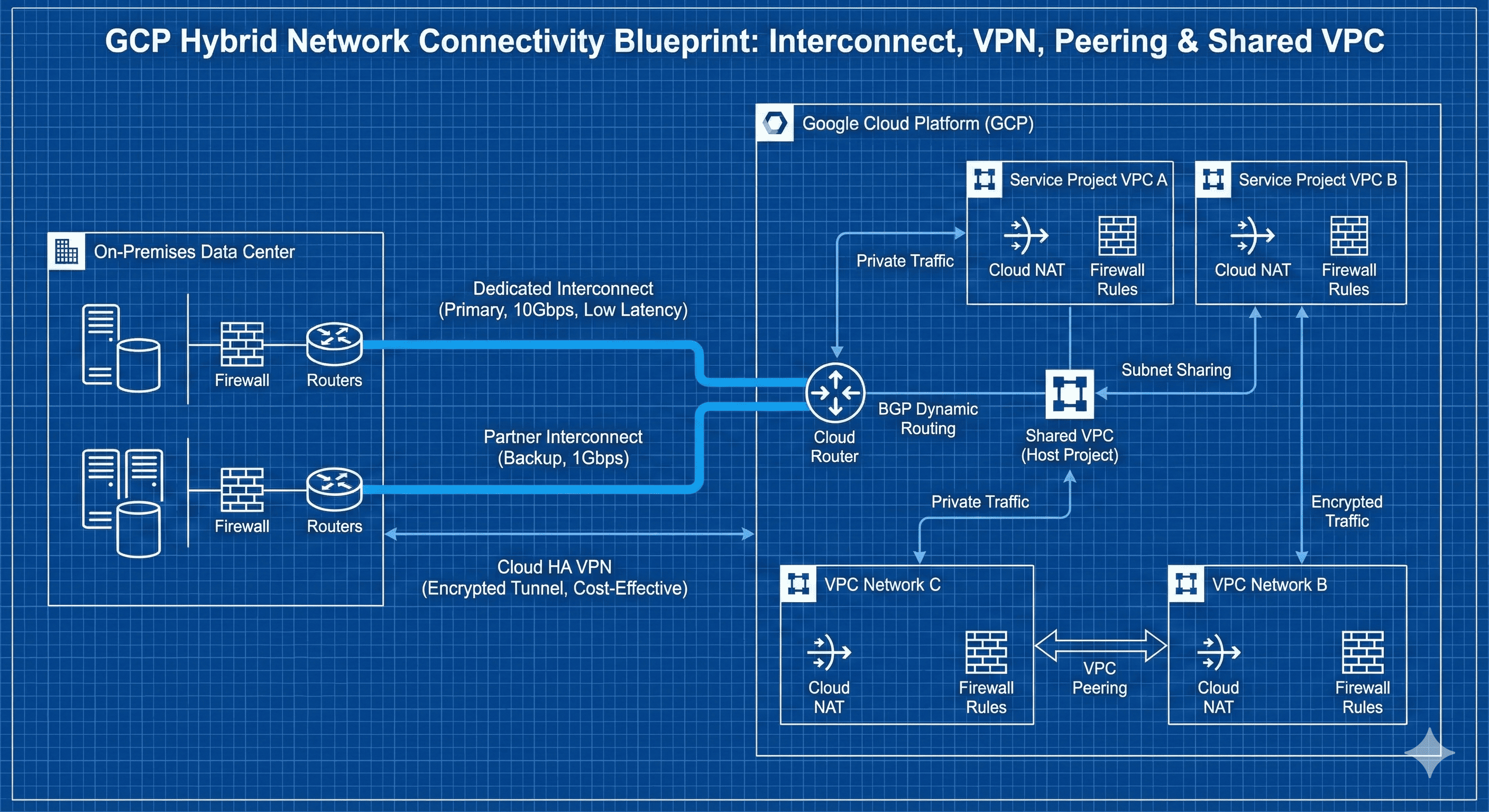
Secure and efficient connectivity between various resources is fundamental to modern IT infrastructure in cloud networking. Google Cloud Platform (GCP) provides diverse networking options for connecting on-premises environments, other cloud providers, and internal GCP resources.
VPC Peering provides private connections between VPCs within the same organization or across different organizations, while Cloud Interconnect ensures high bandwidth and low latency through dedicated connections between on-premises networks and GCP. Cloud VPN enables cost-effective hybrid connections through encrypted tunnels over the internet.
Recent developments in GCP’s networking services have become increasingly sophisticated. From centralized network management through Shared VPC to BGP routing optimization with Cloud Router, and multi-cloud connectivity through Cross-Cloud Interconnect. Architecture design that considers both network security and performance simultaneously has become particularly important.
This guide provides in-depth analysis of the principles and characteristics of each connection method, real-world application scenarios, cost analysis, and optimization strategies. It also covers practical implementation examples using Terraform and hybrid cloud architecture design patterns.
Why Network Connectivity Strategy Matters
The choice of network connectivity fundamentally shapes your infrastructure’s performance, security posture, and operational complexity. Different connectivity solutions serve distinct use cases, requiring understanding of traffic patterns, geographic distribution, bandwidth requirements, and compliance considerations.
Modern enterprise applications demand connectivity solutions that can handle varying traffic loads, provide secure communication channels, integrate seamlessly with existing infrastructure, and support advanced routing capabilities. GCP’s connectivity portfolio addresses these requirements while offering seamless integration with other Google Cloud services.
GCP Network Connectivity Architecture Overview
GCP provides multiple networking solutions that operate at different layers and serve various connectivity requirements:
Network Connectivity Comparison Matrix
| Connectivity Type | Connection Target | Bandwidth | Latency | Cost Model | Best Use Cases |
|---|---|---|---|---|---|
| VPC Peering | VPC to VPC | Network limits | Very Low | Free | Multi-project communication |
| Shared VPC | Project to Project | Network limits | Very Low | Free | Centralized network management |
| Dedicated Interconnect | On-premises | 10-200 Gbps | Low | $1,650+/month | High-volume enterprise traffic |
| Partner Interconnect | On-premises | 50 Mbps - 50 Gbps | Low | $250+/month | Medium-scale hybrid connections |
| Cloud VPN | On-premises | Up to 3 Gbps | Medium | $45+/month | Cost-effective hybrid connectivity |
VPC Networking Fundamentals
Understanding Virtual Private Cloud (VPC)
A VPC is a virtual network environment provided by GCP that offers physically isolated cloud networking. Each VPC maintains an independent network space and includes subnets, routing tables, firewall rules, and connection endpoints.
Core VPC Components
Basic VPC Configuration
# Main VPC configuration
resource "google_compute_network" "main_vpc" {
  name                    = "main-vpc"
  auto_create_subnetworks = false
  description             = "Main VPC for production workloads"
  routing_mode           = "REGIONAL"
}

# Web tier subnet
resource "google_compute_subnetwork" "web_subnet" {
  name          = "web-subnet"
  ip_cidr_range = "10.0.1.0/24"
  region        = "us-central1"
  network       = google_compute_network.main_vpc.id

  # Secondary ranges for GKE
  secondary_ip_range {
    range_name    = "pods"
    ip_cidr_range = "10.1.0.0/16"
  }

  secondary_ip_range {
    range_name    = "services"
    ip_cidr_range = "10.2.0.0/16"
  }

  # Enable private Google access
  private_ip_google_access = true

  # Enable flow logs
  log_config {
    aggregation_interval = "INTERVAL_10_MIN"
    flow_sampling       = 0.5
    metadata           = "INCLUDE_ALL_METADATA"
  }
}

# Application tier subnet
resource "google_compute_subnetwork" "app_subnet" {
  name          = "app-subnet"
  ip_cidr_range = "10.0.2.0/24"
  region        = "us-central1"
  network       = google_compute_network.main_vpc.id

  private_ip_google_access = true
}

# Database tier subnet
resource "google_compute_subnetwork" "db_subnet" {
  name          = "db-subnet"
  ip_cidr_range = "10.0.3.0/24"
  region        = "us-central1"
  network       = google_compute_network.main_vpc.id

  private_ip_google_access = true
}
VPC Peering vs Shared VPC Design Patterns
VPC Peering Concept and Principles
VPC Peering provides network connectivity between two VPCs, enabling communication through private IP addresses. This is implemented through software-defined networking and automatically adds routes to peer VPCs in both routing tables.
VPC Peering Operation Flow
VPC Peering Configuration
# Production VPC
resource "google_compute_network" "production_vpc" {
  name                    = "production-vpc"
  auto_create_subnetworks = false
  routing_mode           = "GLOBAL"
}

# Development VPC
resource "google_compute_network" "development_vpc" {
  name                    = "development-vpc"
  auto_create_subnetworks = false
  routing_mode           = "GLOBAL"
}

# Staging VPC
resource "google_compute_network" "staging_vpc" {
  name                    = "staging-vpc"
  auto_create_subnetworks = false
  routing_mode           = "GLOBAL"
}

# Production to Development peering
resource "google_compute_network_peering" "prod_to_dev" {
  name         = "prod-to-dev-peering"
  network      = google_compute_network.production_vpc.self_link
  peer_network = google_compute_network.development_vpc.self_link

  auto_create_routes = true

  # Custom route import/export settings
  export_custom_routes = true
  import_custom_routes = true

  # Subnet route import/export with public IP
  export_subnet_routes_with_public_ip = false
  import_subnet_routes_with_public_ip = false
}

# Development to Production peering
resource "google_compute_network_peering" "dev_to_prod" {
  name         = "dev-to-prod-peering"
  network      = google_compute_network.development_vpc.self_link
  peer_network = google_compute_network.production_vpc.self_link

  auto_create_routes = true
  export_custom_routes = true
  import_custom_routes = true
  export_subnet_routes_with_public_ip = false
  import_subnet_routes_with_public_ip = false
}

# Cross-organization peering (different projects)
resource "google_compute_network_peering" "cross_org_peering" {
  name         = "cross-org-peering"
  network      = google_compute_network.production_vpc.self_link
  peer_network = "projects/${var.partner_project_id}/global/networks/${var.partner_network_name}"

  auto_create_routes = false  # Manual route management for cross-org
  export_custom_routes = false
  import_custom_routes = false
}
Shared VPC Concept and Design
Shared VPC enables centralized network resource management within an organization. A host project manages the VPC while service projects can use subnets from that VPC.
Shared VPC Architecture Benefits
Shared VPC Implementation
# Enable Shared VPC on host project
resource "google_compute_shared_vpc_host_project" "host" {
  project = var.host_project_id
}

# Attach service projects
resource "google_compute_shared_vpc_service_project" "service_projects" {
  for_each = toset(var.service_project_ids)

  host_project    = google_compute_shared_vpc_host_project.host.project
  service_project = each.value
}

# Shared VPC network
resource "google_compute_network" "shared_vpc" {
  name                    = "shared-vpc-network"
  auto_create_subnetworks = false
  project                 = var.host_project_id
  routing_mode           = "GLOBAL"

  depends_on = [google_compute_shared_vpc_host_project.host]
}

# Service project subnets
resource "google_compute_subnetwork" "service_subnets" {
  for_each = var.service_subnet_configs

  name          = each.key
  ip_cidr_range = each.value.cidr
  region        = each.value.region
  network       = google_compute_network.shared_vpc.id
  project       = var.host_project_id

  # Enable private Google access
  private_ip_google_access = true

  # Secondary ranges for GKE if specified
  dynamic "secondary_ip_range" {
    for_each = lookup(each.value, "secondary_ranges", {})
    content {
      range_name    = secondary_ip_range.key
      ip_cidr_range = secondary_ip_range.value
    }
  }

  # Flow logs configuration
  log_config {
    aggregation_interval = "INTERVAL_5_MIN"
    flow_sampling       = 0.8
    metadata           = "INCLUDE_ALL_METADATA"
  }
}

# IAM bindings for service projects
resource "google_compute_subnetwork_iam_binding" "subnet_users" {
  for_each = var.service_subnet_configs

  project    = var.host_project_id
  region     = each.value.region
  subnetwork = google_compute_subnetwork.service_subnets[each.key].name
  role       = "roles/compute.networkUser"

  members = each.value.service_accounts
}

# Example service subnet configuration
variable "service_subnet_configs" {
  description = "Service project subnet configurations"
  type = map(object({
    cidr           = string
    region         = string
    service_accounts = list(string)
    secondary_ranges = optional(map(string), {})
  }))

  default = {
    "frontend-subnet" = {
      cidr   = "10.1.0.0/24"
      region = "us-central1"
      service_accounts = [
        "serviceAccount:frontend-sa@service-project-1.iam.gserviceaccount.com"
      ]
      secondary_ranges = {
        "pods"     = "10.10.0.0/16"
        "services" = "10.11.0.0/16"
      }
    }
    "backend-subnet" = {
      cidr   = "10.2.0.0/24"
      region = "us-central1"
      service_accounts = [
        "serviceAccount:backend-sa@service-project-2.iam.gserviceaccount.com"
      ]
    }
  }
}
VPC Peering vs Shared VPC Comparison
| Characteristic | VPC Peering | Shared VPC |
|---|---|---|
| Management Approach | Distributed management | Centralized management |
| Organizational Structure | Independent project connections | Organization-wide project integration |
| Network Policies | Individual VPC management | Host project unified management |
| Cost Structure | Per-project billing | Host project consolidated billing |
| Security Management | Individual VPC security management | Centralized security management |
| Routing | Peering-based routing | Single VPC routing |
| Scalability | Peering limitations exist | Subnet-based scaling |
| Use Case Scenarios | Different organization/team connections | Same organization resource sharing |
Cloud Interconnect Deep Dive
Cloud Interconnect Concept and Principles
Cloud Interconnect provides dedicated network connections between on-premises networks and Google Cloud. This private connection bypasses the internet, ensuring high bandwidth, low latency, and consistent performance.
Cloud Interconnect Operation Flow
Dedicated Interconnect
Dedicated Interconnect provides direct physical connections between customer on-premises networks and Google’s network.
# Dedicated Interconnect attachment
resource "google_compute_interconnect_attachment" "dedicated" {
  name         = "dedicated-interconnect-attachment"
  interconnect = var.dedicated_interconnect_name
  description  = "Production dedicated interconnect"

  # Bandwidth configuration
  bandwidth = "BPS_10G"

  # VLAN configuration
  vlan_tag8021q = 100

  # BGP peer IP allocation
  candidate_subnets = ["169.254.1.0/29"]

  # Administrative settings
  admin_enabled = true

  # Encryption (if supported)
  encryption = "IPSEC"
}

# Cloud Router for BGP sessions
resource "google_compute_router" "interconnect_router" {
  name    = "interconnect-cloud-router"
  region  = "us-central1"
  network = google_compute_network.production_vpc.id

  bgp {
    asn            = 65000
    advertise_mode = "CUSTOM"

    # Advertise specific subnets only
    advertised_groups = []

    # Production subnets
    advertised_ip_ranges {
      range       = "10.0.0.0/16"
      description = "Production VPC range"
    }

    # Keep alive and timers
    keepalive_interval = 20
  }
}

# BGP router interface
resource "google_compute_router_interface" "interconnect_interface" {
  name       = "interconnect-interface"
  router     = google_compute_router.interconnect_router.name
  region     = google_compute_router.interconnect_router.region
  ip_range   = "169.254.1.1/30"

  interconnect_attachment = google_compute_interconnect_attachment.dedicated.name
}

# BGP peer session
resource "google_compute_router_peer" "interconnect_peer" {
  name                      = "interconnect-bgp-peer"
  router                    = google_compute_router.interconnect_router.name
  region                    = google_compute_router.interconnect_router.region
  peer_ip_address          = "169.254.1.2"
  peer_asn                 = 65001

  # Route priority for traffic engineering
  advertised_route_priority = 100

  # Interface association
  interface = google_compute_router_interface.interconnect_interface.name

  # Custom route advertisements
  advertise_mode = "CUSTOM"
  advertised_groups = ["ALL_SUBNETS"]

  # Specific route advertisements
  advertised_ip_ranges {
    range       = "192.168.0.0/16"
    description = "Corporate network range"
  }

  # BGP authentication
  enable_ipv6 = false
}

# Redundant interconnect for high availability
resource "google_compute_interconnect_attachment" "dedicated_backup" {
  name         = "dedicated-interconnect-backup"
  interconnect = var.backup_interconnect_name
  description  = "Backup dedicated interconnect"

  bandwidth     = "BPS_10G"
  vlan_tag8021q = 200

  candidate_subnets = ["169.254.2.0/29"]
  admin_enabled     = true
}
Partner Interconnect
Partner Interconnect connects to Google Cloud through supported service providers.
# Partner Interconnect attachment
resource "google_compute_interconnect_attachment" "partner" {
  name        = "partner-interconnect-attachment"
  type        = "PARTNER"
  region      = "us-central1"
  description = "Partner interconnect through ISP"

  # Pairing key from partner
  pairing_key = var.partner_pairing_key

  # Bandwidth selection
  bandwidth = "BPS_1G"

  # VLAN configuration
  candidate_subnets = ["169.254.3.0/29"]
  vlan_tag8021q    = 300

  # Administrative state
  admin_enabled = true
}

# Cloud Router for Partner Interconnect
resource "google_compute_router" "partner_router" {
  name    = "partner-interconnect-router"
  region  = "us-central1"
  network = google_compute_network.production_vpc.id

  bgp {
    asn            = 16550  # Google ASN for partner interconnect
    advertise_mode = "DEFAULT"

    # Less aggressive timers for partner connections
    keepalive_interval = 60
  }
}

# Partner interconnect interface
resource "google_compute_router_interface" "partner_interface" {
  name       = "partner-interface"
  router     = google_compute_router.partner_router.name
  region     = "us-central1"
  ip_range   = "169.254.3.1/30"

  interconnect_attachment = google_compute_interconnect_attachment.partner.name
}

# Partner BGP peer
resource "google_compute_router_peer" "partner_peer" {
  name                      = "partner-bgp-peer"
  router                    = google_compute_router.partner_router.name
  region                    = "us-central1"
  peer_ip_address          = "169.254.3.2"
  peer_asn                 = var.partner_asn
  advertised_route_priority = 200  # Lower priority than dedicated
  interface                = google_compute_router_interface.partner_interface.name
}
Dedicated vs Partner Interconnect Comparison
| Characteristic | Dedicated Interconnect | Partner Interconnect |
|---|---|---|
| Connection Method | Direct physical connection | Partner-mediated connection |
| Minimum Bandwidth | 10 Gbps | 50 Mbps |
| Maximum Bandwidth | 200 Gbps | 50 Gbps |
| Monthly Cost (10 Gbps) | $1,650 | $250-500 |
| Data Transfer Cost | $0.02/GB | $0.02/GB |
| Setup Time | 2-4 weeks | 1-2 weeks |
| SLA | 99.9% | 99.9% |
| Best Use Cases | High-volume traffic | Medium-scale connections |
Cloud VPN Configuration and Optimization
Cloud VPN Concept and Principles
Cloud VPN creates secure IPsec VPN tunnels between on-premises networks and Google Cloud VPCs. It provides encrypted connections over the internet, offering cost-effective hybrid connectivity.
Cloud VPN Architecture Types
High Availability VPN Configuration
# HA VPN Gateway
resource "google_compute_ha_vpn_gateway" "main" {
  name    = "main-ha-vpn-gateway"
  region  = "us-central1"
  network = google_compute_network.production_vpc.id
}

# External VPN Gateway (on-premises)
resource "google_compute_external_vpn_gateway" "onprem" {
  name            = "onprem-gateway"
  redundancy_type = "SINGLE_IP_INTERNALLY_REDUNDANT"
  description     = "On-premises VPN gateway"

  interface {
    id         = 0
    ip_address = var.onprem_gateway_ip
  }
}

# Multiple IP on-premises gateway for higher availability
resource "google_compute_external_vpn_gateway" "onprem_ha" {
  name            = "onprem-ha-gateway"
  redundancy_type = "TWO_IPS_REDUNDANCY"
  description     = "Highly available on-premises gateway"

  interface {
    id         = 0
    ip_address = var.onprem_gateway_ip_1
  }

  interface {
    id         = 1
    ip_address = var.onprem_gateway_ip_2
  }
}

# VPN Tunnels
resource "google_compute_vpn_tunnel" "tunnel1" {
  name                            = "ha-vpn-tunnel1"
  region                          = "us-central1"
  vpn_gateway                     = google_compute_ha_vpn_gateway.main.id
  vpn_gateway_interface          = 0
  peer_external_gateway          = google_compute_external_vpn_gateway.onprem.id
  peer_external_gateway_interface = 0
  shared_secret                   = var.shared_secret_1

  # IKE version and encryption
  ike_version = 2

  # Router for dynamic routing
  router = google_compute_router.vpn_router.id

  # Local and remote traffic selectors for policy-based VPN
  local_traffic_selector  = ["10.0.0.0/16"]
  remote_traffic_selector = ["192.168.0.0/16"]
}

resource "google_compute_vpn_tunnel" "tunnel2" {
  name                            = "ha-vpn-tunnel2"
  region                          = "us-central1"
  vpn_gateway                     = google_compute_ha_vpn_gateway.main.id
  vpn_gateway_interface          = 1
  peer_external_gateway          = google_compute_external_vpn_gateway.onprem.id
  peer_external_gateway_interface = 0
  shared_secret                   = var.shared_secret_2

  ike_version = 2
  router      = google_compute_router.vpn_router.id

  local_traffic_selector  = ["10.0.0.0/16"]
  remote_traffic_selector = ["192.168.0.0/16"]
}

# Cloud Router for VPN
resource "google_compute_router" "vpn_router" {
  name    = "vpn-cloud-router"
  region  = "us-central1"
  network = google_compute_network.production_vpc.id

  bgp {
    asn            = 64512
    advertise_mode = "DEFAULT"

    # Keepalive and hold timers
    keepalive_interval = 20
  }
}

# BGP sessions for VPN tunnels
resource "google_compute_router_interface" "vpn_interface1" {
  name       = "vpn-interface1"
  router     = google_compute_router.vpn_router.name
  region     = "us-central1"
  ip_range   = "169.254.1.1/30"
  vpn_tunnel = google_compute_vpn_tunnel.tunnel1.name
}

resource "google_compute_router_interface" "vpn_interface2" {
  name       = "vpn-interface2"
  router     = google_compute_router.vpn_router.name
  region     = "us-central1"
  ip_range   = "169.254.2.1/30"
  vpn_tunnel = google_compute_vpn_tunnel.tunnel2.name
}

resource "google_compute_router_peer" "vpn_peer1" {
  name                      = "vpn-peer1"
  router                    = google_compute_router.vpn_router.name
  region                    = "us-central1"
  peer_ip_address          = "169.254.1.2"
  peer_asn                 = 65001
  advertised_route_priority = 100
  interface                = google_compute_router_interface.vpn_interface1.name

  # Enable BFD for faster convergence
  enable_ipv6 = false
}

resource "google_compute_router_peer" "vpn_peer2" {
  name                      = "vpn-peer2"
  router                    = google_compute_router.vpn_router.name
  region                    = "us-central1"
  peer_ip_address          = "169.254.2.2"
  peer_asn                 = 65001
  advertised_route_priority = 200  # Lower priority for backup
  interface                = google_compute_router_interface.vpn_interface2.name

  enable_ipv6 = false
}
Cloud Router and BGP Routing Strategy
Cloud Router Concept and Role
Cloud Router is a fully managed router service provided by Google Cloud that enables dynamic routing through BGP (Border Gateway Protocol).
Core Cloud Router Features
Advanced Cloud Router Configuration
# Advanced Cloud Router with multiple connection types
resource "google_compute_router" "advanced_router" {
  name    = "advanced-cloud-router"
  region  = "us-central1"
  network = google_compute_network.production_vpc.id

  bgp {
    asn            = 64512
    advertise_mode = "CUSTOM"

    # Selective subnet advertisement
    advertised_groups = []

    # Production subnets
    advertised_ip_ranges {
      range       = "10.0.1.0/24"
      description = "Web tier subnet"
    }

    advertised_ip_ranges {
      range       = "10.0.2.0/24"
      description = "Application tier subnet"
    }

    # Exclude database subnet from advertisement
    # advertised_ip_ranges {
    #   range       = "10.0.3.0/24"
    #   description = "Database tier subnet - not advertised"
    # }

    # BGP timers
    keepalive_interval = 20
  }
}

# Route policy implementation
resource "google_compute_router_peer" "primary_interconnect_peer" {
  name                      = "primary-interconnect-peer"
  router                    = google_compute_router.advanced_router.name
  region                    = "us-central1"
  peer_ip_address          = "169.254.1.2"
  peer_asn                 = 65001
  advertised_route_priority = 100  # Highest priority
  interface                = google_compute_router_interface.primary_interface.name

  # Custom advertisement for this peer
  advertise_mode = "CUSTOM"
  advertised_groups = ["ALL_SUBNETS"]

  # Specific routes for this peer
  advertised_ip_ranges {
    range       = "192.168.100.0/24"
    description = "Management network"
  }
}

resource "google_compute_router_peer" "backup_vpn_peer" {
  name                      = "backup-vpn-peer"
  router                    = google_compute_router.advanced_router.name
  region                    = "us-central1"
  peer_ip_address          = "169.254.2.2"
  peer_asn                 = 65002
  advertised_route_priority = 200  # Lower priority (backup)
  interface                = google_compute_router_interface.backup_interface.name

  # Different advertisement policy for backup
  advertise_mode = "CUSTOM"
  advertised_groups = []

  # Only essential routes for backup
  advertised_ip_ranges {
    range       = "10.0.1.0/24"
    description = "Critical services only"
  }
}
BGP Routing Optimization Strategies
1. Route Priority and Traffic Engineering
# Primary connection with high priority
resource "google_compute_router_peer" "primary_peer" {
  name                      = "primary-connection"
  router                    = google_compute_router.main_router.name
  region                    = "us-central1"
  peer_ip_address          = "169.254.1.2"
  peer_asn                 = 65001
  advertised_route_priority = 100  # Primary path
  interface                = google_compute_router_interface.primary_interface.name

  # Enable BFD for fast failover
  enable_ipv6 = false
}

# Backup connection with lower priority
resource "google_compute_router_peer" "backup_peer" {
  name                      = "backup-connection"
  router                    = google_compute_router.main_router.name
  region                    = "us-central1"
  peer_ip_address          = "169.254.2.2"
  peer_asn                 = 65002
  advertised_route_priority = 200  # Backup path
  interface                = google_compute_router_interface.backup_interface.name

  enable_ipv6 = false
}

# Disaster recovery connection with lowest priority
resource "google_compute_router_peer" "dr_peer" {
  name                      = "dr-connection"
  router                    = google_compute_router.main_router.name
  region                    = "us-central1"
  peer_ip_address          = "169.254.3.2"
  peer_asn                 = 65003
  advertised_route_priority = 300  # DR path
  interface                = google_compute_router_interface.dr_interface.name

  enable_ipv6 = false
}
2. Route Filtering and Security
# Secure router with filtered advertisements
resource "google_compute_router" "secure_router" {
  name    = "secure-cloud-router"
  region  = "us-central1"
  network = google_compute_network.production_vpc.id

  bgp {
    asn            = 64512
    advertise_mode = "CUSTOM"

    # No default groups
    advertised_groups = []

    # Only specific secure subnets
    advertised_ip_ranges {
      range       = "10.0.0.0/16"
      description = "Internal network only"
    }

    # Exclude sensitive subnets
    # Database and management subnets not advertised
  }
}

# Peer with strict route filtering
resource "google_compute_router_peer" "filtered_peer" {
  name                      = "filtered-peer"
  router                    = google_compute_router.secure_router.name
  region                    = "us-central1"
  peer_ip_address          = "169.254.4.2"
  peer_asn                 = 65004
  advertised_route_priority = 100
  interface                = google_compute_router_interface.filtered_interface.name

  # Strict advertisement control
  advertise_mode = "CUSTOM"
  advertised_groups = []

  # Only public-facing services
  advertised_ip_ranges {
    range       = "10.0.1.0/24"
    description = "Public services subnet"
  }
}
Hybrid Cloud Network Architecture
Multi-Tier Hybrid Architecture
Modern enterprise environments require hybrid architectures spanning on-premises, public cloud, and private cloud environments.
Comprehensive Hybrid Network Implementation
# Hybrid cloud network module
module "hybrid_network" {
  source = "./modules/hybrid-network"

  # On-premises configuration
  onprem_asn          = 65001
  onprem_gateway_ip   = var.onprem_gateway_ip
  onprem_networks     = ["192.168.0.0/16", "172.16.0.0/12"]

  # Cloud network configuration
  cloud_asn           = 64512
  vpc_networks        = {
    production  = "10.0.0.0/16"
    development = "10.1.0.0/16"
    management  = "10.2.0.0/16"
  }

  # Connection preferences
  primary_connection   = "interconnect"
  backup_connection    = "vpn"

  # Security and monitoring
  enable_private_google_access = true
  enable_flow_logs            = true
  enable_cloud_nat            = true
}

# Multi-region hybrid router
resource "google_compute_router" "hybrid_router" {
  name    = "hybrid-cloud-router"
  region  = "us-central1"
  network = google_compute_network.production_vpc.id

  bgp {
    asn            = 64512
    advertise_mode = "CUSTOM"

    # Advertise all subnets to on-premises
    advertised_groups = ["ALL_SUBNETS"]

    # Specific service advertisements
    advertised_ip_ranges {
      range       = "10.0.1.0/24"
      description = "Public-facing services"
    }

    advertised_ip_ranges {
      range       = "10.0.100.0/24"
      description = "Shared services"
    }

    # BGP optimization
    keepalive_interval = 20
  }
}

# Primary: Dedicated Interconnect
resource "google_compute_interconnect_attachment" "primary_hybrid" {
  name         = "primary-hybrid-interconnect"
  interconnect = var.dedicated_interconnect_name
  bandwidth    = "BPS_10G"

  candidate_subnets = ["169.254.10.0/29"]
  vlan_tag8021q    = 1000

  admin_enabled = true
}

# Backup: HA VPN
resource "google_compute_ha_vpn_gateway" "backup_hybrid" {
  name    = "backup-hybrid-vpn"
  region  = "us-central1"
  network = google_compute_network.production_vpc.id
}

# Cross-region replication
resource "google_compute_router" "dr_router" {
  name    = "dr-cloud-router"
  region  = "us-east1"
  network = google_compute_network.production_vpc.id

  bgp {
    asn            = 64512
    advertise_mode = "CUSTOM"

    # DR-specific advertisements
    advertised_groups = []

    advertised_ip_ranges {
      range       = "10.0.200.0/24"
      description = "DR services subnet"
    }
  }
}
Multi-Region Hybrid Connectivity
# Multi-region configuration
locals {
  regions = {
    primary   = "us-central1"
    secondary = "us-east1"
    disaster  = "europe-west1"
  }

  region_priorities = {
    primary   = 100
    secondary = 200
    disaster  = 300
  }
}

# Regional VPN gateways
resource "google_compute_ha_vpn_gateway" "regional_gateways" {
  for_each = local.regions

  name    = "${each.key}-vpn-gateway"
  region  = each.value
  network = google_compute_network.global_vpc.id
}

# Regional Cloud Routers
resource "google_compute_router" "regional_routers" {
  for_each = local.regions

  name    = "${each.key}-router"
  region  = each.value
  network = google_compute_network.global_vpc.id

  bgp {
    asn            = 64512
    advertise_mode = "CUSTOM"

    advertised_groups = ["ALL_SUBNETS"]

    # Regional priority-based advertisements
    advertised_ip_ranges {
      range       = "10.${index(keys(local.regions), each.key)}.0.0/16"
      description = "${each.key} region networks"
    }

    keepalive_interval = 20
  }
}

# Regional interconnect attachments
resource "google_compute_interconnect_attachment" "regional_attachments" {
  for_each = local.regions

  name        = "${each.key}-interconnect"
  type        = "PARTNER"
  region      = each.value
  description = "${each.key} region partner interconnect"

  pairing_key = lookup(var.regional_pairing_keys, each.key, "")
  bandwidth   = "BPS_1G"

  candidate_subnets = ["169.254.${index(keys(local.regions), each.key) + 10}.0/29"]
  vlan_tag8021q    = 1000 + index(keys(local.regions), each.key)

  admin_enabled = true
}
Network Security and Advanced Features
Private Google Access and Private Service Connect
Private Access Configuration
# Private subnet with Google access
resource "google_compute_subnetwork" "private_subnet" {
  name                     = "private-subnet"
  ip_cidr_range           = "10.0.10.0/24"
  region                  = "us-central1"
  network                 = google_compute_network.main_vpc.id
  private_ip_google_access = true

  # Flow logs with detailed metadata
  log_config {
    aggregation_interval = "INTERVAL_5_MIN"
    flow_sampling       = 1.0
    metadata           = "INCLUDE_ALL_METADATA"
    metadata_fields = [
      "src_vpc",
      "dest_vpc",
      "src_gke_details",
      "dest_gke_details",
      "src_instance",
      "dest_instance"
    ]
  }
}

# Private Service Connect endpoint
resource "google_compute_global_address" "psc_endpoint" {
  name         = "private-service-connect-endpoint"
  purpose      = "PRIVATE_SERVICE_CONNECT"
  network      = google_compute_network.main_vpc.id
  address_type = "INTERNAL"
  address      = "10.0.100.10"
}

resource "google_compute_global_forwarding_rule" "psc_forwarding_rule" {
  name                  = "psc-forwarding-rule"
  target                = "all-apis"
  network               = google_compute_network.main_vpc.id
  ip_address           = google_compute_global_address.psc_endpoint.id
  load_balancing_scheme = ""

  # Service attachment for specific services
  service_name = "servicenetworking.googleapis.com"
}

# Private DNS zone for Google APIs
resource "google_dns_managed_zone" "private_google_apis" {
  name        = "private-google-apis"
  dns_name    = "googleapis.com."
  description = "Private DNS zone for Google APIs"

  visibility = "private"

  private_visibility_config {
    networks {
      network_url = google_compute_network.main_vpc.id
    }
  }
}

resource "google_dns_record_set" "private_apis_record" {
  name = "*.googleapis.com."
  type = "A"
  ttl  = 300

  managed_zone = google_dns_managed_zone.private_google_apis.name

  rrdatas = [google_compute_global_address.psc_endpoint.address]
}
Network Monitoring and Logging
# Comprehensive VPC Flow Logs
resource "google_compute_subnetwork" "monitored_subnet" {
  name          = "monitored-subnet"
  ip_cidr_range = "10.0.20.0/24"
  region        = "us-central1"
  network       = google_compute_network.main_vpc.id

  log_config {
    aggregation_interval = "INTERVAL_1_MIN"
    flow_sampling       = 1.0
    metadata           = "INCLUDE_ALL_METADATA"
    filter_expr        = "true"
  }
}

# Network security with detailed logging
resource "google_compute_firewall" "web_tier_allow" {
  name    = "allow-web-tier"
  network = google_compute_network.main_vpc.name

  allow {
    protocol = "tcp"
    ports    = ["80", "443"]
  }

  source_ranges = ["0.0.0.0/0"]
  target_tags   = ["web-server"]

  # Enable comprehensive logging
  log_config {
    metadata = "INCLUDE_ALL_METADATA"
  }
}

resource "google_compute_firewall" "app_tier_allow" {
  name    = "allow-app-tier"
  network = google_compute_network.main_vpc.name

  allow {
    protocol = "tcp"
    ports    = ["8080", "8443", "9090"]
  }

  source_tags = ["web-server"]
  target_tags = ["app-server"]

  log_config {
    metadata = "INCLUDE_ALL_METADATA"
  }
}

resource "google_compute_firewall" "db_tier_allow" {
  name    = "allow-db-tier"
  network = google_compute_network.main_vpc.name

  allow {
    protocol = "tcp"
    ports    = ["5432", "3306", "1433"]
  }

  source_tags = ["app-server"]
  target_tags = ["db-server"]

  log_config {
    metadata = "INCLUDE_ALL_METADATA"
  }
}

# Cloud NAT with logging
resource "google_compute_router" "nat_router" {
  name    = "nat-router"
  region  = "us-central1"
  network = google_compute_network.main_vpc.id
}

resource "google_compute_router_nat" "main_nat" {
  name                               = "main-nat"
  router                            = google_compute_router.nat_router.name
  region                            = "us-central1"
  nat_ip_allocate_option            = "AUTO_ONLY"
  source_subnetwork_ip_ranges_to_nat = "ALL_SUBNETWORKS_ALL_IP_RANGES"

  # Comprehensive NAT logging
  log_config {
    enable = true
    filter = "ALL"
  }

  # Advanced NAT configuration
  min_ports_per_vm                 = 64
  max_ports_per_vm                 = 65536
  enable_endpoint_independent_mapping = true
}
Cost Analysis and Optimization
Connectivity Cost Modeling
# Cost calculation variables
locals {
  # Dedicated Interconnect costs (10 Gbps)
  dedicated_monthly_port_cost = 1650  # USD per month
  dedicated_data_cost        = 0.02   # USD per GB

  # Partner Interconnect costs (1 Gbps)
  partner_monthly_cost = 400   # USD per month
  partner_data_cost   = 0.02   # USD per GB

  # VPN costs
  vpn_gateway_cost = 45    # USD per month per gateway
  vpn_tunnel_cost  = 36    # USD per month per tunnel
  vpn_data_cost   = 0.045  # USD per GB

  # Monthly traffic estimation (GB)
  monthly_traffic_gb = 10000

  # Cost calculations
  dedicated_total_cost = local.dedicated_monthly_port_cost + (local.monthly_traffic_gb * local.dedicated_data_cost)
  partner_total_cost   = local.partner_monthly_cost + (local.monthly_traffic_gb * local.partner_data_cost)
  vpn_total_cost      = (local.vpn_gateway_cost * 2) + (local.vpn_tunnel_cost * 2) + (local.monthly_traffic_gb * local.vpn_data_cost)
}

# Cost optimization recommendations
output "cost_analysis" {
  value = {
    dedicated_interconnect = {
      monthly_cost = "${local.dedicated_total_cost} USD"
      cost_per_gb  = "${local.dedicated_data_cost} USD"
      best_for     = "High-volume traffic (>5TB/month)"
    }
    partner_interconnect = {
      monthly_cost = "${local.partner_total_cost} USD"
      cost_per_gb  = "${local.partner_data_cost} USD"
      best_for     = "Medium-volume traffic (1-5TB/month)"
    }
    ha_vpn = {
      monthly_cost = "${local.vpn_total_cost} USD"
      cost_per_gb  = "${local.vpn_data_cost} USD"
      best_for     = "Low-volume traffic (<1TB/month)"
    }
  }
}
Connection Selection Guide
# Requirements-based connection recommendation
variable "requirements" {
  description = "Network requirements for optimization"
  type = object({
    bandwidth_gbps      = number
    monthly_traffic_tb  = number
    latency_sensitive   = bool
    budget_limit_usd    = number
    compliance_required = bool
    redundancy_required = bool
  })
}

locals {
  # Decision matrix for connection type
  recommended_solution = (
    var.requirements.bandwidth_gbps > 10 ? "dedicated_interconnect" :
    var.requirements.monthly_traffic_tb > 5 ? "partner_interconnect" :
    var.requirements.latency_sensitive && var.requirements.budget_limit_usd > 500 ? "partner_interconnect" :
    var.requirements.compliance_required ? "dedicated_interconnect" :
    var.requirements.budget_limit_usd < 200 ? "ha_vpn" :
    "partner_interconnect"
  )

  # Redundancy recommendations
  redundancy_setup = var.requirements.redundancy_required ? {
    primary = local.recommended_solution
    backup  = local.recommended_solution == "dedicated_interconnect" ? "partner_interconnect" : "ha_vpn"
  } : {
    primary = local.recommended_solution
    backup  = null
  }
}

output "connection_recommendation" {
  value = {
    primary_connection = local.recommended_solution
    redundancy_setup  = local.redundancy_setup
    estimated_monthly_cost = local.recommended_solution == "dedicated_interconnect" ? local.dedicated_total_cost :
                           local.recommended_solution == "partner_interconnect" ? local.partner_total_cost :
                           local.vpn_total_cost
  }
}
Performance Optimization and Monitoring
Regional Traffic Optimization
Global Network Implementation
# Global network with regional optimization
resource "google_compute_network" "global_network" {
  name                    = "global-enterprise-network"
  auto_create_subnetworks = false
  routing_mode           = "GLOBAL"

  # Enable global dynamic routing
  description = "Global network for multi-region deployment"
}

# Regional subnet configuration
resource "google_compute_subnetwork" "regional_subnets" {
  for_each = {
    "us-central1" = {
      cidr = "10.1.0.0/16"
      secondary_ranges = {
        "pods"     = "10.10.0.0/14"
        "services" = "10.14.0.0/16"
      }
    }
    "us-east1" = {
      cidr = "10.2.0.0/16"
      secondary_ranges = {
        "pods"     = "10.20.0.0/14"
        "services" = "10.24.0.0/16"
      }
    }
    "europe-west1" = {
      cidr = "10.3.0.0/16"
      secondary_ranges = {
        "pods"     = "10.30.0.0/14"
        "services" = "10.34.0.0/16"
      }
    }
    "asia-southeast1" = {
      cidr = "10.4.0.0/16"
      secondary_ranges = {
        "pods"     = "10.40.0.0/14"
        "services" = "10.44.0.0/16"
      }
    }
  }

  name          = "${each.key}-subnet"
  ip_cidr_range = each.value.cidr
  region        = each.key
  network       = google_compute_network.global_network.id

  # Enable private Google access globally
  private_ip_google_access = true

  # Secondary IP ranges for GKE
  dynamic "secondary_ip_range" {
    for_each = each.value.secondary_ranges
    content {
      range_name    = secondary_ip_range.key
      ip_cidr_range = secondary_ip_range.value
    }
  }

  # Enable flow logs with sampling
  log_config {
    aggregation_interval = "INTERVAL_10_MIN"
    flow_sampling       = 0.5
    metadata           = "INCLUDE_ALL_METADATA"
  }
}

# Regional Cloud NAT for each region
resource "google_compute_router" "regional_routers" {
  for_each = toset(["us-central1", "us-east1", "europe-west1", "asia-southeast1"])

  name    = "${each.key}-router"
  region  = each.key
  network = google_compute_network.global_network.id

  bgp {
    asn            = 64512
    advertise_mode = "DEFAULT"
    keepalive_interval = 20
  }
}

resource "google_compute_router_nat" "regional_nat" {
  for_each = google_compute_router.regional_routers

  name                               = "${each.key}-nat"
  router                            = each.value.name
  region                            = each.value.region
  nat_ip_allocate_option            = "AUTO_ONLY"
  source_subnetwork_ip_ranges_to_nat = "ALL_SUBNETWORKS_ALL_IP_RANGES"

  # Optimize NAT for high throughput
  min_ports_per_vm = 64
  max_ports_per_vm = 65536

  # Enable comprehensive logging
  log_config {
    enable = true
    filter = "ERRORS_ONLY"  # Reduce log volume
  }
}
Network Performance Monitoring
Disaster Recovery and High Availability Design
Multi-Region Disaster Recovery Architecture
Disaster Recovery Implementation
# Multi-region disaster recovery configuration
variable "regions" {
  description = "Primary, secondary, and DR regions"
  type = object({
    primary   = string
    secondary = string
    dr        = string
  })
  default = {
    primary   = "us-central1"
    secondary = "us-east1"
    dr        = "europe-west1"
  }
}

# Regional VPC networks
resource "google_compute_network" "regional_vpc" {
  for_each = var.regions

  name                    = "${each.key}-vpc"
  auto_create_subnetworks = false
  routing_mode           = "REGIONAL"

  description = "${each.key} region VPC for disaster recovery"
}

# Cross-region VPC peering for DR
resource "google_compute_network_peering" "primary_to_secondary" {
  name         = "primary-to-secondary-peering"
  network      = google_compute_network.regional_vpc["primary"].self_link
  peer_network = google_compute_network.regional_vpc["secondary"].self_link

  auto_create_routes                = true
  export_custom_routes             = true
  import_custom_routes             = true
  export_subnet_routes_with_public_ip = false
  import_subnet_routes_with_public_ip = false
}

resource "google_compute_network_peering" "secondary_to_primary" {
  name         = "secondary-to-primary-peering"
  network      = google_compute_network.regional_vpc["secondary"].self_link
  peer_network = google_compute_network.regional_vpc["primary"].self_link

  auto_create_routes                = true
  export_custom_routes             = true
  import_custom_routes             = true
  export_subnet_routes_with_public_ip = false
  import_subnet_routes_with_public_ip = false
}

resource "google_compute_network_peering" "primary_to_dr" {
  name         = "primary-to-dr-peering"
  network      = google_compute_network.regional_vpc["primary"].self_link
  peer_network = google_compute_network.regional_vpc["dr"].self_link

  auto_create_routes                = true
  export_custom_routes             = false  # Limited DR connectivity
  import_custom_routes             = false
  export_subnet_routes_with_public_ip = false
  import_subnet_routes_with_public_ip = false
}

# Regional connectivity for each region
resource "google_compute_ha_vpn_gateway" "regional_gateways" {
  for_each = var.regions

  name    = "${each.key}-vpn-gateway"
  region  = each.value
  network = google_compute_network.regional_vpc[each.key].id
}

# Health checks for automatic failover
resource "google_compute_health_check" "regional_health" {
  for_each = var.regions

  name               = "${each.key}-region-health"
  check_interval_sec = 10
  timeout_sec        = 3
  healthy_threshold  = 2
  unhealthy_threshold = 3

  tcp_health_check {
    port = "80"
  }

  log_config {
    enable = true
  }
}

# Global load balancer for automatic failover
resource "google_compute_global_address" "global_ip" {
  name         = "global-dr-ip"
  address_type = "EXTERNAL"
  network_tier = "PREMIUM"
}

resource "google_compute_backend_service" "global_backend" {
  name        = "global-dr-backend"
  protocol    = "HTTP"
  timeout_sec = 10

  # Primary region backend
  backend {
    group           = google_compute_instance_group.primary.id
    balancing_mode  = "UTILIZATION"
    max_utilization = 0.8
    capacity_scaler = 1.0
  }

  # Secondary region backend (lower capacity)
  backend {
    group           = google_compute_instance_group.secondary.id
    balancing_mode  = "UTILIZATION"
    max_utilization = 0.8
    capacity_scaler = 0.5  # Reduced capacity for secondary
  }

  # DR region backend (minimal capacity)
  backend {
    group           = google_compute_instance_group.dr.id
    balancing_mode  = "UTILIZATION"
    max_utilization = 0.8
    capacity_scaler = 0.1  # Minimal DR capacity
  }

  health_checks = [
    google_compute_health_check.regional_health["primary"].id,
    google_compute_health_check.regional_health["secondary"].id,
    google_compute_health_check.regional_health["dr"].id
  ]
}
Network Automation and Infrastructure as Code
Modularized Network Infrastructure
# Enterprise network module
module "enterprise_network" {
  source = "./modules/enterprise-network"

  # Project configuration
  project_id     = var.project_id
  organization   = var.organization
  billing_account = var.billing_account

  # Network topology
  regions = {
    primary   = "us-central1"
    secondary = "us-east1"
    dr        = "europe-west1"
  }

  # VPC configurations
  vpc_configs = {
    production = {
      cidr_range       = "10.0.0.0/16"
      enable_flow_logs = true
      routing_mode     = "GLOBAL"
      subnets = {
        web = {
          cidr   = "10.0.1.0/24"
          region = "us-central1"
          secondary_ranges = {
            pods     = "10.1.0.0/16"
            services = "10.2.0.0/16"
          }
        }
        app = {
          cidr   = "10.0.2.0/24"
          region = "us-central1"
        }
        db = {
          cidr   = "10.0.3.0/24"
          region = "us-central1"
        }
      }
    }
    staging = {
      cidr_range       = "10.10.0.0/16"
      enable_flow_logs = false
      routing_mode     = "REGIONAL"
      subnets = {
        web = {
          cidr   = "10.10.1.0/24"
          region = "us-central1"
        }
        app = {
          cidr   = "10.10.2.0/24"
          region = "us-central1"
        }
      }
    }
  }

  # Connectivity configuration
  connectivity_config = {
    interconnect = {
      type         = "partner"
      bandwidth    = "1Gbps"
      vlan_tag     = 100
      redundant    = true
    }
    vpn = {
      type         = "ha_vpn"
      tunnels      = 2
      backup_only  = true
    }
  }

  # Security configuration
  security_config = {
    enable_private_google_access = true
    enable_vpc_flow_logs        = true
    firewall_rules = {
      allow_web = {
        ports         = ["80", "443"]
        source_ranges = ["0.0.0.0/0"]
        target_tags   = ["web-server"]
        priority      = 1000
      }
      allow_ssh = {
        ports         = ["22"]
        source_ranges = [var.admin_cidr]
        target_tags   = ["admin-access"]
        priority      = 1000
      }
      allow_app = {
        ports       = ["8080", "8443"]
        source_tags = ["web-server"]
        target_tags = ["app-server"]
        priority    = 1100
      }
      allow_db = {
        ports       = ["5432", "3306"]
        source_tags = ["app-server"]
        target_tags = ["db-server"]
        priority    = 1200
      }
    }
  }

  # Monitoring configuration
  monitoring_config = {
    enable_monitoring = true
    alert_policies = {
      interconnect_utilization = true
      vpn_tunnel_down         = true
      bgp_session_down        = true
    }
    notification_channels = [var.notification_email]
  }
}

# Output network information
output "network_info" {
  value = {
    vpc_networks     = module.enterprise_network.vpc_networks
    subnet_ranges    = module.enterprise_network.subnet_ranges
    connection_status = module.enterprise_network.connection_status
    monitoring_dashboard = module.enterprise_network.monitoring_dashboard
  }
}
Advanced Network Policies
# Network security policies
resource "google_compute_organization_security_policy" "enterprise_policy" {
  display_name = "Enterprise Network Security Policy"
  parent       = var.organization_id

  # DDoS protection rule
  rule {
    action      = "allow"
    priority    = 1000
    description = "Allow traffic with rate limiting"

    match {
      versioned_expr = "SRC_IPS_V1"
      config {
        src_ip_ranges = ["0.0.0.0/0"]
      }
    }

    rate_limit_options {
      conform_action = "allow"
      exceed_action  = "deny(429)"
      enforce_on_key = "IP"

      rate_limit_threshold {
        count        = 100
        interval_sec = 60
      }
    }
  }

  # Geographic blocking
  rule {
    action      = "deny(403)"
    priority    = 2000
    description = "Block high-risk countries"

    match {
      expr {
        expression = "origin.region_code in ['CN', 'RU', 'KP']"
      }
    }
  }

  # Application layer protection
  rule {
    action      = "deny(403)"
    priority    = 3000
    description = "Block SQL injection attempts"

    match {
      expr {
        expression = "evaluatePreconfiguredExpr('sqli-stable')"
      }
    }
  }
}

# VPC Service Controls perimeter
resource "google_access_context_manager_service_perimeter" "network_perimeter" {
  parent = "accessPolicies/${var.access_policy_id}"
  name   = "accessPolicies/${var.access_policy_id}/servicePerimeters/network_perimeter"
  title  = "Network Security Perimeter"

  status {
    restricted_services = [
      "compute.googleapis.com",
      "storage.googleapis.com",
      "bigquery.googleapis.com"
    ]

    resources = [
      "projects/${var.project_id}"
    ]

    access_levels = [
      google_access_context_manager_access_level.corporate_network.name
    ]

    vpc_accessible_services {
      enable_restriction = true
      allowed_services = [
        "compute.googleapis.com",
        "storage.googleapis.com"
      ]
    }
  }
}
Network Connectivity Comparison Summary
| Connectivity Method | Connection Target | Bandwidth | Latency | Setup Complexity | Monthly Cost | SLA | Security |
|---|---|---|---|---|---|---|---|
| VPC Peering | VPC to VPC | Network limits | Very Low | Low | Free | 99.9% | Private |
| Shared VPC | Project to Project | Network limits | Very Low | Medium | Free | 99.9% | Private |
| Dedicated Interconnect | On-premises | 10-200 Gbps | Low | High | $1,650+ | 99.9% | Dedicated connection |
| Partner Interconnect | On-premises | 50 Mbps - 50 Gbps | Low | Medium | $250+ | 99.9% | Private |
| Cloud VPN | On-premises | Up to 3 Gbps | Medium | Low | $45+ | 99.9% | IPsec encryption |
Conclusion
GCP’s network connectivity options each offer unique advantages and application scenarios, making the appropriate selection crucial for organizational requirements.
VPC Peering provides simple and cost-effective VPC-to-VPC connections, while Shared VPC enables centralized network management for large organizations. Cloud Interconnect offers optimal performance for high-volume traffic through dedicated connections, with Dedicated Interconnect handling large-scale traffic and Partner Interconnect effectively managing medium-scale connections. Cloud VPN represents the most economical hybrid connection method, suitable for medium-scale traffic and backup connections.
Key Selection Criteria
Cost vs Performance: Connection method selection based on traffic patterns and budget considerations is crucial. For monthly traffic over 10TB, Interconnect is cost-effective; for lower volumes, VPN provides better value.
Latency Requirements: Dedicated Interconnect is recommended for real-time applications or high-performance computing, while Partner Interconnect or HA VPN suffices for typical enterprise applications.
Security and Compliance: Industries with strict regulations like finance or healthcare should consider dedicated connections such as Dedicated Interconnect.
Scalability and Management: Shared VPC provides network governance for large organizations, while VPC Peering offers flexible connections between independent projects.
Disaster Recovery: High availability through multi-region configurations and multiple connection methods is essential.
Future Considerations
Dynamic routing through Cloud Router and BGP plays a crucial role in network automation and optimization. Particularly, load balancing using ECMP and priority-based path selection can maximize network performance.
The evolution of GCP networking continues with enhanced serverless integration, AI-powered traffic optimization, and deeper multi-cloud connectivity features. Organizations should design their network connectivity strategy with flexibility to adapt to emerging technologies while maintaining current operational excellence.
Appropriate network architecture significantly impacts application performance, security, and operational efficiency. Based on the design patterns and optimization strategies presented in this guide, we encourage building hybrid cloud networks optimized for your organization’s requirements.
References
Official Google Cloud Documentation
- GCP VPC Documentation - VPC networking fundamentals and configuration
- Cloud Interconnect Documentation - Dedicated connection service guide
- Cloud VPN Documentation - IPsec VPN tunnel configuration
- VPC Peering Documentation - VPC-to-VPC peering connections
- Shared VPC Documentation - Shared VPC setup and management
- Cloud Router Documentation - Dynamic routing configuration
- BGP Routing Best Practices - BGP routing optimization methods
Network Security and Advanced Features
- GCP Network Security Documentation - Network security services
- Private Google Access Documentation - Private Google access configuration
- Private Service Connect Documentation - Private service connections
- Cloud NAT Documentation - Cloud NAT service
- VPC Flow Logs Documentation - Network traffic logging
- Cloud Armor Documentation - DDoS protection and WAF
- Network Intelligence Center - Network monitoring and analysis
Architecture and Design Guides
- GCP Architecture Framework - Cloud architecture design principles
- Hybrid and Multi-cloud Architecture Patterns - Hybrid cloud patterns
- Network Security Design Patterns - Network security design patterns
- Enterprise Networking on GCP - Enterprise networking guide
- Multi-region Architecture - Multi-region architecture patterns
Terraform and Automation
- Terraform Google Cloud Provider - Terraform GCP provider
- Terraform Network Modules - Network modules
- Cloud Foundation Toolkit - IaC templates and modules
- Config Connector - Kubernetes-based resource management
Cost and Operations Optimization
- GCP Network Pricing - Network service pricing
- Cloud Interconnect Pricing - Interconnect pricing structure
- Cloud VPN Pricing - VPN service pricing
- Cost Optimization Best Practices - Cost optimization methods
- Network Performance Guide - Network performance tuning
Monitoring and Troubleshooting
- Cloud Monitoring Documentation - Monitoring service guide
- Cloud Logging Documentation - Logging service configuration
- Network Troubleshooting Guide - Network troubleshooting
- Connectivity Tests - Connectivity testing tools
- Performance Dashboard - Performance dashboards

Comments