31 min to read
GCP Load Balancer Complete Comparison Guide
Master GCP's load balancing solutions with comprehensive analysis and practical implementation
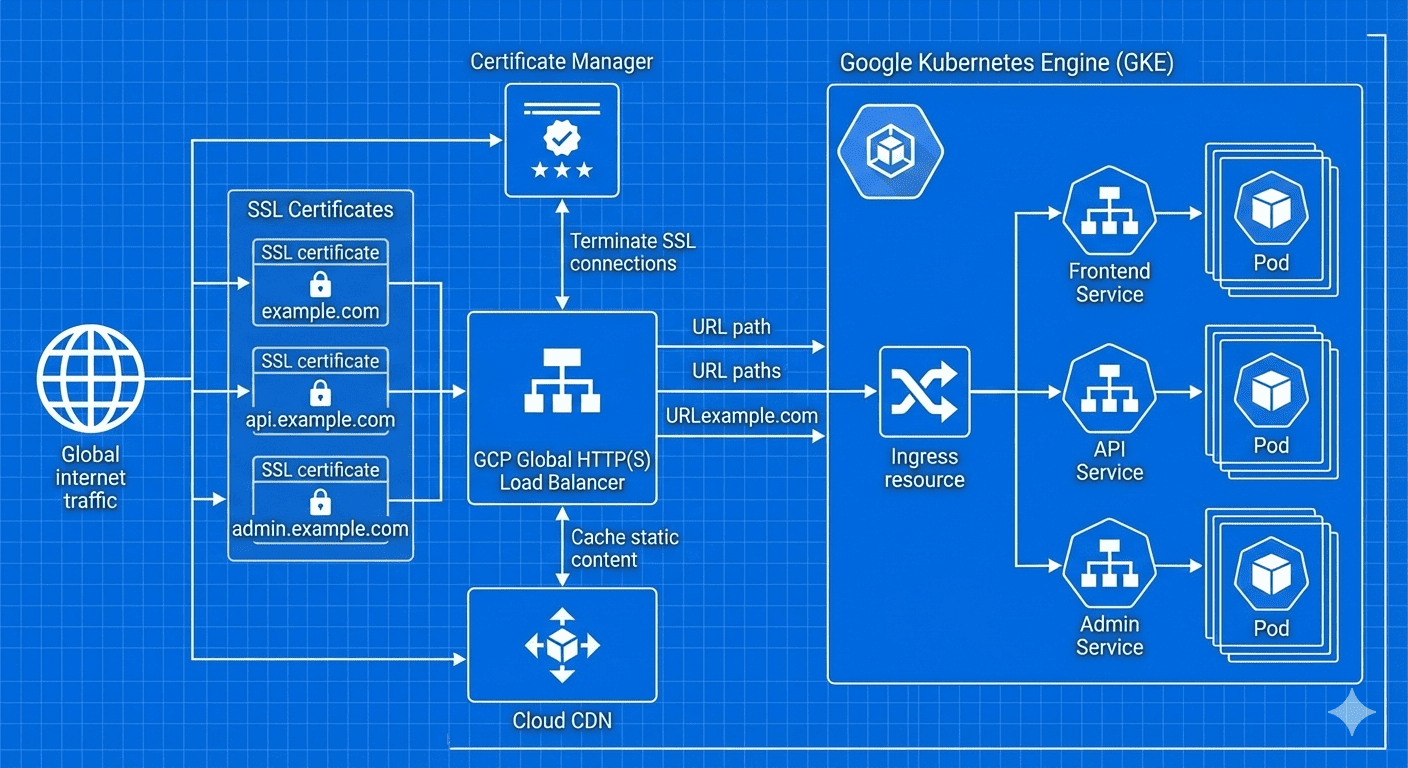
Overview
Google Cloud Platform offers a comprehensive suite of load balancing solutions designed to meet diverse application requirements and architectural patterns. From global HTTP(S) load balancing to regional TCP/UDP load balancing, GCP provides the flexibility and performance needed for modern cloud-native applications.
Load balancers serve as the critical entry point for user traffic, ensuring high availability, optimal performance, and seamless scaling. Understanding the nuances of each GCP load balancer type enables architects and engineers to make informed decisions that directly impact application performance, cost efficiency, and operational complexity.
Recent developments in GCP’s load balancing ecosystem have significantly enhanced SSL certificate management capabilities. The introduction of Certificate Manager allows for sophisticated multi-domain certificate handling, while improvements to Cloud CDN integration provide superior content delivery performance.
Why Load Balancer Selection Matters
The choice of load balancer fundamentally shapes your application’s architecture, performance characteristics, and operational overhead. Different load balancer types serve distinct use cases, and selecting the appropriate solution requires understanding traffic patterns, geographic distribution, protocol requirements, and security considerations.
Modern applications demand load balancing solutions that can handle varying traffic loads, provide SSL termination, integrate with content delivery networks, and support advanced routing capabilities. GCP’s load balancing portfolio addresses these requirements while offering seamless integration with other Google Cloud services.
GCP Load Balancer Architecture Overview
GCP load balancers operate at different layers of the OSI model, providing distinct capabilities and performance characteristics:
Load Balancer Comparison Matrix
| Load Balancer Type | OSI Layer | Scope | Protocol Support | SSL Termination | Best Use Cases |
|---|---|---|---|---|---|
| HTTP(S) Load Balancer | Layer 7 | Global | HTTP, HTTPS | Yes | Web applications, APIs, microservices |
| Network Load Balancer | Layer 4 | Regional | TCP, UDP, ESP, GRE, ICMP | No | Gaming, IoT, real-time applications |
| Internal HTTP(S) Load Balancer | Layer 7 | Regional | HTTP, HTTPS | Yes | Internal microservices, private APIs |
| Internal TCP/UDP Load Balancer | Layer 4 | Regional | TCP, UDP | No | Database connections, internal services |
HTTP(S) Load Balancer Deep Dive
The HTTP(S) Load Balancer represents GCP’s most feature-rich and globally distributed load balancing solution. Operating at Layer 7, it provides intelligent traffic routing, SSL termination, and seamless integration with Cloud CDN.
Key Capabilities and Features
Global Anycast IP
The global anycast IP ensures users connect to the nearest Google edge location, minimizing latency and providing optimal performance regardless of geographic location.
Advanced Routing Capabilities
HTTP(S) Load Balancer supports sophisticated routing based on:
- URL paths and patterns
- HTTP headers and cookies
- Geographic location
- Request methods
- Query parameters
SSL Certificate Management
Multiple SSL certificate management options provide flexibility for different organizational needs and technical requirements.
SSL Certificate Management Strategies
1. Certificate Manager (Recommended for Multi-Domain)
Certificate Manager provides the most advanced and flexible SSL certificate management capabilities:
# Certificate Manager with multiple domains
resource "google_certificate_manager_certificate" "multi_domain_cert" {
  name        = "multi-domain-certificate"
  description = "Certificate for multiple domains"
  scope       = "DEFAULT"

  managed {
    domains = [
      "example.com",
      "www.example.com",
      "api.example.com",
      "admin.example.com"
    ]
    dns_authorizations = [
      google_certificate_manager_dns_authorization.main.id,
      google_certificate_manager_dns_authorization.www.id,
      google_certificate_manager_dns_authorization.api.id,
      google_certificate_manager_dns_authorization.admin.id
    ]
  }
}

# DNS authorizations for domain verification
resource "google_certificate_manager_dns_authorization" "main" {
  name   = "main-dns-auth"
  domain = "example.com"
}

resource "google_certificate_manager_dns_authorization" "www" {
  name   = "www-dns-auth"
  domain = "www.example.com"
}

resource "google_certificate_manager_dns_authorization" "api" {
  name   = "api-dns-auth"
  domain = "api.example.com"
}

resource "google_certificate_manager_dns_authorization" "admin" {
  name   = "admin-dns-auth"
  domain = "admin.example.com"
}

# Certificate Map for domain-specific routing
resource "google_certificate_manager_certificate_map" "domain_map" {
  name        = "certificate-map"
  description = "Certificate mapping for multiple domains"
}

resource "google_certificate_manager_certificate_map_entry" "main_entry" {
  name         = "main-cert-entry"
  map          = google_certificate_manager_certificate_map.domain_map.name
  certificates = [google_certificate_manager_certificate.multi_domain_cert.id]
  hostname     = "example.com"
}

resource "google_certificate_manager_certificate_map_entry" "api_entry" {
  name         = "api-cert-entry"
  map          = google_certificate_manager_certificate_map.domain_map.name
  certificates = [google_certificate_manager_certificate.multi_domain_cert.id]
  hostname     = "api.example.com"
}
2. Compute Engine Managed SSL Certificates
For simpler deployments managed through Terraform:
resource "google_compute_managed_ssl_certificate" "default" {
  name = "managed-ssl-cert"

  managed {
    domains = [
      "example.com",
      "www.example.com",
      "api.example.com"
    ]
  }
}
3. GKE ManagedCertificate Integration
For GKE environments using Kubernetes-native certificate management:
# Separate certificates for each domain (GKE limitation)
apiVersion: networking.gke.io/v1
kind: ManagedCertificate
metadata:
  name: main-domain-cert
spec:
  domains:
    - example.com
---
apiVersion: networking.gke.io/v1
kind: ManagedCertificate
metadata:
  name: api-domain-cert
spec:
  domains:
    - api.example.com
SSL Certificate Management Comparison
| Method | Multi-Domain Support | Management Interface | Automation | Best For |
|---|---|---|---|---|
| Certificate Manager | Yes (unified certificate) | GCP Console + Terraform | DNS-based automation | Complex domain structures |
| Compute Engine Managed SSL | Yes (unified certificate) | Terraform | HTTP-based verification | Compute Engine environments |
| GKE ManagedCertificate | One domain per certificate | Kubernetes YAML | HTTP-based verification | Kubernetes-native deployments |
Network Load Balancer
Network Load Balancer operates at Layer 4, providing high-performance load balancing for TCP and UDP traffic with minimal latency overhead.
Architecture and Performance Characteristics
Key Features
Source IP Preservation
Network Load Balancer preserves the original client IP address, enabling backend services to see the actual source of requests without additional headers or modifications.
Protocol Flexibility
Support for multiple protocols makes Network Load Balancer ideal for:
- Gaming servers requiring UDP
- VPN gateways using ESP
- Custom protocols over TCP
- IoT device communication
Ultra-Low Latency
Layer 4 operation minimizes processing overhead, providing sub-millisecond latency for time-sensitive applications.
Terraform Configuration Example
# External IP address
resource "google_compute_address" "network_lb_ip" {
  name = "network-lb-external-ip"
}

# Health check for TCP service
resource "google_compute_health_check" "tcp_health_check" {
  name               = "tcp-health-check"
  check_interval_sec = 5
  timeout_sec        = 3
  healthy_threshold  = 2
  unhealthy_threshold = 3

  tcp_health_check {
    port = "8080"
  }
}

# Backend service
resource "google_compute_region_backend_service" "network_backend" {
  name                  = "network-backend-service"
  protocol              = "TCP"
  load_balancing_scheme = "EXTERNAL"
  health_checks         = [google_compute_health_check.tcp_health_check.id]

  backend {
    group = google_compute_instance_group.backend_group.id
  }
}

# Forwarding rule
resource "google_compute_forwarding_rule" "network_lb_rule" {
  name                  = "network-lb-forwarding-rule"
  ip_address            = google_compute_address.network_lb_ip.address
  port_range            = "8080"
  backend_service       = google_compute_region_backend_service.network_backend.id
  load_balancing_scheme = "EXTERNAL"
}
Internal Load Balancers
Internal load balancers provide load balancing for traffic within your VPC network, enabling secure communication between internal services without exposure to the internet.
Internal HTTP(S) Load Balancer
Use Cases for Internal HTTP(S) Load Balancer
- Microservices Architecture: Route requests between internal services based on URL paths
- API Gateway Patterns: Centralize internal API access and routing
- Multi-tier Applications: Load balance between application tiers
- Service Mesh Integration: Complement service mesh solutions with centralized ingress
Internal TCP/UDP Load Balancer
Provides Layer 4 load balancing for internal TCP and UDP traffic:
# Internal TCP/UDP Load Balancer
resource "google_compute_forwarding_rule" "internal_lb" {
  name                  = "internal-tcp-lb"
  load_balancing_scheme = "INTERNAL"
  backend_service       = google_compute_region_backend_service.internal_backend.id
  all_ports             = true
  allow_global_access   = true
  network               = "default"
  subnetwork            = "default"
}

resource "google_compute_region_backend_service" "internal_backend" {
  name                  = "internal-backend-service"
  protocol              = "TCP"
  load_balancing_scheme = "INTERNAL"
  health_checks         = [google_compute_health_check.internal_health.id]

  backend {
    group = google_compute_instance_group.internal_group.id
  }
}
GKE Integration and Ingress Controllers
GKE provides seamless integration with GCP load balancers through Kubernetes Ingress resources and service configurations.
GKE Load Balancer Types
Advanced GKE Ingress Configuration
# Frontend configuration for advanced features
apiVersion: networking.gke.io/v1beta1
kind: FrontendConfig
metadata:
  name: advanced-frontend-config
spec:
  redirectToHttps:
    enabled: true
    responseCodeName: MOVED_PERMANENTLY_DEFAULT
  sslPolicy: "modern-ssl-policy"

---
# Backend configuration for performance optimization
apiVersion: cloud.google.com/v1
kind: BackendConfig
metadata:
  name: performance-backend-config
spec:
  timeoutSec: 30
  connectionDraining:
    drainingTimeoutSec: 300
  sessionAffinity:
    affinityType: "CLIENT_IP"
    affinityCookieTtlSec: 3600
  cdn:
    enabled: true
    cachePolicy:
      includeHost: true
      includeProtocol: true
      includeQueryString: false
    negativeCaching: true
  healthCheck:
    checkIntervalSec: 10
    timeoutSec: 5
    healthyThreshold: 2
    unhealthyThreshold: 3
    type: HTTP
    requestPath: /health
    port: 8080

---
# Comprehensive Ingress with multiple domains and paths
apiVersion: networking.k8s.io/v1
kind: Ingress
metadata:
  name: production-ingress
  annotations:
    kubernetes.io/ingress.global-static-ip-name: "production-lb-ip"
    networking.gke.io/managed-certificates: "main-cert,api-cert"
    kubernetes.io/ingress.class: "gce"
    networking.gke.io/v1beta1.FrontendConfig: "advanced-frontend-config"
    cloud.google.com/backend-config: '{"default": "performance-backend-config"}'
spec:
  rules:
  # Main website
  - host: example.com
    http:
      paths:
      - path: /
        pathType: Prefix
        backend:
          service:
            name: frontend-service
            port:
              number: 80
      - path: /static/*
        pathType: Prefix
        backend:
          service:
            name: cdn-service
            port:
              number: 80

  # API services
  - host: api.example.com
    http:
      paths:
      - path: /v1/*
        pathType: Prefix
        backend:
          service:
            name: api-v1-service
            port:
              number: 8080
      - path: /v2/*
        pathType: Prefix
        backend:
          service:
            name: api-v2-service
            port:
              number: 8080
      - path: /health
        pathType: Exact
        backend:
          service:
            name: health-service
            port:
              number: 8080
GKE Certificate Manager Integration
For modern GKE deployments, Certificate Manager provides superior certificate management:
# Using Certificate Manager instead of ManagedCertificate
apiVersion: networking.k8s.io/v1
kind: Ingress
metadata:
  name: cert-manager-ingress
  annotations:
    kubernetes.io/ingress.global-static-ip-name: "production-ip"
    kubernetes.io/ingress.class: "gce"
    # Use Certificate Manager instead of ManagedCertificate
    networking.gke.io/certificate-map: "production-cert-map"
    networking.gke.io/v1beta1.FrontendConfig: "frontend-config"
spec:
  rules:
  - host: example.com
    # ... routing configuration
  - host: api.example.com
    # ... API routing configuration
Cloud CDN Integration and Performance Optimization
Cloud CDN integration with HTTP(S) Load Balancers provides global content caching and acceleration.
CDN Architecture Pattern
Advanced CDN Configuration
# Backend service with optimized CDN configuration
resource "google_compute_backend_service" "cdn_optimized_backend" {
  name        = "cdn-optimized-backend"
  protocol    = "HTTP"
  timeout_sec = 10

  backend {
    group = google_compute_instance_group.web_servers.id
  }

  health_checks = [google_compute_http_health_check.default.id]

  # Enable Cloud CDN with advanced configuration
  enable_cdn = true

  cdn_policy {
    cache_mode                   = "CACHE_ALL_STATIC"
    default_ttl                 = 3600
    max_ttl                     = 86400
    client_ttl                  = 1800
    negative_caching            = true

    negative_caching_policy {
      code = 404
      ttl  = 120
    }

    negative_caching_policy {
      code = 500
      ttl  = 60
    }

    # Advanced cache key configuration
    cache_key_policy {
      include_host         = true
      include_protocol     = true
      include_query_string = false
      query_string_whitelist = ["version", "locale", "format"]
      include_http_headers = ["Accept-Language"]
    }

    # Signed URL configuration for protected content
    signed_url_cache_max_age_sec = 3600
  }
}
Performance Optimization Strategies
| Optimization Area | Technique | Configuration | Performance Impact |
|---|---|---|---|
| Cache Efficiency | Strategic TTL values | Short TTL for dynamic, long TTL for static | Reduced origin load, faster response times |
| Cache Keys | Selective query string caching | Whitelist only necessary parameters | Higher cache hit ratio |
| Compression | Enable gzip compression | Backend service compression | Reduced bandwidth, faster loading |
| Connection Management | Keep-alive and connection pooling | Backend service timeouts | Lower latency, better throughput |
Security and Access Control
GCP load balancers integrate with Cloud Armor for DDoS protection and web application firewall capabilities.
Cloud Armor Integration
# Cloud Armor security policy
resource "google_compute_security_policy" "security_policy" {
  name = "load-balancer-security-policy"

  # DDoS protection rule
  rule {
    action   = "allow"
    priority = "1000"
    match {
      versioned_expr = "SRC_IPS_V1"
      config {
        src_ip_ranges = ["*"]
      }
    }
    description = "Default allow rule"

    rate_limit_options {
      conform_action = "allow"
      exceed_action  = "deny(429)"
      enforce_on_key = "IP"

      rate_limit_threshold {
        count        = 100
        interval_sec = 60
      }
    }
  }

  # Block specific countries
  rule {
    action   = "deny(403)"
    priority = "2000"
    match {
      expr {
        expression = "origin.region_code == 'CN' || origin.region_code == 'RU'"
      }
    }
    description = "Block traffic from specific regions"
  }

  # SQL injection protection
  rule {
    action   = "deny(403)"
    priority = "3000"
    match {
      expr {
        expression = "evaluatePreconfiguredExpr('sqli-stable')"
      }
    }
    description = "Block SQL injection attempts"
  }

  # XSS protection
  rule {
    action   = "deny(403)"
    priority = "4000"
    match {
      expr {
        expression = "evaluatePreconfiguredExpr('xss-stable')"
      }
    }
    description = "Block XSS attempts"
  }
}

# Apply security policy to backend service
resource "google_compute_backend_service" "secure_backend" {
  name        = "secure-backend-service"
  protocol    = "HTTP"
  timeout_sec = 10

  security_policy = google_compute_security_policy.security_policy.id

  backend {
    group = google_compute_instance_group.web_servers.id
  }

  health_checks = [google_compute_http_health_check.default.id]
}
Cost Optimization Strategies
Understanding GCP load balancer pricing models enables effective cost optimization.
Pricing Structure Analysis
| Load Balancer Type | Base Cost | Data Processing | Additional Costs | Cost Optimization Tips |
|---|---|---|---|---|
| HTTP(S) Load Balancer | $18/month (first 5 rules) | $0.008/GB | $7/month per additional rule | Consolidate rules, use path-based routing |
| Network Load Balancer | $18/month | $0.008/GB | None | Regional placement, connection pooling |
| Internal Load Balancer | $18/month | $0.008/GB | None | Efficient backend selection |
Cost Optimization Techniques
1. Rule Consolidation Strategy
# Efficient: Single Ingress with multiple paths
apiVersion: networking.k8s.io/v1
kind: Ingress
metadata:
  name: consolidated-ingress
spec:
  rules:
  - host: example.com
    http:
      paths:
      - path: /api/v1
        pathType: Prefix
        backend:
          service:
            name: api-v1-service
            port:
              number: 8080
      - path: /api/v2
        pathType: Prefix
        backend:
          service:
            name: api-v2-service
            port:
              number: 8080
      - path: /
        pathType: Prefix
        backend:
          service:
            name: web-service
            port:
              number: 80
2. Regional vs Global Decision Matrix
Monitoring and Observability
Comprehensive monitoring ensures optimal load balancer performance and enables proactive issue resolution.
Key Metrics and Monitoring Strategy
Terraform Monitoring Configuration
Troubleshooting Common Issues
SSL Certificate Issues
- Provisioning Stuck: Verify DNS records point to load balancer IP
- Domain Validation Failures: Ensure domain ownership and accessibility
- Certificate Not Attached: Check load balancer configuration and certificate map
- Mixed Content Warnings: Ensure all resources use HTTPS
Diagnostic Commands
# Check certificate status
gcloud compute ssl-certificates describe certificate-name

# Verify DNS resolution
nslookup your-domain.com

# Test certificate validity
openssl s_client -connect your-domain.com:443 -servername your-domain.com

# Check GKE ManagedCertificate status
kubectl describe managedcertificate certificate-name
Backend Service Health Issues
# Check backend service health
gcloud compute backend-services get-health backend-service-name --global

# Verify health check configuration
gcloud compute health-checks describe health-check-name

# Test health check endpoint manually
curl -I http://backend-ip:port/health

# Check firewall rules for health check traffic
gcloud compute firewall-rules list --filter="direction:INGRESS"
Performance Optimization Troubleshooting
# Enhanced backend configuration for performance
resource "google_compute_backend_service" "optimized_backend" {
  name        = "optimized-backend-service"
  protocol    = "HTTP"
  timeout_sec = 30

  backend {
    group = google_compute_instance_group.web_servers.id

    # Connection balancing mode
    balancing_mode  = "UTILIZATION"
    max_utilization = 0.8

    # Connection draining
    capacity_scaler = 1.0
  }

  health_checks = [google_compute_health_check.optimized_health.id]

  # Connection draining
  connection_draining_timeout_sec = 300

  # Session affinity for stateful applications
  session_affinity = "CLIENT_IP"

  # Load balancing algorithm
  locality_lb_policy = "ROUND_ROBIN"

  # Circuit breaker configuration
  circuit_breakers {
    max_requests_per_connection = 10
    max_connections            = 100
    max_pending_requests       = 10
    max_requests               = 100
    max_retries               = 3
  }
}
Advanced Use Cases and Patterns
Multi-Region Deployment Pattern
# Multi-region backend service configuration
resource "google_compute_backend_service" "global_backend" {
  name        = "global-multi-region-backend"
  protocol    = "HTTP"
  timeout_sec = 30

  # US region backend
  backend {
    group = google_compute_instance_group.us_central1.id
    balancing_mode = "RATE"
    max_rate = 1000
    capacity_scaler = 1.0
  }

  # Europe region backend
  backend {
    group = google_compute_instance_group.europe_west1.id
    balancing_mode = "RATE"
    max_rate = 1000
    capacity_scaler = 1.0
  }

  # Asia region backend
  backend {
    group = google_compute_instance_group.asia_southeast1.id
    balancing_mode = "RATE"
    max_rate = 1000
    capacity_scaler = 1.0
  }

  health_checks = [google_compute_health_check.global_health.id]

  # Locality preferences for optimal routing
  locality_lb_policy = "MAGLEV"

  # Consistent hash for session affinity across regions
  consistent_hash {
    minimum_ring_size = 1024
  }
}
Blue-Green Deployment with Load Balancers
# Blue-Green deployment configuration
resource "google_compute_url_map" "blue_green_url_map" {
  name            = "blue-green-url-map"
  default_service = google_compute_backend_service.blue_backend.id

  host_rule {
    hosts        = ["app.example.com"]
    path_matcher = "blue-green-matcher"
  }

  path_matcher {
    name            = "blue-green-matcher"
    default_service = var.active_environment == "blue" ? google_compute_backend_service.blue_backend.id : google_compute_backend_service.green_backend.id

    # Canary testing route
    path_rule {
      paths   = ["/canary/*"]
      service = google_compute_backend_service.green_backend.id
    }
  }
}

# Blue environment backend
resource "google_compute_backend_service" "blue_backend" {
  name     = "blue-backend-service"
  protocol = "HTTP"

  backend {
    group = google_compute_instance_group.blue_environment.id
  }

  health_checks = [google_compute_health_check.app_health.id]
}

# Green environment backend
resource "google_compute_backend_service" "green_backend" {
  name     = "green-backend-service"
  protocol = "HTTP"

  backend {
    group = google_compute_instance_group.green_environment.id
  }

  health_checks = [google_compute_health_check.app_health.id]
}
Migration Strategies
From Other Cloud Providers
| Source | Target GCP Load Balancer | Key Considerations | Migration Approach |
|---|---|---|---|
| AWS ALB | HTTP(S) Load Balancer | Path-based routing, SSL certificates | Parallel deployment with DNS cutover |
| AWS NLB | Network Load Balancer | Source IP preservation, health checks | Direct migration with IP preservation |
| Azure Application Gateway | HTTP(S) Load Balancer | WAF rules, URL rewriting | Feature mapping and testing |
| Azure Load Balancer | Network Load Balancer | Health probe configuration | Health check adaptation |
Migration Checklist
# Pre-migration assessment
# 1. Document current load balancer configuration
aws elbv2 describe-load-balancers > current-lb-config.json

# 2. Analyze traffic patterns
aws cloudwatch get-metric-statistics --namespace AWS/ApplicationELB --metric-name RequestCount

# 3. Export SSL certificates
aws acm list-certificates

# Migration steps
# 1. Create equivalent GCP resources
terraform plan -out=migration.tfplan

# 2. Configure DNS for testing
# Create CNAME records pointing to GCP load balancer

# 3. Validate functionality
curl -H "Host: app.example.com" http://gcp-lb-ip/health

# 4. Gradual traffic migration
# Update DNS TTL to low values
# Gradually shift traffic using weighted DNS

# 5. Monitor and validate
gcloud logging read "resource.type=http_load_balancer"
Future-Proofing and Emerging Technologies
Integration with Emerging GCP Services
Serverless Integration Patterns
# Cloud Run integration with HTTP(S) Load Balancer
resource "google_cloud_run_service" "api_service" {
  name     = "api-service"
  location = "us-central1"

  template {
    spec {
      containers {
        image = "gcr.io/project/api:latest"

        resources {
          limits = {
            cpu    = "2"
            memory = "2Gi"
          }
        }
      }
    }
  }

  traffic {
    percent         = 100
    latest_revision = true
  }
}

# Network Endpoint Group for Cloud Run
resource "google_compute_region_network_endpoint_group" "cloud_run_neg" {
  name                  = "cloud-run-neg"
  network_endpoint_type = "SERVERLESS"
  region                = "us-central1"

  cloud_run {
    service = google_cloud_run_service.api_service.name
  }
}

# Backend service for serverless
resource "google_compute_backend_service" "serverless_backend" {
  name = "serverless-backend-service"

  backend {
    group = google_compute_region_network_endpoint_group.cloud_run_neg.id
  }

  # Serverless-optimized configuration
  timeout_sec = 300
  protocol    = "HTTP"
}
Conclusion
GCP’s load balancing ecosystem provides comprehensive solutions for modern cloud applications, from simple web services to complex microservices architectures. The choice between HTTP(S), Network, and Internal load balancers depends on specific application requirements, traffic patterns, and architectural constraints.
Key Decision Factors
| Factor | HTTP(S) Load Balancer | Network Load Balancer | Internal Load Balancer |
|---|---|---|---|
| Application Layer | ✅ Layer 7 features | ❌ Layer 4 only | ✅ Layer 7 features |
| Global Distribution | ✅ Global anycast | ❌ Regional only | ❌ Regional only |
| Protocol Support | HTTP/HTTPS only | ✅ TCP/UDP/ESP/GRE | HTTP/HTTPS only |
| SSL Termination | ✅ Advanced SSL management | ❌ Pass-through only | ✅ SSL termination |
| CDN Integration | ✅ Native Cloud CDN | ❌ Not applicable | ❌ Internal only |
Best Practices Summary
- Choose the Right Type: Match load balancer capabilities to application requirements
- SSL Strategy: Use Certificate Manager for complex domain structures
- Performance Optimization: Leverage CDN, compression, and connection pooling
- Security: Implement Cloud Armor for DDoS and WAF protection
- Cost Management: Consolidate rules and optimize regional placement
- Monitoring: Set up comprehensive observability and alerting
- Automation: Use Terraform for consistent infrastructure deployment
Looking Forward
The evolution of GCP load balancing continues with enhanced serverless integration, AI-powered traffic optimization, and deeper service mesh integration. Organizations should design their load balancing strategy with flexibility to adapt to emerging technologies while maintaining current operational excellence.
The integration of load balancers with emerging technologies like Cloud Run, Vertex AI, and advanced networking features positions GCP as a platform capable of supporting next-generation application architectures. Understanding these fundamentals provides the foundation for leveraging future enhancements and maintaining competitive advantage in cloud-native development.

Comments