38 min to read
GCP Database Selection Complete Guide - Cloud SQL vs Spanner vs Firestore vs BigQuery
Master database selection with comprehensive analysis and practical implementation strategies
Overview
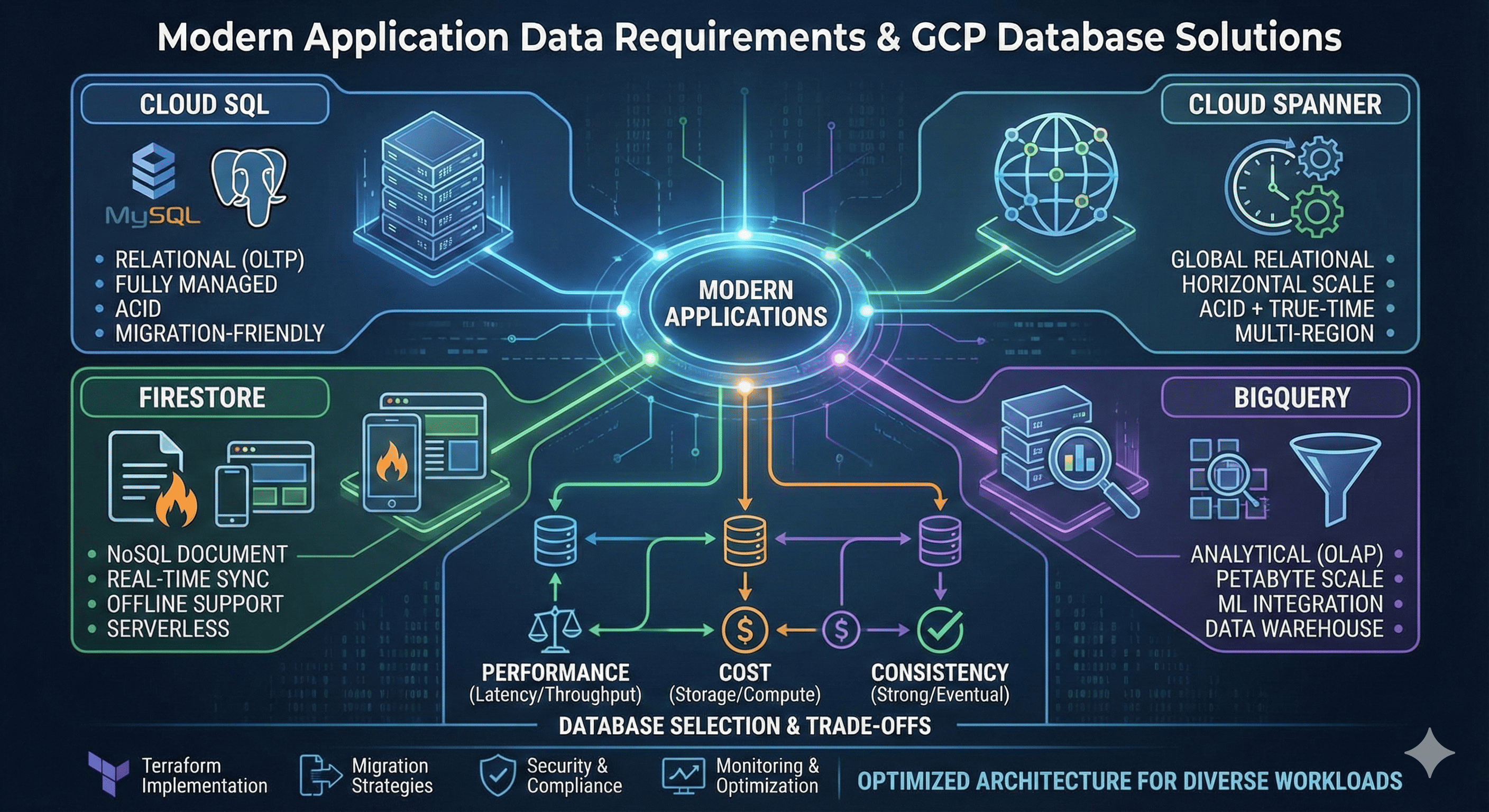
Modern application data requirements are more complex and diverse than ever before. Google Cloud Platform (GCP) provides comprehensive database services spanning relational, NoSQL, and analytical databases to meet these varied requirements. Each database has unique strengths and application scenarios, making the right choice crucial for application performance and cost efficiency.
Cloud SQL serves as a fully managed relational database service supporting MySQL, PostgreSQL, and SQL Server, optimized for migrating existing applications to the cloud. Cloud Spanner is Google’s innovative globally distributed relational database that uniquely provides both ACID transactions and horizontal scalability.
Firestore is a serverless NoSQL document database optimized for mobile and web applications through real-time synchronization and automatic scaling. BigQuery is a fully managed data warehouse for petabyte-scale data analysis, providing powerful analytics capabilities for machine learning and business intelligence.
Recent developments in database technology have added more sophisticated features to each service. Examples include Cloud SQL’s high availability and read replica optimization, Spanner’s multi-region strong consistency, Firestore’s offline support and real-time listeners, and BigQuery’s real-time streaming and ML integration.
This guide provides in-depth analysis of each database’s core principles and characteristics, concrete examination of cost, performance, and consistency trade-offs, along with real-world operational scenarios, Terraform implementation examples, and optimization strategies for OLTP and analytical workloads.
Database Fundamentals and Classification
Relational Database Principles
Relational databases are based on Edgar F. Codd’s relational model, structuring data in tabular form. They guarantee data integrity through ACID (Atomicity, Consistency, Isolation, Durability) properties and support complex queries and join operations through SQL.
NoSQL Database Characteristics
NoSQL databases are designed according to the CAP theorem (Consistency, Availability, Partition tolerance), emphasizing scalability and performance in large-scale distributed environments. They offer flexible schemas and easy horizontal scaling.
| CAP Property | Definition | Implementation Trade-offs | Real-world Examples |
|---|---|---|---|
| Consistency | All nodes see the same data simultaneously | Higher latency, complex distributed coordination | Banking systems, inventory management |
| Availability | System continues operating continuously | Potential data inconsistency, partition handling | Social media feeds, content delivery |
| Partition Tolerance | System operates despite network partitions | Must choose between consistency and availability | Distributed systems, multi-region deployments |
Analytical Database Structure
Analytical databases are optimized for OLAP (Online Analytical Processing) workloads, utilizing columnar storage and parallel processing engines for large-scale data processing.
Cloud SQL In-Depth Analysis
Cloud SQL Architecture and Principles
Cloud SQL is a fully managed relational database service running on Google’s infrastructure. It provides automatic backups, patch management, and high availability while ensuring compatibility with existing applications.
High Availability Configuration Principles
Cloud SQL’s high availability is implemented through synchronous replication. Primary and standby instances are placed in different availability zones, achieving RTO (Recovery Time Objective) under 60 seconds through automatic failover.
# Cloud SQL MySQL Instance Configuration
resource "google_sql_database_instance" "main" {
  name             = "main-instance"
  database_version = "MYSQL_8_0"
  region          = "us-central1"

  settings {
    tier = "db-n1-standard-2"

    # High Availability Configuration
    availability_type = "REGIONAL"

    # Backup Configuration
    backup_configuration {
      enabled                        = true
      start_time                    = "02:00"
      point_in_time_recovery_enabled = true
      transaction_log_retention_days = 7
      backup_retention_settings {
        retained_backups = 30
        retention_unit   = "COUNT"
      }
    }

    # IP Configuration
    ip_configuration {
      ipv4_enabled    = true
      private_network = google_compute_network.private_network.id
      require_ssl     = true

      authorized_networks {
        name  = "office-network"
        value = "203.0.113.0/24"
      }
    }

    # Database Flags
    database_flags {
      name  = "slow_query_log"
      value = "on"
    }

    database_flags {
      name  = "general_log"
      value = "on"
    }

    # Disk Configuration
    disk_type    = "PD_SSD"
    disk_size    = 100
    disk_autoresize = true
    disk_autoresize_limit = 500
  }

  deletion_protection = true
}

# Read Replica Configuration
resource "google_sql_database_instance" "read_replica" {
  name                 = "read-replica"
  master_instance_name = google_sql_database_instance.main.name
  region              = "us-east1"
  database_version     = "MYSQL_8_0"

  replica_configuration {
    failover_target = false
  }

  settings {
    tier = "db-n1-standard-1"

    availability_type = "ZONAL"

    ip_configuration {
      ipv4_enabled    = true
      private_network = google_compute_network.private_network.id
      require_ssl     = true
    }

    disk_type = "PD_SSD"
    disk_size = 50
  }
}

# Database Creation
resource "google_sql_database" "database" {
  name     = "application_db"
  instance = google_sql_database_instance.main.name
  charset  = "utf8mb4"
  collation = "utf8mb4_unicode_ci"
}

# User Creation
resource "google_sql_user" "app_user" {
  name     = "app_user"
  instance = google_sql_database_instance.main.name
  password = var.db_password
  host     = "%"
}

# SSL Certificate Generation
resource "google_sql_ssl_cert" "client_cert" {
  common_name = "client-cert"
  instance    = google_sql_database_instance.main.name
}
Cloud SQL Performance Optimization
Connection Pooling and Caching Strategy
# Service Account for Cloud SQL Proxy
resource "google_service_account" "sql_proxy" {
  account_id   = "sql-proxy"
  display_name = "Cloud SQL Proxy Service Account"
}

# Grant Cloud SQL Client Permission
resource "google_project_iam_member" "sql_proxy_client" {
  project = var.project_id
  role    = "roles/cloudsql.client"
  member  = "serviceAccount:${google_service_account.sql_proxy.email}"
}

# Using Cloud SQL Proxy in GKE
resource "kubernetes_deployment" "app" {
  metadata {
    name = "web-app"
  }

  spec {
    replicas = 3

    selector {
      match_labels = {
        app = "web-app"
      }
    }

    template {
      metadata {
        labels = {
          app = "web-app"
        }
      }

      spec {
        service_account_name = google_service_account.sql_proxy.email

        container {
          name  = "web-app"
          image = "gcr.io/project/web-app:latest"

          env {
            name  = "DB_HOST"
            value = "127.0.0.1"
          }

          env {
            name  = "DB_PORT"
            value = "3306"
          }

          env {
            name = "DB_PASSWORD"
            value_from {
              secret_key_ref {
                name = "db-credentials"
                key  = "password"
              }
            }
          }
        }

        # Cloud SQL Proxy Sidecar
        container {
          name  = "cloudsql-proxy"
          image = "gcr.io/cloudsql-docker/gce-proxy:1.33.2"

          command = [
            "/cloud_sql_proxy",
            "-instances=${google_sql_database_instance.main.connection_name}=tcp:3306"
          ]

          security_context {
            run_as_non_root = true
          }
        }
      }
    }
  }
}
Cloud Spanner Revolutionary Architecture
Spanner’s Global Distribution Principles
Cloud Spanner is an innovative database that provides strong consistency in globally distributed environments using Google’s TrueTime API. It has a unique architecture that transcends the traditional limitations of the CAP theorem.
TrueTime and External Consistency
TrueTime is a global time synchronization system using GPS and atomic clocks, assigning globally unique timestamps to each transaction. This enables External Consistency guarantees.
# Cloud Spanner Instance Configuration
resource "google_spanner_instance" "main" {
  config       = "regional-us-central1"
  display_name = "Main Instance"
  name         = "main-instance"
  num_nodes    = 3

  labels = {
    environment = "production"
    team       = "backend"
  }
}

# Spanner Database Creation
resource "google_spanner_database" "database" {
  instance = google_spanner_instance.main.name
  name     = "application_db"

  ddl = [
    "CREATE TABLE Users (UserId STRING(36) NOT NULL, Email STRING(MAX), Name STRING(MAX), CreatedAt TIMESTAMP NOT NULL OPTIONS (allow_commit_timestamp=true)) PRIMARY KEY (UserId)",
    "CREATE TABLE Orders (OrderId STRING(36) NOT NULL, UserId STRING(36) NOT NULL, Amount NUMERIC NOT NULL, Status STRING(20) NOT NULL, CreatedAt TIMESTAMP NOT NULL OPTIONS (allow_commit_timestamp=true)) PRIMARY KEY (OrderId)",
    "CREATE INDEX UserEmailIndex ON Users(Email)",
    "CREATE INDEX UserOrdersIndex ON Orders(UserId, CreatedAt DESC)"
  ]

  deletion_protection = true
}

# Multi-Region Configuration
resource "google_spanner_instance" "multi_region" {
  config       = "nam-eur-asia1"  # North America-Europe-Asia Multi-region
  display_name = "Multi-Region Instance"
  name         = "multi-region-instance"
  num_nodes    = 9  # 3 nodes per region

  labels = {
    environment = "production"
    scope      = "global"
  }
}
Spanner Schema Design Optimization
Key Design for Hotspot Prevention
Spanner requires careful key design to prevent hotspots caused by sequential keys.
-- Incorrect Design (Sequential key causes hotspots)
CREATE TABLE Orders (
  OrderId INT64 NOT NULL,  -- Auto-incrementing key causes hotspots
  UserId STRING(36) NOT NULL,
  Amount NUMERIC NOT NULL,
  CreatedAt TIMESTAMP NOT NULL
) PRIMARY KEY (OrderId);

-- Correct Design (UUID or hash-based key)
CREATE TABLE Orders (
  OrderId STRING(36) NOT NULL,  -- Use UUID
  UserId STRING(36) NOT NULL,
  Amount NUMERIC NOT NULL,
  CreatedAt TIMESTAMP NOT NULL OPTIONS (allow_commit_timestamp=true)
) PRIMARY KEY (OrderId);

-- Or distribute using composite key
CREATE TABLE UserOrders (
  UserId STRING(36) NOT NULL,
  OrderId STRING(36) NOT NULL,
  Amount NUMERIC NOT NULL,
  CreatedAt TIMESTAMP NOT NULL OPTIONS (allow_commit_timestamp=true)
) PRIMARY KEY (UserId, OrderId);
Firestore Real-time NoSQL Database
Firestore’s Document-based Data Model
Firestore is a NoSQL database using a document-collection hierarchical structure, providing real-time synchronization and offline support. Each document consists of key-value pairs and can have subcollections.
# Firestore Database Creation
resource "google_firestore_database" "database" {
  project     = var.project_id
  name        = "(default)"
  location_id = "us-central"
  type        = "FIRESTORE_NATIVE"

  concurrency_mode = "OPTIMISTIC"
  app_engine_integration_mode = "DISABLED"
}

# Composite Index Creation
resource "google_firestore_index" "user_orders_index" {
  project = var.project_id

  collection = "orders"

  fields {
    field_path = "userId"
    order      = "ASCENDING"
  }

  fields {
    field_path = "createdAt"
    order      = "DESCENDING"
  }

  fields {
    field_path = "status"
    order      = "ASCENDING"
  }
}
Firestore Security Rules
// Firestore Security Rules Example
rules_version = '2';
service cloud.firestore {
  match /databases/{database}/documents {
    // User profile access control
    match /users/{userId} {
      allow read, write: if request.auth != null && request.auth.uid == userId;
    }

    // Order information access control
    match /orders/{orderId} {
      allow read, write: if request.auth != null
        && request.auth.uid == resource.data.userId;
      allow create: if request.auth != null
        && request.auth.uid == request.resource.data.userId;
    }

    // Public product information
    match /products/{productId} {
      allow read: if true;
      allow write: if request.auth != null
        && 'admin' in request.auth.token.roles;
    }
  }
}
BigQuery Large-scale Analytics Platform
BigQuery’s Columnar Storage Structure
BigQuery is a fully managed data warehouse based on Dremel technology, supporting petabyte-scale data analysis through columnar storage and massive parallel processing.
# BigQuery Dataset Creation
resource "google_bigquery_dataset" "analytics" {
  dataset_id  = "analytics"
  description = "Analytics data warehouse"
  location    = "US"

  default_table_expiration_ms = 3600000  # 1 hour

  access {
    role          = "OWNER"
    user_by_email = google_service_account.bigquery_admin.email
  }

  access {
    role   = "READER"
    domain = "example.com"
  }

  labels = {
    environment = "production"
    team       = "analytics"
  }
}

# Partitioned Table Creation
resource "google_bigquery_table" "user_events" {
  dataset_id = google_bigquery_dataset.analytics.dataset_id
  table_id   = "user_events"

  description = "User events partitioned by date"

  time_partitioning {
    type                     = "DAY"
    field                   = "event_timestamp"
    require_partition_filter = true
    expiration_ms           = 5184000000  # 60 days
  }

  clustering = ["user_id", "event_type"]

  schema = jsonencode([
    {
      name = "event_id"
      type = "STRING"
      mode = "REQUIRED"
    },
    {
      name = "user_id"
      type = "STRING"
      mode = "REQUIRED"
    },
    {
      name = "event_type"
      type = "STRING"
      mode = "REQUIRED"
    },
    {
      name = "event_timestamp"
      type = "TIMESTAMP"
      mode = "REQUIRED"
    },
    {
      name = "properties"
      type = "JSON"
      mode = "NULLABLE"
    }
  ])
}
Database Selection Criteria and Comparative Analysis
Workload-based Database Selection Matrix
| Characteristic | Cloud SQL | Cloud Spanner | Firestore | BigQuery |
|---|---|---|---|---|
| Data Model | Relational (Tables) | Relational (Schema) | Document-based NoSQL | Columnar Analytical |
| Scalability | Vertical (up to 96vCPU) | Horizontal (Global) | Automatic Horizontal | Petabyte-scale |
| Consistency | ACID Strong Consistency | ACID External Consistency | Eventual Consistency | Batch Consistency |
| Latency | < 10ms | < 10ms (within region) | < 100ms | Seconds to Minutes |
| Query Language | SQL | SQL | NoSQL Queries | SQL (Analytics Optimized) |
| Real-time Features | Triggers/Replication | Change Streams | Real-time Listeners | Streaming Inserts |
| Global Distribution | Read Replicas | Native Support | Multi-region Replication | Global Availability |
| Offline Support | None | None | Native Support | None |
| Transactions | ACID | Distributed ACID | Limited | Batch |
| Monthly Cost (Medium Scale) | $200-800 | $900-3000 | $100-500 | $100-1000 |
| Application Scenarios | Legacy App Migration | Global OLTP | Mobile/Web Apps | Data Analytics |
Performance and Cost Trade-off Analysis
Performance Testing Configuration
# Performance test resource configuration
locals {
  performance_scenarios = {
    oltp_high_throughput = {
      database_type = "spanner"
      config = {
        instance_config = "regional-us-central1"
        node_count     = 3
        expected_qps   = 10000
      }
    }

    oltp_cost_optimized = {
      database_type = "cloud_sql"
      config = {
        tier           = "db-n1-standard-4"
        replica_count  = 2
        expected_qps   = 2000
      }
    }

    mobile_app_backend = {
      database_type = "firestore"
      config = {
        location     = "us-central"
        read_units   = 100000
        write_units  = 50000
      }
    }

    analytics_workload = {
      database_type = "bigquery"
      config = {
        slot_capacity    = 500
        storage_tb      = 10
        query_frequency = "hourly"
      }
    }
  }
}

# Cost calculation module
module "cost_calculator" {
  source = "./modules/database-cost-calculator"

  for_each = local.performance_scenarios

  scenario_name = each.key
  database_type = each.value.database_type
  config       = each.value.config

  region = var.region
  usage_pattern = {
    hours_per_day = 24
    days_per_month = 30
  }
}

output "cost_analysis" {
  value = {
    for scenario, config in local.performance_scenarios :
    scenario => {
      database_type = config.database_type
      estimated_monthly_cost = module.cost_calculator[scenario].monthly_cost
      performance_tier = module.cost_calculator[scenario].performance_tier
    }
  }
}
Real-time Analytics and OLTP Workload Optimization
Hybrid Architecture Configuration
# OLTP + Real-time Analytics Hybrid Architecture
resource "google_sql_database_instance" "oltp_primary" {
  name             = "oltp-primary"
  database_version = "POSTGRES_14"
  region          = "us-central1"

  settings {
    tier = "db-custom-4-16384"  # 4 vCPU, 16GB RAM

    availability_type = "REGIONAL"

    backup_configuration {
      enabled = true
      start_time = "02:00"
      point_in_time_recovery_enabled = true
    }

    # Settings for real-time replication
    database_flags {
      name  = "cloudsql.logical_decoding"
      value = "on"
    }

    database_flags {
      name  = "max_replication_slots"
      value = "10"
    }
  }
}

# Dataflow job for real-time CDC
resource "google_dataflow_job" "cdc_to_bigquery" {
  name              = "postgres-cdc-to-bigquery"
  template_gcs_path = "gs://dataflow-templates/latest/Cloud_SQL_to_BigQuery_CDC"
  temp_gcs_location = "gs://${google_storage_bucket.temp.name}/temp"

  parameters = {
    inputSubscription    = google_pubsub_subscription.cdc_subscription.id
    outputTableSpec     = "${var.project_id}:${google_bigquery_dataset.realtime.dataset_id}.transactions"
    outputDeadletterTable = "${var.project_id}:${google_bigquery_dataset.realtime.dataset_id}.failed_records"
  }

  depends_on = [google_sql_database_instance.oltp_primary]
}

# Materialized view for real-time dashboard
resource "google_bigquery_table" "realtime_metrics" {
  dataset_id = google_bigquery_dataset.realtime.dataset_id
  table_id   = "realtime_metrics"

  description = "Real-time business metrics"

  materialized_view {
    query = <<-SQL
      SELECT
        DATETIME_TRUNC(transaction_timestamp, MINUTE) as minute,
        COUNT(*) as transaction_count,
        SUM(amount) as total_amount,
        AVG(amount) as avg_amount,
        COUNT(DISTINCT user_id) as unique_users
      FROM `${var.project_id}.${google_bigquery_dataset.realtime.dataset_id}.transactions`
      WHERE transaction_timestamp >= DATETIME_SUB(CURRENT_DATETIME(), INTERVAL 1 HOUR)
      GROUP BY minute
      ORDER BY minute DESC
    SQL

    enable_refresh = true
    refresh_interval_ms = 60000  # Refresh every minute
  }
}
Performance Tuning and Optimization
Cloud SQL Performance Tuning
-- Cloud SQL PostgreSQL Performance Optimization Example

-- 1. Index optimization
CREATE INDEX CONCURRENTLY idx_orders_user_created
ON orders (user_id, created_at DESC)
WHERE status = 'active';

-- 2. Partition table configuration
CREATE TABLE orders_partitioned (
    order_id UUID PRIMARY KEY,
    user_id UUID NOT NULL,
    amount DECIMAL(10,2) NOT NULL,
    created_at TIMESTAMP NOT NULL,
    status VARCHAR(20) NOT NULL
) PARTITION BY RANGE (created_at);

-- Monthly partition creation
CREATE TABLE orders_2024_01 PARTITION OF orders_partitioned
FOR VALUES FROM ('2024-01-01') TO ('2024-02-01');

-- 3. Materialized view utilization
CREATE MATERIALIZED VIEW user_order_summary AS
SELECT
    user_id,
    COUNT(*) as total_orders,
    SUM(amount) as total_amount,
    AVG(amount) as avg_amount,
    MAX(created_at) as last_order_date
FROM orders
GROUP BY user_id;

-- Add index
CREATE UNIQUE INDEX ON user_order_summary (user_id);
Spanner Query Optimization
-- Spanner Performance Optimization Example

-- 1. Index design (hotspot prevention)
CREATE INDEX UserOrdersByTimestamp ON Orders(UserId, CreatedAt DESC);

-- 2. Interleaved table utilization
CREATE TABLE OrderItems (
    OrderId STRING(36) NOT NULL,
    ItemId STRING(36) NOT NULL,
    ProductId STRING(36) NOT NULL,
    Quantity INT64 NOT NULL,
    Price NUMERIC NOT NULL
) PRIMARY KEY (OrderId, ItemId),
  INTERLEAVE IN PARENT Orders ON DELETE CASCADE;

-- 3. Batch query optimization
-- Correct approach (utilizing index)
SELECT * FROM Orders@{FORCE_INDEX=UserOrdersByTimestamp}
WHERE UserId = @user_id AND CreatedAt > @start_date;

-- 4. Mutation batching
-- Batch processing instead of single mutations
INSERT INTO Orders (OrderId, UserId, Amount, CreatedAt)
VALUES
    ('order1', 'user1', 100.00, PENDING_COMMIT_TIMESTAMP()),
    ('order2', 'user2', 200.00, PENDING_COMMIT_TIMESTAMP()),
    ('order3', 'user3', 150.00, PENDING_COMMIT_TIMESTAMP());
BigQuery Performance Optimization
-- BigQuery Performance Optimization Example

-- 1. Partition and clustering utilization
SELECT
    user_id,
    COUNT(*) as event_count,
    SUM(revenue) as total_revenue
FROM `project.dataset.user_events`
WHERE _PARTITIONDATE = '2024-01-15'  -- Partition pruning
  AND event_type = 'purchase'        -- Clustering utilization
GROUP BY user_id;

-- 2. Window function optimization
SELECT
    user_id,
    event_timestamp,
    revenue,
    SUM(revenue) OVER (
        PARTITION BY user_id
        ORDER BY event_timestamp
        ROWS BETWEEN UNBOUNDED PRECEDING AND CURRENT ROW
    ) as running_total
FROM `project.dataset.user_events`
WHERE _PARTITIONDATE BETWEEN '2024-01-01' AND '2024-01-31';

-- 3. Approximate aggregate functions utilization (large-scale data)
SELECT
    event_type,
    APPROX_COUNT_DISTINCT(user_id) as unique_users,
    APPROX_QUANTILES(revenue, 100)[OFFSET(50)] as median_revenue
FROM `project.dataset.user_events`
WHERE _PARTITIONDATE >= '2024-01-01'
GROUP BY event_type;
Database Migration Strategies
Cloud SQL Migration
Database Migration Service Utilization
# Database Migration Service Configuration
resource "google_database_migration_service_connection_profile" "source" {
  location              = "us-central1"
  connection_profile_id = "source-mysql"
  display_name         = "Source MySQL Database"

  mysql {
    host     = var.source_db_host
    port     = 3306
    username = var.source_db_user
    password = var.source_db_password

    ssl {
      ca_certificate = file("./ssl/ca-cert.pem")
    }
  }
}

resource "google_database_migration_service_connection_profile" "destination" {
  location              = "us-central1"
  connection_profile_id = "destination-cloudsql"
  display_name         = "Destination Cloud SQL"

  cloudsql {
    cloud_sql_id = google_sql_database_instance.target.connection_name
  }
}

resource "google_database_migration_service_migration_job" "default" {
  location         = "us-central1"
  migration_job_id = "mysql-migration"
  display_name     = "MySQL to Cloud SQL Migration"

  source          = google_database_migration_service_connection_profile.source.name
  destination     = google_database_migration_service_connection_profile.destination.name

  type = "CONTINUOUS"

  vpc_peering_connectivity {
    vpc = google_compute_network.migration_vpc.id
  }

  dump_path = "gs://${google_storage_bucket.migration.name}/dump"
}
Spanner Schema Migration
# HarborBridge configuration for Spanner migration
resource "google_cloudbuild_trigger" "spanner_migration" {
  name = "spanner-migration"

  github {
    owner = var.github_owner
    name  = var.github_repo

    push {
      branch = "^main$"
    }
  }

  build {
    step {
      name = "gcr.io/cloud-spanner-pg-adapter/harbourbridge"
      args = [
        "-source=mysql",
        "-source-profile=host=${var.source_host},user=${var.source_user},password=${var.source_password}",
        "-target-profile=projects/${var.project_id}/instances/${google_spanner_instance.main.name}/databases/${google_spanner_database.database.name}",
        "-schema-file=gs://${google_storage_bucket.migration.name}/schema.json"
      ]
    }

    step {
      name = "gcr.io/google.com/cloudsdktool/cloud-sdk"
      args = [
        "gcloud", "spanner", "databases", "ddl", "update",
        google_spanner_database.database.name,
        "--instance=${google_spanner_instance.main.name}",
        "--ddl-file=schema.sql"
      ]
    }
  }
}
Security and Compliance
Data Encryption and Key Management
# Cloud KMS key management
resource "google_kms_key_ring" "database_keyring" {
  name     = "database-keyring"
  location = "global"
}

resource "google_kms_crypto_key" "database_key" {
  name     = "database-encryption-key"
  key_ring = google_kms_key_ring.database_keyring.id

  rotation_period = "2592000s"  # 30 days

  version_template {
    algorithm = "GOOGLE_SYMMETRIC_ENCRYPTION"
  }
}

# Cloud SQL using CMEK
resource "google_sql_database_instance" "encrypted" {
  name             = "encrypted-instance"
  database_version = "POSTGRES_14"
  region          = "us-central1"

  encryption_key_name = google_kms_crypto_key.database_key.id

  settings {
    tier = "db-n1-standard-2"

    ip_configuration {
      ipv4_enabled                                  = false
      private_network                              = google_compute_network.private_network.id
      enable_private_path_for_google_cloud_services = true
    }
  }

  depends_on = [google_kms_crypto_key_iam_member.sql_kms_binding]
}

# BigQuery table encryption
resource "google_bigquery_table" "encrypted_table" {
  dataset_id = google_bigquery_dataset.analytics.dataset_id
  table_id   = "encrypted_user_data"

  encryption_configuration {
    kms_key_name = google_kms_crypto_key.database_key.id
  }

  schema = jsonencode([
    {
      name = "user_id"
      type = "STRING"
      mode = "REQUIRED"
    },
    {
      name = "encrypted_data"
      type = "BYTES"
      mode = "REQUIRED"
    }
  ])
}
Audit Logging and Monitoring
Database Monitoring and Operations
Performance Metrics and Alerting
Automated Backup and Recovery
# Cross-region backup strategy
resource "google_sql_backup_run" "automated_backup" {
  instance = google_sql_database_instance.main.name

  description = "Automated daily backup"
  type        = "ON_DEMAND"
  location    = "us-east1"  # Different region backup
}

# Spanner backup automation
resource "google_spanner_backup" "automated_backup" {
  instance    = google_spanner_instance.main.name
  database    = google_spanner_database.database.name
  backup_id   = "auto-backup-${formatdate("YYYY-MM-DD", timestamp())}"
  expire_time = timeadd(timestamp(), "2160h")  # Expire after 90 days
}

# Firestore backup automation
resource "google_cloud_scheduler_job" "firestore_backup" {
  name      = "firestore-backup"
  schedule  = "0 2 * * *"  # Daily at 2 AM
  time_zone = "UTC"

  http_target {
    http_method = "POST"
    uri         = "https://firestore.googleapis.com/v1/projects/${var.project_id}/databases/(default):exportDocuments"

    headers = {
      "Content-Type" = "application/json"
    }

    body = base64encode(jsonencode({
      outputUriPrefix = "gs://${google_storage_bucket.backups.name}/firestore-backup"
    }))

    oauth_token {
      service_account_email = google_service_account.backup_service.email
    }
  }
}

# BigQuery table backup scheduling
resource "google_bigquery_data_transfer_config" "table_backup" {
  display_name   = "BigQuery Table Backup"
  location       = "us"
  data_source_id = "scheduled_query"
  schedule       = "every day 03:00"

  destination_dataset_id = google_bigquery_dataset.backup.dataset_id

  params = {
    query = "CREATE OR REPLACE TABLE `${var.project_id}.${google_bigquery_dataset.backup.dataset_id}.user_events_backup` AS SELECT * FROM `${var.project_id}.${google_bigquery_dataset.analytics.dataset_id}.user_events`"
  }
}
Cost Optimization Strategies
Pricing Model Analysis
| Database Type | Pricing Model | Key Cost Factors | Optimization Strategies | Cost Control Methods |
|---|---|---|---|---|
| Cloud SQL | Instance-based | CPU, Memory, Storage, Network | Right-sizing, read replicas | Automated scaling, scheduling |
| Cloud Spanner | Node-based | Node count, storage, network | Regional vs multi-region | Processing unit optimization |
| Firestore | Usage-based | Operations, storage, bandwidth | Index optimization, caching | Query optimization |
| BigQuery | Query + Storage | Data processed, storage, streaming | Partitioning, clustering | Slot reservations, query optimization |
Cost Optimization Implementation
# Cost-optimized database configurations
locals {
  cost_optimization_configs = {
    development = {
      cloud_sql_tier = "db-f1-micro"
      spanner_nodes = 1
      bigquery_slots = 100
    }

    staging = {
      cloud_sql_tier = "db-n1-standard-1"
      spanner_nodes = 1
      bigquery_slots = 500
    }

    production = {
      cloud_sql_tier = "db-n1-standard-4"
      spanner_nodes = 3
      bigquery_slots = 2000
    }
  }
}

# Environment-based cost optimization
resource "google_sql_database_instance" "cost_optimized" {
  name             = "${var.environment}-cost-optimized"
  database_version = "POSTGRES_14"
  region          = var.region

  settings {
    tier = local.cost_optimization_configs[var.environment].cloud_sql_tier

    # Auto-scaling configuration for cost optimization
    disk_autoresize = true
    disk_autoresize_limit = var.environment == "production" ? 1000 : 100

    # Maintenance window for non-production environments
    maintenance_window {
      day  = 7  # Sunday
      hour = 3  # 3 AM
      update_track = var.environment == "production" ? "stable" : "canary"
    }

    # Database flags for performance tuning
    database_flags {
      name  = "shared_preload_libraries"
      value = "pg_stat_statements"
    }
  }

  # Deletion protection only for production
  deletion_protection = var.environment == "production"
}

# BigQuery cost control with slot reservations
resource "google_bigquery_reservation" "cost_control" {
  count    = var.environment == "production" ? 1 : 0
  name     = "production-reservation"
  location = "US"

  slot_capacity = local.cost_optimization_configs[var.environment].bigquery_slots
}
Conclusion
GCP’s database services each have unique strengths and application areas, requiring careful selection based on application requirements. Cloud SQL is optimized for cloud migration of existing relational database workloads, offering the convenience of fully managed services and familiar SQL interfaces.
Cloud Spanner is an innovative solution that addresses demanding requirements for both ACID transactions and horizontal scalability in globally distributed applications. External consistency guarantees through TrueTime provide unique value that transcends traditional distributed database limitations.
Firestore is specialized for real-time collaboration and offline support requirements of mobile and web applications, significantly improving development productivity through serverless architecture and automatic scaling. BigQuery demonstrates excellent performance in petabyte-scale analytical workloads and provides advanced analytics capabilities through machine learning integration.
Key Selection Criteria
| Decision Factor | Cloud SQL | Cloud Spanner | Firestore | BigQuery |
|---|---|---|---|---|
| Workload Type | Traditional OLTP | Global OLTP | Real-time Apps | Analytics/OLAP |
| Scalability Requirements | Vertical scaling sufficient | Global horizontal scaling needed | Automatic scaling important | Petabyte-scale processing |
| Consistency Requirements | Strong consistency within single region | Strong consistency globally | Eventual consistency acceptable | Batch consistency sufficient |
| Operational Complexity | Familiar SQL operations | Distributed system expertise needed | Minimal operational overhead | Analytics expertise required |
Best Practices Summary
- Choose the Right Type: Match database capabilities to application requirements
- Performance Optimization: Leverage indexing, partitioning, and caching strategies
- Cost Management: Implement environment-based configurations and monitoring
- Security: Use encryption, audit logging, and access controls
- Monitoring: Set up comprehensive observability and alerting
- Automation: Use Terraform for consistent infrastructure deployment
- Migration Planning: Consider data migration strategies and testing approaches
The appropriate choice and optimization of databases is a critical factor determining application performance, scalability, and operational efficiency. Based on the comparative analysis and optimization strategies presented in this guide, build the most suitable database architecture for each organization’s requirements.
References
- Cloud SQL Documentation - Fully managed relational database service
- Cloud Spanner Documentation - Globally distributed relational database
- Firestore Documentation - NoSQL document database
- BigQuery Documentation - Serverless data warehouse
- Database Migration Service - Database migration tools
- Database Design Patterns - Database design patterns
- Multi-region Architecture - Multi-region high availability architecture
- Data Lifecycle Management - Data lifecycle management
- Microservices Data Architecture - Microservices data architecture
- Real-time Analytics Architecture - Real-time analytics architecture

Comments