46 min to read
GCP CDN Services Complete Guide - Cloud CDN vs Media CDN vs Firebase Hosting Implementation Strategy
Master Google Cloud content delivery optimization with comprehensive analysis and performance tuning strategies
Overview
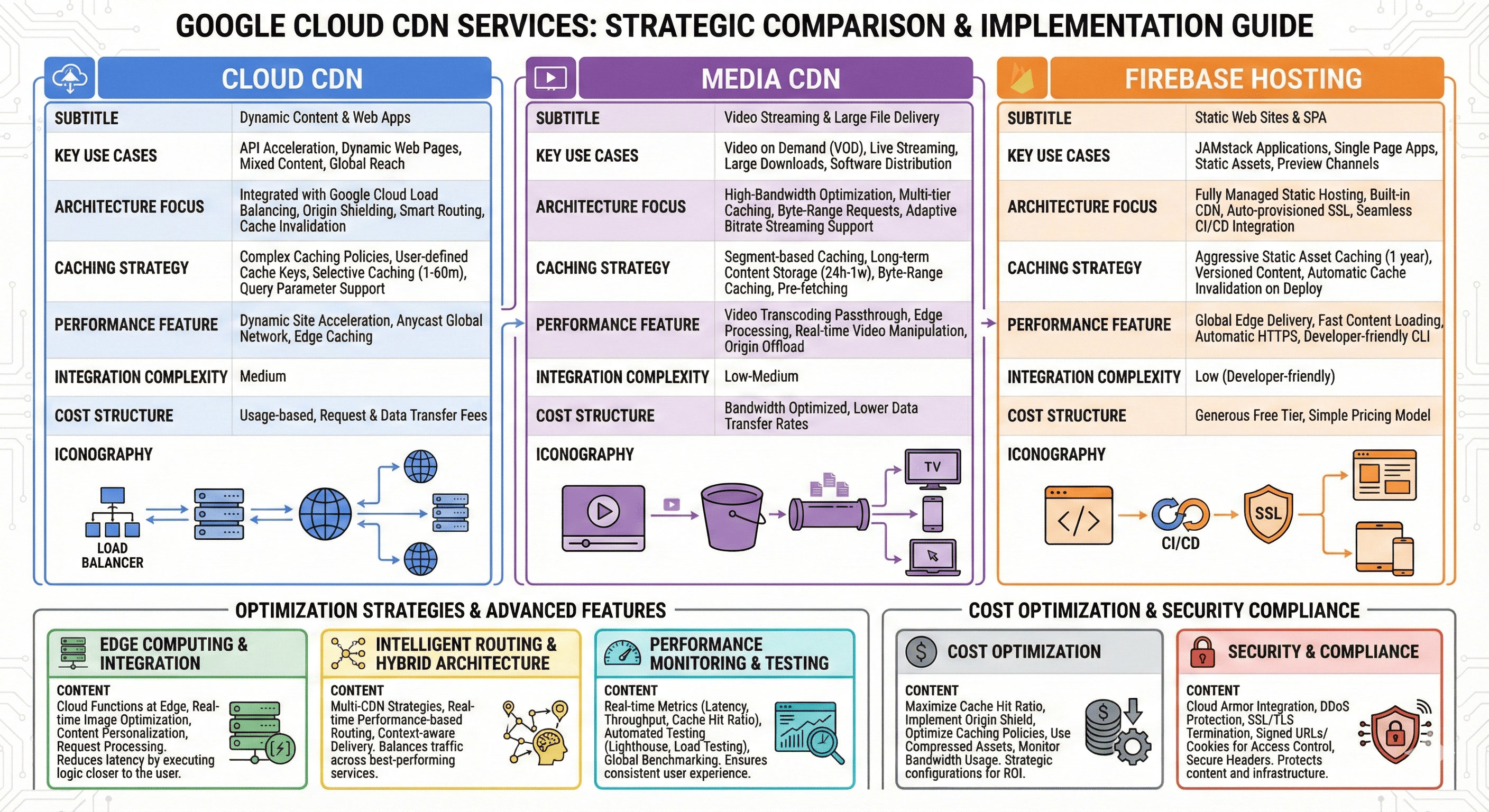
Global content delivery has become a critical factor in application performance and user experience. Google Cloud Platform offers three distinct CDN solutions: Cloud CDN for general web content, Media CDN for streaming and large file delivery, and Firebase Hosting for static web applications. Each service addresses specific content delivery requirements with unique optimization strategies and cost structures.
Understanding the differences between these services enables architects to design optimal content delivery architectures that balance performance, cost, and operational complexity. Cloud CDN integrates seamlessly with Google Cloud Load Balancing for dynamic content acceleration, while Media CDN specializes in high-bandwidth media streaming with advanced caching policies. Firebase Hosting provides a complete static hosting solution with built-in CDN capabilities and seamless CI/CD integration.
Modern content delivery extends beyond simple file caching. Edge computing capabilities, real-time content optimization, and intelligent routing algorithms significantly impact user experience metrics. GCP’s CDN services leverage Google’s global network infrastructure, providing consistent performance across diverse geographic regions and network conditions.
This comprehensive analysis examines platform selection criteria, implementation strategies, performance optimization techniques, and cost-effective design patterns that can be immediately applied in production environments. We’ll explore advanced caching strategies, edge computing integration, and monitoring approaches that ensure optimal content delivery performance.
GCP CDN Services Comparative Analysis
Complete Static Solution] D --> H[Cloud CDN
Load Balancer Integration] E --> I[Media CDN
Streaming Optimization] F --> J[Media CDN
Large File Delivery] G --> K[Built-in CI/CD
Global Edge Network] H --> L[Origin Shield
Dynamic Caching] I --> M[Adaptive Bitrate
Video Optimization] J --> N[Range Requests
Byte-range Caching] style G fill:#4285f4,color:#fff style H fill:#34a853,color:#fff style I fill:#ea4335,color:#fff style J fill:#fbbc04,color:#000
Service Characteristics and Selection Matrix
| Service | Primary Use Cases | Content Types | Integration Complexity | Cost Structure | Performance Focus |
|---|---|---|---|---|---|
| Cloud CDN | Web applications, APIs, Dynamic content | Mixed static/dynamic | Medium | Usage-based | Global acceleration |
| Media CDN | Video streaming, Large downloads, Software distribution | Media files, Large assets | Low-Medium | Bandwidth-optimized | Streaming performance |
| Firebase Hosting | Static websites, SPAs, JAMstack applications | Static assets only | Low | Generous free tier | Developer experience |
Cloud CDN: Dynamic Content Acceleration
Features and Architecture Advantages
Cloud CDN integrates tightly with Google Cloud Load Balancing to accelerate both static and dynamic content delivery. The service provides origin shielding, smart routing, and cache invalidation capabilities that make it ideal for complex web applications requiring both static asset delivery and dynamic content acceleration.
The platform supports advanced caching policies with fine-grained control over cache behavior based on request headers, query parameters, and custom cache keys. This flexibility enables sophisticated caching strategies for applications with personalized content or complex routing requirements.
Advanced Caching Strategies
Cloud CDN supports sophisticated caching configurations that enable optimal performance for different content types and user access patterns:
| Content Type | Cache Strategy | TTL Configuration | Cache Key Policy |
|---|---|---|---|
| Static Assets | Long-term caching | 1 year (with versioning) | URL + query parameters |
| API Responses | Short-term caching | 5-30 minutes | URL + headers + auth context |
| Dynamic Pages | Selective caching | 1-60 minutes | URL + user segment |
| Personalized Content | Edge-side includes | Variable per fragment | Custom cache keys |
Cloud CDN Terraform Implementation
# Cloud CDN with Load Balancer Integration
resource "google_compute_global_address" "cdn_ip" {
  name = "cdn-global-ip"
}

resource "google_compute_managed_ssl_certificate" "cdn_ssl" {
  name = "cdn-ssl-cert"

  managed {
    domains = [var.domain_name, "www.${var.domain_name}"]
  }
}

resource "google_compute_backend_service" "web_backend" {
  name                  = "web-backend-service"
  protocol              = "HTTP"
  timeout_sec          = 30
  enable_cdn           = true

  # CDN configuration
  cdn_policy {
    cache_mode                   = "CACHE_ALL_STATIC"
    default_ttl                 = 3600
    max_ttl                     = 86400
    client_ttl                  = 7200
    negative_caching            = true
    serve_while_stale           = 86400

    # Custom cache key policy
    cache_key_policy {
      include_host           = true
      include_protocol       = true
      include_query_string   = false
      query_string_whitelist = ["version", "lang"]

      include_http_headers = [
        "Accept-Encoding",
        "Accept-Language"
      ]
    }

    # Negative caching policy
    negative_caching_policy {
      code = 404
      ttl  = 120
    }

    negative_caching_policy {
      code = 410
      ttl  = 3600
    }
  }

  backend {
    group                        = google_compute_instance_group.web_servers.self_link
    balancing_mode              = "UTILIZATION"
    max_utilization             = 0.8
    capacity_scaler             = 1.0
  }

  health_checks = [google_compute_health_check.web_health.id]

  # Custom request/response headers
  custom_request_headers = [
    "X-Client-Region:{client_region}",
    "X-Client-City:{client_city}"
  ]

  # Security headers
  custom_response_headers = [
    "X-Cache-Status:{cdn_cache_status}",
    "X-Cache-Id:{cdn_cache_id}"
  ]
}

# Backend bucket for static assets
resource "google_compute_backend_bucket" "static_assets" {
  name        = "static-assets-backend"
  bucket_name = google_storage_bucket.static_assets.name
  enable_cdn  = true

  cdn_policy {
    cache_mode       = "CACHE_ALL_STATIC"
    default_ttl     = 31536000  # 1 year
    max_ttl         = 31536000
    client_ttl      = 86400     # 1 day

    # Aggressive caching for static assets
    cache_key_policy {
      include_host         = false
      include_protocol     = false
      include_query_string = true
    }

    # CORS configuration
    bypass_cache_on_request_headers = [
      "Authorization",
      "Cookie"
    ]
  }
}

# URL Map for routing
resource "google_compute_url_map" "cdn_url_map" {
  name            = "cdn-url-map"
  default_service = google_compute_backend_service.web_backend.id

  host_rule {
    hosts        = [var.domain_name, "www.${var.domain_name}"]
    path_matcher = "main-matcher"
  }

  path_matcher {
    name            = "main-matcher"
    default_service = google_compute_backend_service.web_backend.id

    # Static assets routing
    path_rule {
      paths   = ["/static/*", "/assets/*", "/images/*"]
      service = google_compute_backend_bucket.static_assets.id
    }

    # API routing (different caching policy)
    path_rule {
      paths   = ["/api/*"]
      service = google_compute_backend_service.api_backend.id
    }
  }
}

# HTTPS Load Balancer
resource "google_compute_target_https_proxy" "cdn_proxy" {
  name             = "cdn-https-proxy"
  url_map          = google_compute_url_map.cdn_url_map.id
  ssl_certificates = [google_compute_managed_ssl_certificate.cdn_ssl.id]
  ssl_policy       = google_compute_ssl_policy.modern_ssl.id
}

resource "google_compute_global_forwarding_rule" "cdn_https" {
  name       = "cdn-https-rule"
  target     = google_compute_target_https_proxy.cdn_proxy.id
  port_range = "443"
  ip_address = google_compute_global_address.cdn_ip.id
}

# HTTP to HTTPS redirect
resource "google_compute_target_http_proxy" "cdn_http_proxy" {
  name    = "cdn-http-proxy"
  url_map = google_compute_url_map.https_redirect.id
}

resource "google_compute_url_map" "https_redirect" {
  name = "https-redirect"

  default_url_redirect {
    https_redirect         = true
    redirect_response_code = "MOVED_PERMANENTLY_DEFAULT"
    strip_query           = false
  }
}

resource "google_compute_global_forwarding_rule" "cdn_http" {
  name       = "cdn-http-rule"
  target     = google_compute_target_http_proxy.cdn_http_proxy.id
  port_range = "80"
  ip_address = google_compute_global_address.cdn_ip.id
}

# SSL Policy for modern security
resource "google_compute_ssl_policy" "modern_ssl" {
  name            = "modern-ssl-policy"
  profile         = "MODERN"
  min_tls_version = "TLS_1_2"
}

# Storage bucket for static assets
resource "google_storage_bucket" "static_assets" {
  name          = "${var.project_id}-static-assets"
  location      = "US"
  storage_class = "STANDARD"

  website {
    main_page_suffix = "index.html"
    not_found_page   = "404.html"
  }

  cors {
    origin          = ["*"]
    method          = ["GET", "HEAD"]
    response_header = ["Content-Type", "Cache-Control"]
    max_age_seconds = 3600
  }

  lifecycle_rule {
    condition {
      age = 365
    }
    action {
      type = "Delete"
    }
  }
}

# Cache invalidation automation
resource "google_cloudfunctions_function" "cache_invalidation" {
  name        = "cache-invalidation"
  runtime     = "python39"
  entry_point = "invalidate_cache"

  source_archive_bucket = google_storage_bucket.functions_source.name
  source_archive_object = google_storage_bucket_object.cache_function.name

  event_trigger {
    event_type = "google.storage.object.finalize"
    resource   = google_storage_bucket.static_assets.name
  }

  environment_variables = {
    CDN_URL_MAP = google_compute_url_map.cdn_url_map.name
  }
}
Media CDN: Streaming and Large File Optimization
Streaming-Focused Architecture
Media CDN is specifically designed for high-bandwidth content delivery with optimizations for video streaming, software distribution, and large file downloads. The service provides advanced features like adaptive bitrate streaming support, byte-range request optimization, and intelligent prefetching for media content.
Advanced Media Delivery Features
Media CDN provides specialized capabilities for media and large file delivery that standard CDNs cannot match:
| Feature | Media CDN | Cloud CDN | Use Case |
|---|---|---|---|
| Byte-range Caching | Native support | Limited | Large file streaming, resumable downloads |
| Video Optimization | Built-in transcoding | Pass-through | Adaptive bitrate streaming |
| Edge Computing | Video processing | Basic transforms | Real-time video manipulation |
| Origin Shield | Multi-tier caching | Single tier | Reduce origin load for popular content |
| Analytics | Media-specific metrics | General web metrics | Streaming quality monitoring |
Media CDN Implementation
Firebase Hosting: Static Site Excellence
Complete Static Hosting Solution
Firebase Hosting provides an integrated solution for static websites and single-page applications with built-in CDN, SSL certificates, and seamless CI/CD integration. The platform excels in developer experience with features like preview channels, custom domains, and automatic HTTPS.
Advanced Firebase Hosting Configuration
Firebase Hosting provides sophisticated routing and caching capabilities through the firebase.json configuration:
{
  "hosting": {
    "public": "dist",
    "ignore": [
      "firebase.json",
      "**/.*",
      "**/node_modules/**"
    ],
    "rewrites": [
      {
        "source": "/api/**",
        "function": "api"
      },
      {
        "source": "/admin/**",
        "destination": "/admin.html"
      },
      {
        "source": "**",
        "destination": "/index.html"
      }
    ],
    "redirects": [
      {
        "source": "/old-page",
        "destination": "/new-page",
        "type": 301
      }
    ],
    "headers": [
      {
        "source": "**/*.@(jpg|jpeg|gif|png|svg|webp)",
        "headers": [
          {
            "key": "Cache-Control",
            "value": "max-age=31536000"
          }
        ]
      },
      {
        "source": "**/*.@(js|css)",
        "headers": [
          {
            "key": "Cache-Control",
            "value": "max-age=31536000"
          }
        ]
      },
      {
        "source": "/sw.js",
        "headers": [
          {
            "key": "Cache-Control",
            "value": "max-age=0"
          }
        ]
      },
      {
        "source": "**",
        "headers": [
          {
            "key": "X-Content-Type-Options",
            "value": "nosniff"
          },
          {
            "key": "X-Frame-Options",
            "value": "DENY"
          },
          {
            "key": "X-XSS-Protection",
            "value": "1; mode=block"
          }
        ]
      }
    ],
    "cleanUrls": true,
    "trailingSlash": false
  }
}
CI/CD Integration with GitHub Actions
# .github/workflows/firebase-deploy.yml
name: Deploy to Firebase Hosting

on:
  push:
    branches: [ main, develop ]
  pull_request:
    branches: [ main ]

jobs:
  build-and-deploy:
    runs-on: ubuntu-latest

    steps:
    - name: Checkout code
      uses: actions/checkout@v3

    - name: Setup Node.js
      uses: actions/setup-node@v3
      with:
        node-version: '18'
        cache: 'npm'

    - name: Install dependencies
      run: npm ci

    - name: Run tests
      run: npm run test:ci

    - name: Build application
      run: npm run build
      env:
        NODE_ENV: production

    - name: Deploy to Firebase Hosting Preview
      if: github.event_name == 'pull_request'
      uses: FirebaseExtended/action-hosting-deploy@v0
      with:
        repoToken: '$'
        firebaseServiceAccount: '$'
        projectId: '$'
        expires: 7d

    - name: Deploy to Firebase Hosting Production
      if: github.ref == 'refs/heads/main'
      uses: FirebaseExtended/action-hosting-deploy@v0
      with:
        repoToken: '$'
        firebaseServiceAccount: '$'
        projectId: '$'
        channelId: live

    - name: Performance Audit
      if: github.ref == 'refs/heads/main'
      run: |
        npm install -g lighthouse
        lighthouse https://$.web.app --output=json --output-path=./lighthouse-results.json

    - name: Upload Lighthouse Results
      if: github.ref == 'refs/heads/main'
      uses: actions/upload-artifact@v3
      with:
        name: lighthouse-results
        path: lighthouse-results.json
Firebase Hosting with Terraform
# Firebase project configuration
resource "google_firebase_project" "default" {
  provider = google-beta
  project  = var.project_id
}

resource "google_firebase_web_app" "basic" {
  provider     = google-beta
  project      = var.project_id
  display_name = var.app_display_name

  depends_on = [google_firebase_project.default]
}

# Custom domain configuration
resource "google_firebase_hosting_site" "default" {
  provider = google-beta
  project  = var.project_id
  site_id  = var.site_id

  depends_on = [google_firebase_project.default]
}

resource "google_firebase_hosting_custom_domain" "default" {
  provider    = google-beta
  project     = var.project_id
  site_id     = google_firebase_hosting_site.default.site_id
  custom_domain = var.custom_domain

  cert_preference = "GROUPED_CERT"

  depends_on = [
    google_firebase_hosting_site.default,
    google_dns_record_set.firebase_domain_verification
  ]
}

# DNS configuration for custom domain
resource "google_dns_managed_zone" "firebase_zone" {
  name     = "firebase-zone"
  dns_name = "${var.custom_domain}."
}

resource "google_dns_record_set" "firebase_domain_verification" {
  name = google_dns_managed_zone.firebase_zone.dns_name
  type = "TXT"
  ttl  = 300

  managed_zone = google_dns_managed_zone.firebase_zone.name

  rrdatas = [google_firebase_hosting_custom_domain.default.required_dns_updates[0].required_txt_record]
}

resource "google_dns_record_set" "firebase_a_record" {
  name = google_dns_managed_zone.firebase_zone.dns_name
  type = "A"
  ttl  = 300

  managed_zone = google_dns_managed_zone.firebase_zone.name

  rrdatas = ["199.36.158.100"]  # Firebase Hosting IP
}

# Security rules for Firebase
resource "google_firebase_hosting_release" "default" {
  provider = google-beta
  site_id  = google_firebase_hosting_site.default.site_id
  version_name = "v${formatdate("YYYYMMDD-hhmmss", timestamp())}"

  message = "Deployed via Terraform"
}
Static vs Dynamic Content Caching Strategies
Content Classification and Optimization
Effective CDN implementation requires understanding content characteristics and applying appropriate caching strategies:
| Content Type | Caching Strategy | Recommended TTL | Cache Headers | Optimization Techniques |
|---|---|---|---|---|
| Static Assets (Images, CSS, JS) | Aggressive caching with versioning | 1 year | Cache-Control: max-age=31536000, immutable | Compression, WebP conversion, Minification |
| HTML Pages | Short-term caching with validation | 5-15 minutes | Cache-Control: max-age=900, must-revalidate | ETag validation, Server-side includes |
| API Responses | Contextual caching | 1-30 minutes | Cache-Control: max-age=1800, private | Personalization headers, Conditional requests |
| Dynamic Content | Edge-side includes | Variable | Surrogate-Control with tags | Fragment caching, Selective invalidation |
| Media Streaming | Segment-based caching | 24 hours - 1 week | Cache-Control: max-age=604800 | Range requests, Adaptive bitrate |
Advanced Caching Patterns Implementation
# Multi-tier caching strategy
resource "google_compute_region_backend_service" "api_backend" {
  name                  = "api-backend-service"
  protocol              = "HTTP"
  timeout_sec          = 30
  load_balancing_scheme = "EXTERNAL_MANAGED"

  # API-specific CDN configuration
  cdn_policy {
    cache_mode                   = "USE_ORIGIN_HEADERS"
    default_ttl                 = 0
    max_ttl                     = 3600
    client_ttl                  = 300
    negative_caching            = true
    serve_while_stale           = 86400

    # Custom cache key for API endpoints
    cache_key_policy {
      include_host             = true
      include_protocol         = true
      include_query_string     = true
      query_string_whitelist   = ["userId", "version", "locale"]

      include_http_headers = [
        "Authorization",
        "Accept-Language",
        "User-Agent"
      ]
    }

    # Bypass cache for authenticated requests
    bypass_cache_on_request_headers = [
      "Authorization",
      "Cookie"
    ]

    # Negative caching for API errors
    negative_caching_policy {
      code = 404
      ttl  = 300
    }

    negative_caching_policy {
      code = 500
      ttl  = 0
    }
  }

  backend {
    group                        = google_compute_instance_group.api_servers.self_link
    balancing_mode              = "RATE"
    max_rate_per_instance       = 100
    capacity_scaler             = 1.0
  }
}

# Edge-side includes configuration
resource "google_compute_backend_service" "esi_backend" {
  name       = "esi-backend-service"
  protocol   = "HTTP"
  enable_cdn = true

  cdn_policy {
    cache_mode       = "CACHE_ALL_STATIC"
    default_ttl     = 1800  # 30 minutes
    max_ttl         = 7200  # 2 hours

    # ESI configuration
    cache_key_policy {
      include_host         = true
      include_protocol     = false
      include_query_string = false

      # Include user segment for personalization
      include_http_headers = [
        "X-User-Segment",
        "X-Geo-Country"
      ]
    }
  }

  # Custom headers for ESI processing
  custom_request_headers = [
    "X-Edge-Cache: enabled",
    "X-ESI-Enabled: true"
  ]
}

# Fragment caching with surrogate keys
resource "google_compute_backend_service" "fragment_cache" {
  name       = "fragment-cache-service"
  protocol   = "HTTP"
  enable_cdn = true

  cdn_policy {
    cache_mode   = "USE_ORIGIN_HEADERS"
    default_ttl = 3600

    # Support for surrogate key invalidation
    signed_request_mode = "DISABLED"

    cache_key_policy {
      include_host         = true
      include_protocol     = false
      include_query_string = true

      # Fragment-specific cache keys
      query_string_whitelist = [
        "fragment",
        "version",
        "user_type"
      ]
    }
  }

  # Headers for fragment cache management
  custom_response_headers = [
    "Surrogate-Key: {fragment_type}",
    "Cache-Tag: {content_version}"
  ]
}
Edge Caching and Performance Monitoring
Global Performance Optimization
Edge caching strategies significantly impact user experience across different geographic regions. GCP’s CDN services provide comprehensive performance monitoring and optimization capabilities:
Comprehensive Monitoring Implementation
Real-time Performance Analytics
# Cloud Function for CDN Performance Analysis
import json
import base64
from google.cloud import monitoring_v3
from google.cloud import logging

def analyze_cdn_performance(event, context):
    """Analyze CDN performance and trigger optimizations."""

    # Decode Pub/Sub message
    pubsub_message = base64.b64decode(event['data']).decode('utf-8')
    metrics_data = json.loads(pubsub_message)

    client = monitoring_v3.MetricServiceClient()
    project_name = f"projects/{os.environ['GCP_PROJECT']}"

    # Query cache hit ratio
    cache_hit_ratio = query_cache_hit_ratio(client, project_name)

    # Query origin response time
    origin_response_time = query_origin_response_time(client, project_name)

    # Query bandwidth utilization
    bandwidth_usage = query_bandwidth_usage(client, project_name)

    # Performance analysis
    performance_score = calculate_performance_score(
        cache_hit_ratio,
        origin_response_time,
        bandwidth_usage
    )

    # Trigger optimizations if needed
    if performance_score < float(os.environ.get('PERFORMANCE_THRESHOLD', '0.8')):
        trigger_optimization(metrics_data, performance_score)

    # Log performance metrics
    log_performance_metrics(performance_score, metrics_data)

def query_cache_hit_ratio(client, project_name):
    """Query CDN cache hit ratio from Cloud Monitoring."""
    interval = monitoring_v3.TimeInterval()
    now = time.time()
    interval.end_time.seconds = int(now)
    interval.start_time.seconds = int(now - 3600)  # Last hour

    results = client.list_time_series(
        request={
            "name": project_name,
            "filter": 'resource.type="https_lb_rule" AND metric.type="loadbalancing.googleapis.com/https/request_count"',
            "interval": interval,
            "view": monitoring_v3.ListTimeSeriesRequest.TimeSeriesView.FULL,
        }
    )

    total_requests = 0
    cache_hits = 0

    for result in results:
        for point in result.points:
            total_requests += point.value.double_value
            if result.metric.labels.get('cache_result') == 'HIT':
                cache_hits += point.value.double_value

    return cache_hits / total_requests if total_requests > 0 else 0

def calculate_performance_score(hit_ratio, response_time, bandwidth_efficiency):
    """Calculate overall CDN performance score."""
    hit_ratio_score = min(hit_ratio / 0.9, 1.0)  # Target 90% hit ratio
    response_time_score = max(0, 1 - (response_time - 100) / 2000)  # Target <100ms
    bandwidth_score = min(bandwidth_efficiency, 1.0)

    return (hit_ratio_score * 0.5 + response_time_score * 0.3 + bandwidth_score * 0.2)

def trigger_optimization(metrics_data, performance_score):
    """Trigger CDN optimization based on performance analysis."""
    optimizations = []

    if metrics_data.get('cache_hit_ratio', 0) < 0.8:
        optimizations.append('increase_cache_ttl')

    if metrics_data.get('origin_response_time', 0) > 1000:
        optimizations.append('enable_origin_shield')

    if metrics_data.get('bandwidth_usage', 0) > 0.8:
        optimizations.append('enable_compression')

    # Execute optimizations
    for optimization in optimizations:
        execute_optimization(optimization)

def execute_optimization(optimization_type):
    """Execute specific CDN optimization."""
    if optimization_type == 'increase_cache_ttl':
        # Update cache TTL policies
        update_cache_policies('increase_ttl')
    elif optimization_type == 'enable_origin_shield':
        # Enable origin shield for high-traffic content
        enable_origin_shield()
    elif optimization_type == 'enable_compression':
        # Enable additional compression algorithms
        update_compression_settings()
Cost-Effective CDN Design Patterns
Cost Optimization Strategies
CDN costs can vary significantly based on traffic patterns, geographic distribution, and caching efficiency. Implementing cost-effective design patterns ensures optimal ROI:
| Cost Factor | Cloud CDN | Media CDN | Firebase Hosting | Optimization Strategy |
|---|---|---|---|---|
| Data Transfer | $0.08-0.20/GB | $0.04-0.15/GB | $0.15/GB (after free tier) | Maximize cache hit ratios |
| HTTP/HTTPS Requests | $0.0075/10K requests | $0.0060/10K requests | $0.40/10K requests | Reduce request frequency |
| Cache Invalidation | $0.005/request | $0.005/request | Free | Batch invalidations |
| Origin Bandwidth | Standard egress rates | Standard egress rates | N/A | Origin shield implementation |
Multi-Tier Cost Optimization
Cost-Optimized Implementation
Advanced Integration Patterns
Multi-CDN Hybrid Architecture
For mission-critical applications, implementing a hybrid CDN strategy provides redundancy and performance optimization:
Edge Computing Integration
# Edge computing with Cloud Functions
resource "google_cloudfunctions_function" "edge_processor" {
  name        = "edge-content-processor"
  runtime     = "python39"
  entry_point = "process_edge_request"

  source_archive_bucket = google_storage_bucket.functions_source.name
  source_archive_object = google_storage_bucket_object.edge_function.name

  https_trigger {
    url = "https://${var.region}-${var.project_id}.cloudfunctions.net/edge-content-processor"
  }

  environment_variables = {
    CDN_CACHE_CONTROL = "max-age=3600"
    IMAGE_OPTIMIZATION = "enabled"
    COMPRESSION_LEVEL = "6"
  }

  # Regional deployment for edge computing
  region = var.region
}

# Image optimization at the edge
resource "google_cloudfunctions_function" "image_optimizer" {
  name        = "edge-image-optimizer"
  runtime     = "python39"
  entry_point = "optimize_image"

  source_archive_bucket = google_storage_bucket.functions_source.name
  source_archive_object = google_storage_bucket_object.image_optimizer.name

  https_trigger {
    url = "https://${var.region}-${var.project_id}.cloudfunctions.net/optimize-image"
  }

  environment_variables = {
    WEBP_QUALITY = "85"
    AVIF_QUALITY = "80"
    RESIZE_ALGORITHM = "lanczos"
    CACHE_TTL = "31536000"  # 1 year for optimized images
  }
}

# Real-time content personalization
resource "google_cloudfunctions_function" "content_personalizer" {
  name        = "edge-content-personalizer"
  runtime     = "nodejs18"
  entry_point = "personalizeContent"

  source_archive_bucket = google_storage_bucket.functions_source.name
  source_archive_object = google_storage_bucket_object.personalizer_function.name

  https_trigger {
    url = "https://${var.region}-${var.project_id}.cloudfunctions.net/personalize"
  }

  environment_variables = {
    PERSONALIZATION_API = google_apikeys_key.personalization_api.key_string
    USER_SEGMENT_TTL = "1800"  # 30 minutes
    CONTENT_CACHE_TTL = "300"  # 5 minutes
  }
}
Intelligent Traffic Routing
# Cloud Function for intelligent CDN routing
import json
import requests
from google.cloud import monitoring_v3
from google.cloud import dns

def intelligent_routing(request):
    """Route traffic to optimal CDN based on real-time performance."""

    request_json = request.get_json()
    user_location = request_json.get('location', {})
    content_type = request_json.get('content_type', 'web')

    # Analyze current CDN performance
    performance_metrics = get_cdn_performance_metrics()

    # Determine optimal CDN for request
    optimal_cdn = select_optimal_cdn(
        user_location,
        content_type,
        performance_metrics
    )

    # Generate routing decision
    routing_decision = {
        'cdn_service': optimal_cdn,
        'cache_policy': get_cache_policy(content_type),
        'routing_reason': f"Optimal for {content_type} in {user_location.get('country', 'unknown')}"
    }

    return json.dumps(routing_decision)

def get_cdn_performance_metrics():
    """Retrieve real-time CDN performance metrics."""
    client = monitoring_v3.MetricServiceClient()
    project_name = f"projects/{os.environ['GCP_PROJECT']}"

    # Query metrics for different CDN services
    metrics = {}

    # Cloud CDN metrics
    metrics['cloud_cdn'] = {
        'latency': query_latency_metric(client, project_name, 'cloud_cdn'),
        'hit_ratio': query_hit_ratio_metric(client, project_name, 'cloud_cdn'),
        'availability': query_availability_metric(client, project_name, 'cloud_cdn')
    }

    # Media CDN metrics
    metrics['media_cdn'] = {
        'latency': query_latency_metric(client, project_name, 'media_cdn'),
        'hit_ratio': query_hit_ratio_metric(client, project_name, 'media_cdn'),
        'availability': query_availability_metric(client, project_name, 'media_cdn')
    }

    # Firebase Hosting metrics
    metrics['firebase_hosting'] = {
        'latency': query_latency_metric(client, project_name, 'firebase'),
        'hit_ratio': 0.95,  # Firebase has excellent caching
        'availability': 0.999
    }

    return metrics

def select_optimal_cdn(user_location, content_type, performance_metrics):
    """Select optimal CDN based on content type and performance."""

    # Content type routing rules
    if content_type in ['video', 'audio', 'large_file']:
        # Media CDN is optimal for streaming content
        if performance_metrics['media_cdn']['availability'] > 0.99:
            return 'media_cdn'

    elif content_type in ['static', 'spa', 'jamstack']:
        # Firebase Hosting for static content
        if performance_metrics['firebase_hosting']['availability'] > 0.99:
            return 'firebase_hosting'

    # Default to Cloud CDN for dynamic content
    if performance_metrics['cloud_cdn']['availability'] > 0.99:
        return 'cloud_cdn'

    # Fallback logic based on best available performance
    best_cdn = 'cloud_cdn'
    best_score = 0

    for cdn, metrics in performance_metrics.items():
        score = (
            metrics['availability'] * 0.4 +
            (1 - metrics['latency'] / 2000) * 0.4 +  # Normalize latency
            metrics['hit_ratio'] * 0.2
        )

        if score > best_score:
            best_score = score
            best_cdn = cdn

    return best_cdn

def get_cache_policy(content_type):
    """Return cache policy based on content type."""
    cache_policies = {
        'static': {
            'ttl': 31536000,  # 1 year
            'cache_control': 'public, max-age=31536000, immutable'
        },
        'dynamic': {
            'ttl': 900,  # 15 minutes
            'cache_control': 'public, max-age=900, must-revalidate'
        },
        'video': {
            'ttl': 86400,  # 24 hours
            'cache_control': 'public, max-age=86400'
        },
        'api': {
            'ttl': 300,  # 5 minutes
            'cache_control': 'public, max-age=300, s-maxage=1800'
        }
    }

    return cache_policies.get(content_type, cache_policies['dynamic'])
Security and Compliance Considerations
CDN Security Implementation
Security Configuration Implementation
# Cloud Armor security policy for CDN
resource "google_compute_security_policy" "cdn_security" {
  name = "cdn-security-policy"

  # Default rule - allow all traffic
  rule {
    action   = "allow"
    priority = "2147483647"
    match {
      versioned_expr = "SRC_IPS_V1"
      config {
        src_ip_ranges = ["*"]
      }
    }
    description = "Default allow rule"
  }

  # Rate limiting rule
  rule {
    action   = "rate_based_ban"
    priority = "1000"
    match {
      versioned_expr = "SRC_IPS_V1"
      config {
        src_ip_ranges = ["*"]
      }
    }
    rate_limit_options {
      conform_action = "allow"
      exceed_action  = "deny(429)"
      enforce_on_key = "IP"

      rate_limit_threshold {
        count        = 100
        interval_sec = 60
      }

      ban_threshold {
        count        = 1000
        interval_sec = 300
      }

      ban_duration_sec = 3600
    }
    description = "Rate limiting rule"
  }

  # Geo-blocking rule
  rule {
    action   = "deny(403)"
    priority = "1100"
    match {
      expr {
        expression = "origin.region_code == 'CN' || origin.region_code == 'RU'"
      }
    }
    description = "Block specific regions"
  }

  # SQL injection protection
  rule {
    action   = "deny(403)"
    priority = "1200"
    match {
      expr {
        expression = "evaluatePreconfiguredExpr('sqli-stable')"
      }
    }
    description = "SQL injection protection"
  }

  # XSS protection
  rule {
    action   = "deny(403)"
    priority = "1300"
    match {
      expr {
        expression = "evaluatePreconfiguredExpr('xss-stable')"
      }
    }
    description = "XSS protection"
  }
}

# Apply security policy to backend service
resource "google_compute_backend_service" "secure_backend" {
  name            = "secure-backend-service"
  protocol        = "HTTP"
  enable_cdn      = true
  security_policy = google_compute_security_policy.cdn_security.id

  cdn_policy {
    cache_mode       = "CACHE_ALL_STATIC"
    default_ttl     = 3600
    signed_url_cache_max_age_sec = 3600

    # Secure cache key policy
    cache_key_policy {
      include_host         = true
      include_protocol     = true
      include_query_string = false

      # Exclude sensitive headers from cache key
      include_http_headers = []
    }

    # Negative caching for security
    negative_caching = true
    negative_caching_policy {
      code = 403
      ttl  = 120
    }
    negative_caching_policy {
      code = 404
      ttl  = 300
    }
  }

  # Security headers
  custom_response_headers = [
    "Strict-Transport-Security: max-age=31536000; includeSubDomains",
    "X-Content-Type-Options: nosniff",
    "X-Frame-Options: DENY",
    "X-XSS-Protection: 1; mode=block",
    "Referrer-Policy: strict-origin-when-cross-origin",
    "Content-Security-Policy: default-src 'self'; script-src 'self' 'unsafe-inline'"
  ]
}

# Signed URL generation for protected content
resource "google_storage_bucket" "protected_content" {
  name          = "${var.project_id}-protected-content"
  location      = "US"
  storage_class = "STANDARD"

  # Prevent public access
  uniform_bucket_level_access = true

  # Enable versioning for content integrity
  versioning {
    enabled = true
  }

  # Lifecycle management
  lifecycle_rule {
    condition {
      age = 7
    }
    action {
      type = "Delete"
    }
  }
}

# IAM for signed URL generation
resource "google_service_account" "signed_url_generator" {
  account_id   = "signed-url-generator"
  display_name = "Signed URL Generator Service Account"
}

resource "google_storage_bucket_iam_member" "signed_url_access" {
  bucket = google_storage_bucket.protected_content.name
  role   = "roles/storage.objectViewer"
  member = "serviceAccount:${google_service_account.signed_url_generator.email}"
}

# Cloud Function for signed URL generation
resource "google_cloudfunctions_function" "signed_url_generator" {
  name        = "generate-signed-urls"
  runtime     = "python39"
  entry_point = "generate_signed_url"

  source_archive_bucket = google_storage_bucket.functions_source.name
  source_archive_object = google_storage_bucket_object.signed_url_function.name

  https_trigger {
    url = "https://${var.region}-${var.project_id}.cloudfunctions.net/generate-signed-url"
  }

  service_account_email = google_service_account.signed_url_generator.email

  environment_variables = {
    BUCKET_NAME = google_storage_bucket.protected_content.name
    URL_EXPIRY_HOURS = "24"
    ALLOWED_IPS = var.allowed_ip_ranges
  }
}
Performance Benchmarking and Testing
Comprehensive Testing Framework
CDN performance testing requires systematic evaluation across multiple dimensions including latency, throughput, cache efficiency, and global distribution effectiveness:
| Test Category | Metrics | Tools | Target Performance |
|---|---|---|---|
| Latency Testing | TTFB, Round-trip time, Edge response time | Lighthouse, WebPageTest, Custom monitoring | < 100ms global P95 |
| Throughput Testing | Bandwidth utilization, Concurrent connections | Apache Bench, JMeter, Load testing tools | > 10 Gbps per edge location |
| Cache Efficiency | Hit ratio, Cache penetration, Origin load | CDN analytics, Custom dashboards | > 90% cache hit ratio |
| Global Distribution | Geographic coverage, Regional performance | Multi-region testing, User experience monitoring | Consistent performance worldwide |
Automated Performance Testing
Migration and Implementation Best Practices
Phased Migration Strategy
Implementation Checklist
| Phase | Implementation Steps | Validation Criteria | Rollback Plan |
|---|---|---|---|
| Phase 1: Static Assets | Deploy Firebase Hosting or Cloud CDN for CSS, JS, images | Cache hit ratio > 95%, TTFB < 50ms | DNS failback to origin |
| Phase 2: Dynamic Content | Implement Cloud CDN with smart caching policies | Origin load reduction > 60%, performance improvement | Bypass CDN via origin direct |
| Phase 3: Media Content | Deploy Media CDN for video and large file delivery | Streaming performance metrics, bandwidth efficiency | Fallback to previous CDN service |
| Phase 4: Full Migration | Complete migration with optimization and monitoring | Full performance targets met, cost objectives achieved | Complete infrastructure rollback |
Conclusion
Google Cloud Platform’s CDN services provide comprehensive solutions for modern content delivery requirements, each addressing specific use cases with optimized performance and cost characteristics. Understanding the nuanced differences between Cloud CDN, Media CDN, and Firebase Hosting enables architects to design optimal content delivery strategies that balance performance, cost, and operational complexity.
Cloud CDN excels in accelerating dynamic web applications through tight integration with Google Cloud Load Balancing, providing sophisticated caching policies and origin shielding capabilities. Its strength lies in handling mixed content types with intelligent cache key policies and fine-grained control over caching behavior.
Media CDN specializes in high-bandwidth content delivery with advanced optimizations for video streaming and large file distribution. Features like byte-range caching, adaptive bitrate support, and multi-tier caching make it the optimal choice for media-heavy applications requiring consistent streaming performance globally.
Firebase Hosting delivers an exceptional developer experience for static websites and single-page applications, combining CDN capabilities with seamless CI/CD integration and comprehensive web hosting features. Its generous free tier and automatic optimizations make it ideal for modern web development workflows.
Strategic Implementation Framework
Content-Based Architecture: Design CDN strategies around content characteristics rather than technology preferences. Static assets benefit from Firebase Hosting’s simplicity, dynamic content leverages Cloud CDN’s sophistication, and media content requires Media CDN’s specialized capabilities.
Hybrid Approach: Most successful implementations combine multiple CDN services, using each platform’s strengths for specific content types within a unified delivery architecture. This approach maximizes performance while optimizing costs across different traffic patterns.
Performance-First Design: Implement comprehensive monitoring and optimization from day one. CDN effectiveness depends heavily on proper cache configuration, intelligent routing, and continuous performance tuning based on real-world usage patterns.
Cost Optimization: Balance performance requirements with cost constraints through strategic cache policies, origin shielding, and intelligent traffic routing. Understanding the cost implications of different CDN features enables informed architectural decisions.
Security Integration: Build security considerations into CDN design rather than treating them as an afterthought. Proper SSL termination, DDoS protection, and access controls ensure reliable content delivery while protecting against security threats.
The future of content delivery increasingly emphasizes edge computing capabilities, real-time optimization, and intelligent routing based on user context and network conditions. GCP’s CDN services provide the foundation for these advanced capabilities while maintaining the simplicity and reliability required for production deployments.
Success in CDN implementation lies not in choosing a single service, but in orchestrating multiple platforms to create efficient, secure, and cost-effective content delivery systems that enhance user experience while supporting business objectives.
References
- Google Cloud CDN Documentation - Comprehensive platform documentation and configuration guides
- Media CDN Documentation - Streaming and large file delivery optimization
- Firebase Hosting Documentation - Static site hosting and deployment guide
- CDN Performance Best Practices - Optimization strategies and implementation patterns
- Cloud Load Balancing Integration - Advanced traffic management and routing
- Cloud Monitoring for CDN - Performance monitoring and analytics implementation
- Terraform Google Provider - Infrastructure as Code for CDN services
- Web Performance Optimization - Modern web performance best practices
- Content Security Policy - Security headers and content protection
- HTTP Caching Standards - Cache-Control and HTTP caching specifications

Comments