27 min to read
GCP AI/ML Platform Complete Guide - Vertex AI vs AutoML vs Custom Training Implementation Strategy
Master Google Cloud AI/ML services with comprehensive analysis and practical deployment strategies
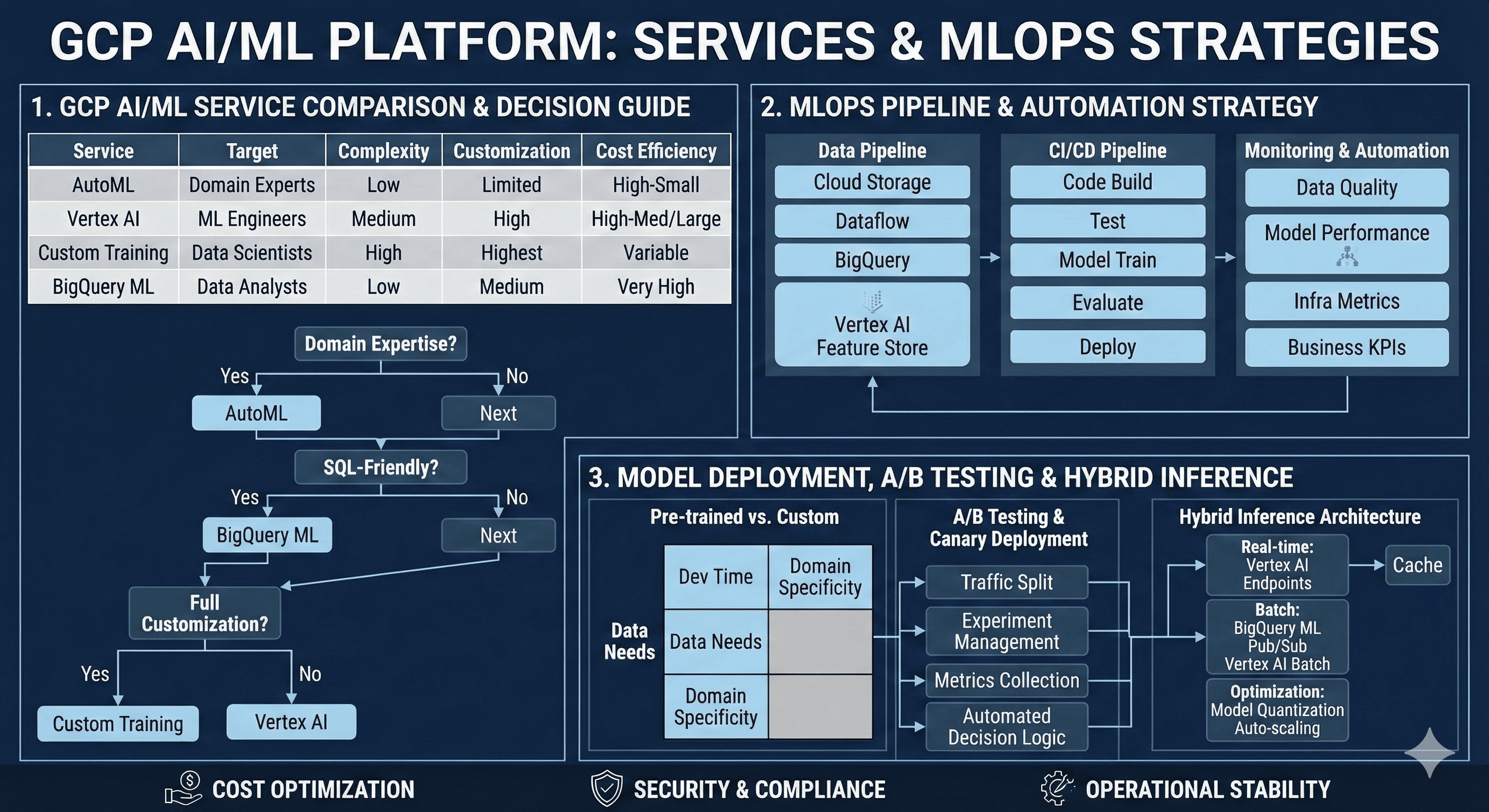
Overview
As cloud-based machine learning becomes a core competitive advantage for enterprises, Google Cloud Platform’s AI/ML services are gaining significant attention. From Vertex AI and AutoML to Custom Training and BigQuery ML, GCP provides an integrated platform that meets diverse ML requirements across different maturity levels.
This comprehensive guide examines the characteristics and selection criteria for each service, MLOps pipeline construction strategies, and practical architecture patterns that can be immediately applied in production environments. We’ll explore the trade-offs between pre-trained and custom model development, automated model deployment with A/B testing, and real-time inference system implementation.
Modern AI/ML platforms have evolved beyond simple model training services. They now encompass the entire machine learning lifecycle, from data ingestion and feature engineering to model deployment and monitoring. GCP’s approach integrates these components seamlessly, enabling organizations to build robust, scalable ML systems that deliver business value.
The platform selection decision significantly impacts development velocity, operational complexity, and long-term maintenance costs. Understanding these implications early in the project lifecycle prevents architectural debt and ensures optimal resource utilization across different use cases.
GCP AI/ML Platform Comparative Analysis
Low Complexity] D --> H[Vertex AI
Medium Complexity] E --> I[Custom Training
High Complexity] F --> J[BigQuery ML
SQL-Native] G --> K[Rapid Prototyping
Limited Customization] H --> L[Integrated MLOps
Balanced Control] I --> M[Maximum Flexibility
Research-Grade] J --> N[SQL Workflow
High Cost Efficiency] style G fill:#4285f4,color:#fff style H fill:#34a853,color:#fff style I fill:#ea4335,color:#fff style J fill:#fbbc04,color:#000
Service Characteristics and Selection Matrix
| Service | Target Users | Development Complexity | Customization Level | Cost Efficiency | Time to Production |
|---|---|---|---|---|---|
| AutoML | Domain experts, Business analysts | Low | Limited | High (small scale) | 1-2 weeks |
| Vertex AI | ML engineers, DevOps teams | Medium | High | High (medium-large scale) | 4-8 weeks |
| Custom Training | Data scientists, Researchers | High | Maximum | Variable | 8-24 weeks |
| BigQuery ML | Data analysts, SQL developers | Low | Medium | Very High | 1-3 weeks |
MLOps Pipeline Implementation Strategy
Data Pipeline Architecture Design
Effective MLOps begins with a robust data pipeline foundation. GCP recommends the following architectural patterns for enterprise-grade implementations:
Core Components:
- Cloud Storage: Scalable raw data repository with lifecycle management
- Dataflow: Stream and batch processing with Apache Beam
- BigQuery: Analytics data warehouse with ML capabilities
- Vertex AI Feature Store: Centralized feature management and serving
- Vertex AI Model Registry: Version-controlled model artifact storage
Continuous Integration and Deployment Pipeline
# MLOps Pipeline Infrastructure
resource "google_cloudbuild_trigger" "ml_pipeline" {
  name = "ml-training-pipeline"

  github {
    owner = var.github_owner
    name  = var.github_repo
    push {
      branch = "^main$"
    }
  }

  build {
    step {
      name = "gcr.io/cloud-builders/docker"
      args = ["build", "-t", "gcr.io/$PROJECT_ID/ml-trainer:$COMMIT_SHA", "."]
    }

    step {
      name = "gcr.io/cloud-builders/docker"
      args = ["push", "gcr.io/$PROJECT_ID/ml-trainer:$COMMIT_SHA"]
    }

    step {
      name = "gcr.io/cloud-builders/gcloud"
      args = [
        "ai", "custom-jobs", "create",
        "--region", var.region,
        "--display-name", "training-job-$BUILD_ID",
        "--config", "training_config.yaml"
      ]
    }

    step {
      name = "gcr.io/cloud-builders/kubectl"
      env = ["CLOUDSDK_COMPUTE_REGION=${var.region}"]
      args = [
        "apply", "-f", "k8s/",
        "--namespace", "ml-production"
      ]
    }
  }

  substitutions = {
    _REGION = var.region
    _MODEL_NAME = var.model_name
  }
}

# Vertex AI Training Job Configuration
resource "google_vertex_ai_training_pipeline" "model_training" {
  display_name = "automated-training-pipeline"
  location     = var.region

  training_task_definition = jsonencode({
    training_task_inputs = {
      base_output_directory = {
        output_uri_prefix = "gs://${google_storage_bucket.ml_artifacts.name}/models"
      }

      worker_pool_specs = [{
        machine_spec = {
          machine_type = "n1-standard-4"
        }
        replica_count = 1
        container_spec = {
          image_uri = "gcr.io/${var.project_id}/ml-trainer:latest"
          args = [
            "--model-name=${var.model_name}",
            "--epochs=100",
            "--batch-size=32"
          ]
        }
      }]
    }
  })

  model_to_upload = {
    display_name = var.model_name
    container_spec = {
      image_uri = "gcr.io/${var.project_id}/ml-predictor:latest"
      health_route = "/health"
      predict_route = "/predict"
      ports = [{
        container_port = 8080
      }]
    }
  }
}
Monitoring and Automation Framework
| Pipeline Stage | Monitoring Metrics | Automated Actions | Alert Thresholds |
|---|---|---|---|
| Data Quality | Schema drift, Missing values, Outlier detection | Pipeline halt, Data validation alerts | >5% schema changes |
| Model Performance | Accuracy, Latency, Throughput, Drift | Retraining trigger, Model rollback | >10% performance degradation |
| Infrastructure | CPU/Memory utilization, Cost metrics | Auto-scaling, Resource optimization | >80% resource utilization |
| Business Metrics | Conversion rates, Revenue impact | A/B test termination, Rollback | >5% negative business impact |
Pre-trained Models vs Custom Model Development
Decision Matrix and Trade-off Analysis
The choice between pre-trained models and custom development significantly impacts project timeline, resource requirements, and performance outcomes:
| Factor | Pre-trained Models | Custom Models | Hybrid Approach |
|---|---|---|---|
| Development Time | 1-2 weeks | 2-6 months | 4-12 weeks |
| Data Requirements | 1K-10K samples | 10K-1M+ samples | 5K-100K samples |
| Domain Specialization | Limited | Maximum | High |
| Maintenance Cost | Low | High | Medium |
| Performance Ceiling | Medium | High | High |
Progressive Implementation Strategy
Low investment] B --> E[Domain adaptation
Balanced approach] C --> F[Maximum performance
High investment] D --> G[Business validation] E --> H[Performance optimization] F --> I[Production deployment] style A fill:#4285f4,color:#fff style B fill:#34a853,color:#fff style C fill:#ea4335,color:#fff
The hybrid approach provides optimal risk mitigation by establishing baseline performance quickly while building toward specialized solutions. This strategy allows teams to validate business assumptions early while preparing for long-term performance optimization.
Implementation Pattern:
- MVP Phase: Deploy pre-trained models for immediate business value
- Optimization Phase: Fine-tune with domain-specific data
- Specialization Phase: Develop custom architectures for maximum performance
Model Deployment and A/B Testing Automation
Canary Deployment Strategy
Vertex AI Endpoints enable sophisticated deployment patterns with traffic splitting and gradual rollout capabilities:
A/B Testing Framework Implementation
| Component | GCP Service | Function | Configuration |
|---|---|---|---|
| Traffic Routing | Cloud Load Balancer | User group routing | Header-based splitting |
| Experiment Management | Firebase A/B Testing | Experiment setup | Statistical analysis |
| Metrics Collection | Cloud Monitoring | Performance tracking | Real-time dashboards |
| Statistical Analysis | BigQuery + Looker | Results analysis | Automated reporting |
Automated Decision Logic
# Automated Model Promotion Logic
def evaluate_ab_test_results(control_metrics, treatment_metrics,
                           min_statistical_significance=0.95,
                           min_business_impact=0.05):
    """
    Automated decision logic for model promotion based on A/B test results.

    Args:
        control_metrics: Performance metrics from control group
        treatment_metrics: Performance metrics from treatment group
        min_statistical_significance: Minimum p-value threshold
        min_business_impact: Minimum business impact threshold

    Returns:
        Decision action string
    """
    statistical_significance = calculate_statistical_significance(
        control_metrics, treatment_metrics
    )
    business_impact = calculate_business_impact(
        control_metrics, treatment_metrics
    )

    if (statistical_significance > min_statistical_significance and
        business_impact > min_business_impact):
        return "PROMOTE_TO_PRODUCTION"
    elif (statistical_significance > min_statistical_significance and
          business_impact < -0.02):
        return "ROLLBACK_IMMEDIATELY"
    elif statistical_significance < 0.8:
        return "EXTEND_TEST_DURATION"
    else:
        return "CONTINUE_MONITORING"

# Integration with Vertex AI Model Registry
class ModelPromotionManager:
    def __init__(self, project_id, region):
        self.client = aiplatform.gapic.ModelServiceClient()
        self.project_id = project_id
        self.region = region

    def promote_model(self, model_id, endpoint_id, traffic_percentage=100):
        """Promote model to production with specified traffic allocation."""
        endpoint = f"projects/{self.project_id}/locations/{self.region}/endpoints/{endpoint_id}"

        deployment_config = {
            "model": f"projects/{self.project_id}/locations/{self.region}/models/{model_id}",
            "traffic_split": {"new_model": traffic_percentage},
            "dedicated_resources": {
                "machine_spec": {"machine_type": "n1-standard-4"},
                "min_replica_count": 1,
                "max_replica_count": 10
            }
        }

        operation = self.client.deploy_model(
            endpoint=endpoint,
            deployed_model=deployment_config
        )

        return operation.result()
BigQuery ML and Real-time Inference Architecture
BigQuery ML Use Case Scenarios
BigQuery ML excels in specific scenarios where SQL-native workflows and batch processing align with business requirements:
- Batch Prediction Workloads: Daily, weekly, or monthly prediction tasks
- Data Warehouse Integration: Existing BigQuery data infrastructure
- SQL-Centric Teams: Organizations with strong SQL expertise
- Rapid Prototyping: Quick model validation and experimentation
Hybrid Inference Architecture
Performance Optimization Strategies
| Inference Type | Latency Target | Recommended Architecture | Optimization Techniques |
|---|---|---|---|
| Real-time (<100ms) | Ultra-low | Vertex AI Endpoints + Caching | Model quantization, Prediction caching |
| Near real-time (<1s) | Low | Vertex AI Batch + Pub/Sub | Batch size optimization, Async processing |
| Batch (minutes/hours) | High throughput | BigQuery ML | Slot optimization, Query scheduling |
-- BigQuery ML Model Creation and Deployment
CREATE OR REPLACE MODEL `project.dataset.customer_ltv_model`
OPTIONS(
  model_type='linear_reg',
  input_label_cols=['customer_lifetime_value'],
  auto_class_weights=true,
  data_split_method='AUTO_SPLIT',
  data_split_eval_fraction=0.2,
  data_split_col='split_column',
  max_iterations=50,
  learn_rate=0.4,
  l1_reg=0.01,
  l2_reg=0.01
) AS
SELECT
  customer_id,
  age,
  gender,
  purchase_frequency,
  average_order_value,
  days_since_last_purchase,
  customer_lifetime_value,
  CASE
    WHEN MOD(ABS(FARM_FINGERPRINT(CAST(customer_id AS STRING))), 10) < 8
    THEN 'train'
    ELSE 'eval'
  END AS split_column
FROM `project.dataset.customer_features`
WHERE customer_lifetime_value IS NOT NULL;

-- Batch Prediction with Model
CREATE OR REPLACE TABLE `project.dataset.customer_predictions` AS
SELECT
  customer_id,
  predicted_customer_lifetime_value,
  predicted_customer_lifetime_value_upper_bound,
  predicted_customer_lifetime_value_lower_bound
FROM ML.PREDICT(
  MODEL `project.dataset.customer_ltv_model`,
  (SELECT * FROM `project.dataset.new_customers`)
);

-- Model Performance Evaluation
SELECT
  *
FROM ML.EVALUATE(
  MODEL `project.dataset.customer_ltv_model`,
  (SELECT * FROM `project.dataset.customer_features` WHERE split_column = 'eval')
);
Real-time Inference Optimization Techniques
Model Optimization:
- Quantization: Reduce model size by 4x with minimal accuracy loss
- Pruning: Remove unnecessary parameters for faster inference
- Knowledge Distillation: Transfer large model performance to smaller models
- Model Compilation: Optimize computation graphs for target hardware
Infrastructure Optimization:
- GPU vs CPU Selection: Choose appropriate compute based on model characteristics
- Auto-scaling Policies: Configure responsive scaling based on traffic patterns
- Multi-region Deployment: Reduce latency through geographic distribution
- Edge Deployment: Leverage Google Cloud’s edge locations for ultra-low latency
Cost Optimization and Operational Efficiency
Resource Management Strategy
| Workload Type | Recommended Instance | Cost Reduction Strategy | Expected Savings |
|---|---|---|---|
| Model Training | Preemptible GPU | Checkpointing, Restart logic | 60-80% |
| Batch Inference | CPU instances | Scheduled start/stop | 40-60% |
| Real-time Inference | Standard instances | Auto-scaling, Caching | 20-40% |
| Development/Testing | Spot instances | Environment lifecycle management | 70-90% |
Cost-Optimized Implementation
# Cost-optimized Vertex AI Training
resource "google_vertex_ai_custom_job" "cost_optimized_training" {
  display_name = "cost-optimized-training-job"
  location     = var.region

  job_spec {
    worker_pool_specs {
      machine_spec {
        machine_type = "n1-standard-4"
      }
      replica_count = 1

      # Use preemptible instances for significant cost savings
      spot = true

      container_spec {
        image_uri = "gcr.io/${var.project_id}/ml-trainer:latest"

        args = [
          "--checkpoint-dir=gs://${google_storage_bucket.checkpoints.name}",
          "--save-checkpoints-steps=1000",
          "--max-train-steps=10000"
        ]
      }
    }

    # Restart policy for spot instance interruptions
    restart_job_on_worker_restart = true

    # Service account with minimal permissions
    service_account = google_service_account.training_sa.email
  }

  # Scheduling for off-peak hours
  lifecycle {
    ignore_changes = [job_spec[0].scheduling]
  }
}

# Scheduled model retraining for cost optimization
resource "google_cloud_scheduler_job" "model_retraining" {
  name      = "weekly-model-retraining"
  schedule  = "0 2 * * 0"  # Sunday 2 AM
  time_zone = "UTC"

  http_target {
    http_method = "POST"
    uri         = "https://cloudbuild.googleapis.com/v1/projects/${var.project_id}/triggers/${google_cloudbuild_trigger.training.trigger_id}:run"

    oauth_token {
      service_account_email = google_service_account.scheduler_sa.email
    }
  }
}

# Auto-scaling configuration for cost efficiency
resource "google_vertex_ai_endpoint" "cost_optimized_endpoint" {
  name         = "cost-optimized-endpoint"
  display_name = "Cost Optimized Model Endpoint"
  location     = var.region

  # Enable request-response logging for optimization insights
  enable_access_logging = true
}

resource "google_vertex_ai_endpoint_deployed_model" "auto_scaling_model" {
  endpoint = google_vertex_ai_endpoint.cost_optimized_endpoint.id
  model    = google_vertex_ai_model.production_model.id

  deployed_model_id = "auto-scaling-model"

  dedicated_resources {
    machine_spec {
      machine_type = "n1-standard-2"  # Right-sized instances
    }

    min_replica_count = 0  # Scale to zero during low usage
    max_replica_count = 20

    autoscaling_metric_specs {
      metric_name = "aiplatform.googleapis.com/prediction/online/cpu_utilization"
      target      = 60  # Conservative target for cost efficiency
    }

    autoscaling_metric_specs {
      metric_name = "aiplatform.googleapis.com/prediction/online/prediction_request_count"
      target      = 100
    }
  }
}
Security and Compliance Framework
Comprehensive Security Implementation
# Workload Identity Configuration
resource "google_service_account" "ml_workload_identity" {
  account_id   = "ml-workload-identity"
  display_name = "ML Workload Identity Service Account"
}

resource "google_service_account_iam_binding" "workload_identity_binding" {
  service_account_id = google_service_account.ml_workload_identity.name
  role               = "roles/iam.workloadIdentityUser"

  members = [
    "serviceAccount:${var.project_id}.svc.id.goog[ml-namespace/ml-service-account]"
  ]
}

# Binary Authorization for Container Security
resource "google_binary_authorization_policy" "ml_policy" {
  admission_whitelist_patterns {
    name_pattern = "gcr.io/${var.project_id}/*"
  }

  default_admission_rule {
    evaluation_mode         = "REQUIRE_ATTESTATION"
    enforcement_mode       = "ENFORCED_BLOCK_AND_AUDIT_LOG"
    require_attestations_by = [google_binary_authorization_attestor.ml_attestor.name]
  }

  cluster_admission_rules {
    cluster                = google_container_cluster.ml_cluster.name
    evaluation_mode        = "REQUIRE_ATTESTATION"
    enforcement_mode      = "ENFORCED_BLOCK_AND_AUDIT_LOG"
    require_attestations_by = [google_binary_authorization_attestor.ml_attestor.name]
  }
}

# Data Loss Prevention for Sensitive Data
resource "google_data_loss_prevention_inspect_template" "ml_data_template" {
  parent       = "projects/${var.project_id}"
  description  = "ML Data Inspection Template"
  display_name = "ML-Data-Inspection"

  inspect_config {
    info_types {
      name = "PERSON_NAME"
    }
    info_types {
      name = "EMAIL_ADDRESS"
    }
    info_types {
      name = "CREDIT_CARD_NUMBER"
    }

    min_likelihood = "POSSIBLE"
    include_quote  = true

    limits {
      max_findings_per_item    = 100
      max_findings_per_request = 1000
    }
  }
}

# VPC for ML Workloads
resource "google_compute_network" "ml_vpc" {
  name                    = "ml-vpc"
  auto_create_subnetworks = false
  mtu                     = 1460
}

resource "google_compute_subnetwork" "ml_subnet" {
  name          = "ml-subnet"
  ip_cidr_range = "10.0.0.0/16"
  region        = var.region
  network       = google_compute_network.ml_vpc.id

  secondary_ip_range {
    range_name    = "ml-pods"
    ip_cidr_range = "192.168.0.0/18"
  }

  private_ip_google_access = true
}

# Firewall Rules for ML Security
resource "google_compute_firewall" "ml_firewall" {
  name    = "ml-security-firewall"
  network = google_compute_network.ml_vpc.name

  allow {
    protocol = "tcp"
    ports    = ["443", "8080"]
  }

  source_ranges = ["10.0.0.0/8"]
  target_tags   = ["ml-workload"]
}
Performance Monitoring and Observability
Comprehensive Monitoring Implementation
Effective monitoring enables proactive issue resolution and performance optimization across the entire ML pipeline:
Distributed Tracing for ML Pipelines
| Component | Trace Scope | Key Metrics | Performance Targets |
|---|---|---|---|
| Data Ingestion | End-to-end pipeline latency | Processing time, Error rate | < 5 minutes for batch, < 1s for streaming |
| Feature Engineering | Feature computation time | Transformation latency, Cache hit rate | < 100ms per feature set |
| Model Inference | Prediction request lifecycle | Latency, Throughput, Queue depth | < 50ms P95, > 1000 RPS |
| Result Processing | Post-processing pipeline | Output formatting, Delivery time | < 10ms processing time |
Migration Strategies and Best Practices
Enterprise Migration Framework
Legacy System Integration
# Hybrid Cloud Integration for Migration
resource "google_compute_vpn_gateway" "legacy_integration" {
  name    = "legacy-ml-vpn"
  network = google_compute_network.ml_vpc.id
  region  = var.region
}

resource "google_compute_vpn_tunnel" "legacy_tunnel" {
  name          = "legacy-ml-tunnel"
  peer_ip       = var.on_premises_ip
  shared_secret = var.vpn_shared_secret

  target_vpn_gateway = google_compute_vpn_gateway.legacy_integration.id

  local_traffic_selector  = ["10.0.0.0/16"]
  remote_traffic_selector = [var.on_premises_cidr]

  depends_on = [google_compute_forwarding_rule.legacy_vpn_rule]
}

# Data Pipeline for Legacy Integration
resource "google_dataflow_job" "legacy_data_migration" {
  name              = "legacy-data-migration"
  template_gcs_path = "gs://dataflow-templates/latest/Cloud_SQL_to_BigQuery"
  temp_gcs_location = "gs://${google_storage_bucket.dataflow_temp.name}/temp"

  parameters = {
    connectionURL    = "jdbc:mysql://${var.legacy_db_host}:3306/${var.legacy_db_name}"
    username        = var.legacy_db_username
    password        = var.legacy_db_password
    query           = "SELECT * FROM ml_features WHERE updated_at >= CURRENT_DATE - INTERVAL 1 DAY"
    outputTable     = "${var.project_id}:${google_bigquery_dataset.ml_data.dataset_id}.migrated_features"
    bigQueryLoadingTemporaryDirectory = "gs://${google_storage_bucket.dataflow_temp.name}/bq_load_temp"
  }

  on_delete = "cancel"
}

# Gradual Traffic Migration
resource "google_compute_url_map" "migration_load_balancer" {
  name            = "migration-lb"
  default_service = google_compute_backend_service.legacy_backend.id

  host_rule {
    hosts        = [var.domain_name]
    path_matcher = "migration-matcher"
  }

  path_matcher {
    name            = "migration-matcher"
    default_service = google_compute_backend_service.legacy_backend.id

    # Gradual migration rules
    path_rule {
      paths   = ["/api/v2/*"]
      service = google_compute_backend_service.gcp_ml_backend.id
    }

    path_rule {
      paths   = ["/predict/new/*"]
      service = google_compute_backend_service.gcp_ml_backend.id
    }
  }
}
Advanced Use Cases and Industry Applications
Industry-Specific Implementation Patterns
| Industry | Primary Use Cases | Recommended Platform | Compliance Requirements |
|---|---|---|---|
| Financial Services | Fraud detection, Risk modeling, Algorithmic trading | Vertex AI + Custom Training | SOX, PCI DSS, GDPR |
| Healthcare | Medical imaging, Drug discovery, Patient monitoring | Vertex AI + AutoML Vision | HIPAA, FDA validation |
| Retail & E-commerce | Recommendation systems, Demand forecasting, Price optimization | AutoML + BigQuery ML | GDPR, CCPA |
| Manufacturing | Predictive maintenance, Quality control, Supply chain optimization | Vertex AI + IoT integration | ISO 9001, Industry 4.0 |
Multi-Modal AI Implementation
Future Trends and Roadmap
Emerging Technologies Integration
Strategic Recommendations
- Foundation First: Establish robust MLOps fundamentals before pursuing advanced capabilities
- Incremental Adoption: Gradual platform migration reduces risk and enables learning
- Hybrid Strategy: Combine multiple GCP AI/ML services based on specific use case requirements
- Cost Consciousness: Implement cost monitoring and optimization from day one
- Security Integration: Build security into the ML pipeline rather than retrofitting
- Observability Priority: Comprehensive monitoring enables proactive issue resolution
- Team Development: Invest in team training and capability development alongside technology adoption
Conclusion
Google Cloud Platform’s AI/ML ecosystem provides a comprehensive suite of services designed to meet diverse organizational needs, from rapid prototyping to enterprise-scale production deployments. The strategic choice between AutoML, Vertex AI, Custom Training, and BigQuery ML significantly impacts development velocity, operational complexity, and long-term success.
AutoML excels in democratizing machine learning for domain experts and business analysts, enabling rapid model development with minimal technical overhead. Its strength lies in quick validation of ML hypotheses and production deployment of standard use cases with limited customization requirements.
Vertex AI represents the optimal balance for most enterprise scenarios, providing integrated MLOps capabilities while maintaining flexibility for custom requirements. The unified platform approach streamlines the entire ML lifecycle, from data preparation through model deployment and monitoring.
Custom Training remains essential for research-intensive applications and specialized requirements where maximum flexibility outweighs operational complexity. Organizations with deep ML expertise can leverage this platform for cutting-edge model architectures and experimental approaches.
BigQuery ML transforms SQL-native teams into ML practitioners, providing unprecedented accessibility to machine learning capabilities within familiar data warehouse environments. Its cost efficiency and integration with existing analytics workflows make it ideal for organizations with strong SQL expertise.
Key Success Factors
Platform Selection Strategy: Begin with the simplest solution that meets current requirements, then evolve complexity as needs grow. This approach minimizes risk while building organizational capabilities progressively.
Hybrid Implementation: Most successful deployments combine multiple platforms, using each service’s strengths for specific use cases within the broader ML ecosystem.
Operational Excellence: Invest in MLOps fundamentals including monitoring, security, cost optimization, and compliance from the initial implementation phase.
Continuous Evolution: The ML landscape evolves rapidly; maintain flexibility in architecture and platform choices to adapt to emerging technologies and changing business requirements.
Team Enablement: Technology platform success depends heavily on team capabilities; invest in training and skill development alongside infrastructure implementation.
The future of enterprise AI lies not in choosing a single platform, but in orchestrating multiple services to create robust, scalable, and cost-effective ML systems that deliver measurable business value. GCP’s comprehensive AI/ML platform provides the foundation for this multi-faceted approach, enabling organizations to build sustainable competitive advantages through intelligent automation and data-driven decision making.
References
- Google Cloud Vertex AI Documentation - Comprehensive platform documentation and best practices
- AutoML Documentation - No-code machine learning platform guide
- BigQuery ML Documentation - SQL-native machine learning implementation
- MLOps Architecture Patterns - Production ML pipeline design
- Vertex AI Pricing - Cost optimization strategies and pricing models
- AI Platform Security Best Practices - Security implementation guidelines
- Terraform Google Provider - Infrastructure as Code documentation
- Kubernetes Patterns for ML - Container orchestration for ML workloads
- Google Cloud Architecture Center - Reference architectures and design patterns
- Cloud AI Research - Latest research and emerging technologies

Comments