18 min to read
Valkey: The Open-Source Alternative to Redis in 2026
Complete guide to deploying Valkey on Kubernetes with Helm Chart, license comparison, and technical analysis
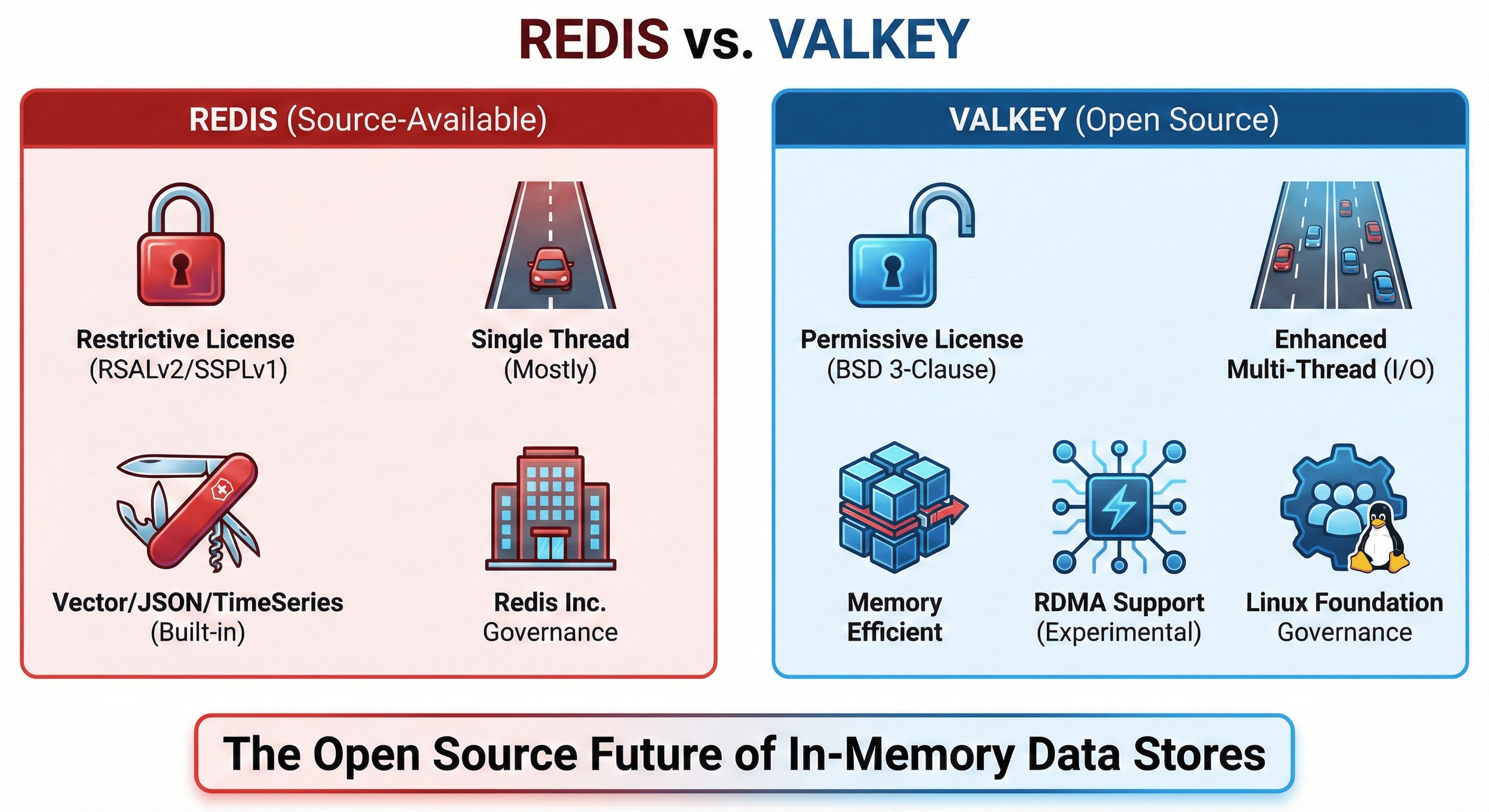
Table of Contents
- Overview
- What is Valkey?
- Redis vs Valkey Comprehensive Comparison
- Deploying Valkey on Kubernetes with Helm
- Project Directory Structure
- Conclusion
- References
Overview
For years, Redis has been synonymous with in-memory data stores. Its exceptional performance across diverse workloads—caching, session management, message queuing—established it as the de facto industry standard.
However, in March 2024, Redis Inc. fundamentally altered the landscape by abandoning the BSD 3-Clause license in favor of source-available licensing. This decision represented a significant shift from true open-source principles, triggering concerns across the industry about vendor lock-in, commercial restrictions, and the future of open-source in-memory databases.
In response, the Linux Foundation spearheaded the Valkey project, backed by major cloud vendors including AWS, Google Cloud, and Oracle. Valkey forked from Redis 7.2.4 (the last open-source version), maintaining the BSD 3-Clause license while continuing the mission of providing a truly open-source, high-performance in-memory data store.
This comprehensive guide examines Valkey’s architecture, compares it with Redis across licensing and technical dimensions, and provides detailed instructions for deploying Valkey to Kubernetes clusters using the official Helm Chart.
Key Context: The Redis license change created a critical inflection point for organizations relying on in-memory data stores. Valkey emerged not merely as a fork, but as a community-driven evolution committed to open-source principles and vendor neutrality.
What is Valkey?
Valkey is a high-performance, open-source in-memory key-value data store. Forked from Redis 7.2.4, it’s managed by the Linux Foundation as a community-driven project under true open-source governance. Valkey handles most workloads traditionally served by Redis—caching, message queuing, session storage—while maintaining high compatibility with Redis 7.2, enabling seamless migration using existing Redis clients.
Evolution Beyond Redis
Since Valkey 8.0, the project has pursued an independent technical roadmap. Kyle Davis, a core Valkey maintainer, emphasized this divergence:
“From this point forward, Redis and Valkey are two different pieces of software.”
This statement marks Valkey’s transition from a simple fork to an independent project with its own architectural vision and optimization priorities.
Industry Support & Adoption
| Category | Details |
|---|---|
| Governance | Linux Foundation (vendor-neutral) |
| Major Sponsors | AWS, Google Cloud, Oracle, Ericsson, Snap Inc. |
| Cloud Integration | AWS ElastiCache, AWS MemoryDB, Google Memorystore |
| License | BSD 3-Clause (permissive open-source) |
| Protocol Compatibility | Redis 7.2 wire protocol (drop-in replacement) |
Key Characteristics
Open-Source Commitment:
- BSD 3-Clause license ensures freedom for commercial use
- No vendor lock-in or licensing uncertainty
- Community-driven development roadmap
Performance Focus:
- Enhanced multi-threading for improved throughput
- Optimized memory efficiency with redesigned hash tables
- Experimental RDMA support for ultra-low latency
Enterprise Readiness:
- Production support from major cloud providers
- Active community development
- Comprehensive documentation and migration guides
Redis vs Valkey Comprehensive Comparison
License Analysis
The licensing shift represents the most critical differentiator between Redis and Valkey, fundamentally affecting deployment strategies and long-term viability.
| Aspect | Redis | Valkey |
|---|---|---|
| Current License | RSALv2 / SSPLv1 / AGPLv3 (Triple License) |
BSD 3-Clause |
| OSI Approved | AGPLv3 only (with restrictions) | Yes (fully permissive) |
| Commercial Use | Restricted for cloud services | Unrestricted |
| Code Modification | Must disclose under AGPLv3 | No disclosure requirement |
| Governance | Redis Inc. controlled | Linux Foundation (neutral) |
Redis License Evolution Timeline
| Period | License Status |
|---|---|
| Until Feb 2024 | BSD 3-Clause (fully open-source) |
| March 2024 | RSALv2 / SSPLv1 (source-available, not open-source) |
| May 2025 (Redis 8.0) | AGPLv3 added (triple license, technically OSI but restrictive) |
Critical Analysis:
While Redis’s addition of AGPLv3 technically qualifies it as open-source again, the copyleft provisions create significant friction for enterprise adoption:
- Disclosure Requirements: Modified code must be publicly released
- Service Provision Trigger: AGPLv3 requires source disclosure when providing network services
- Corporate Policy Conflicts: Many organizations prohibit AGPLv3 in their technology stack
Conversely, Valkey’s BSD 3-Clause license imposes minimal restrictions:
- Modification Freedom: No obligation to disclose changes
- Commercial Flexibility: No restrictions on cloud service provision
- Enterprise Friendly: Compatible with most corporate open-source policies
Technical Comparison
| Feature | Redis | Valkey |
|---|---|---|
| Threading Model | Single-threaded commands (partial I/O multi-threading) |
Enhanced I/O multi-threading (better multi-core utilization) |
| Memory Efficiency | Traditional hash table structure | Redesigned hash tables with reduced memory overhead |
| RDMA Support | Not supported | Experimental (Valkey 8.0+) |
| Vector Search | Redis Query Engine (native) | Not supported |
| JSON Operations | Native support (RedisJSON) | Not supported |
| Time Series | Built-in (RedisTimeSeries) | Not supported |
| Compatibility | - | High (Redis 7.2 protocol) |
Performance Characteristics
Valkey Strengths:
- Core Workloads: Exceptional performance for caching, session storage, message queues
- Multi-Threading: Improved throughput and reduced latency through enhanced parallelism
- Memory Optimization: Lower memory overhead per key-value pair
- Network Performance: RDMA support enables microsecond-level latency for specialized hardware
Redis Strengths:
- Advanced Features: Native vector search, JSON manipulation, time series analysis
- AI/ML Workloads: Integrated capabilities for modern application requirements
- Ecosystem Maturity: Extensive module ecosystem and third-party integrations
Use Case Recommendations
| Workload Type | Recommended Choice | Rationale |
|---|---|---|
| Caching Layer | Valkey | Better multi-threading, lower cost |
| Session Storage | Valkey | Simpler deployment, no license risk |
| Message Queue | Valkey | Core strength, proven performance |
| Vector Search | Redis | Native vector operations required |
| JSON Documents | Redis | RedisJSON provides native support |
| Time Series Data | Redis | Built-in time series capabilities |
| AI/ML Applications | Redis | Integrated ML features |
Community & Enterprise Support
| Aspect | Redis | Valkey |
|---|---|---|
| Community Model | Redis Inc. centered | Linux Foundation, AWS, Google Cloud |
| Enterprise Support | Redis Enterprise (commercial) | Community-based + CSP managed services |
| Managed Services | Redis Cloud | AWS ElastiCache, Google Memorystore, etc. |
| Original Creator | Antirez returned (2024, evangelist role) | Multiple Redis core committers involved |
Deploying Valkey on Kubernetes with Helm
This section provides comprehensive guidance for deploying Valkey to Kubernetes using the official Helm Chart (valkey-io/valkey-helm) in standalone mode with Helmfile for declarative configuration management.
Prerequisites
Before proceeding, ensure your environment meets these requirements:
| Requirement | Details |
|---|---|
| Kubernetes Cluster | v1.23+ recommended (tested on v1.28) |
| kubectl | Configured with cluster access |
| helm | v3.8+ installed and configured |
| helmfile | Optional but recommended for declarative management |
| StorageClass | Dynamic provisioner (e.g., local-path, gp3, standard) |
Step 1: Add Helm Repository
# Add Valkey official Helm repository
helm repo add valkey https://valkey.io/valkey-helm/

# Update repository index
helm repo update

# Verify repository addition
helm search repo valkey
Expected output:
NAME          CHART VERSION  APP VERSION  DESCRIPTION
valkey/valkey 0.9.3          9.0.1        A Helm chart for Valkey on Kubernetes
Step 2: Configure Values File
Create values/valkey.values.yaml with production-ready configuration:
# Global image settings
global:
  imageRegistry: ""
  imagePullSecrets: []

# Valkey container image configuration
image:
  registry: "docker.io"
  repository: valkey/valkey
  pullPolicy: IfNotPresent
  tag: ""  # Uses Chart appVersion by default

# Resource naming overrides
nameOverride: "valkey-redis"
fullnameOverride: "valkey-redis"

# Kubernetes cluster domain (adjust for your environment)
clusterDomain: my-cluster.local

# Service configuration
service:
  # NodePort enables external access via node IP
  type: NodePort
  port: 6379
  annotations: {}
  # NodePort must be in range 30000-32767
  nodePort: 30500
  clusterIP: ""
  loadBalancerClass: ""
  appProtocol: ""

# Network policy (disabled by default)
networkPolicy: {}

# Resource limits and requests
resources:
  limits:
    cpu: 500m
    memory: 1024Mi
  requests:
    cpu: 100m
    memory: 256Mi

# Persistent storage configuration (Standalone mode)
dataStorage:
  enabled: true
  persistentVolumeClaimName: ""
  subPath: ""
  volumeName: "valkey-data"
  requestedSize: "5Gi"
  # Specify your StorageClass
  className: "local-path"
  accessModes:
    - ReadWriteOnce
  keepPvc: false
  annotations: {}
  labels: {}
  hostPath: ""

# Authentication configuration (disabled for demo; enable for production)
auth:
  enabled: false
  # password: "your-secure-password"
  # existingSecret: "valkey-auth-secret"

# Replication configuration (disabled for standalone)
replica:
  enabled: false
  # replicaCount: 2
  # resources: {}

# TLS/SSL configuration
tls:
  enabled: false
  # certManager: true
  # certificatesSecret: "valkey-tls"

# Pod node placement
nodeSelector:
  local-path: enabled

# Valkey log verbosity
# Options: debug, verbose, notice, warning
valkeyLogLevel: "notice"

# Additional environment variables
env: {}

# Prometheus metrics exporter
metrics:
  enabled: false
  # serviceMonitor:
  #   enabled: true
  #   namespace: monitoring
Configuration Breakdown
Service Configuration:
type: NodePort: Enables external access via<NodeIP>:30500nodePort: 30500: Fixed port for consistent access (change if port conflicts exist)
Storage Configuration:
enabled: true: Creates PersistentVolumeClaim for data persistenceclassName: "local-path": Uses Rancher Local Path Provisioner (adjust for your environment)requestedSize: "5Gi": Allocates 5GB storage (adjust based on expected data volume)
Standalone Mode:
replica.enabled: false: Deploys single instance without replication- For production with high availability, enable replication and configure sentinel
Authentication:
auth.enabled: false: Disabled for demo purposes- Production recommendation: Enable authentication with strong passwords
Step 3: Create Helmfile Configuration
Create helmfile.yaml for declarative deployment:
repositories:
  - name: valkey
    url: https://valkey.io/valkey-helm/

releases:
  - name: valkey-redis
    chart: valkey/valkey
    namespace: my-db-redis
    version: 0.9.3
    values:
      - values/valkey.values.yaml
    # Optional: Create namespace if it doesn't exist
    createNamespace: true
    # Wait for deployment to complete
    wait: true
    timeout: 300
Step 4: Deploy to Kubernetes
Option A: Helmfile Deployment (Recommended)
# Preview changes
helmfile diff

# Apply configuration
helmfile sync

# Monitor deployment
helmfile status
Option B: Direct Helm Deployment
Step 5: Verify Deployment
# Check pod status
kubectl get pods -n my-db-redis

# Expected output:
# NAME             READY   STATUS    RESTARTS   AGE
# valkey-redis-0   1/1     Running   0          2m

# Check service configuration
kubectl get svc -n my-db-redis

# Expected output:
# NAME           TYPE       CLUSTER-IP      EXTERNAL-IP   PORT(S)          AGE
# valkey-redis   NodePort   10.96.xxx.xxx   <none>        6379:30500/TCP   2m

# Verify persistent volume claim
kubectl get pvc -n my-db-redis

# Expected output:
# NAME                    STATUS   VOLUME                                     CAPACITY   ACCESS MODES
# valkey-data-valkey-0    Bound    pvc-xxxxx-xxxx-xxxx-xxxx-xxxxxxxxxxxx      5Gi        RWO
Step 6: Connection Testing
Valkey maintains Redis protocol compatibility, enabling use of standard Redis clients.
External Access via NodePort:
# Connect using redis-cli
redis-cli -h <NODE_IP> -p 30500

# Example with specific node IP
redis-cli -h 192.168.1.100 -p 30500
Internal Access from Kubernetes:
# Port-forward for local testing
kubectl port-forward -n my-db-redis svc/valkey-redis 6379:6379

# Connect via localhost
redis-cli -h localhost -p 6379
Basic Operations Test:
# PING test
<NODE_IP>:30500> PING
PONG

# Server information
<NODE_IP>:30500> INFO server
# Server
redis_version:7.2.4
server_name:valkey
valkey_version:9.0.1
redis_git_sha1:00000000
redis_git_dirty:0
redis_build_id:0
redis_mode:standalone
os:Linux 5.15.0-91-generic x86_64
arch_bits:64
monotonic_clock:POSIX clock_gettime
multiplexing_api:epoll
atomicvar_api:c11-builtin
gcc_version:11.4.0
process_id:1
process_supervised:no
run_id:xxxxxxxxxxxxxxxxxxxxxxxxxxxxxxxxxxxxx
tcp_port:6379
server_time_usec:1709568234123456
uptime_in_seconds:120
uptime_in_days:0
hz:10
configured_hz:10
lru_clock:12345678
Key Verification Points:
server_name:valkeyconfirms Valkey is runningvalkey_version:9.0.1shows current Valkey versionredis_version:7.2.4indicates Redis protocol compatibilityredis_mode:standaloneconfirms single-instance deployment
Data Persistence Test:
# Set test key
<NODE_IP>:30500> SET test:key "Hello Valkey"
OK

# Retrieve value
<NODE_IP>:30500> GET test:key
"Hello Valkey"

# Simulate pod restart
kubectl delete pod valkey-redis-0 -n my-db-redis

# Wait for pod recreation (StatefulSet auto-recovers)
kubectl wait --for=condition=ready pod/valkey-redis-0 -n my-db-redis --timeout=60s

# Reconnect and verify persistence
redis-cli -h <NODE_IP> -p 30500
<NODE_IP>:30500> GET test:key
"Hello Valkey"  # Data persisted successfully
Advanced Configuration Options
Enabling Authentication:
# values/valkey.values.yaml
auth:
  enabled: true
  password: "your-secure-password-here"
  # Or use existing secret
  # existingSecret: "valkey-auth-secret"
  # existingSecretPasswordKey: "password"
Connect with authentication:
redis-cli -h <NODE_IP> -p 30500 -a your-secure-password-here
Enabling Metrics Collection:
# values/valkey.values.yaml
metrics:
  enabled: true
  serviceMonitor:
    enabled: true
    namespace: monitoring
    interval: 30s
Configuring Replication:
# values/valkey.values.yaml
replica:
  enabled: true
  replicaCount: 2
  resources:
    limits:
      cpu: 500m
      memory: 1024Mi
    requests:
      cpu: 100m
      memory: 256Mi
Troubleshooting Common Issues
Issue 1: Pod in Pending State
# Check pod events
kubectl describe pod valkey-redis-0 -n my-db-redis

# Common causes:
# - Insufficient node resources
# - StorageClass not available
# - PVC binding failure
Solution:
# Verify StorageClass exists
kubectl get storageclass

# Check PVC status
kubectl get pvc -n my-db-redis

# Verify node resources
kubectl describe node <node-name>
Issue 2: Cannot Connect via NodePort
# Verify service configuration
kubectl get svc valkey-redis -n my-db-redis -o yaml

# Check firewall rules
# Ensure port 30500 is open on node firewall
Solution:
Issue 3: Data Loss After Pod Restart
# Verify PVC is bound
kubectl get pvc -n my-db-redis

# Check pod volume mounts
kubectl describe pod valkey-redis-0 -n my-db-redis | grep -A5 Mounts
Solution:
Ensure dataStorage.enabled: true in values file and PVC is successfully bound.
Project Directory Structure
Final project organization:
valkey/
├── helmfile.yaml
└── values/
    └── valkey.values.yaml
File Descriptions:
helmfile.yaml: Declarative Helm release configurationvalues/valkey.values.yaml: Valkey-specific configuration overrides
Optional additions for production:
valkey/
├── helmfile.yaml
├── values/
│   ├── valkey.values.yaml           # Base configuration
│   ├── valkey.values.prod.yaml      # Production overrides
│   └── valkey.values.dev.yaml       # Development overrides
├── secrets/
│   └── valkey-auth.enc.yaml         # Encrypted secrets (use sops/sealed-secrets)
└── scripts/
    ├── backup.sh                    # Backup automation
    └── monitoring-setup.sh          # Prometheus/Grafana integration
Conclusion
The Redis licensing transition in March 2024 created a pivotal moment in the open-source in-memory database landscape, catalyzing the emergence of Valkey as a powerful, truly open-source alternative. Valkey transcends being merely a Redis fork—it represents an independent technical evolution with multi-threading optimization, enhanced memory efficiency, RDMA support, and community-driven innovation.
Strategic Advantages of Valkey
License Certainty:
The BSD 3-Clause license under Linux Foundation governance eliminates uncertainty around future licensing changes, providing organizations with long-term stability and freedom from vendor lock-in.
Enterprise Ecosystem:
Major cloud platforms (AWS ElastiCache, Google Memorystore) officially support Valkey, demonstrating industry confidence and ensuring robust managed service options.
Technical Evolution:
Post-8.0 releases show Valkey’s commitment to innovation independent of Redis, with optimizations specifically targeting high-throughput, low-latency workloads.
When to Choose Valkey
- Traditional In-Memory Workloads: Caching, session management, message queuing
- License-Conscious Organizations: BSD 3-Clause eliminates AGPLv3 concerns
- Cloud-Native Deployments: Strong support from major cloud providers
- Cost Optimization: No commercial licensing fees or restrictions
- New Projects: Start with open-source foundation without future licensing risk
When to Consider Redis
- Advanced Features: Vector search, native JSON operations, time series analysis
- AI/ML Workloads: Integrated machine learning capabilities required
- Specific Module Dependencies: Applications heavily utilizing RedisJSON, RedisTimeSeries, etc.
- Existing Deployments: Migration cost exceeds licensing concerns (evaluate case-by-case)
Migration Considerations
For organizations evaluating migration from Redis to Valkey:
- Compatibility Assessment: Verify Redis 7.2 protocol compatibility covers your use cases
- Feature Audit: Identify dependencies on Redis-specific modules (JSON, TimeSeries, etc.)
- Testing Strategy: Implement comprehensive testing in staging environment
- Rollback Plan: Maintain ability to revert if issues arise
- Performance Validation: Benchmark against production workload patterns
The Open-Source Imperative
Valkey’s emergence underscores the enduring value of truly open-source infrastructure. Organizations building critical systems benefit from:
- Community Innovation: Diverse contributors drive feature development
- Vendor Neutrality: No single company controls the project direction
- Long-Term Viability: Open governance ensures project continuity
- Economic Efficiency: No licensing costs enable resource allocation to innovation
If you’re initiating a new project or seeking alternatives due to Redis licensing concerns, Valkey warrants serious evaluation. Its combination of technical excellence, permissive licensing, and strong industry backing positions it as the natural evolution of open-source in-memory data stores.
The future of in-memory databases is open-source, community-driven, and vendor-neutral. Valkey embodies these principles while delivering production-grade performance and reliability.
References
- Valkey Official Website
- Valkey GitHub Repository
- Valkey Helm Chart GitHub
- Valkey Helm Chart Blog
- Redis vs Valkey - Better Stack
- Redis vs Valkey - Percona
- Redis vs Valkey - AWS
- Redis 8.0 vs Valkey 8.1 Technical Comparison - DragonflyDB
- Linux Foundation Valkey Project
- The Open Source Definition (OSI)
Questions or feedback? Feel free to leave comments on the blog, and I’ll respond promptly. Thank you for reading!

Comments