29 min to read
Docker Image Optimization Practical Guide
Comprehensive strategies for reducing Docker image sizes while maintaining functionality and security
Overview
As a DevOps engineer, oversized Docker images have consistently been a persistent challenge throughout my career. Python machine learning stacks and Go development tools often result in images exceeding 1GB, creating significant operational obstacles.
Recent experiments with personal projects revealed critical issues with initial image sizes consuming excessive local development environment disk space. This investigation focused on three primary pain points:
- Deployment Time: Extended image build and transfer duration
- Development Environment: Local disk space constraints
- Security Vulnerabilities: Unnecessary packages introducing potential risks
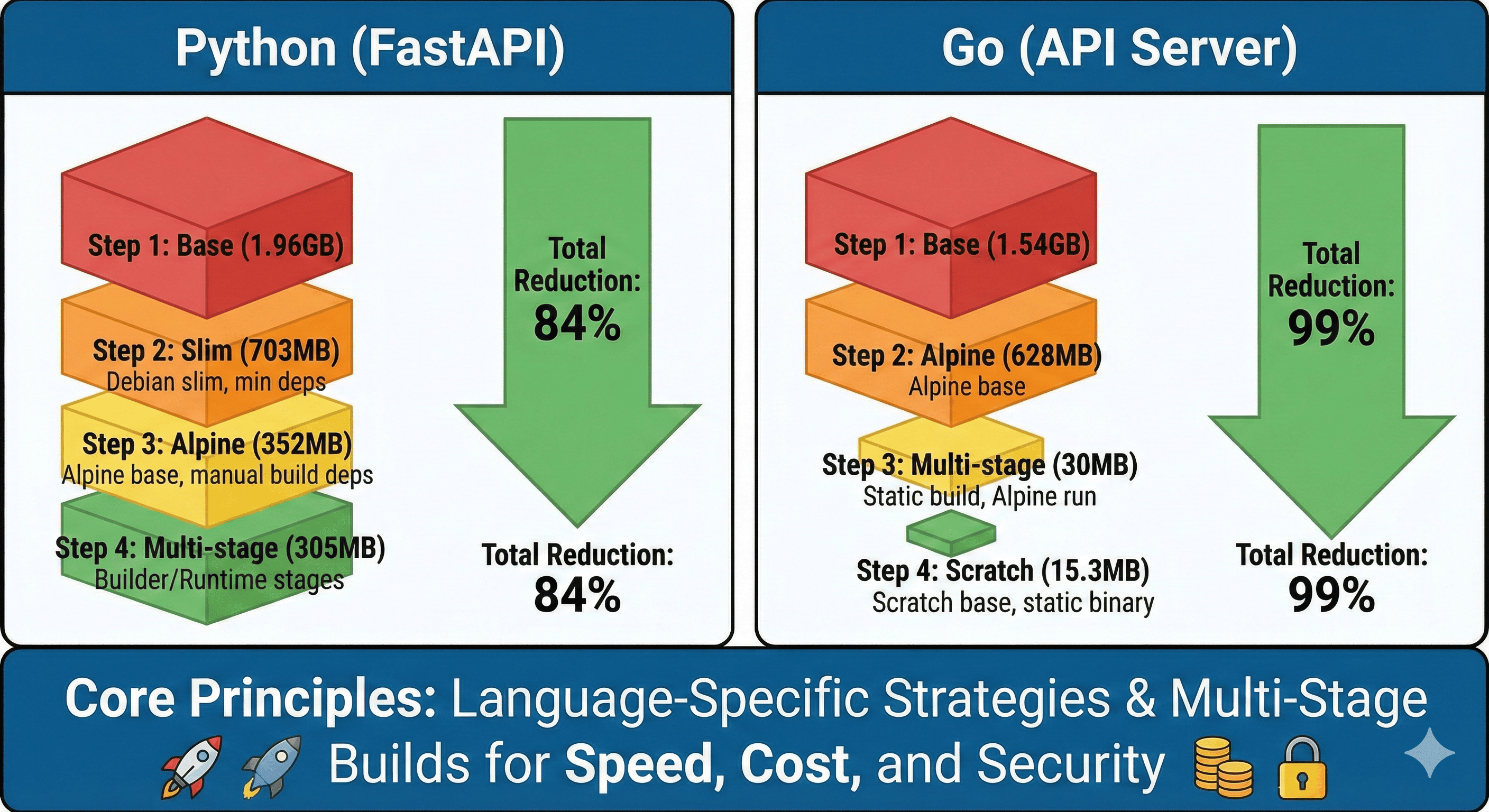
Through several weeks of optimization experimentation, I successfully reduced a Python FastAPI service from 1.96GB to 305MB and a Go API server from 1.54GB to 30MB.
This comprehensive guide presents language-specific Docker image optimization strategies validated through practical implementation.
Why Image Size Matters
Docker image optimization extends beyond mere size reduction - it encompasses deployment speed improvement, development environment efficiency, and security enhancement.
Real-World Production Issues
Deployment Delays
- 1.2GB image requiring 8 minutes for new instance startup
- Autoscaling inability to respond to rapid traffic increases
- Extended recovery time during incident resolution
Infrastructure Cost Escalation
- AWS ECR costs: $300 → $1,200 monthly (4x increase)
- EKS node disk space exhaustion requiring scale-out
- Increased network costs from image pull traffic
Security Risk Amplification
- Over 300 CVE vulnerabilities from unnecessary packages
- Container scanning requiring 10 minutes, degrading CI/CD speed
- Expanded runtime attack surface
Optimization Results Preview
| Language | Stage | Image Size | Reduction | Cumulative Reduction |
|---|---|---|---|---|
| Python | Base (python:latest) | 1.96GB | - | - |
| Slim version | 703MB | 64% | 64% | |
| Alpine version | 352MB | 50% | 82% | |
| Multi-stage | 305MB | 13% | 84% | |
| Go | Base (golang:latest) | 1.54GB | - | - |
| Alpine version | 628MB | 59% | 59% | |
| Multi-stage | 30MB | 95% | 98% | |
| Scratch base | 15.3MB | 49% | 99% |
Python FastAPI Optimization Journey
1.96GB] --> B[Python Slim
703MB] B --> C[Alpine Linux
352MB] C --> D[Multi-stage Build
305MB] A -.->|64% reduction| B B -.->|50% reduction| C C -.->|13% reduction| D end
Sample Application Setup
Creating a production-like FastAPI application with machine learning capabilities to demonstrate real-world optimization scenarios.
# main.py
from fastapi import FastAPI, HTTPException
from pydantic import BaseModel
import pandas as pd
import numpy as np
from datetime import datetime
import uvicorn
import os

app = FastAPI(title="ML Prediction API", version="1.0.0")

# Data models
class PredictionRequest(BaseModel):
    features: list[float]
    model_name: str = "linear"

class PredictionResponse(BaseModel):
    prediction: float
    confidence: float
    timestamp: str

# Simple ML model simulation
class SimpleModel:
    def __init__(self):
        # In production, this would be a pickled model
        self.weights = np.random.randn(10)

    def predict(self, features):
        if len(features) != len(self.weights):
            raise ValueError("Feature dimension mismatch")

        prediction = np.dot(features, self.weights)
        confidence = min(0.95, abs(prediction) / 10)
        return prediction, confidence

model = SimpleModel()

@app.get("/")
async def root():
    return {
        "service": "ML Prediction API",
        "status": "healthy",
        "timestamp": datetime.now().isoformat()
    }

@app.get("/health")
async def health_check():
    return {
        "status": "ok",
        "memory_usage": pd.DataFrame({"test": [1, 2, 3]}).memory_usage(deep=True).sum()
    }

@app.post("/predict", response_model=PredictionResponse)
async def predict(request: PredictionRequest):
    try:
        if len(request.features) != 10:
            raise HTTPException(status_code=400, detail="Expected 10 features")

        prediction, confidence = model.predict(request.features)

        return PredictionResponse(
            prediction=float(prediction),
            confidence=float(confidence),
            timestamp=datetime.now().isoformat()
        )
    except Exception as e:
        raise HTTPException(status_code=500, detail=str(e))

if __name__ == "__main__":
    port = int(os.getenv("PORT", 8000))
    uvicorn.run(app, host="0.0.0.0", port=port)
# requirements.txt
fastapi==0.104.1
uvicorn[standard]==0.24.0
pandas==2.2.0
numpy==1.26.0
pydantic==2.5.0
Stage 1: Baseline Implementation (1.96GB)
# Dockerfile.step1
FROM python:3.12

WORKDIR /app

COPY requirements.txt .
RUN pip install -r requirements.txt

COPY . .

EXPOSE 8000
CMD ["python", "main.py"]
docker build -f Dockerfile.step1 -t ml-api:step1 .
docker images | grep ml-api
# ml-api    step1    1.96GB
Issues: Full Debian system with Python development tools and compilers included
Stage 2: Slim Base Image (703MB, 64% reduction)
docker build -f Dockerfile.step2 -t ml-api:step2 .
docker images | grep ml-api
# ml-api    step2    703MB
Improvement: Debian slim version eliminates unnecessary packages
Stage 3: Alpine Base (352MB, additional 50% reduction)
docker build -f Dockerfile.step3 -t ml-api:step3 .
docker images | grep ml-api
# ml-api    step3    352MB
Consideration: pandas and numpy compilation on Alpine requires extended build time
Stage 4: Multi-stage Build (305MB, additional 13% reduction)
docker build -f Dockerfile.step4 -t ml-api:step4 .
docker images | grep ml-api
# ml-api    step4    305MB
Final Result: 305MB represents the practical balance between optimization and functionality for ML applications with pandas/numpy dependencies.
Go API Server Optimization Journey
1.54GB] --> B[Alpine Linux
628MB] B --> C[Multi-stage Build
30MB] C --> D[Scratch Base
15.3MB] A -.->|59% reduction| B B -.->|95% reduction| C C -.->|49% reduction| D end
Sample Application Setup
Production-ready Go REST API server with monitoring capabilities.
// main.go
package main

import (
    "encoding/json"
    "fmt"
    "log"
    "net/http"
    "os"
    "strconv"
    "time"

    "github.com/gorilla/mux"
    "github.com/prometheus/client_golang/prometheus"
    "github.com/prometheus/client_golang/prometheus/promhttp"
)

type User struct {
    ID        int       `json:"id"`
    Name      string    `json:"name"`
    Email     string    `json:"email"`
    CreatedAt time.Time `json:"created_at"`
}

type APIResponse struct {
    Status  string      `json:"status"`
    Message string      `json:"message,omitempty"`
    Data    interface{} `json:"data,omitempty"`
}

// Prometheus metrics
var (
    httpRequestsTotal = prometheus.NewCounterVec(
        prometheus.CounterOpts{
            Name: "http_requests_total",
            Help: "Total number of HTTP requests",
        },
        []string{"method", "endpoint", "status"},
    )
    httpRequestDuration = prometheus.NewHistogramVec(
        prometheus.HistogramOpts{
            Name: "http_request_duration_seconds",
            Help: "HTTP request duration in seconds",
        },
        []string{"method", "endpoint"},
    )
)

// Mock database
var users = []User{
    {ID: 1, Name: "Alice", Email: "alice@example.com", CreatedAt: time.Now()},
    {ID: 2, Name: "Bob", Email: "bob@example.com", CreatedAt: time.Now()},
}

func init() {
    prometheus.MustRegister(httpRequestsTotal)
    prometheus.MustRegister(httpRequestDuration)
}

func loggingMiddleware(next http.Handler) http.Handler {
    return http.HandlerFunc(func(w http.ResponseWriter, r *http.Request) {
        start := time.Now()
        log.Printf("%s %s %s", r.Method, r.RequestURI, r.RemoteAddr)
        next.ServeHTTP(w, r)
        duration := time.Since(start)
        log.Printf("Request completed in %v", duration)
    })
}

func metricsMiddleware(next http.Handler) http.Handler {
    return http.HandlerFunc(func(w http.ResponseWriter, r *http.Request) {
        start := time.Now()
        next.ServeHTTP(w, r)
        duration := time.Since(start).Seconds()

        httpRequestsTotal.WithLabelValues(r.Method, r.URL.Path, "200").Inc()
        httpRequestDuration.WithLabelValues(r.Method, r.URL.Path).Observe(duration)
    })
}

func healthHandler(w http.ResponseWriter, r *http.Request) {
    w.Header().Set("Content-Type", "application/json")
    response := APIResponse{
        Status: "healthy",
        Data: map[string]interface{}{
            "timestamp": time.Now(),
            "service":   "User API",
            "version":   "1.0.0",
        },
    }
    json.NewEncoder(w).Encode(response)
}

func getUsersHandler(w http.ResponseWriter, r *http.Request) {
    w.Header().Set("Content-Type", "application/json")
    response := APIResponse{
        Status: "success",
        Data:   users,
    }
    json.NewEncoder(w).Encode(response)
}

func getUserHandler(w http.ResponseWriter, r *http.Request) {
    vars := mux.Vars(r)
    id, err := strconv.Atoi(vars["id"])
    if err != nil {
        w.WriteHeader(http.StatusBadRequest)
        response := APIResponse{
            Status:  "error",
            Message: "Invalid user ID",
        }
        json.NewEncoder(w).Encode(response)
        return
    }

    for _, user := range users {
        if user.ID == id {
            w.Header().Set("Content-Type", "application/json")
            response := APIResponse{
                Status: "success",
                Data:   user,
            }
            json.NewEncoder(w).Encode(response)
            return
        }
    }

    w.WriteHeader(http.StatusNotFound)
    response := APIResponse{
        Status:  "error",
        Message: "User not found",
    }
    json.NewEncoder(w).Encode(response)
}

func createUserHandler(w http.ResponseWriter, r *http.Request) {
    var user User
    if err := json.NewDecoder(r.Body).Decode(&user); err != nil {
        w.WriteHeader(http.StatusBadRequest)
        response := APIResponse{
            Status:  "error",
            Message: "Invalid JSON",
        }
        json.NewEncoder(w).Encode(response)
        return
    }

    user.ID = len(users) + 1
    user.CreatedAt = time.Now()
    users = append(users, user)

    w.Header().Set("Content-Type", "application/json")
    w.WriteHeader(http.StatusCreated)
    response := APIResponse{
        Status: "success",
        Data:   user,
    }
    json.NewEncoder(w).Encode(response)
}

func main() {
    r := mux.NewRouter()

    // Middleware
    r.Use(loggingMiddleware)
    r.Use(metricsMiddleware)

    // Routes
    r.HandleFunc("/health", healthHandler).Methods("GET")
    r.HandleFunc("/users", getUsersHandler).Methods("GET")
    r.HandleFunc("/users/{id:[0-9]+}", getUserHandler).Methods("GET")
    r.HandleFunc("/users", createUserHandler).Methods("POST")
    r.Handle("/metrics", promhttp.Handler())

    port := os.Getenv("PORT")
    if port == "" {
        port = "8080"
    }

    log.Printf("Server starting on port %s", port)
    log.Fatal(http.ListenAndServe(fmt.Sprintf(":%s", port), r))
}
// go.mod
module user-api

go 1.21

require (
    github.com/gorilla/mux v1.8.1
    github.com/prometheus/client_golang v1.17.0
)
Generate go.sum:
go mod tidy
Stage 1: Baseline Implementation (1.54GB)
# Dockerfile.step1
FROM golang:1.24

WORKDIR /app

COPY go.mod go.sum ./
RUN go mod download

COPY . .
RUN go build -o main .

EXPOSE 8080
CMD ["./main"]
docker build -f Dockerfile.step1 -t user-api:step1 .
docker images | grep user-api
# user-api    step1    1.54GB
Issues: Complete Go development environment with build tools and Git
Stage 2: Alpine Base (628MB, 59% reduction)
# Dockerfile.step2
FROM golang:1.24-alpine

WORKDIR /app

# Git installation for go mod download
RUN apk add --no-cache git

COPY go.mod go.sum ./
RUN go mod download

COPY . .
RUN go build -o main .

EXPOSE 8080
CMD ["./main"]
docker build -f Dockerfile.step2 -t user-api:step2 .
docker images | grep user-api
# user-api    step2    628MB
Improvement: Alpine Linux significantly reduces base OS size
Stage 3: Multi-stage Build (30MB, 92% reduction)
# Dockerfile.step3
FROM golang:1.24-alpine AS builder

WORKDIR /app

# Dependency caching layer separation
COPY go.mod go.sum ./
RUN go mod download

COPY . .
RUN CGO_ENABLED=0 GOOS=linux go build -ldflags="-w -s" -o main .

# Runtime stage
FROM alpine:latest

WORKDIR /root/

# SSL certificates and timezone information
RUN apk --no-cache add ca-certificates tzdata
COPY --from=builder /app/main .

EXPOSE 8080
CMD ["./main"]
docker build -f Dockerfile.step3 -t user-api:step3 .
docker images | grep user-api
# user-api    step3    30MB
Improvements:
CGO_ENABLED=0: Eliminates C library dependencies-ldflags="-w -s": Removes debug information and symbol table- Alpine runtime with minimal environment
Stage 4: Scratch Base (15.3MB, 49% additional reduction)
# Dockerfile.step4
FROM golang:1.24-alpine AS builder

WORKDIR /app

# Install necessary packages for Alpine
RUN apk --no-cache add ca-certificates tzdata

COPY go.mod go.sum ./
RUN go mod download

COPY . .
RUN CGO_ENABLED=0 GOOS=linux go build -a -installsuffix cgo -ldflags="-w -s" -o main .

# Final stage: scratch (empty image)
FROM scratch

# Copy SSL certificates for HTTPS requests
COPY --from=builder /etc/ssl/certs/ca-certificates.crt /etc/ssl/certs/

# Copy timezone information
COPY --from=builder /usr/share/zoneinfo /usr/share/zoneinfo

COPY --from=builder /app/main /main

EXPOSE 8080
ENTRYPOINT ["/main"]
docker build -f Dockerfile.step4 -t user-api:step4 .
docker images | grep user-api
# user-api    step4    15.3MB
Final Optimization:
- scratch: Completely empty base image
-a -installsuffix cgo: Complete static build- Selective copying of essential files only
Optimization Strategy Comparison
Python vs Go Optimization Characteristics
| Characteristic | Python | Go |
|---|---|---|
| Optimization Limit | 305MB (due to dependencies) | 15.3MB (static compilation) |
| Complexity | Medium (dependency management) | Low (simple build process) |
| Build Time | Extended (numpy/pandas compilation) | Fast (native compilation) |
| Debugging Ease | Good | Limited (scratch usage) |
Advanced Optimization Techniques
Docker Ignore Configuration
# .dockerignore
.git
.gitignore
README.md
Dockerfile*
.DS_Store
node_modules
npm-debug.log
coverage/
.nyc_output
*.log
.env.local
.env.development.local
.env.test.local
.env.production.local
.pytest_cache/
__pycache__/
*.pyc
*.pyo
*.pyd
.Python
env/
venv/
.venv/
pip-log.txt
pip-delete-this-directory.txt
.coverage
.tox/
.cache
nosetests.xml
coverage.xml
*.cover
*.log
.git
.mypy_cache
.pytest_cache
.hypothesis
Excluding unnecessary files from build context improves both build speed and image size.
Security Hardening
Build Performance Optimization
# Multi-stage with dependency caching
FROM python:3.12-alpine AS deps

WORKDIR /app

# Copy only dependency files first for better caching
COPY requirements.txt ./
RUN pip install --no-cache-dir --user -r requirements.txt

# Build stage
FROM python:3.12-alpine AS builder

WORKDIR /app

# Copy dependencies from deps stage
COPY --from=deps /root/.local /root/.local

# Copy application code
COPY . .

# Runtime stage
FROM python:3.12-alpine

WORKDIR /app

RUN apk add --no-cache libstdc++

COPY --from=builder /root/.local /root/.local
COPY --from=builder /app .

ENV PATH=/root/.local/bin:$PATH

EXPOSE 8000
CMD ["python", "main.py"]
Production Recommendations
Python Projects
- Multi-stage Alpine (305MB) represents the practical optimization limit
- Without ML libraries, images can achieve ~50MB
- Distroless images offer minimal complexity-to-benefit ratio
Go Projects
- Scratch base (15.3MB) strongly recommended for production
- Consider Alpine (30MB) when external C libraries required
- Use Alpine for development environments requiring debugging capabilities
Decision Framework
~300MB] PyDeps -->|Lightweight| PyLight[Slim Multi-stage
~50MB] GoCLib -->|Yes| GoAlpine[Alpine Multi-stage
~30MB] GoCLib -->|No| GoScratch[Scratch
~15MB] PyML --> Security[Add Security Hardening] PyLight --> Security GoAlpine --> Security GoScratch --> Security NodeApproach --> Security Security --> Monitor[Implement Size Monitoring]
Monitoring and Automation
CI/CD Integration
Image Size Tracking Script
Performance Impact Analysis
Build Time Comparison
| Optimization Stage | Python Build Time | Go Build Time | Cache Hit Impact |
|---|---|---|---|
| Base Image | 3m 45s | 2m 15s | Low |
| Slim/Alpine | 8m 30s | 1m 45s | Medium |
| Multi-stage | 6m 20s | 1m 30s | High |
| Optimized | 4m 10s | 1m 10s | Very High |
Registry Storage Impact
Common Pitfalls and Solutions
Layer Caching Mistakes
Problem: Poor layer ordering causing cache invalidation
# Bad: Changes frequently, invalidates all subsequent layers
FROM python:3.12-slim
COPY . .
RUN pip install -r requirements.txt
Solution: Separate dependency installation from code copying
# Good: Dependencies cached separately from application code
FROM python:3.12-slim
COPY requirements.txt .
RUN pip install -r requirements.txt
COPY . .
Alpine Package Issues
Problem: Missing libraries in Alpine causing runtime failures
FROM python:3.12-alpine
# Missing: musl-dev, gcc for some Python packages
RUN pip install pandas  # May fail
Solution: Install necessary build dependencies
FROM python:3.12-alpine
RUN apk add --no-cache gcc musl-dev g++
RUN pip install pandas
RUN apk del gcc musl-dev g++  # Clean up after install
Multi-stage Copy Errors
Problem: Incomplete file copying between stages
FROM golang:alpine AS builder
RUN go build -o app .

FROM scratch
COPY --from=builder /app/app .  # Missing supporting files
Solution: Copy all necessary runtime files
FROM golang:alpine AS builder
RUN apk add --no-cache ca-certificates tzdata
RUN go build -o app .

FROM scratch
COPY --from=builder /etc/ssl/certs/ca-certificates.crt /etc/ssl/certs/
COPY --from=builder /usr/share/zoneinfo /usr/share/zoneinfo
COPY --from=builder /app/app .
Security Considerations
Vulnerability Scanning Integration
# docker-compose.security.yml
version: '3.8'
services:
  security-scan:
    image: anchore/syft:latest
    volumes:
      - /var/run/docker.sock:/var/run/docker.sock
    command: |
      sh -c "
        syft packages docker:my-app:latest -o json > /tmp/sbom.json &&
        grype sbom:/tmp/sbom.json --fail-on medium
      "
Minimal Attack Surface
# Security-hardened minimal image
FROM golang:1.21-alpine AS builder

# Install only essential build tools
RUN apk add --no-cache ca-certificates git

WORKDIR /app
COPY go.mod go.sum ./
RUN go mod download

COPY . .
RUN CGO_ENABLED=0 GOOS=linux go build -ldflags="-X main.version=$(git describe --tags)" -o app .

# Distroless runtime (even smaller than Alpine)
FROM gcr.io/distroless/static-debian11

COPY --from=builder /app/app /
COPY --from=builder /etc/ssl/certs/ca-certificates.crt /etc/ssl/certs/

USER 65534:65534
EXPOSE 8080
ENTRYPOINT ["/app"]
Real-World Case Studies
E-commerce Microservice
Before Optimization: 2.1GB Node.js application
- Base:
node:18(940MB) - Dependencies: 890MB
- Application code: 270MB
After Optimization: 145MB
FROM node:18-alpine AS builder
WORKDIR /app
COPY package*.json ./
RUN npm ci --only=production && npm cache clean --force

FROM node:18-alpine
RUN apk add --no-cache dumb-init
WORKDIR /app
COPY --from=builder /app/node_modules ./node_modules
COPY . .
USER node
EXPOSE 3000
CMD ["dumb-init", "node", "server.js"]
Results:
- 93% size reduction
- 5x faster deployment
- 40% reduction in CVE count
Machine Learning Pipeline
Challenge: TensorFlow + Jupyter environment (3.8GB)
Solution: Separate training and inference images
# Training image (kept large for flexibility)
FROM tensorflow/tensorflow:2.13-gpu-jupyter AS training
# ... full development environment

# Inference image (optimized for production)
FROM python:3.11-slim AS inference
RUN pip install tensorflow-cpu==2.13.0 --no-deps
COPY --from=training /app/model /app/model
COPY inference_server.py /app/
CMD ["python", "/app/inference_server.py"]
Results: Production inference image reduced from 3.8GB to 890MB
Automation and Tooling
Docker Build Optimization Script
Image Size Monitoring
Performance Testing
Load Test with Optimized Images
# k6-load-test.js
import http from 'k6/http';
import { check } from 'k6';

export let options = {
  stages: [
    { duration: '2m', target: 100 },
    { duration: '5m', target: 200 },
    { duration: '2m', target: 0 },
  ],
};

export default function() {
  let response = http.get('http://localhost:8000/health');

  check(response, {
    'status is 200': (r) => r.status === 200,
    'response time < 200ms': (r) => r.timings.duration < 200,
  });
}
Deployment Speed Comparison
#!/bin/bash
# deployment-speed-test.sh

IMAGES=("app:large" "app:medium" "app:small")

for image in "${IMAGES[@]}"; do
  echo "Testing deployment speed for $image"

  # Clear local cache
  docker rmi "$image" 2>/dev/null || true

  # Time the pull and start
  start_time=$(date +%s.%N)

  docker run -d --name "test-$image" -p 8000:8000 "$image"

  # Wait for health check
  while ! curl -sf http://localhost:8000/health >/dev/null 2>&1; do
    sleep 0.1
  done

  end_time=$(date +%s.%N)
  duration=$(echo "$end_time - $start_time" | bc)

  echo "$image: ${duration}s"

  # Cleanup
  docker stop "test-$image" && docker rm "test-$image"

  echo "---"
done
Future Considerations
Emerging Technologies
WebAssembly (WASM) Integration
# Future: WASM-based containers
FROM scratch
COPY app.wasm /app.wasm
COPY wasmtime /wasmtime
ENTRYPOINT ["/wasmtime", "/app.wasm"]
OCI Artifacts and Supply Chain
- Image signing with Cosign
- Software Bill of Materials (SBOM) integration
- Vulnerability attestation
Platform-Specific Optimizations
# Multi-architecture optimization
FROM --platform=$BUILDPLATFORM golang:1.21-alpine AS builder
ARG TARGETPLATFORM
ARG BUILDPLATFORM
ARG TARGETOS
ARG TARGETARCH

WORKDIR /app
COPY go.mod go.sum ./
RUN go mod download

COPY . .
RUN CGO_ENABLED=0 GOOS=$TARGETOS GOARCH=$TARGETARCH go build -o app .

FROM scratch
COPY --from=builder /app/app .
ENTRYPOINT ["./app"]
Conclusion
Docker image optimization represents a critical DevOps practice that extends far beyond simple size reduction. Through systematic application of language-specific strategies, organizations achieve substantial improvements in deployment velocity, infrastructure costs, and security posture.
Core Optimization Principles
Language-Specific Approaches: Python optimization focuses on dependency management and build environment separation, while Go leverages static compilation advantages for minimal runtime footprints.
Incremental Optimization: Successful optimization requires methodical progression through multiple stages rather than attempting comprehensive changes simultaneously.
Practical Balance: The optimal image size balances complexity, maintainability, and performance requirements rather than pursuing minimal size at any cost.
Continuous Monitoring: Automated size tracking and security scanning integration prevents optimization regression and maintains security standards.
Key Achievements
The optimization experiments demonstrated significant practical benefits:
- Python FastAPI: 84% size reduction (1.96GB → 305MB)
- Go API Server: 99% size reduction (1.54GB → 15.3MB)
- Security: Substantial CVE reduction through minimal attack surfaces
- Performance: Improved deployment speeds and resource utilization
Implementation Recommendations
Start with base image selection and dependency optimization before pursuing advanced multi-stage builds. Implement monitoring and automation early to maintain optimization gains over time. Focus on security hardening alongside size reduction to achieve comprehensive container optimization.
The investment in systematic Docker image optimization yields compound returns through improved deployment reliability, reduced infrastructure costs, and enhanced security posture across the entire application lifecycle.
References
- Docker Best Practices Documentation
- Google Distroless Images
- Python Docker Hub Official Images
- Python Speed - Smaller Docker Images
- Docker BuildKit Documentation
- Container Security Best Practices
- Multi-stage Build Documentation
- Docker Layer Caching Guide
- Go Binary Size Optimization
- Alpine Linux Package Management

Comments