7 min to read
Building an Automated APK QR Code Generator Bot with Jenkins CI/CD and Slack Integration
Streamlining mobile app distribution by automatically generating and sharing QR codes through Slack
Overview
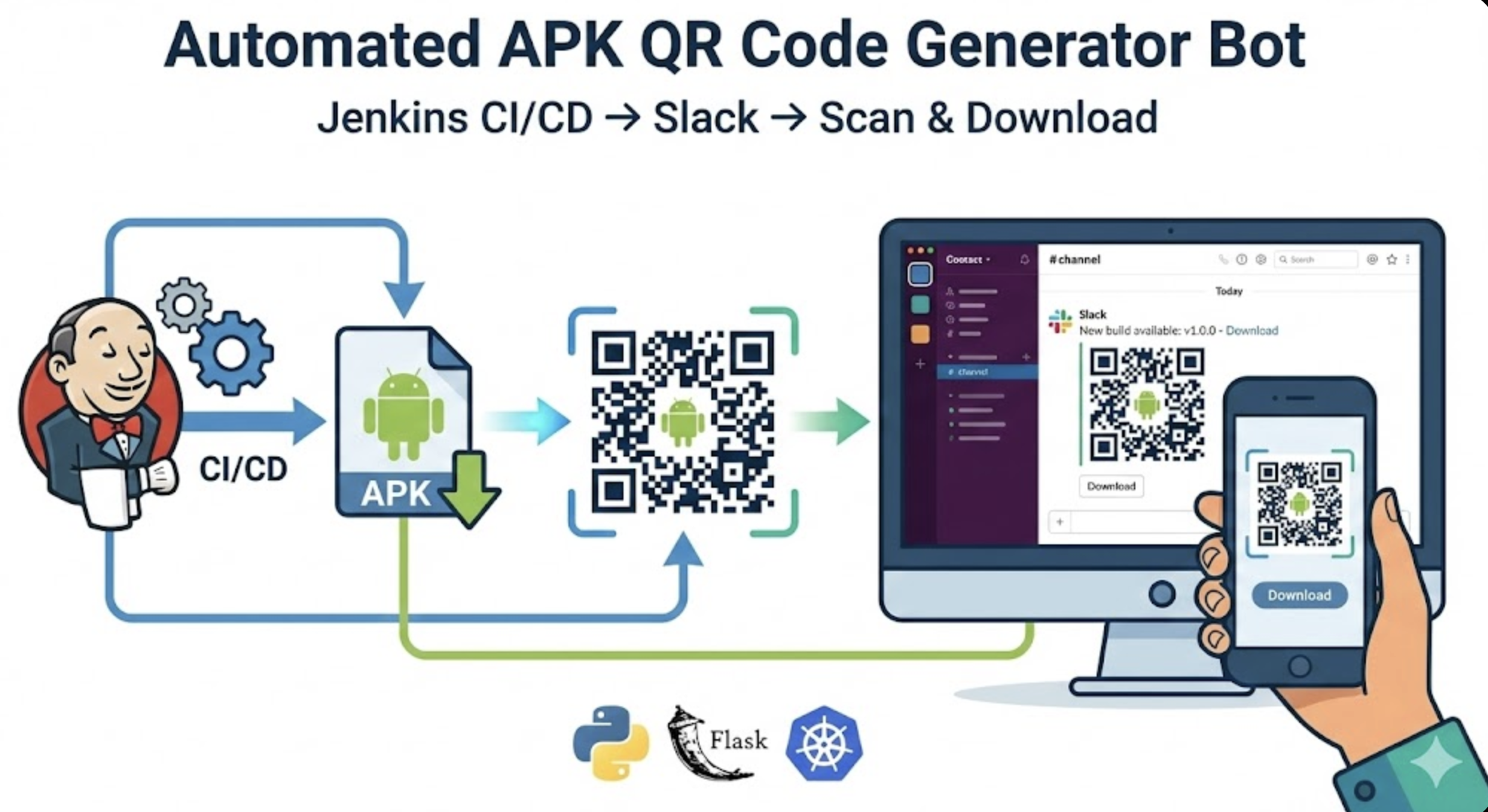
In mobile app development environments, distributing APK builds to testers can be surprisingly cumbersome. You copy download links and paste them into Slack, then testers must manually enter or copy these links on their mobile devices. Long URLs are particularly prone to input errors.
To solve this inconvenience, I developed a bot that automatically converts APK download links into QR codes and sends them to Slack channels. When Jenkins builds complete, QR codes are automatically generated and sent to Slack, allowing testers to simply scan the QR code with their mobile devices to download the APK instantly.
This article shares the complete process of building a Python Flask-based Slack Bot and deploying it on Kubernetes.
Key Features
This bot goes beyond simple QR code generation to include several features needed in production environments.
Core Functionality
- APK Link → QR Code Automatic Conversion: Converts URLs to QR code images
- Multi-Channel Simultaneous Transmission: Send QR codes to multiple Slack channels at once
- QR Code Customization: Adjustable colors and sizes
- Build Information Display: Includes build number and download URL
Security and Stability
- API Key Authentication: Only CI/CD pipelines can make calls through authentication
- Rate Limiting: DoS attack defense (requests per minute limited)
- Automatic Retry: Up to 3 automatic retries on Slack API temporary failures
- Structured JSON Logging: Easy integration with ELK Stack and Loki
Developer Friendly
- Swagger UI: Interactive API documentation provided
- Detailed Health Check: Real-time Slack connection status verification
- Various Endpoints: Support for single/multiple/all channel transmission
System Architecture
Jenkins/GitLab CI/GitHub Actions
    ↓ (HTTP POST with X-API-Key)
Ingress (slack-qr-bot.concrit.us)
    ↓
Kubernetes Service
    ↓
Flask Application Pod
    ├─ API Key Authentication
    ├─ Rate Limiter
    ├─ JSON Logger
    └─ Retry Logic (Tenacity)
        ↓
Slack API (files.upload_v2)
Technology Stack
- Language: Python 3.14
- Framework: Flask 3.0 + Gunicorn
- Key Libraries:
- slack-sdk - Slack API communication
- qrcode[pil] - QR code generation
- flasgger - Swagger API documentation
- flask-limiter - Rate Limiting
- tenacity - Retry logic
- python-json-logger - JSON logging
- Infrastructure: Docker, Kubernetes, GitLab CI, Harbor Registry
Implementation Process
1. Slack App Configuration
First, create a new app in the Slack API and configure necessary permissions.
Required Bot Token Scopes:
chat:write- Send messagesfiles:write- Upload fileschannels:read- View Public channel informationgroups:read- View Private channel informationgroups:write- Access Private channels
After installing the app in your workspace, copy the Bot User OAuth Token. The format starts with xoxb-.
If you encounter app addition errors, execute the following command in the channel:
/invite @your-bot-name
Note: When modifying Scopes, you must Reinstall the App.
2. Project Structure
slack-qr-bot
├── Dockerfile
├── README.md
├── backup
│   └── app.py.bak
├── img
│   └── slack-qr-bot-example.png
├── k8s
│   ├── api-key-secret.yaml
│   ├── deployment.yaml
│   ├── harbor-robot-secret.yaml
│   └── slack-token-secret.yaml
├── requirements.txt
└── src
    ├── __init__.py
    ├── app.py
    ├── config.py
    ├── decorators.py
    ├── routes
    │   ├── __init__.py
    │   ├── channels.py
    │   ├── health.py
    │   ├── qr.py
    │   └── slack_events.py
    ├── services.py
    └── utils.py
3. Python Code Implementation
Source code available at: https://github.com/somaz94/slack-qr-bot/tree/main/src
4. Kubernetes Deployment
Kubernetes manifests available at: https://github.com/somaz94/slack-qr-bot/tree/main/k8s
5. GitLab CI/CD Pipeline
Automated Build and Deployment:
- Automatic build when files in
src/folder change - Push images to Harbor Registry
- Manual or automatic deployment triggers
Usage Methods
1. Calling from Jenkins
You can automatically send QR codes after APK builds in Jenkins pipelines.
Note: Change apk_url to the path where you upload APK files. Other values like channel, build_number, and POST address are all examples.
2. Calling with curl
Note: Both channel name and channel ID are supported.
3. Testing with Swagger UI
Access http://<slack-bot-url>/api-docs in your browser to interactively test all APIs:
- Click “Authorize” button in upper right
- Enter API Key
- Select desired API and click “Try it out”
- Enter parameters and click “Execute”
Execution Results
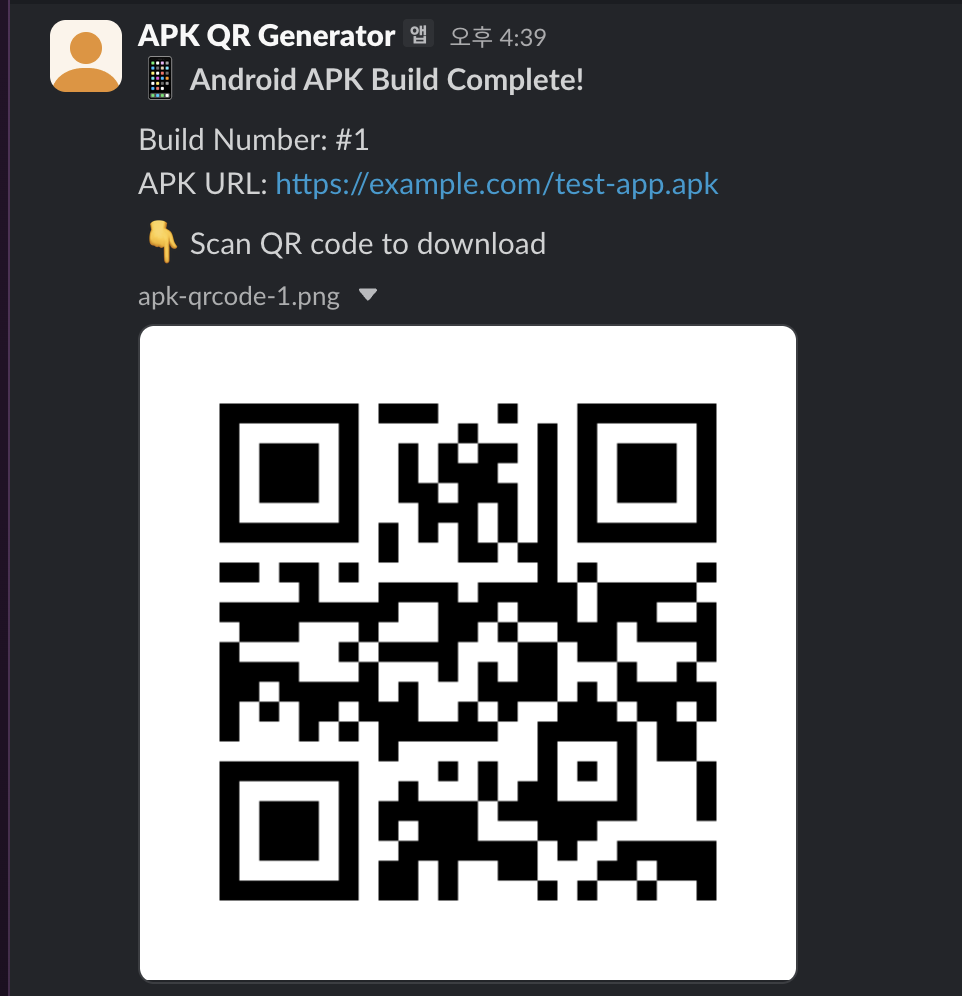
QR codes are sent to Slack channels as shown below:
Local Testing Methods
Docker Build
docker build -f Dockerfile -t slack-bot:test .
Docker Run
Local Feature Testing
Health Check:
curl http://localhost:8080/health | jq
List Channels:
curl http://localhost:8080/channels | jq
Query by Channel Name:
Query by Channel ID:
Generate Custom QR Code:
Multi-Channel Transmission:
Broadcast to All Channels:
Troubleshooting
1. channel_not_found Error
Cause: Bot not added to channel
Solution:
# Execute in Slack channel
/invite @APK QR Generator
For Private channels, groups:read and groups:write permissions are required.
2. 429 Too Many Requests Error
Cause: Rate limit exceeded
Solution:
- Wait 1 minute and retry
- Development environment: Disable with
RATE_LIMIT_ENABLED=false
3. Slack API Temporary Failures
Automatic retry logic attempts up to 3 times (waits 2s → 4s → 8s).
If failures persist after retries, check logs:
kubectl logs -f -n slack-bots deployment/slack-qr-bot
Performance and Monitoring
Rate Limiting Policy
| Endpoint | Limit | Purpose |
|---|---|---|
| Global Default | 10 req/min | General calls |
| /generate-qr | 20 req/min | Single channel QR generation |
| /generate-qr/broadcast | 10 req/min | Multi-channel transmission |
| /generate-qr/broadcast-all | 5 req/min | All channel transmission |
| /health | Unlimited | Health check |
Structured Logging
Logs are recorded in JSON format for easy analysis in ELK Stack or Loki:
{
  "asctime": "2025-12-23 10:30:45",
  "name": "src.app",
  "levelname": "INFO",
  "message": "QR code sent successfully",
  "channel": "apk-qr-generator",
  "file_id": "F07KP4R8E9S"
}
Conclusion
This project significantly improved the mobile app deployment process.
When Jenkins builds APKs, QR codes are automatically sent to Slack channels, and testers can download apps immediately by scanning QR codes with their mobile devices.
Key Benefits:
- Enhanced Convenience: Download via QR scan without URL copy/paste
- Error Prevention: Eliminates typos when entering long URLs
- Automation: Fully integrated into CI/CD pipeline
- Scalability: Supports various features like multi-channel, custom QR codes
- Stability: Considers production environment with API authentication, Rate Limiting, automatic retry
Future Enhancements:
- Automatic APK metadata extraction (version, build date, etc.)
- Logo insertion in QR codes
- Download statistics tracking
- Multi-platform support (iOS IPA, Web deployment, etc.)
I hope this bot helps others working in similar environments.

Comments