11 min to read
GitLab CI/CD YAML Optimization: Eliminating Duplication and Enhancing Reusability
Master three powerful techniques for streamlining GitLab CI/CD pipelines through efficient YAML configuration patterns
Overview
As GitLab CI/CD pipelines grow in complexity, YAML configuration files often accumulate duplicated code and intricate configurations. This increases maintenance overhead and creates opportunities for errors. GitLab provides powerful YAML reusability features to address these challenges.
This comprehensive guide explores three core methods for optimizing GitLab CI/CD YAML files, enabling teams to build maintainable, scalable, and efficient pipeline configurations.
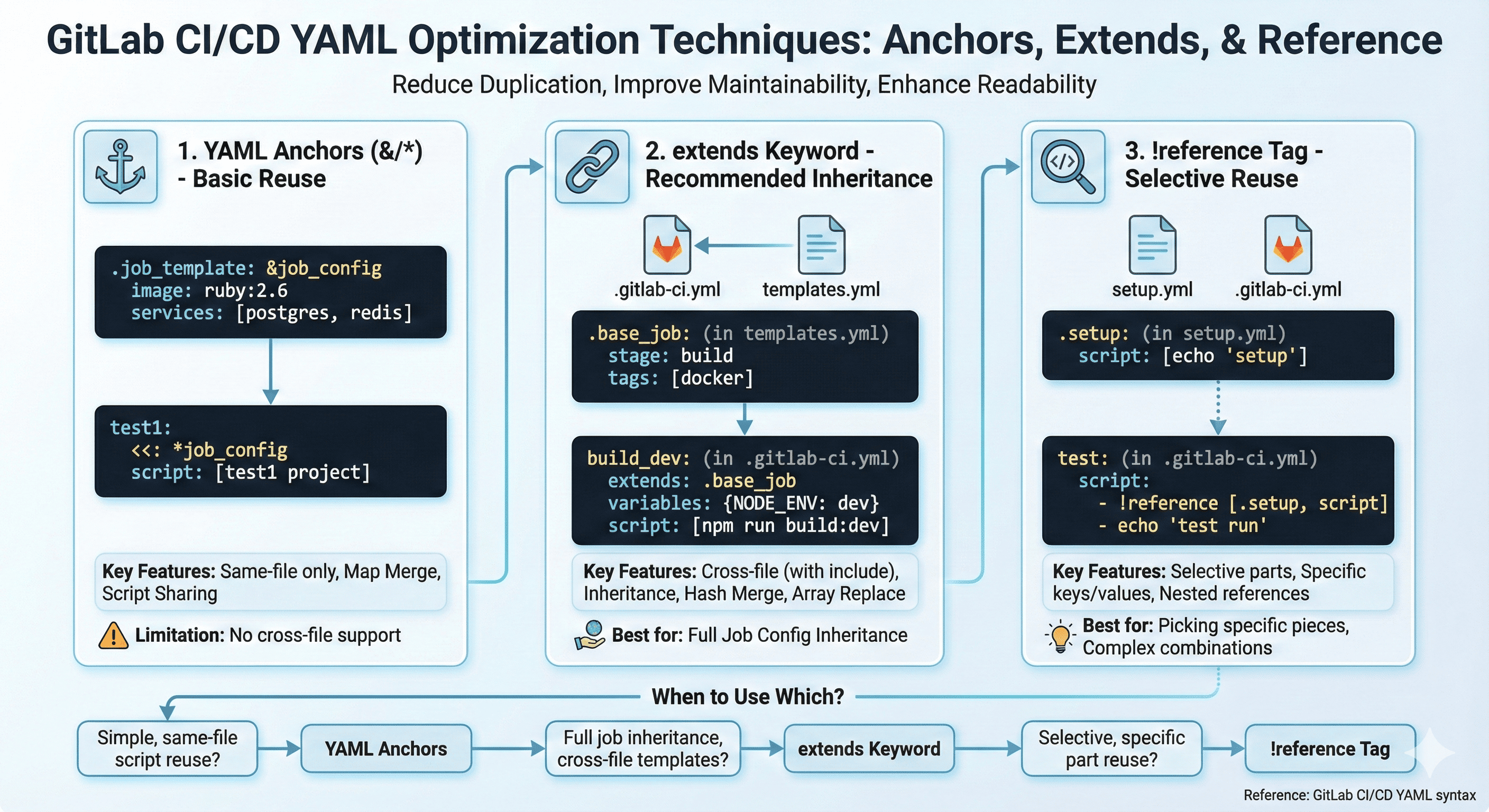
GitLab CI/CD offers three primary YAML optimization tools that can be categorized as follows:
- YAML Anchors: Traditional YAML syntax for basic reusability
- extends keyword: GitLab’s recommended configuration inheritance approach
- !reference tag: Flexible selective referencing for advanced use cases
Understanding when and how to apply each technique enables the creation of sophisticated pipeline architectures that scale with project complexity while maintaining clarity and reducing maintenance burden.
YAML Anchors: Foundational Reuse Patterns
YAML anchors represent the traditional approach to configuration reuse, utilizing standard YAML syntax with & for anchor definition and * for reference.
Basic Anchor Usage
Anchors provide a straightforward mechanism for reusing configuration blocks within the same file:
# Anchor definition
.job_template: &job_configuration
  image: ruby:2.6
  services:
    - postgres
    - redis

# Anchor reference
test1:
  <<: *job_configuration  # Map merging
  script:
    - test1 project

test2:
  <<: *job_configuration
  script:
    - test2 project
Script-Focused Anchor Applications
Anchors prove particularly valuable for script sections that require sharing across multiple jobs:
.setup_script: &setup_script
  - echo "Environment setup initiated"
  - npm install

.test_script: &test_script
  - echo "Test execution started"
  - npm test

job1:
  before_script:
    - *setup_script
  script:
    - *test_script
    - echo "job1 specific commands"
Anchor Limitations
Anchors operate exclusively within the same file scope. External file anchors imported via include cannot be referenced, limiting their applicability in modular pipeline architectures.
| Feature | Capability | Limitation |
|---|---|---|
| Scope | Same file only | Cannot reference external anchors |
| Syntax | Standard YAML | Requires YAML knowledge |
| Flexibility | Basic reuse | Limited to simple patterns |
extends: GitLab’s Recommended Inheritance System
The extends keyword provides a more flexible and readable alternative to YAML anchors, offering GitLab-specific functionality for configuration inheritance.
Basic Inheritance Patterns
The extends mechanism enables clean inheritance of job configurations with the ability to override specific properties:
.base_job:
  image: node:16
  stage: build
  tags:
    - docker

build_dev:
  extends: .base_job
  variables:
    NODE_ENV: development
  script:
    - npm run build:dev

build_prod:
  extends: .base_job
  variables:
    NODE_ENV: production
  script:
    - npm run build:prod
Multi-Level Inheritance
GitLab supports inheritance chains up to 11 levels, though limiting to 3 levels is recommended for maintainability:
.tests:
  rules:
    - if: $CI_PIPELINE_SOURCE == "push"

.rspec:
  extends: .tests
  script: rake rspec

rspec_unit:
  extends: .rspec
  variables:
    TEST_TYPE: unit
External File Integration
Combining include with extends creates powerful reusability across pipeline configurations:
# templates.yml
.build_template:
  stage: build
  script:
    - echo "Build process initiated"

# .gitlab-ci.yml
include:
  - local: templates.yml

my_build:
  extends: .build_template
  variables:
    PROJECT_NAME: "my-project"
Merge Behavior Understanding
The extends mechanism follows specific merge rules that affect how configurations combine:
.base:
  variables:
    VAR1: "base"
  script:
    - echo "base script"

job:
  extends: .base
  variables:
    VAR2: "job"     # VAR1 and VAR2 both retained
  script:
    - echo "job script"  # base script completely replaced
Important: Hash/object properties merge, while arrays are completely replaced.
!reference Tag: Advanced Selective Referencing
The !reference tag represents GitLab’s most recent innovation, enabling selective reuse of specific configuration portions from other jobs.
Basic Reference Syntax
Reference tags allow precise selection of configuration elements from template jobs:
# setup.yml
.setup:
  script:
    - echo "Environment configuration"

# .gitlab-ci.yml
include:
  - local: setup.yml

.teardown:
  after_script:
    - echo "Cleanup operations"

test:
  script:
    - !reference [.setup, script]
    - echo "Test execution"
  after_script:
    - !reference [.teardown, after_script]
Variable Selective Referencing
Reference tags enable granular control over variable inheritance:
.common_vars:
  variables:
    API_URL: "https://api.example.com"
    DEBUG_MODE: "false"

test_all_vars:
  variables: !reference [.common_vars, variables]
  script:
    - printenv

test_specific_var:
  variables:
    MY_API_URL: !reference [.common_vars, variables, API_URL]
  script:
    - echo $MY_API_URL
Nested Reference Capabilities
GitLab supports nested references up to 10 levels deep, enabling sophisticated composition patterns:
.scripts:
  basic:
    - echo "Basic script operations"
  extended:
    - !reference [.scripts, basic]
    - echo "Extended script operations"
  full:
    - !reference [.scripts, extended]
    - echo "Complete script operations"

complex_job:
  script:
    - !reference [.scripts, full]
Integration Example: Comprehensive Pipeline Architecture
Combining all three techniques creates sophisticated yet maintainable pipeline configurations:
# Common configuration (anchor utilization)
.common_config: &common_config
  interruptible: true
  retry:
    max: 2
    when:
      - runner_system_failure

# Base template (extends utilization)
.build_template:
  <<: *common_config
  stage: build
  image: node:16
  before_script:
    - npm ci

# Script fragments (!reference utilization)
.scripts:
  test:
    - npm run test
  lint:
    - npm run lint
  security:
    - npm audit

# Actual pipeline jobs
build_frontend:
  extends: .build_template
  script:
    - npm run build:frontend

test_and_lint:
  extends: .build_template
  script:
    - !reference [.scripts, test]
    - !reference [.scripts, lint]

security_audit:
  extends: .build_template
  script:
    - !reference [.scripts, security]
IDE Configuration Support
VS Code requires specific configuration to handle !reference tag syntax correctly:
// settings.json
{
  "yaml.customTags": [
    "!reference sequence"
  ]
}
Selection Criteria: When to Use Each Approach
YAML Anchors Usage Scenarios
| Use Case | Description | Benefits |
|---|---|---|
| Same-file reuse | Simple configuration sharing within single files | Standard YAML syntax |
| Script array sharing | Common script sequences across multiple jobs | Familiar to YAML users |
| Legacy compatibility | Existing YAML knowledge utilization | No GitLab-specific learning |
extends Usage Scenarios
| Use Case | Description | Benefits |
|---|---|---|
| Configuration inheritance | Complete job configuration extension | Clean inheritance model |
| External template expansion | Cross-file template utilization | Modular architecture |
| Multi-level inheritance | Complex inheritance hierarchies | Powerful composition |
!reference Usage Scenarios
| Use Case | Description | Benefits |
|---|---|---|
| Selective key reuse | Specific configuration element extraction | Precise control |
| Partial external file usage | Limited external file integration | Minimal coupling |
| Complex script composition | Advanced script assembly patterns | Maximum flexibility |
Advanced Optimization Strategies
Template Library Architecture
Large-scale projects benefit from establishing template libraries that provide reusable components:
# templates/base.yml
.docker_template:
  image: docker:20.10.16
  services:
    - docker:20.10.16-dind

.node_template:
  image: node:18-alpine
  cache:
    paths:
      - node_modules/

# templates/scripts.yml
.scripts:
  install:
    - npm ci --prefer-offline --no-audit
  build:
    - npm run build
  test:
    - npm run test:coverage
Performance Considerations
Optimization techniques impact pipeline performance in measurable ways:
| Technique | Memory Impact | Parse Time | Maintenance Overhead |
|---|---|---|---|
| Anchors | Low | Fast | Medium |
| extends | Medium | Medium | Low |
| !reference | Higher | Slower | Very Low |
Best Practices Summary
Implementing these optimization patterns requires adherence to established best practices:
- Start Simple: Begin with anchors for basic reuse needs
- Graduate to extends: Adopt extends for cross-file inheritance
- Apply !reference Selectively: Use references for complex composition
- Document Template Usage: Maintain clear documentation for template libraries
- Test Template Changes: Validate template modifications across dependent pipelines
Key Points
-
Foundation Building
- Master YAML anchors for basic reuse patterns
- Understand scope limitations and merge behaviors
- Establish consistent naming conventions -
Inheritance Strategies
- Leverage extends for clean configuration inheritance
- Design modular template architectures
- Implement multi-level inheritance judiciously -
Advanced Composition
- Apply !reference for precise configuration control
- Create sophisticated script composition patterns
- Balance flexibility with maintainability
Conclusion
GitLab CI/CD YAML optimization transcends simple code reduction, fundamentally improving maintainability and readability. From basic YAML anchor reuse through powerful extends inheritance to sophisticated !reference selective composition, understanding each tool’s characteristics enables the construction of efficient, manageable pipeline architectures.
Large-scale projects particularly benefit from aggressive utilization of these features to establish template systems. While initial setup requires time investment, long-term development productivity and code quality improvements justify the effort.
Successful optimization requires understanding not just individual techniques, but their strategic combination. Begin with foundational patterns, progressively incorporate advanced features, and maintain focus on team comprehension and long-term maintainability over clever complexity.
The evolution from basic duplication elimination to sophisticated template architectures represents a maturation process that reflects growing pipeline complexity and organizational needs. Teams that master these optimization patterns position themselves for scalable CI/CD success.

Comments