11 min to read
GitLab 19.0 Upgrade: Clearing the Bundled Mattermost Removal Block
Why a clean gitlab.rb still fails the 18.11.x → 19.x upgrade, and how the cached Chef node attributes are the real blocker
Overview
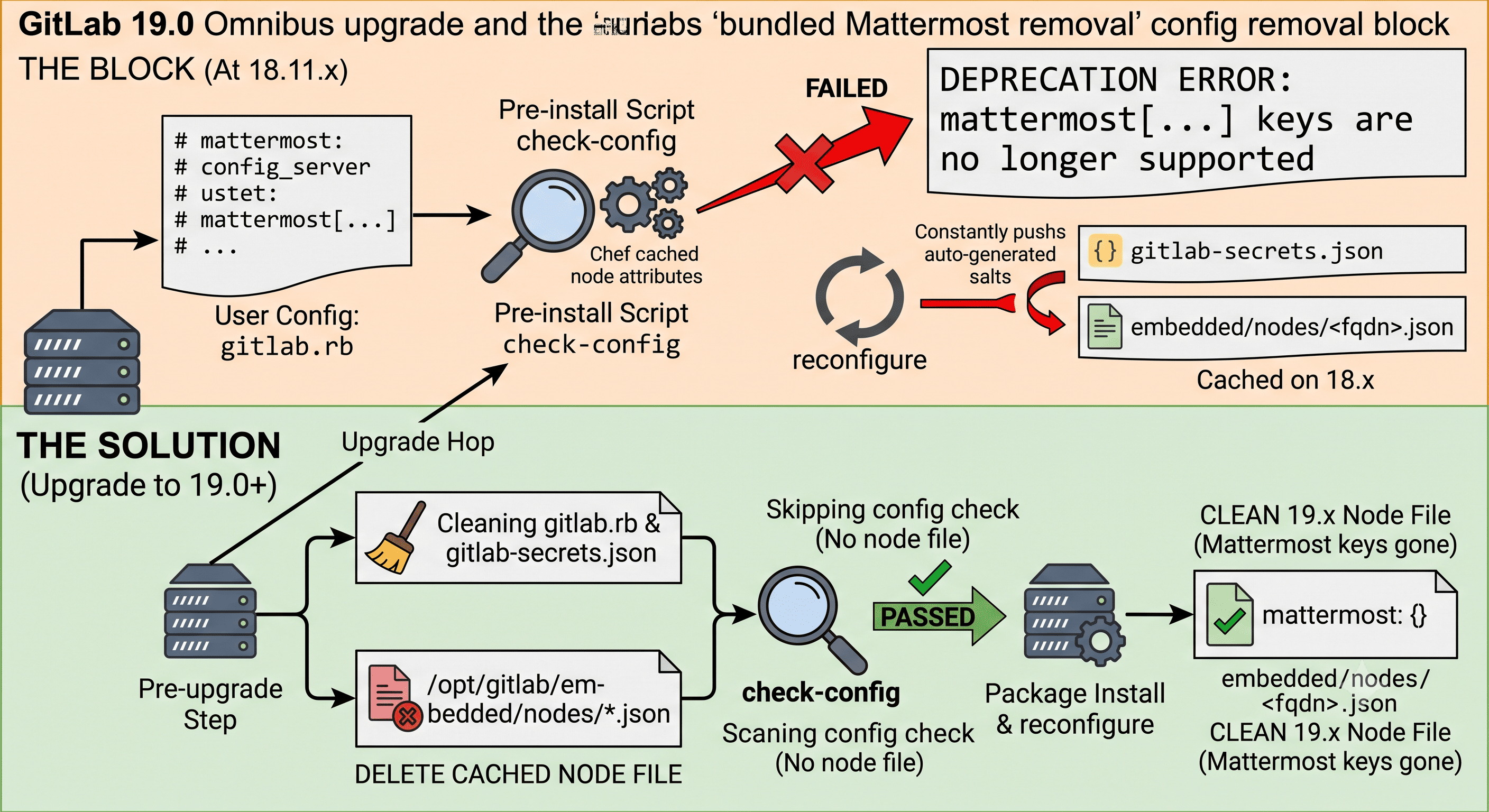
Starting with GitLab 19.0, the bundled Mattermost shipped inside the Linux (Omnibus) package has been completely removed. If your instance ever ran — or was even just configured for — the bundled Mattermost, upgrading from GitLab 18.11.x to 19.x can fail at the package pre-install step with a mattermost[...] keys are no longer supported deprecation error.
The frustrating part: you can comment out every mattermost line in /etc/gitlab/gitlab.rb, re-run the upgrade, and hit the exact same error. This post walks through why that happens, where the setting is actually coming from, and the precise sequence that gets you past it — based on a real 18.11.7 → 19.1.2 upgrade.
This is a direct sequel to the GitLab 17.x → 18.0 git_data_dirs removal post — same class of problem (a config removed at a major version), but this one hides in a place grep on gitlab.rb will never find. All hostnames and paths below are sanitized example values.
Problem Description
During the upgrade from 18.11.7 to 19.1.2, apt-get install gitlab-ce=19.1.2-ce.0 aborts during unpack:
Preparing to unpack .../gitlab-ce_19.1.2-ce.0_amd64.deb ...
* mattermost has been deprecated since 19.0 and was removed in 19.0. Bundled
  Mattermost has been removed from the Linux package in 19.0; `mattermost[...]`
  keys are no longer supported. Deploy Mattermost separately and point GitLab
  at it with `gitlab_rails['mattermost_host']`.
Deprecations found. Please correct them and try again.
dpkg: error processing archive /var/cache/apt/archives/gitlab-ce_19.1.2-ce.0_amd64.deb (--unpack):
 new gitlab-ce package pre-installation script subprocess returned error exit status 1
The message points at mattermost[...] keys, so the obvious first move is to clean up gitlab.rb.
First Instinct: Check gitlab.rb (And Why It Is Not Enough)
Check for any active mattermost configuration:
gitlab.rb was clean, yet the upgrade still failed with the identical error. So the deprecation is not being read from gitlab.rb. It is coming from somewhere else.
Root Cause: The Check Reads Cached Node Attributes
The pre-install script does not parse gitlab.rb directly. Extract the .deb control scripts and you can see what it actually runs:
deb=/var/cache/apt/archives/gitlab-ce_19.1.2-ce.0_amd64.deb
tmp=$(mktemp -d); dpkg-deb -e "$deb" "$tmp/DEBIAN"
grep -n "check-config" "$tmp/DEBIAN/preinst"
The preinst calls:
gitlab-ctl check-config --version="19.1"
And check-config (/opt/gitlab/embedded/service/omnibus-ctl/check_config.rb) reads the cached Chef node attributes produced by the last gitlab-ctl reconfigure — not gitlab.rb:
# Extracting JSON from the fqdn.json file generated by reconfigure.
node_json_file = Dir.glob("#{base_path}/embedded/nodes/*.json")[0]
unless node_json_file
  log "JSON file with existing configuration not found ..."
  log "Skipping config check."
  Kernel.exit 0
end

node_json      = JSON.load_file(node_json_file)
existing_config = node_json['normal']
messages = Gitlab::Deprecations.check_config(opts[:version], existing_config, :removal)
So the check inspects /opt/gitlab/embedded/nodes/<fqdn>.json → ["normal"]["mattermost"]. Confirm it is still populated:
grep -c mattermost /opt/gitlab/embedded/nodes/*.json
# 17
There it is. The cached node file still carries the full mattermost block from the last reconfigure — which ran before you touched anything. Editing gitlab.rb does not change this file.
Where the Secrets Come From
Even on an instance that never used Mattermost, the salts exist. They live in /etc/gitlab/gitlab-secrets.json:
During reconfigure, Omnibus merges gitlab-secrets.json into the node attributes, which is how ["normal"]["mattermost"] gets populated in the first place — regardless of whether Mattermost is enabled or running.
The Trap: Do NOT Run reconfigure on 18.x to “Fix” It
The intuitive fix is: remove the mattermost block from gitlab-secrets.json, then gitlab-ctl reconfigure to refresh the node file. This does not work on 18.x, and it is worth understanding why.
The salt generation in gitlab/libraries/gitlab_mattermost.rb is unconditional — it is not gated on mattermost['enable']:
def parse_secrets
  Gitlab['mattermost']['email_invite_salt']       ||= SecretsHelper.generate_hex(16)
  Gitlab['mattermost']['file_public_link_salt']   ||= SecretsHelper.generate_hex(16)
  Gitlab['mattermost']['sql_at_rest_encrypt_key'] ||= SecretsHelper.generate_hex(16)
  Gitlab['mattermost']['gitlab_id']               ||= SecretsHelper.generate_urlsafe_base64
  Gitlab['mattermost']['gitlab_secret']           ||= SecretsHelper.generate_urlsafe_base64
end
Because GitLab 18.x still bundles the Mattermost cookbook, any reconfigure on 18.x regenerates these salts and writes them straight back into both gitlab-secrets.json and the node file. You clean the block, reconfigure, and it reappears — right back to square one.
The key insight: 18.x cannot produce a Mattermost-free node file. So the goal is not to fix the node file on 18.x — it is to get past the pre-install check without reconfiguring on 18.x, and let the 19.x post-install reconfigure (which has no Mattermost cookbook) generate a clean node file.
Solution
The winning move exploits the early return in check_config.rb: if there is no node JSON file, the check logs Skipping config check and exits 0. Delete the stale node file, then upgrade immediately — before anything triggers a reconfigure.
1. Back Up First
sudo gitlab-backup create        # application data
sudo cp -a /etc/gitlab/gitlab.rb            /etc/gitlab/gitlab.rb.bak.$(date +%F)
sudo cp -a /etc/gitlab/gitlab-secrets.json  /etc/gitlab/gitlab-secrets.json.bak.$(date +%F)
2. Clean gitlab.rb (Likely Already Clean)
Ensure no active mattermost keys remain:
If anything shows up, comment it out:
3. Remove the mattermost Block from gitlab-secrets.json
gitlab-secrets.json is JSON — edit it programmatically, not by hand:
4. Delete the Cached Node File
This is the step that actually gets you past the pre-install check:
sudo rm -f /opt/gitlab/embedded/nodes/*.json
With no node file present, check-config short-circuits to exit 0.
5. Do NOT reconfigure — Upgrade Directly
⚠️ Critical: Do not run
gitlab-ctl reconfigurebetween deleting the node file and installing 19.x. On 18.x it regenerates the Mattermost salts and the node file, undoing steps 3–4.
Go straight to the package install:
sudo apt-get install -y gitlab-ce=19.1.2-ce.0
The 19.x post-install reconfigure runs against a package where the Mattermost cookbook is gone, so it writes a clean node file and never regenerates the salts.
Alternative: skip-fail-config-check
If you would rather not delete the node file, Omnibus provides an official bypass. The preinst runs the check with --no-fail when this flag file exists:
sudo touch /etc/gitlab/skip-fail-config-check
sudo apt-get install -y gitlab-ce=19.1.2-ce.0
sudo rm -f /etc/gitlab/skip-fail-config-check   # remove after a successful upgrade
Both approaches reach the same end state. Before relying on --no-fail, run gitlab-ctl check-config --version=19.1 once and confirm Mattermost is the only flagged removal, so you are not silently skipping a genuine one.
Post-Upgrade Verification
After the install completes:
Confirm the Mattermost residue is gone and future upgrades will not hit the same wall:
["normal"]["mattermost"] is now an empty hash and check-config returns 0 — the deprecation is fully cleared.
What About the Leftover mattermost Cookbook?
You may notice the Mattermost cookbook still exists on 19.x:
ls /opt/gitlab/embedded/cookbooks/mattermost/recipes/
# disable.rb
This is intentional. It is a cleanup stub — only disable.rb, no enable.rb. Its metadata says it all:
Cleans up the runit service for the bundled Mattermost binary, which was removed in 19.0. To be deleted once the deprecation cycle ends.
Its job is to stop and remove any leftover Mattermost runit service and reverse-proxy config on upgrade. It is removed at a later required upgrade stop. Nothing to do here.
Pre-Upgrade Checklist
- Confirm the upgrade path — 19.0 requires you to be on the latest 18.11.x first.
sudo gitlab-backup create(application data) completed./etc/gitlab/gitlab.rband/etc/gitlab/gitlab-secrets.jsoncopied aside.grep -nE "^[[:space:]]*mattermost" /etc/gitlab/gitlab.rbreturns empty.mattermostblock removed fromgitlab-secrets.json.- Cached node file deleted (
/opt/gitlab/embedded/nodes/*.json). - No
gitlab-ctl reconfigurebetween the delete and the install. - Migrating an actively-used Mattermost? Plan the standalone migration separately before upgrading.
Backup and Rollback Strategy
For a single-node Omnibus instance:
# Full application backup (repos, DB, uploads, ...)
sudo gitlab-backup create

# Configuration + secrets (backed up separately from application data)
sudo tar -czf /root/gitlab-etc-$(date +%F).tar.gz /etc/gitlab
If the upgrade goes wrong and you must roll back, reinstall the previous package and restore config:
sudo apt-get install -y gitlab-ce=18.11.7-ce.0
sudo cp -a /etc/gitlab/gitlab-secrets.json.bak.* /etc/gitlab/gitlab-secrets.json
sudo gitlab-ctl reconfigure
Rolling back an application backup across a major version is not supported — restore only onto the same version it was taken from. The safest rollback is a VM/snapshot taken immediately before the upgrade.
Do Not Forget: Background Migrations
Crossing a major version (18 → 19) queues batched background migrations. Let them finish before the next upgrade, or you risk a broken schema:
Admin → Monitoring → Background Migrations → all "Finished"
Do not start another upgrade hop until every batched migration reports finished.
Conclusion
The bundled Mattermost removal in GitLab 19.0 is a textbook example of a deprecation that is not where the error message tells you to look. The mattermost[...] keys the check complains about are almost never in your gitlab.rb — they are auto-generated salts, merged from gitlab-secrets.json into a cached Chef node file that the pre-install check reads instead of your live config.
Key Takeaways
- The pre-install
check-configreads/opt/gitlab/embedded/nodes/*.json(["normal"]), notgitlab.rb. - Mattermost salts are generated unconditionally on 18.x, so
reconfigureon 18.x always re-adds them — you cannot produce a clean node file there. - The reliable fix: clean
gitlab.rb+gitlab-secrets.json, delete the cached node file, and upgrade without reconfiguring on 18.x. The 19.x post-install reconfigure produces a clean state. skip-fail-config-checkis a valid alternative bypass — verify Mattermost is the only flagged removal first.- After upgrading,
["normal"]["mattermost"]becomes{}andcheck-configreturns0, so the next upgrade is unaffected.
Future Considerations
- If you actually run Mattermost, migrate it to a standalone deployment and wire it back with
gitlab_rails['mattermost_host']before upgrading. - Automate the pre-flight (grep
gitlab.rb, strip the secrets block, remove the node file) as a guarded script so the “do not reconfigure” rule is never violated by hand.

Comments