17 min to read
EKS Fargate vs EC2 Node Groups Complete Analysis - Kubernetes Worker Node Options
Comprehensive comparison of EKS compute options for optimal Kubernetes workload deployment
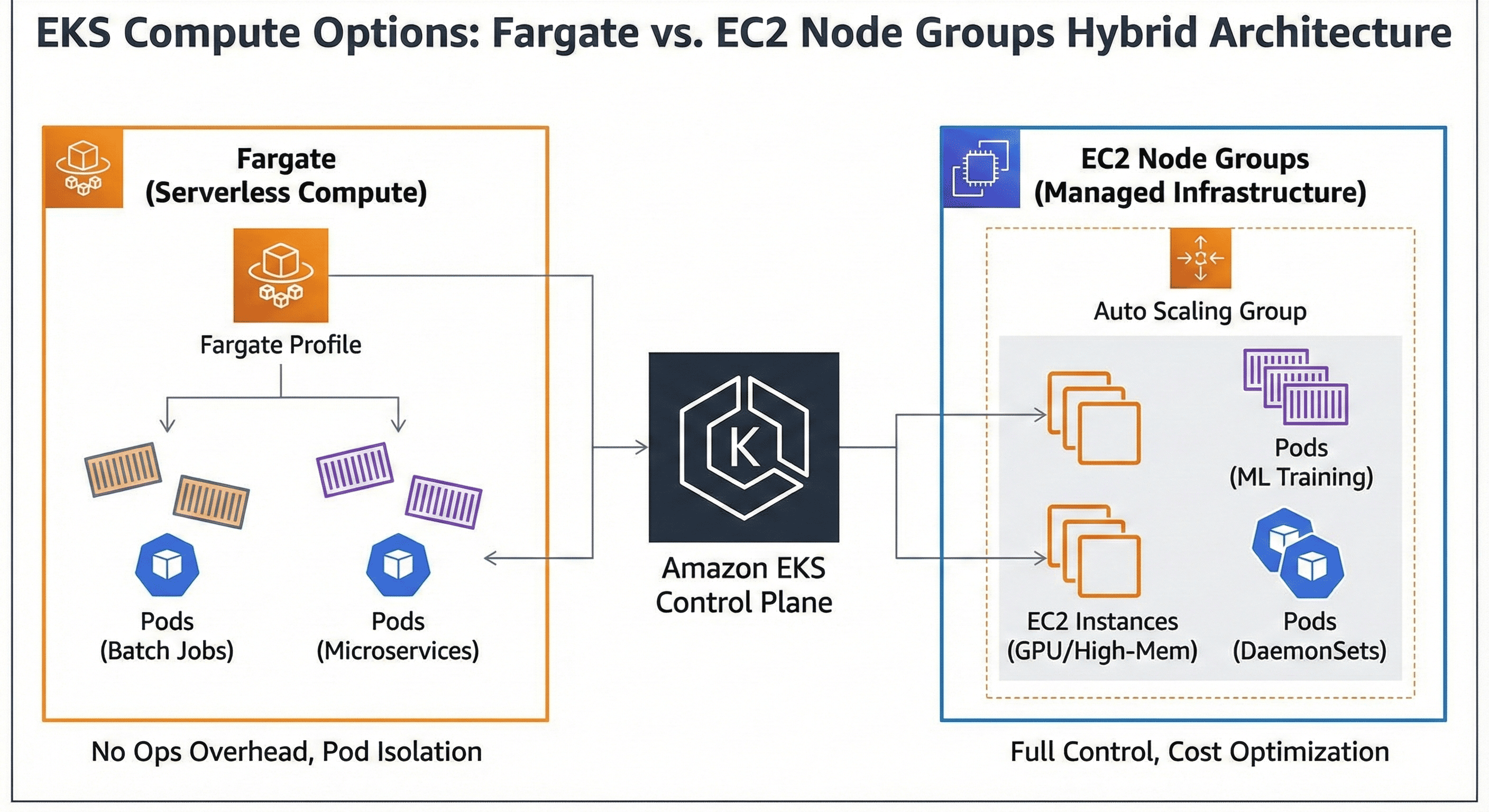
Overview
Amazon Elastic Kubernetes Service (EKS) provides two primary compute options for running Kubernetes workloads: Fargate and EC2 Node Groups.
Each approach offers distinct advantages and trade-offs in terms of operational overhead, cost structure, performance characteristics, and deployment flexibility.
This comprehensive analysis examines the technical architecture, cost implications, and operational considerations of both options, providing guidance for optimal Kubernetes cluster design decisions.
EKS Compute Architecture Overview
EKS Fargate In-Depth Analysis
EKS Fargate provides serverless compute for Kubernetes pods, eliminating the need for node management.
Each pod runs on dedicated compute resources with automatic scaling and infrastructure abstraction.
Technical Architecture
Fargate operates on a serverless model where each pod runs on dedicated compute infrastructure managed entirely by AWS. The service provides automatic resource allocation based on pod specifications without requiring cluster operators to manage underlying EC2 instances.
Key Features
- Serverless Infrastructure: No EC2 instance management required
- Pod-Level Isolation: Each pod runs on dedicated compute resources
- Automatic Scaling: Resources scale automatically based on pod requirements
- Security Isolation: Enhanced security through pod-level isolation
Fargate Profile Configuration
Fargate profiles define which pods should run on Fargate compute. These profiles use selectors based on namespace and labels to determine pod placement.
Limitations and Constraints
Fargate imposes several operational constraints compared to EC2 node groups. DaemonSets are not supported, privileged containers cannot run, and host networking is unavailable. Storage options are limited to ephemeral storage and EFS volumes.
Terraform Implementation
# EKS Cluster with Fargate
resource "aws_eks_cluster" "main" {
  name     = "main-cluster"
  role_arn = aws_iam_role.eks_cluster.arn
  version  = "1.29"

  vpc_config {
    subnet_ids              = var.subnet_ids
    endpoint_private_access = true
    endpoint_public_access  = true
  }

  depends_on = [
    aws_iam_role_policy_attachment.eks_cluster_policy,
  ]
}

# Fargate Profile
resource "aws_eks_fargate_profile" "main" {
  cluster_name           = aws_eks_cluster.main.name
  fargate_profile_name   = "main-fargate-profile"
  pod_execution_role_arn = aws_iam_role.fargate_pod_execution_role.arn
  subnet_ids            = var.private_subnet_ids

  selector {
    namespace = "default"
    labels = {
      "compute-type" = "fargate"
    }
  }

  selector {
    namespace = "kube-system"
    labels = {
      "k8s-app" = "kube-dns"
    }
  }

  tags = {
    Name = "main-fargate-profile"
  }
}

# IAM Role for Fargate Pod Execution
resource "aws_iam_role" "fargate_pod_execution_role" {
  name = "eks-fargate-pod-execution-role"

  assume_role_policy = jsonencode({
    Statement = [{
      Action = "sts:AssumeRole"
      Effect = "Allow"
      Principal = {
        Service = "eks-fargate-pods.amazonaws.com"
      }
    }]
    Version = "2012-10-17"
  })
}

resource "aws_iam_role_policy_attachment" "fargate_pod_execution_role_policy" {
  policy_arn = "arn:aws:iam::aws:policy/AmazonEKSFargatePodExecutionRolePolicy"
  role       = aws_iam_role.fargate_pod_execution_role.name
}
EC2 Node Groups Comprehensive Analysis
EC2 Node Groups provide traditional Kubernetes worker nodes with full control over the underlying infrastructure.
This approach offers maximum flexibility and compatibility with the complete Kubernetes ecosystem.
Architectural Foundation
EC2 Node Groups operate on managed EC2 instances that join the EKS cluster as worker nodes. AWS handles the AMI updates, security patches, and node lifecycle management while providing full access to the underlying compute infrastructure.
Core Capabilities
- Full Kubernetes Compatibility: Supports all Kubernetes features including DaemonSets
- Flexible Instance Types: Wide range of EC2 instance types including GPU instances
- Storage Options: Complete EBS integration with persistent volume support
- Networking Control: Host networking and privileged container support
Node Group Types
EKS supports three types of node groups, each with specific use cases and management characteristics.
| Node Group Type | Management Level | Customization | Use Cases |
|---|---|---|---|
| Managed Node Groups | Fully Managed | Limited | Standard workloads, simplified operations |
| Self-Managed Node Groups | User Managed | Full Control | Custom AMIs, specific requirements |
| Spot Node Groups | Managed with Spot | Limited | Cost optimization, fault-tolerant workloads |
Auto Scaling and Resource Management
EC2 node groups integrate with Cluster Autoscaler to automatically adjust cluster capacity based on pod resource requirements. This provides dynamic scaling while maintaining cost efficiency.
Terraform Implementation
# Managed Node Group
resource "aws_eks_node_group" "main" {
  cluster_name    = aws_eks_cluster.main.name
  node_group_name = "main-node-group"
  node_role_arn   = aws_iam_role.node_group.arn
  subnet_ids      = var.private_subnet_ids
  instance_types  = ["t3.medium", "t3.large"]

  scaling_config {
    desired_size = 2
    max_size     = 5
    min_size     = 1
  }

  update_config {
    max_unavailable_percentage = 50
  }

  ami_type       = "AL2_x86_64"
  capacity_type  = "ON_DEMAND"
  disk_size      = 50

  labels = {
    "node-type" = "managed"
  }

  tags = {
    Name = "main-eks-node-group"
  }

  depends_on = [
    aws_iam_role_policy_attachment.node_group_AmazonEKSWorkerNodePolicy,
    aws_iam_role_policy_attachment.node_group_AmazonEKS_CNI_Policy,
    aws_iam_role_policy_attachment.node_group_AmazonEC2ContainerRegistryReadOnly,
  ]
}

# Spot Instance Node Group for Cost Optimization
resource "aws_eks_node_group" "spot" {
  cluster_name    = aws_eks_cluster.main.name
  node_group_name = "spot-node-group"
  node_role_arn   = aws_iam_role.node_group.arn
  subnet_ids      = var.private_subnet_ids
  instance_types  = ["t3.medium", "t3.large", "t3.xlarge"]

  scaling_config {
    desired_size = 0
    max_size     = 10
    min_size     = 0
  }

  capacity_type = "SPOT"

  taint {
    key    = "node.kubernetes.io/spot"
    value  = "true"
    effect = "NO_SCHEDULE"
  }

  labels = {
    "node-type"     = "spot"
    "instance-type" = "spot"
  }

  tags = {
    Name = "spot-eks-node-group"
  }
}

# IAM Role for Node Groups
resource "aws_iam_role" "node_group" {
  name = "eks-node-group-role"

  assume_role_policy = jsonencode({
    Statement = [{
      Action = "sts:AssumeRole"
      Effect = "Allow"
      Principal = {
        Service = "ec2.amazonaws.com"
      }
    }]
    Version = "2012-10-17"
  })
}

resource "aws_iam_role_policy_attachment" "node_group_AmazonEKSWorkerNodePolicy" {
  policy_arn = "arn:aws:iam::aws:policy/AmazonEKSWorkerNodePolicy"
  role       = aws_iam_role.node_group.name
}

resource "aws_iam_role_policy_attachment" "node_group_AmazonEKS_CNI_Policy" {
  policy_arn = "arn:aws:iam::aws:policy/AmazonEKS_CNI_Policy"
  role       = aws_iam_role.node_group.name
}

resource "aws_iam_role_policy_attachment" "node_group_AmazonEC2ContainerRegistryReadOnly" {
  policy_arn = "arn:aws:iam::aws:policy/AmazonEC2ContainerRegistryReadOnly"
  role       = aws_iam_role.node_group.name
}
Cost Analysis Deep Dive
Fargate Cost Structure
Fargate billing is based on vCPU and memory resources allocated to pods, with pricing calculated per second with a 1-minute minimum. This pay-per-use model eliminates idle resource costs but can be expensive for consistently running workloads.
| Resource Type | Cost (USD/hour) | Minimum Unit | Notes |
|---|---|---|---|
| vCPU | $0.04048 | 0.25 vCPU | Per vCPU per hour |
| Memory | $0.004445 | 0.5 GB | Per GB per hour |
| Storage | $0.000111 | 1 GB | Ephemeral storage per GB per hour |
EC2 Node Groups Cost Model
EC2 node groups follow standard EC2 pricing with additional considerations for EBS storage and data transfer. Cost optimization opportunities exist through Reserved Instances, Spot Instances, and right-sizing strategies.
| Instance Type | On-Demand (USD/hour) | Spot (USD/hour) | vCPU | Memory (GB) |
|---|---|---|---|---|
| t3.medium | $0.0416 | ~$0.0125 | 2 | 4 |
| t3.large | $0.0832 | ~$0.0250 | 2 | 8 |
| m5.large | $0.096 | ~$0.0288 | 2 | 8 |
| c5.xlarge | $0.17 | ~$0.051 | 4 | 8 |
Cost Comparison Scenarios
Resource utilization patterns significantly impact cost efficiency between Fargate and EC2 node groups.
Performance Characteristics Analysis
Startup Time Comparison
Fargate pods typically experience longer startup times due to the infrastructure provisioning process, while EC2 node groups benefit from pre-provisioned capacity for faster pod scheduling.
| Metric | Fargate | EC2 Node Groups | Impact |
|---|---|---|---|
| Pod Startup Time | 30-60 seconds | 5-15 seconds | Application responsiveness |
| Cold Start Impact | High | Low | Scaling responsiveness |
| Resource Availability | On-demand | Pre-provisioned | Immediate scheduling |
Network Performance Considerations
Both compute options provide similar network performance characteristics, with variations based on instance types and network configuration rather than the compute model itself.
Storage Performance
EC2 node groups offer superior storage flexibility with full EBS integration, while Fargate is limited to ephemeral storage and EFS for persistent volumes.
Pod Scheduling Strategies
Fargate Scheduling Mechanism
Fargate uses profiles to determine pod placement, with scheduling decisions based on namespace and label selectors. This approach provides predictable placement but requires careful profile design.
# Fargate-compatible deployment
apiVersion: apps/v1
kind: Deployment
metadata:
  name: fargate-app
  namespace: default
spec:
  replicas: 3
  selector:
    matchLabels:
      app: fargate-app
  template:
    metadata:
      labels:
        app: fargate-app
        compute-type: fargate  # Fargate profile selector
    spec:
      containers:
      - name: app
        image: nginx:latest
        resources:
          requests:
            cpu: 250m
            memory: 512Mi
          limits:
            cpu: 500m
            memory: 1Gi
EC2 Node Group Scheduling Strategies
EC2 node groups support advanced scheduling techniques including node selectors, affinity rules, and taints/tolerations for precise workload placement.
# Advanced scheduling with node affinity
apiVersion: apps/v1
kind: Deployment
metadata:
  name: compute-intensive-app
spec:
  replicas: 2
  selector:
    matchLabels:
      app: compute-intensive-app
  template:
    metadata:
      labels:
        app: compute-intensive-app
    spec:
      nodeSelector:
        node-type: compute-optimized
      affinity:
        nodeAffinity:
          requiredDuringSchedulingIgnoredDuringExecution:
            nodeSelectorTerms:
            - matchExpressions:
              - key: instance-type
                operator: In
                values: ["c5.large", "c5.xlarge"]
      tolerations:
      - key: "high-compute"
        operator: "Equal"
        value: "true"
        effect: "NoSchedule"
      containers:
      - name: app
        image: compute-app:latest
        resources:
          requests:
            cpu: 1
            memory: 2Gi
          limits:
            cpu: 2
            memory: 4Gi
Hybrid Scheduling Approach
Many organizations implement hybrid strategies combining both compute options based on workload characteristics and requirements.
Operational Considerations
Management Overhead
Fargate significantly reduces operational overhead by eliminating node management responsibilities, while EC2 node groups require ongoing maintenance and monitoring.
| Operational Task | Fargate | EC2 Node Groups | Impact |
|---|---|---|---|
| OS Patching | Managed by AWS | Requires management | Security compliance |
| Capacity Planning | Automatic | Manual planning required | Resource efficiency |
| Node Monitoring | Not required | Full monitoring needed | Operational complexity |
| Scaling Management | Automatic | Cluster Autoscaler setup | Responsiveness |
Security Implications
Fargate provides enhanced security through pod-level isolation, while EC2 node groups offer more granular security control but require additional configuration.
Monitoring and Observability
Both compute options integrate with CloudWatch Container Insights, but EC2 node groups provide additional node-level metrics and monitoring capabilities.
# CloudWatch Container Insights DaemonSet (EC2 only)
apiVersion: apps/v1
kind: DaemonSet
metadata:
  name: cloudwatch-agent
  namespace: amazon-cloudwatch
spec:
  selector:
    matchLabels:
      name: cloudwatch-agent
  template:
    metadata:
      labels:
        name: cloudwatch-agent
    spec:
      tolerations:
      - key: node-role.kubernetes.io/master
        effect: NoSchedule
      containers:
      - name: cloudwatch-agent
        image: amazon/cloudwatch-agent:1.247354.0b251981
        # DaemonSet configuration...
Decision Framework
Fargate Optimal Scenarios
- Batch Processing: Short-lived, variable workloads with unpredictable resource requirements
- Microservices: Small, independent services with minimal resource needs
- Development/Testing: Environments requiring rapid provisioning and teardown
- Security-Critical: Workloads requiring enhanced isolation and compliance
EC2 Node Groups Optimal Scenarios
- Long-Running Applications: Persistent services with consistent resource utilization
- High-Performance Computing: CPU or memory-intensive workloads requiring dedicated resources
- System Services: DaemonSets, monitoring agents, and infrastructure components
- Cost Optimization: Environments where resource utilization exceeds 60-70%
Hybrid Architecture Benefits
Most enterprise environments benefit from hybrid approaches that leverage both compute options strategically.
Best Practices and Recommendations
Resource Optimization Strategies
- Right-sizing: Match compute resources to actual workload requirements
- Profile Design: Create targeted Fargate profiles for specific workload patterns
- Node Diversification: Use multiple instance types in EC2 node groups for flexibility
- Spot Integration: Leverage spot instances for fault-tolerant workloads
Cost Management Approaches
- Resource Monitoring: Implement comprehensive cost tracking and allocation
- Scheduling Optimization: Use appropriate scheduling strategies to maximize utilization
- Reserved Capacity: Consider Reserved Instances for predictable workloads
- Auto-scaling Configuration: Fine-tune scaling parameters for cost efficiency
Security Hardening
# Pod Security Standards implementation
apiVersion: v1
kind: Namespace
metadata:
  name: secure-workloads
  labels:
    pod-security.kubernetes.io/enforce: restricted
    pod-security.kubernetes.io/audit: restricted
    pod-security.kubernetes.io/warn: restricted
---
apiVersion: networking.k8s.io/v1
kind: NetworkPolicy
metadata:
  name: deny-all
  namespace: secure-workloads
spec:
  podSelector: {}
  policyTypes:
  - Ingress
  - Egress
Conclusion
The choice between EKS Fargate and EC2 Node Groups depends on specific workload characteristics, operational requirements, and cost considerations.
Fargate excels in scenarios requiring operational simplicity, enhanced security isolation, and variable workload patterns. Its serverless model eliminates infrastructure management overhead while providing automatic scaling and resource optimization.
EC2 Node Groups offer superior flexibility, performance consistency, and cost efficiency for high-utilization environments. They provide full Kubernetes compatibility and extensive customization options essential for complex enterprise workloads.
Most successful EKS deployments implement hybrid architectures that strategically combine both compute options. This approach enables organizations to optimize for cost, performance, and operational efficiency while maintaining the flexibility to evolve their container infrastructure as requirements change.
The key to success lies in understanding workload patterns, implementing proper monitoring and cost controls, and designing scheduling strategies that align compute resources with application requirements. Through careful planning and ongoing optimization, organizations can achieve optimal Kubernetes cluster performance while maintaining cost efficiency and operational excellence.

Comments