22 min to read
AWS DynamoDB Complete Guide: Serverless NoSQL at Scale
Fully managed NoSQL database for real-time applications with single-digit millisecond latency
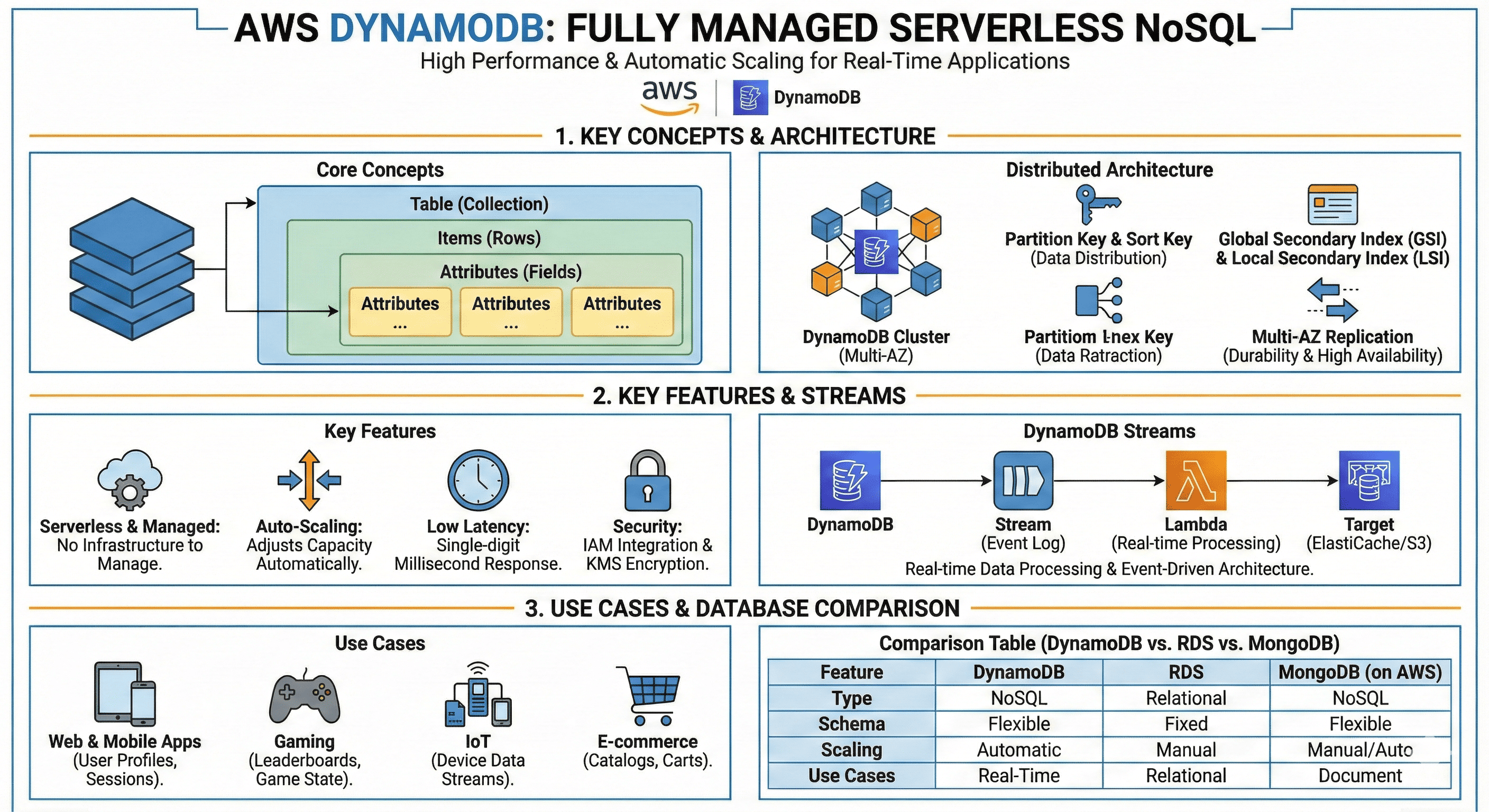
Overview
Amazon DynamoDB is AWS’s fully managed serverless NoSQL database service, providing the ideal solution for applications requiring real-time performance and high scalability at scale.
With table-based unstructured data storage, automatic scaling capabilities, and deep AWS service integration, DynamoDB enables fast and reliable data processing.
It’s widely used in various real-time workloads including gaming, IoT, mobile backends, and e-commerce. With DynamoDB Streams and Lambda, you can easily build event-driven architectures.
This article provides comprehensive understanding of DynamoDB’s core concepts, features, use cases, and comparisons with other databases.
Related Articles
- AWS IAM Overview and Configuration
- AWS EC2 Instance Creation
- AWS S3 Overview and Usage
- AWS Secrets Manager (OAuth, SSO)
- AWS CLI Reference
- What is AWS VPC?
- AWS IRSA (IAM Roles for Service Accounts)
- AWS Assume Role Explained
- AWS Network ACL vs Security Group
- EKS Pod Identity Addon
- AWS DynamoDB Local Installation
What is AWS DynamoDB?
Amazon DynamoDB is a fully managed NoSQL database service designed to provide high performance, scalability, and reliability for modern applications.
Core Value Proposition
DynamoDB delivers three critical requirements:
- Fully Managed: Zero infrastructure management
- Scalability: Automatic scaling from zero to millions of requests per second
- Low Latency: Consistent single-digit millisecond response times
Why NoSQL?
Traditional relational databases struggle with:
- Horizontal scaling
- Schema flexibility
- High-velocity data ingestion
- Unpredictable access patterns
DynamoDB solves these with:
- Schema-less design
- Automatic partitioning
- Built-in replication
- Serverless architecture
Key Features
1. Automatic Scaling and Performance
Dynamic Capacity Management:
Application Load → DynamoDB Auto-Scaling → Capacity Adjustment
Performance Guarantees:
- Read latency: <10ms (typical: 1-5ms)
- Write latency: <10ms (typical: 1-5ms)
- Throughput: Unlimited (with proper partition key design)
Global Tables:
- Multi-region, multi-active replication
- <1 second typical replication latency
- Automatic conflict resolution
2. Flexible Data Model
NoSQL Structure:
- No fixed schema required
- Each item can have different attributes
- Supports nested data structures
Primary Key Types:
| Type | Structure | Example Use Case |
|---|---|---|
| Simple | Partition Key only | User profiles by userId |
| Composite | Partition Key + Sort Key | Orders by userId and orderDate |
Example Data:
// Simple Primary Key
{
  "userId": "user123",         // Partition Key
  "name": "John Doe",
  "email": "john@example.com",
  "createdAt": "2024-01-01"
}

// Composite Primary Key
{
  "userId": "user123",         // Partition Key
  "orderId": "order456",       // Sort Key
  "orderDate": "2024-01-15",
  "total": 99.99,
  "items": [...]
}
3. Truly Serverless
Zero Infrastructure Management:
- No servers to provision or maintain
- No patches or upgrades required
- Automatic backup and recovery
- Built-in security
Operational Benefits:
Traditional Database:
→ Provision servers
→ Install database
→ Configure replication
→ Setup backups
→ Monitor and scale
→ Patch and upgrade

DynamoDB:
→ Create table (done!)
4. Data Durability and Availability
Automatic Replication:
Your Data → Multiple AZs (Automatic)
├── Availability Zone 1
├── Availability Zone 2
└── Availability Zone 3
Backup Options:
- Point-in-Time Recovery (PITR): Up to 35 days
- On-Demand Backups: Manual snapshots
- AWS Backup Integration: Centralized backup management
Availability SLAs:
- Single-region tables: 99.99% availability
- Global tables: 99.999% availability
5. Security and Compliance
Encryption:
At Rest:
  - AWS KMS encryption
  - Customer managed keys supported
  - Encryption enabled by default

In Transit:
  - TLS 1.2+ required
  - VPC endpoints available
Access Control:
- IAM policies for fine-grained permissions
- VPC endpoints for private connectivity
- CloudTrail integration for audit logging
Compliance:
- HIPAA, PCI DSS, SOC 1/2/3
- ISO 27001, 27017, 27018
- FedRAMP authorized
Core Concepts Deep Dive
Tables
Definition: Collections of items (similar to tables in RDBMS)
Key Characteristics:
Table Name: Must be unique within AWS account and region
Primary Key: Required at table creation
Attributes: Flexible, can vary between items
Indexes: Optional secondary indexes for query flexibility
Example Table Structure:
Table: Users
Primary Key: userId (Partition Key)

Items:
1. { "userId": "user1", "name": "Alice", "age": 30 }
2. { "userId": "user2", "name": "Bob", "email": "bob@ex.com" }
3. { "userId": "user3", "name": "Carol", "age": 25, "city": "NYC" }
Items and Attributes
Items (rows):
- Maximum size: 400KB
- Can have different attributes
- Accessed via primary key
Attributes (columns):
- No predefined schema
- Various data types supported
Data Types:
| Category | Types | Example |
|---|---|---|
| Scalar | String, Number, Binary, Boolean, Null | "John", 42, true |
| Document | List, Map | [1, 2, 3], {"key": "value"} |
| Set | String Set, Number Set, Binary Set | ["a", "b", "c"] |
Indexes
Global Secondary Index (GSI)
Purpose: Query on non-primary-key attributes
Characteristics:
- Different partition and sort keys from base table
- Can be created/deleted anytime
- Eventual consistency only
- Has own provisioned throughput
Example:
// Base Table
Primary Key: userId
GSI: email-index
  Partition Key: email

Query: Find user by email
→ Use email-index GSI
Local Secondary Index (LSI)
Purpose: Alternative sort key for same partition key
Characteristics:
- Same partition key as base table
- Different sort key
- Strong or eventual consistency
- Must be created with table
- Shares throughput with base table
Example:
// Base Table
Partition Key: userId
Sort Key: timestamp

LSI: status-index
  Partition Key: userId (same)
  Sort Key: status

Query: Get all orders by userId sorted by status
→ Use status-index LSI
Capacity Modes
Provisioned Mode
How it works:
You specify:
- Read Capacity Units (RCU)
- Write Capacity Units (WCU)

DynamoDB provides:
- Reserved capacity
- Predictable performance
- Lower cost for steady workloads
Capacity Unit Calculation:
Read Capacity Unit (RCU):
- 1 RCU = 1 strongly consistent read/sec (≤4KB)
- 1 RCU = 2 eventually consistent reads/sec (≤4KB)

Example: Read 10KB item with strong consistency
→ Need 3 RCUs (10KB / 4KB = 2.5, rounded up to 3)

Write Capacity Unit (WCU):
- 1 WCU = 1 write/sec (≤1KB)

Example: Write 3KB item
→ Need 3 WCUs (3KB / 1KB = 3)
Auto Scaling:
Configuration:
  Target Utilization: 70%
  Minimum Capacity: 5 RCU/WCU
  Maximum Capacity: 100 RCU/WCU

Behavior:
  Usage > 70% → Scale up
  Usage < 70% → Scale down (gradual)
On-Demand Mode
How it works:
You specify: Nothing (just enable on-demand)

DynamoDB provides:
- Automatic scaling
- Pay per request
- No capacity planning
- Instant scaling
When to use:
- Unpredictable workloads
- New applications
- Sporadic traffic
- Don’t want to manage capacity
DynamoDB Streams
Purpose: Capture item-level changes in real-time
Architecture:
DynamoDB Table
    ↓ (change occurs)
DynamoDB Stream
    ↓ (triggers)
AWS Lambda
    ↓ (processes)
Action (notification, replication, analytics)
Stream Record Types:
| Type | Contains | Use Case |
|---|---|---|
KEYS_ONLY |
Primary key only | Lightweight change detection |
NEW_IMAGE |
Item after change | Replication, downstream updates |
OLD_IMAGE |
Item before change | Audit trails |
NEW_AND_OLD_IMAGES |
Before and after | Diff calculation |
Example Use Case:
// User updates email
Old: { "userId": "user1", "email": "old@example.com" }
New: { "userId": "user1", "email": "new@example.com" }

Stream Record (NEW_AND_OLD_IMAGES):
{
  "eventName": "MODIFY",
  "dynamodb": {
    "Keys": { "userId": "user1" },
    "OldImage": { "email": "old@example.com" },
    "NewImage": { "email": "new@example.com" }
  }
}

Lambda triggers:
→ Send verification email to new address
→ Log audit event
→ Update cache
Real-World Use Cases
1. Web and Mobile Applications
User Session Management:
{
  "sessionId": "sess123",      // Partition Key
  "userId": "user456",
  "loginTime": "2024-01-15T10:00:00Z",
  "ipAddress": "192.168.1.1",
  "ttl": 1705320000           // Auto-delete after expiry
}
Benefits:
- Fast session lookup
- Automatic TTL cleanup
- Scales with user base
2. Gaming
Player Profiles:
{
  "playerId": "player789",     // Partition Key
  "gameId": "game001",         // Sort Key
  "level": 42,
  "score": 98500,
  "inventory": ["sword", "shield", "potion"],
  "lastPlayed": "2024-01-15"
}
Leaderboards:
// Table: Leaderboards
{
  "gameId": "game001",         // Partition Key
  "score": 98500,              // Sort Key (descending)
  "playerId": "player789",
  "playerName": "ProGamer123",
  "timestamp": "2024-01-15T10:00:00Z"
}

// Query top 10: Query gameId = "game001", limit 10
3. IoT Applications
Sensor Data:
{
  "deviceId": "sensor001",     // Partition Key
  "timestamp": "2024-01-15T10:00:00Z", // Sort Key
  "temperature": 22.5,
  "humidity": 45.2,
  "location": {
    "lat": 37.7749,
    "lon": -122.4194
  }
}
Time-Series Queries:
Query: Get sensor readings for last hour
→ deviceId = "sensor001"
→ timestamp BETWEEN "2024-01-15T09:00:00Z" AND "2024-01-15T10:00:00Z"
4. E-commerce
Product Catalog:
{
  "productId": "prod001",      // Partition Key
  "name": "Wireless Mouse",
  "category": "Electronics",
  "price": 29.99,
  "inventory": 150,
  "rating": 4.5,
  "reviews": 234
}
Shopping Cart:
{
  "userId": "user456",         // Partition Key
  "cartId": "cart789",         // Sort Key
  "items": [
    {
      "productId": "prod001",
      "quantity": 2,
      "price": 29.99
    }
  ],
  "total": 59.98,
  "lastModified": "2024-01-15T10:00:00Z"
}
5. Event-Driven Architectures
Order Processing Pipeline:
Order Created (DynamoDB)
    ↓
DynamoDB Stream
    ↓
Lambda Function
    ├→ Send confirmation email (SES)
    ├→ Update inventory (DynamoDB)
    ├→ Create shipping label (API)
    └→ Notify analytics (Kinesis)
Advantages
✅ Zero Infrastructure Management
What you don’t need to do:
- Provision servers
- Install database software
- Configure replication
- Manage backups
- Apply patches
- Monitor disk space
- Plan capacity (on-demand mode)
✅ Unlimited Scalability
Scale characteristics:
Requests per second: Unlimited*
Storage: Unlimited
Tables per account: Default 256 (can be increased)

*With proper partition key design
Automatic handling:
- Data partitioning
- Load distribution
- Hardware failures
- Traffic spikes
✅ Deep AWS Integration
Native integrations:
Lambda → Event processing
API Gateway → REST APIs
S3 → Data export/import
CloudWatch → Monitoring
IAM → Access control
KMS → Encryption
Kinesis → Stream processing
Athena → SQL analytics
✅ Flexible Pricing
Cost optimization options:
- On-Demand: Pay per request
- Provisioned: Reserve capacity
- Reserved Capacity: Long-term commitment discounts
- Auto-scaling: Optimize provisioned capacity
Limitations and Considerations
❌ Limited Query Flexibility
Cannot do:
- Complex JOINs across tables
- Aggregations (SUM, AVG, COUNT*)
- Full-text search
- Ad-hoc queries on non-indexed attributes
Workarounds:
Problem: Need full-text search
Solution: Use Amazon OpenSearch Service

Problem: Need complex analytics
Solution: Export to S3 → Athena or Redshift

Problem: Need aggregations
Solution: Maintain aggregate tables or use streams + Lambda
❌ Cost at Scale
Can be expensive for:
- Sustained high traffic (millions of requests/day)
- Large table scans
- Heavy GSI usage
- On-demand with high sustained load
Cost optimization:
Strategy 1: Use provisioned mode for predictable workload
Strategy 2: Implement caching (DAX, ElastiCache)
Strategy 3: Archive old data to S3
Strategy 4: Optimize partition key design
Strategy 5: Use projection expressions to reduce data transfer
❌ No Built-in Relationships
Challenge: No foreign keys or joins
Solution: Denormalize data
// Instead of:
Users table: { userId, name }
Orders table: { orderId, userId, ... }

// Do:
Orders table: {
  orderId,
  userId,
  userName,  // Denormalized
  ...
}
Comparison with Other Databases
Feature Comparison
| Feature | DynamoDB | RDS (PostgreSQL) | MongoDB Atlas | Aurora |
|---|---|---|---|---|
| Type | NoSQL Key-Value/Document | Relational SQL | NoSQL Document | Relational SQL |
| Schema | Schema-less | Fixed schema | Schema-less | Fixed schema |
| Scaling | Automatic horizontal | Manual vertical/horizontal | Manual/Auto | Automatic vertical |
| Consistency | Eventual or Strong | Strong (ACID) | Tunable | Strong (ACID) |
| Latency | <10ms (typical <5ms) | 10-50ms | 10-50ms | 5-10ms |
| Max Throughput | Unlimited | Limited by instance | Limited by cluster | High (100K+ writes/sec) |
| Management | Fully serverless | Managed | Managed | Managed |
| Joins | No | Yes | Limited ($lookup) | Yes |
| Transactions | Single-partition | Multi-row ACID | Multi-document ACID | Multi-row ACID |
| Backup | Automatic PITR | Automated backups | Continuous backups | Automated backups |
| Pricing Model | Pay-per-request or provisioned | Instance-based | Instance-based | Instance-based |
When to Choose Each
Choose DynamoDB when:
✅ Need predictable single-digit millisecond latency
✅ Workload is primarily key-based lookups
✅ Want zero infrastructure management
✅ Need to scale to millions of requests/sec
✅ Building serverless applications
Choose RDS when:
✅ Complex queries and JOINs required
✅ Relational model fits naturally
✅ Need full ACID transactions
✅ Existing SQL expertise
✅ Business intelligence and reporting
Choose MongoDB when:
✅ Flexible document model needed
✅ Rich query language required
✅ Multi-document transactions
✅ Want self-hosting option
✅ Need geospatial queries
Choose Aurora when:
✅ Need both SQL and high performance
✅ Require relational features with scale
✅ Global database needed (Aurora Global)
✅ Want MySQL/PostgreSQL compatibility
✅ Read replicas for analytics
Best Practices
1. Design for Access Patterns First
Wrong approach:
1. Design normalized schema
2. Create tables
3. Figure out queries
4. Add indexes as needed
Right approach:
1. Identify all access patterns
2. Design primary key and indexes
3. Create table schema
4. Test query performance
Example:
Access Patterns:
1. Get user by userId
2. Get orders by userId
3. Get orders by userId and date range
4. Get order by orderId

Design:
Table: Orders
PK: orderId
GSI: userId-date-index
  PK: userId
  SK: orderDate
2. Use Composite Keys Wisely
Pattern: Hierarchical data
{
  "PK": "USER#user123",
  "SK": "ORDER#2024-01-15#order456",
  "orderTotal": 99.99
}
Benefits:
- One table stores multiple entity types
- Efficient range queries
- Reduces table count
3. Implement Time-To-Live (TTL)
Use case: Auto-delete expired data
{
  "sessionId": "sess789",
  "userId": "user123",
  "data": {...},
  "expirationTime": 1705320000  // Unix timestamp
}
Configuration:
1. Enable TTL on table
2. Specify TTL attribute name
3. Set attribute value (Unix timestamp)
4. DynamoDB deletes within 48 hours of expiry
4. Use DynamoDB Accelerator (DAX)
What is DAX:
- In-memory cache for DynamoDB
- Microsecond latency
- Drop-in replacement (no code changes)
Architecture:
Application
    ↓
DAX Cluster (Cache)
    ↓ (cache miss)
DynamoDB (Database)
When to use:
- Read-heavy workloads
- Need <1ms latency
- Want to reduce DynamoDB costs
5. Monitor Key Metrics
Essential CloudWatch metrics:
Consumed Capacity:
  - ConsumedReadCapacityUnits
  - ConsumedWriteCapacityUnits

Throttling:
  - ReadThrottleEvents
  - WriteThrottleEvents

Errors:
  - UserErrors
  - SystemErrors

Latency:
  - SuccessfulRequestLatency
Alerting recommendations:
Alert when:
- ThrottleEvents > 0 (immediate action)
- Consumed capacity > 80% of provisioned
- Error rate > 1%
- Latency p99 > 100ms
Pricing Overview
On-Demand Mode
Pricing structure (US East):
Write Request Units (WRU): $1.25 per million
Read Request Units (RRU): $0.25 per million
Storage: $0.25 per GB-month

Example calculation:
10M writes/month: 10 × $1.25 = $12.50
50M reads/month: 50 × $0.25 = $12.50
Total: $25.00 (excluding storage)
Best for:
- Development/testing
- Unpredictable workloads
- New applications
- Sporadic traffic patterns
Provisioned Mode
Pricing structure (US East):
Write Capacity Unit (WCU): $0.00065 per hour
Read Capacity Unit (RCU): $0.00013 per hour
Storage: $0.25 per GB-month

Example calculation (1000 WCU, 5000 RCU):
WCU: 1000 × $0.00065 × 730 hours = $474.50/month
RCU: 5000 × $0.00013 × 730 hours = $474.50/month
Total: $949.00/month (excluding storage)
Best for:
- Predictable workloads
- Cost optimization
- High sustained throughput
Reserved Capacity
Savings:
- 1-year: ~35% discount
- 3-year: ~76% discount
Commitment required:
- Pay upfront or monthly
- Cannot be canceled
- Region-specific
Conclusion
DynamoDB delivers on three critical promises: fully managed + scalable + low latency, making it an exceptional NoSQL service for modern applications.
When DynamoDB Shines
✅ Key-based access patterns dominate
✅ Single-digit millisecond latency is critical
✅ Serverless architecture is preferred
✅ Massive scale is anticipated
✅ AWS ecosystem integration is important
When to Consider Alternatives
❌ Complex relational queries with JOINs
❌ Ad-hoc analytics and reporting
❌ Cost-sensitive with sustained high traffic
❌ Full-text search requirements
❌ Need for traditional ACID transactions across multiple items
Hybrid Architecture
Consider combining DynamoDB with:
- RDS/Aurora: Complex relational data
- Redshift: Data warehousing and analytics
- OpenSearch: Full-text search
- S3: Long-term data archival
- DAX: Caching for ultra-low latency
Understanding and effectively leveraging DynamoDB provides a solid foundation for building cloud-native, serverless applications at any scale.

Comments