14 min to read
AWS Network ACL vs Security Group - Complete Comparison and Implementation Guide
Understanding the differences between stateful and stateless firewalls in AWS VPC
Overview
AWS provides two primary network security mechanisms within VPC (Virtual Private Cloud): Security Groups and Network ACLs (Access Control Lists).
Understanding the differences between these stateful and stateless firewalls is crucial for implementing robust security architectures in AWS.
This comprehensive guide explores the fundamental differences, use cases, limitations, and best practices for both security mechanisms.
What are Security Groups and Network ACLs?
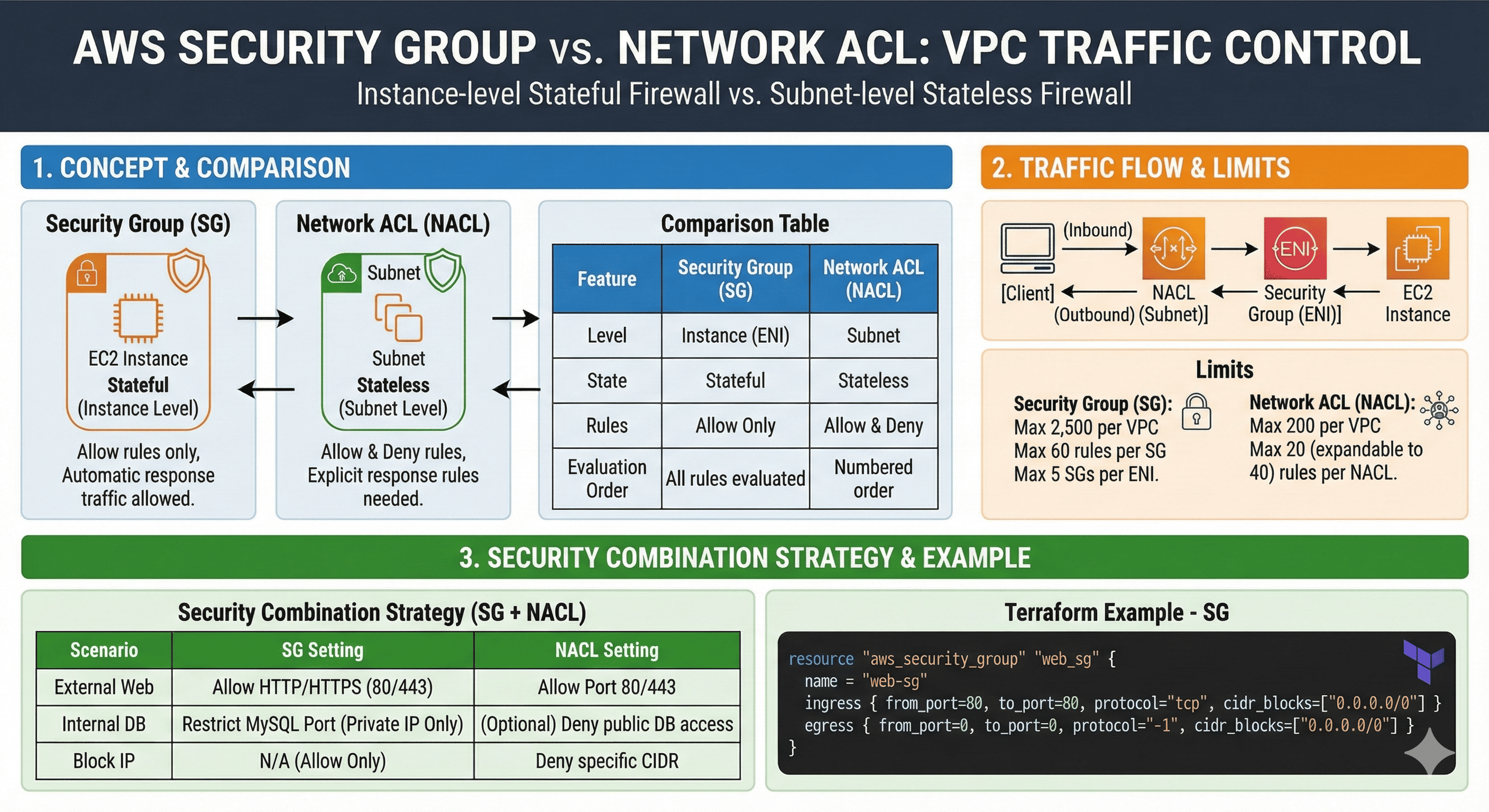
Security Groups act as instance-level stateful firewalls, while Network ACLs function as subnet-level stateless firewalls.
Both work together to provide layered security for your AWS resources, each serving distinct purposes in your security architecture.
Security Groups (Stateful Firewall)
Security Groups operate at the instance level (specifically at the Elastic Network Interface level) and maintain connection state information. When you allow inbound traffic, the corresponding outbound response traffic is automatically allowed.
Network ACLs (Stateless Firewall)
Network ACLs operate at the subnet level and evaluate each packet independently. They require explicit rules for both inbound and outbound traffic, making them stateless in nature.
Detailed Comparison: Security Group vs Network ACL
| Feature | Security Group (Stateful) | Network ACL (Stateless) |
|---|---|---|
| Operating Level | EC2 Instance (ENI) level | Subnet level |
| Firewall Type | Stateful - tracks connection state | Stateless - evaluates each packet independently |
| Rule Types | Allow rules only | Both Allow and Deny rules |
| Response Handling | Automatic outbound response for allowed inbound | Explicit inbound/outbound rules required |
| Rule Evaluation | All rules evaluated, most permissive applied | Rules evaluated in order, first match applied |
| Application Scope | Applied to explicitly specified instances | Automatically applied to entire subnet |
| Default Behavior | Default deny inbound, allow outbound | Default deny all traffic |
| Cross-referencing | Can reference other Security Groups | Cannot reference Security Groups |
| Logging | VPC Flow Logs required | VPC Flow Logs + optional NACL logs |
Traffic Flow Architecture
How Security Groups and NACLs Work Together
[Internet/Client]
   ↓ (Inbound Traffic)
[Network ACL (Subnet Level)]
   ↓ (First Filter)
[Security Group (Instance Level)]
   ↓ (Second Filter)
[EC2 Instance]
For outbound traffic, the flow reverses but both layers still apply their respective filtering rules.
Processing Order
- Inbound Traffic: NACL → Security Group → Instance
- Outbound Traffic: Security Group → NACL → Destination
- Both layers must allow traffic for successful communication
Implementation Examples with Terraform
Security Group Configuration
# Example: Web Server Security Group
resource "aws_security_group" "web_sg" {
  name_prefix = "web-server-sg"
  description = "Security group for web servers"
  vpc_id      = aws_vpc.main.id

  # HTTP access from anywhere
  ingress {
    description = "HTTP"
    from_port   = 80
    to_port     = 80
    protocol    = "tcp"
    cidr_blocks = ["0.0.0.0/0"]
  }

  # HTTPS access from anywhere
  ingress {
    description = "HTTPS"
    from_port   = 443
    to_port     = 443
    protocol    = "tcp"
    cidr_blocks = ["0.0.0.0/0"]
  }

  # SSH access from bastion host
  ingress {
    description     = "SSH from bastion"
    from_port       = 22
    to_port         = 22
    protocol        = "tcp"
    security_groups = [aws_security_group.bastion_sg.id]
  }

  # All outbound traffic allowed
  egress {
    description = "All outbound"
    from_port   = 0
    to_port     = 0
    protocol    = "-1"
    cidr_blocks = ["0.0.0.0/0"]
  }

  tags = {
    Name        = "web-server-sg"
    Environment = var.environment
  }
}

# Database Security Group
resource "aws_security_group" "database_sg" {
  name_prefix = "database-sg"
  description = "Security group for database servers"
  vpc_id      = aws_vpc.main.id

  # MySQL/Aurora access from web servers only
  ingress {
    description     = "MySQL from web servers"
    from_port       = 3306
    to_port         = 3306
    protocol        = "tcp"
    security_groups = [aws_security_group.web_sg.id]
  }

  # No outbound internet access needed
  egress {
    description = "VPC internal only"
    from_port   = 0
    to_port     = 0
    protocol    = "-1"
    cidr_blocks = [aws_vpc.main.cidr_block]
  }

  tags = {
    Name        = "database-sg"
    Environment = var.environment
  }
}
Network ACL Configuration
# Custom Network ACL for web tier
resource "aws_network_acl" "web_nacl" {
  vpc_id     = aws_vpc.main.id
  subnet_ids = aws_subnet.web_subnets[*].id

  # Allow HTTP inbound
  ingress {
    rule_no    = 100
    protocol   = "tcp"
    action     = "allow"
    cidr_block = "0.0.0.0/0"
    from_port  = 80
    to_port    = 80
  }

  # Allow HTTPS inbound
  ingress {
    rule_no    = 110
    protocol   = "tcp"
    action     = "allow"
    cidr_block = "0.0.0.0/0"
    from_port  = 443
    to_port    = 443
  }

  # Allow SSH from management subnet only
  ingress {
    rule_no    = 120
    protocol   = "tcp"
    action     = "allow"
    cidr_block = aws_subnet.management.cidr_block
    from_port  = 22
    to_port    = 22
  }

  # Allow ephemeral ports for return traffic
  ingress {
    rule_no    = 130
    protocol   = "tcp"
    action     = "allow"
    cidr_block = "0.0.0.0/0"
    from_port  = 1024
    to_port    = 65535
  }

  # Deny specific malicious IP range
  ingress {
    rule_no    = 50
    protocol   = "-1"
    action     = "deny"
    cidr_block = "192.0.2.0/24"  # Example malicious range
  }

  # Allow outbound HTTP/HTTPS for updates
  egress {
    rule_no    = 100
    protocol   = "tcp"
    action     = "allow"
    cidr_block = "0.0.0.0/0"
    from_port  = 80
    to_port    = 80
  }

  egress {
    rule_no    = 110
    protocol   = "tcp"
    action     = "allow"
    cidr_block = "0.0.0.0/0"
    from_port  = 443
    to_port    = 443
  }

  # Allow database access to database subnet
  egress {
    rule_no    = 120
    protocol   = "tcp"
    action     = "allow"
    cidr_block = aws_subnet.database.cidr_block
    from_port  = 3306
    to_port    = 3306
  }

  # Allow ephemeral ports for responses
  egress {
    rule_no    = 130
    protocol   = "tcp"
    action     = "allow"
    cidr_block = "0.0.0.0/0"
    from_port  = 1024
    to_port    = 65535
  }

  tags = {
    Name        = "web-tier-nacl"
    Environment = var.environment
  }
}

# Restricted Network ACL for database tier
resource "aws_network_acl" "database_nacl" {
  vpc_id     = aws_vpc.main.id
  subnet_ids = aws_subnet.database_subnets[*].id

  # Allow MySQL from web tier only
  ingress {
    rule_no    = 100
    protocol   = "tcp"
    action     = "allow"
    cidr_block = aws_subnet.web.cidr_block
    from_port  = 3306
    to_port    = 3306
  }

  # Allow responses to web tier
  egress {
    rule_no    = 100
    protocol   = "tcp"
    action     = "allow"
    cidr_block = aws_subnet.web.cidr_block
    from_port  = 1024
    to_port    = 65535
  }

  # Block all other traffic (implicit deny)

  tags = {
    Name        = "database-tier-nacl"
    Environment = var.environment
  }
}
Limitations and Constraints
Network ACL Limitations
| Resource | Default Limit | Maximum Limit |
|---|---|---|
| NACLs per VPC | 200 | Configurable via support |
| Rules per NACL | 20 inbound, 20 outbound | 40 each (requestable increase) |
| Performance Impact | Minimal with few rules | Increases with rule count |
Security Group Limitations
| Resource | Default Limit | Maximum Limit |
|---|---|---|
| Security Groups per VPC | 2,500 | Configurable via support |
| Rules per Security Group | 60 inbound, 60 outbound | Configurable via support |
| Security Groups per ENI | 5 | 5 (hard limit) |
Security Strategy Combinations
Layered Security Approach
| Scenario | Security Group Configuration | Network ACL Configuration |
|---|---|---|
| Public Web Access | Allow HTTP/HTTPS ingress | Allow ports 80/443, block malicious IPs |
| Database Protection | Allow only from specific SGs | Deny database ports at subnet level |
| Unauthorized IP Blocking | Cannot deny specific IPs | Explicit deny rules for IP ranges |
| Internal Service Communication | Cross-SG references for microservices | Subnet-level isolation between tiers |
Monitoring and Logging
VPC Flow Logs Configuration
# Enable VPC Flow Logs for comprehensive monitoring
resource "aws_flow_log" "vpc_flow_log" {
  iam_role_arn    = aws_iam_role.flow_log_role.arn
  log_destination = aws_cloudwatch_log_group.vpc_flow_log.arn
  traffic_type    = "ALL"
  vpc_id          = aws_vpc.main.id

  tags = {
    Name        = "vpc-flow-logs"
    Environment = var.environment
  }
}

# CloudWatch Log Group for Flow Logs
resource "aws_cloudwatch_log_group" "vpc_flow_log" {
  name              = "/aws/vpc/flowlogs"
  retention_in_days = 30

  tags = {
    Name        = "vpc-flow-logs"
    Environment = var.environment
  }
}

# IAM Role for Flow Logs
resource "aws_iam_role" "flow_log_role" {
  name = "vpc-flow-log-role"

  assume_role_policy = jsonencode({
    Version = "2012-10-17"
    Statement = [
      {
        Action = "sts:AssumeRole"
        Effect = "Allow"
        Principal = {
          Service = "vpc-flow-logs.amazonaws.com"
        }
      }
    ]
  })
}

resource "aws_iam_role_policy" "flow_log_policy" {
  name = "vpc-flow-log-policy"
  role = aws_iam_role.flow_log_role.id

  policy = jsonencode({
    Version = "2012-10-17"
    Statement = [
      {
        Action = [
          "logs:CreateLogGroup",
          "logs:CreateLogStream",
          "logs:PutLogEvents",
          "logs:DescribeLogGroups",
          "logs:DescribeLogStreams"
        ]
        Effect   = "Allow"
        Resource = "*"
      }
    ]
  })
}
Monitoring Best Practices
- Enable Flow Logs: Monitor all traffic patterns
- Set Up Alerts: Create CloudWatch alarms for unusual traffic
- Log Analysis: Use Athena or ElasticSearch for log analysis
- Regular Reviews: Audit security group and NACL rules periodically
Best Practices
Security Group Best Practices
- Principle of Least Privilege: Grant minimum necessary access
- Descriptive Naming: Use clear, descriptive names for rules
- Regular Audits: Review and clean up unused security groups
- Cross-referencing: Use security group references instead of IP ranges
- Documentation: Document the purpose of each rule
Network ACL Best Practices
- Rule Numbering: Leave gaps between rule numbers for future insertions
- Deny First: Place deny rules with lower numbers than allow rules
- Ephemeral Ports: Remember to allow ephemeral ports for return traffic
- Testing: Test NACL changes in non-production environments first
- Minimal Rules: Keep rules simple and minimal for better performance
Common Use Cases
When to Use Security Groups Only
- Standard Web Applications: Simple three-tier architectures
- Development Environments: Flexible access requirements
- Microservices: Service-to-service communication
- Container Workloads: Dynamic scaling environments
When to Add Network ACLs
- Compliance Requirements: Regulatory compliance needs
- IP-based Blocking: Blocking specific IP ranges or countries
- Subnet Isolation: Strong separation between tiers
- Additional Logging: Enhanced monitoring requirements
Troubleshooting Common Issues
Connectivity Problems
- Check Both Layers: Verify both SG and NACL rules
- Ephemeral Ports: Ensure return traffic paths are open
- Rule Order: Check NACL rule numbering and precedence
- Flow Logs: Analyze traffic patterns for blocked connections
Performance Issues
- Rule Optimization: Minimize the number of NACL rules
- Specific Rules: Use specific ports instead of wide ranges
- Regular Cleanup: Remove unused or duplicate rules
- Monitoring: Track rule evaluation metrics
Frequently Asked Questions
Q1. Can I use only one security mechanism?
Most AWS environments work well with Security Groups alone. However, for environments requiring subnet-level traffic blocking or compliance requirements, combining both mechanisms provides optimal security.
Q2. Which is applied first - NACL or Security Group?
For inbound traffic, NACL is evaluated first at the subnet level, then Security Group at the instance level. Both must allow traffic for successful communication.
Q3. Can I track security rule usage?
Yes, VPC Flow Logs provide comprehensive traffic monitoring. Additionally, NACL-specific logging can be enabled for detailed packet-level analysis.
Q4. How do I block specific IP addresses?
Use Network ACLs with explicit deny rules. Security Groups only support allow rules, so they cannot block specific IPs.
Conclusion
Understanding the differences between AWS Security Groups and Network ACLs is fundamental to building secure cloud architectures.
Security Groups provide instance-level stateful filtering ideal for most use cases, while Network ACLs offer subnet-level stateless filtering for additional security layers.
The key to effective AWS security is not choosing between these mechanisms, but understanding how to combine them appropriately based on your specific requirements. Most workloads benefit from Security Groups as the primary control, with Network ACLs added for compliance, IP blocking, or subnet isolation needs.
By implementing both mechanisms strategically, you can achieve defense-in-depth security that protects your AWS resources while maintaining operational flexibility.

Comments