33 min to read
AWS Container Strategy - Lambda vs ECS vs EKS Comprehensive Guide
Strategic analysis of AWS container services from serverless to fully-managed Kubernetes for optimal workload deployment
Overview
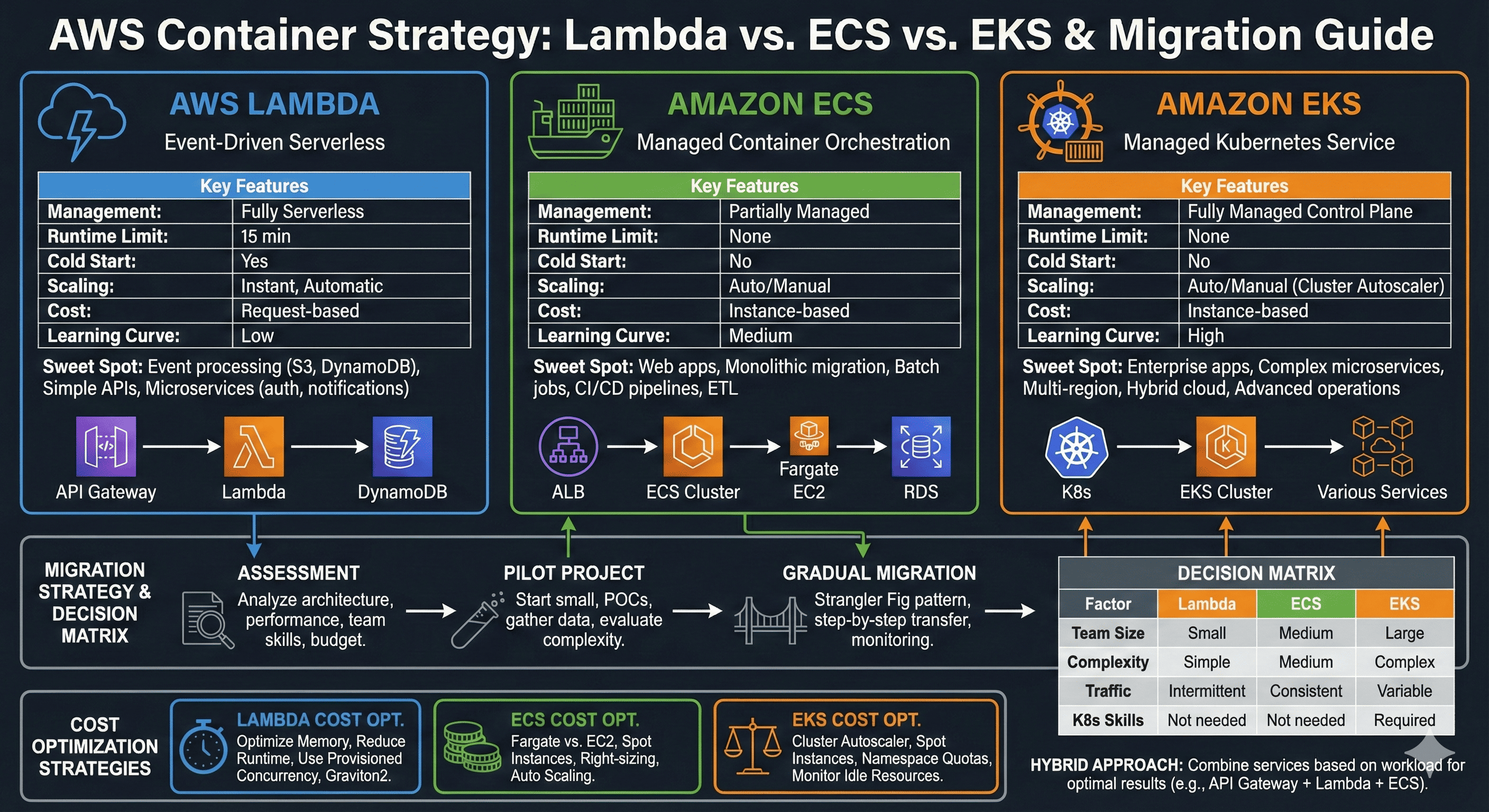
Modern cloud-native application development demands strategic container deployment decisions that directly impact system performance, scalability, and operational efficiency. AWS provides a comprehensive spectrum of container services, ranging from fully serverless Lambda functions to enterprise-grade Kubernetes clusters through EKS.
The container orchestration landscape has evolved significantly, with each AWS service targeting specific use cases and operational models. Lambda revolutionizes event-driven architectures through serverless execution, while ECS provides simplified container orchestration with deep AWS integration. EKS delivers complete Kubernetes compatibility for complex, production-grade workloads requiring advanced orchestration capabilities.
This comprehensive analysis examines the technical architecture, performance characteristics, and strategic implementation patterns for AWS Lambda, ECS (Elastic Container Service), and EKS (Elastic Kubernetes Service). We explore the distinct advantages, optimal use cases, and migration strategies that enable organizations to make informed decisions aligned with their technical requirements and business objectives.
AWS Container Services Architecture Overview
AWS Lambda: Serverless Computing Excellence
Lambda represents the pinnacle of serverless architecture, enabling developers to focus purely on business logic while AWS manages all infrastructure concerns.
With automatic scaling, pay-per-execution pricing, and extensive integration capabilities, Lambda transforms how we approach event-driven computing.
Technical Architecture and Execution Model
AWS Lambda operates on a revolutionary serverless execution model where functions execute in response to events without requiring server provisioning or management. The service automatically handles capacity planning, scaling, fault tolerance, and resource allocation, enabling developers to concentrate exclusively on application logic.
Lambda’s execution environment provides isolated, secure runtime contexts with configurable memory allocation from 128 MB to 10,240 MB. CPU allocation scales proportionally with memory configuration, providing predictable performance characteristics. The service supports multiple runtime environments including Node.js, Python, Java, .NET, Go, and custom runtimes through container images.
Event-Driven Architecture Patterns
Lambda excels in event-driven architectures where functions respond to triggers from AWS services or external sources. The service integrates seamlessly with over 200 AWS services, enabling sophisticated workflows through service chaining and event orchestration.
Performance Characteristics and Limitations
Lambda provides exceptional performance for short-duration, stateless computations with automatic scaling capabilities that can handle millions of concurrent executions. However, the service imposes constraints that influence architectural decisions:
- Execution Time Limit: 15-minute maximum execution duration
- Cold Start Latency: Initial invocation delays for new containers
- Memory Constraints: Maximum 10 GB memory allocation
- Payload Limitations: 6 MB synchronous response limit
Terraform Implementation Strategy
# Advanced Lambda function configuration
resource "aws_lambda_function" "microservice_function" {
  filename         = "deployment-package.zip"
  function_name    = "advanced-microservice"
  role            = aws_iam_role.lambda_execution_role.arn
  handler         = "index.handler"
  source_code_hash = filebase64sha256("deployment-package.zip")
  runtime         = "nodejs18.x"
  timeout         = 900
  memory_size     = 2048

  # VPC configuration for database access
  vpc_config {
    subnet_ids         = var.private_subnet_ids
    security_group_ids = [aws_security_group.lambda_sg.id]
  }

  # Environment variables for configuration
  environment {
    variables = {
      DATABASE_URL = var.database_connection_string
      CACHE_ENDPOINT = aws_elasticache_cluster.redis.cache_nodes[0].address
      LOG_LEVEL = "INFO"
    }
  }

  # Dead letter queue configuration
  dead_letter_config {
    target_arn = aws_sqs_queue.lambda_dlq.arn
  }

  # Tracing configuration
  tracing_config {
    mode = "Active"
  }

  tags = {
    Environment = "production"
    Service     = "microservice-api"
  }
}

# Lambda layer for shared dependencies
resource "aws_lambda_layer_version" "shared_dependencies" {
  filename         = "layer-dependencies.zip"
  layer_name       = "shared-dependencies"
  source_code_hash = filebase64sha256("layer-dependencies.zip")

  compatible_runtimes = ["nodejs18.x", "nodejs16.x"]
  description        = "Shared libraries and utilities"
}

# EventBridge integration for event-driven processing
resource "aws_cloudwatch_event_rule" "scheduled_processing" {
  name                = "lambda-scheduled-processing"
  description         = "Trigger Lambda function on schedule"
  schedule_expression = "rate(5 minutes)"
}

resource "aws_cloudwatch_event_target" "lambda_target" {
  rule      = aws_cloudwatch_event_rule.scheduled_processing.name
  target_id = "TriggerLambdaFunction"
  arn       = aws_lambda_function.microservice_function.arn
}

resource "aws_lambda_permission" "allow_eventbridge" {
  statement_id  = "AllowExecutionFromEventBridge"
  action        = "lambda:InvokeFunction"
  function_name = aws_lambda_function.microservice_function.function_name
  principal     = "events.amazonaws.com"
  source_arn    = aws_cloudwatch_event_rule.scheduled_processing.arn
}
Amazon ECS: Container Orchestration Simplified
ECS bridges the gap between serverless simplicity and container flexibility, providing managed orchestration with AWS-native integration.
With support for both Fargate and EC2 launch types, ECS offers deployment flexibility while maintaining operational simplicity.
Container Orchestration Architecture
Amazon ECS provides a fully managed container orchestration service that simplifies the deployment, management, and scaling of containerized applications. The service abstracts cluster management complexity while providing fine-grained control over container placement, networking, and resource allocation.
ECS operates through several core components: clusters (logical grouping of compute resources), task definitions (blueprint for container configuration), services (ensure desired task count), and tasks (running instances of task definitions). This architecture enables sophisticated deployment patterns while maintaining operational simplicity.
Fargate vs EC2 Launch Types
ECS supports two distinct compute models: AWS Fargate for serverless container execution and EC2 for traditional instance-based deployment. Fargate eliminates infrastructure management overhead by providing on-demand compute capacity with per-second billing. EC2 launch type offers greater control over instance types, networking configuration, and cost optimization through reserved instances and spot pricing.
| Aspect | Fargate | EC2 |
|---|---|---|
| Infrastructure Management | Fully managed by AWS | Customer managed instances |
| Pricing Model | Per-second billing for resources | Instance-based pricing |
| Resource Flexibility | Predefined CPU/memory combinations | Full instance type selection |
| Scaling Speed | Rapid container provisioning | Instance launch latency |
| Cost Optimization | Pay-per-use efficiency | Reserved instances, spot pricing |
Service Discovery and Load Balancing
ECS integrates with AWS service discovery mechanisms including Application Load Balancer (ALB), Network Load Balancer (NLB), and AWS Cloud Map for DNS-based service discovery. These integrations enable dynamic service registration, health checking, and intelligent traffic routing across container instances.
Terraform Implementation for ECS
# ECS Cluster with Fargate capacity providers
resource "aws_ecs_cluster" "main_cluster" {
  name = "production-cluster"

  capacity_providers = ["FARGATE", "FARGATE_SPOT"]

  default_capacity_provider_strategy {
    capacity_provider = "FARGATE"
    weight           = 70
    base             = 2
  }

  default_capacity_provider_strategy {
    capacity_provider = "FARGATE_SPOT"
    weight           = 30
  }

  setting {
    name  = "containerInsights"
    value = "enabled"
  }

  tags = {
    Environment = "production"
    Service     = "microservices-platform"
  }
}

# ECS Task Definition with advanced configuration
resource "aws_ecs_task_definition" "api_service" {
  family                   = "api-service"
  requires_compatibilities = ["FARGATE"]
  network_mode            = "awsvpc"
  cpu                     = "1024"
  memory                  = "2048"
  execution_role_arn      = aws_iam_role.ecs_execution_role.arn
  task_role_arn          = aws_iam_role.ecs_task_role.arn

  container_definitions = jsonencode([
    {
      name  = "api-container"
      image = "your-account.dkr.ecr.us-west-2.amazonaws.com/api-service:latest"

      portMappings = [
        {
          containerPort = 8080
          protocol      = "tcp"
        }
      ]

      environment = [
        {
          name  = "ENV"
          value = "production"
        }
      ]

      secrets = [
        {
          name      = "DATABASE_PASSWORD"
          valueFrom = aws_ssm_parameter.db_password.arn
        }
      ]

      logConfiguration = {
        logDriver = "awslogs"
        options = {
          "awslogs-group"         = aws_cloudwatch_log_group.api_logs.name
          "awslogs-region"        = "us-west-2"
          "awslogs-stream-prefix" = "ecs"
        }
      }

      healthCheck = {
        command = ["CMD-SHELL", "curl -f http://localhost:8080/health || exit 1"]
        interval = 30
        timeout = 5
        retries = 3
        startPeriod = 60
      }
    }
  ])

  tags = {
    Environment = "production"
    Service     = "api-service"
  }
}

# ECS Service with auto-scaling configuration
resource "aws_ecs_service" "api_service" {
  name            = "api-service"
  cluster         = aws_ecs_cluster.main_cluster.id
  task_definition = aws_ecs_task_definition.api_service.arn
  desired_count   = 3

  capacity_provider_strategy {
    capacity_provider = "FARGATE"
    weight           = 70
    base             = 2
  }

  capacity_provider_strategy {
    capacity_provider = "FARGATE_SPOT"
    weight           = 30
  }

  network_configuration {
    subnets          = var.private_subnet_ids
    security_groups  = [aws_security_group.ecs_service_sg.id]
    assign_public_ip = false
  }

  load_balancer {
    target_group_arn = aws_lb_target_group.api_service_tg.arn
    container_name   = "api-container"
    container_port   = 8080
  }

  service_registries {
    registry_arn = aws_service_discovery_service.api_service.arn
  }

  deployment_configuration {
    maximum_percent         = 200
    minimum_healthy_percent = 100
  }

  tags = {
    Environment = "production"
    Service     = "api-service"
  }
}

# Auto Scaling configuration
resource "aws_appautoscaling_target" "ecs_target" {
  max_capacity       = 10
  min_capacity       = 2
  resource_id        = "service/${aws_ecs_cluster.main_cluster.name}/${aws_ecs_service.api_service.name}"
  scalable_dimension = "ecs:service:DesiredCount"
  service_namespace  = "ecs"
}

resource "aws_appautoscaling_policy" "ecs_scale_up" {
  name               = "scale-up"
  policy_type        = "TargetTrackingScaling"
  resource_id        = aws_appautoscaling_target.ecs_target.resource_id
  scalable_dimension = aws_appautoscaling_target.ecs_target.scalable_dimension
  service_namespace  = aws_appautoscaling_target.ecs_target.service_namespace

  target_tracking_scaling_policy_configuration {
    predefined_metric_specification {
      predefined_metric_type = "ECSServiceAverageCPUUtilization"
    }
    target_value = 70.0
  }
}
Amazon EKS: Enterprise Kubernetes Platform
EKS delivers the full power of Kubernetes with AWS-managed control plane, enabling sophisticated orchestration patterns for complex, production-grade workloads.
With complete Kubernetes API compatibility, EKS supports advanced deployment strategies, custom resource definitions, and third-party tooling ecosystems.
Kubernetes Control Plane Management
Amazon EKS provides a fully managed Kubernetes control plane that automatically handles master node provisioning, patching, and scaling. AWS operates the control plane across multiple Availability Zones, ensuring high availability and fault tolerance for cluster operations.
The managed control plane includes the Kubernetes API server, etcd cluster state store, and controller manager components. AWS handles all control plane updates, security patches, and capacity management, enabling teams to focus on application deployment rather than cluster administration.
Node Group Architecture and Scaling
EKS supports multiple node group types including managed node groups, self-managed node groups, and AWS Fargate for serverless pod execution. Managed node groups provide automated provisioning, scaling, and lifecycle management of worker nodes with support for multiple instance types and Availability Zone distribution.
Advanced Kubernetes Features
EKS provides complete compatibility with upstream Kubernetes, supporting advanced features including Custom Resource Definitions (CRDs), operators, service meshes, and GitOps workflows. The platform integrates with AWS services through specialized controllers and add-ons, enabling sophisticated cloud-native architectures.
Key capabilities include horizontal pod autoscaling (HPA), vertical pod autoscaling (VPA), cluster autoscaling, and integration with AWS Load Balancer Controller for advanced ingress patterns. EKS also supports AWS CNI for VPC networking, providing native AWS networking integration with security group and subnet controls.
Terraform Implementation for EKS
# EKS Cluster with comprehensive configuration
resource "aws_eks_cluster" "main_cluster" {
  name     = "production-eks-cluster"
  role_arn = aws_iam_role.eks_cluster_role.arn
  version  = "1.28"

  vpc_config {
    subnet_ids              = concat(var.private_subnet_ids, var.public_subnet_ids)
    endpoint_private_access = true
    endpoint_public_access  = true
    public_access_cidrs     = ["0.0.0.0/0"]
    security_group_ids      = [aws_security_group.eks_cluster_sg.id]
  }

  # Enable EKS cluster logging
  enabled_cluster_log_types = [
    "api",
    "audit",
    "authenticator",
    "controllerManager",
    "scheduler"
  ]

  # Encryption configuration
  encryption_config {
    provider {
      key_arn = aws_kms_key.eks_cluster_key.arn
    }
    resources = ["secrets"]
  }

  depends_on = [
    aws_iam_role_policy_attachment.eks_cluster_AmazonEKSClusterPolicy,
    aws_cloudwatch_log_group.eks_cluster_logs
  ]

  tags = {
    Environment = "production"
    ManagedBy   = "terraform"
  }
}

# Managed Node Group with mixed instance types
resource "aws_eks_node_group" "main_node_group" {
  cluster_name    = aws_eks_cluster.main_cluster.name
  node_group_name = "main-node-group"
  node_role_arn   = aws_iam_role.eks_node_role.arn
  subnet_ids      = var.private_subnet_ids

  # Instance configuration
  instance_types = ["t3.medium", "t3.large"]
  capacity_type  = "ON_DEMAND"

  # Scaling configuration
  scaling_config {
    desired_size = 3
    max_size     = 10
    min_size     = 1
  }

  # Update configuration
  update_config {
    max_unavailable_percentage = 25
  }

  # Launch template for advanced configuration
  launch_template {
    id      = aws_launch_template.eks_node_template.id
    version = aws_launch_template.eks_node_template.latest_version
  }

  # Ensure proper ordering of resource creation
  depends_on = [
    aws_iam_role_policy_attachment.eks_node_AmazonEKSWorkerNodePolicy,
    aws_iam_role_policy_attachment.eks_node_AmazonEKS_CNI_Policy,
    aws_iam_role_policy_attachment.eks_node_AmazonEC2ContainerRegistryReadOnly,
  ]

  tags = {
    Environment = "production"
    NodeGroup   = "main"
  }
}

# Spot instance node group for cost optimization
resource "aws_eks_node_group" "spot_node_group" {
  cluster_name    = aws_eks_cluster.main_cluster.name
  node_group_name = "spot-node-group"
  node_role_arn   = aws_iam_role.eks_node_role.arn
  subnet_ids      = var.private_subnet_ids

  instance_types = ["t3.medium", "t3.large", "t3.xlarge"]
  capacity_type  = "SPOT"

  scaling_config {
    desired_size = 2
    max_size     = 20
    min_size     = 0
  }

  update_config {
    max_unavailable_percentage = 50
  }

  # Taints for spot instances
  taint {
    key    = "node.kubernetes.io/instance-type"
    value  = "spot"
    effect = "NO_SCHEDULE"
  }

  tags = {
    Environment = "production"
    NodeGroup   = "spot"
  }
}

# Fargate profile for serverless pod execution
resource "aws_eks_fargate_profile" "serverless_profile" {
  cluster_name           = aws_eks_cluster.main_cluster.name
  fargate_profile_name   = "serverless-profile"
  pod_execution_role_arn = aws_iam_role.eks_fargate_role.arn
  subnet_ids            = var.private_subnet_ids

  selector {
    namespace = "serverless"
    labels = {
      compute-type = "fargate"
    }
  }

  selector {
    namespace = "batch-jobs"
  }

  tags = {
    Environment = "production"
    Profile     = "serverless"
  }
}

# EKS Add-ons for enhanced functionality
resource "aws_eks_addon" "vpc_cni" {
  cluster_name = aws_eks_cluster.main_cluster.name
  addon_name   = "vpc-cni"
  addon_version = "v1.15.1-eksbuild.1"
  resolve_conflicts = "OVERWRITE"
}

resource "aws_eks_addon" "coredns" {
  cluster_name = aws_eks_cluster.main_cluster.name
  addon_name   = "coredns"
  addon_version = "v1.10.1-eksbuild.4"
  resolve_conflicts = "OVERWRITE"
}

resource "aws_eks_addon" "kube_proxy" {
  cluster_name = aws_eks_cluster.main_cluster.name
  addon_name   = "kube-proxy"
  addon_version = "v1.28.2-eksbuild.2"
  resolve_conflicts = "OVERWRITE"
}
Comprehensive Performance Analysis
Latency and Response Time Characteristics
Performance analysis across AWS container services reveals distinct patterns optimized for different workload types. Lambda provides exceptional performance for cached, short-duration computations but introduces cold start latency for infrequently accessed functions. ECS delivers consistent performance without initialization delays, making it suitable for steady-state workloads. EKS offers the most comprehensive performance tuning capabilities through Kubernetes resource management and scheduling policies.
| Performance Metric | Lambda | ECS | EKS |
|---|---|---|---|
| Cold Start Latency | 100ms - 10s | None (warm containers) | Pod startup: 30s - 2min |
| Warm Execution | 1-50ms | Consistent response | Optimized scheduling |
| Scaling Speed | Milliseconds | 1-2 minutes | 30s - 5 minutes |
| Concurrent Requests | 1000 default/region | Instance dependent | Cluster capacity |
| Resource Efficiency | Pay-per-execution | Container density | Resource scheduling |
Scalability Patterns and Limits
Each service implements distinct scaling mechanisms aligned with their architectural paradigms. Lambda provides virtually unlimited horizontal scaling with automatic concurrency management. ECS supports both horizontal scaling through service desired count adjustment and vertical scaling through task definition modifications. EKS offers the most sophisticated scaling options including horizontal pod autoscaling, vertical pod autoscaling, and cluster-level node scaling.
Strategic Cost Analysis
Lambda Cost Optimization Strategies
Lambda’s pay-per-execution model provides exceptional cost efficiency for sporadic workloads but requires careful optimization for high-frequency operations. Memory allocation directly impacts both performance and cost, requiring profiling to identify optimal configurations. Provisioned Concurrency eliminates cold starts for critical functions while incurring additional costs for reserved capacity.
Key optimization techniques include:
- Memory Right-Sizing: Profiling to determine optimal memory allocation
- ARM Graviton2 Processors: 20% price-performance improvement
- Provisioned Concurrency: Strategic allocation for latency-sensitive functions
- Request Batching: Consolidating multiple operations per invocation
ECS Cost Management
ECS cost optimization focuses on efficient resource utilization and instance selection strategies. Fargate provides simplified pricing with per-second billing, while EC2 launch type enables significant savings through reserved instances and spot pricing. Mixed capacity strategies combining on-demand and spot instances optimize both cost and availability.
| Cost Factor | Fargate Strategy | EC2 Strategy |
|---|---|---|
| Base Pricing | Per-second resource billing | Instance-hour pricing |
| Reserved Capacity | Savings Plans (up to 50%) | Reserved Instances (up to 75%) |
| Spot Pricing | Fargate Spot (up to 70% savings) | EC2 Spot Instances (up to 90%) |
| Resource Utilization | Right-sized containers | High-density packing |
EKS Financial Optimization
EKS cost management requires comprehensive cluster optimization including node instance selection, resource requests and limits configuration, and intelligent pod scheduling. The managed control plane cost ($0.10/hour per cluster) becomes more economical with higher workload density.
Advanced optimization strategies include:
- Multi-AZ Instance Distribution: Balanced placement for availability
- Mixed Instance Types: Combining instance families for optimal cost-performance
- Horizontal Pod Autoscaling: Dynamic scaling based on metrics
- Cluster Autoscaling: Node provisioning aligned with demand
Migration Strategy Framework
Assessment and Planning Phase
Successful container migration begins with comprehensive workload assessment including application architecture analysis, dependency mapping, and performance requirements definition. Teams must evaluate existing infrastructure, identify modernization opportunities, and establish success criteria for migration outcomes.
Phased Migration Approach
Migration strategies should follow proven patterns that minimize risk while maximizing learning opportunities. The Strangler Fig pattern enables gradual replacement of legacy components with containerized alternatives, allowing teams to validate performance and operational characteristics before complete cutover.
Phase 1: Pilot Implementation
- Select low-risk, self-contained components for initial migration
- Establish monitoring, logging, and alerting baselines
- Validate performance characteristics and operational procedures
- Document lessons learned and optimization opportunities
Phase 2: Incremental Expansion
- Migrate additional services based on pilot learnings
- Implement cross-service communication patterns
- Establish CI/CD pipelines and deployment automation
- Optimize resource allocation and cost management
Phase 3: Production Optimization
- Complete migration of remaining components
- Implement advanced features (auto-scaling, service mesh, GitOps)
- Establish operational excellence practices
- Continuous optimization based on production metrics
Use Case Decision Matrix
Lambda Optimal Scenarios
Lambda excels in scenarios requiring rapid development velocity, automatic scaling, and event-driven processing. The service’s serverless model eliminates infrastructure management overhead while providing exceptional cost efficiency for variable workloads.
Prime Use Cases:
- API Gateway Integration: RESTful APIs with variable traffic patterns
- Event Processing: S3 triggers, DynamoDB streams, EventBridge workflows
- Data Transformation: ETL operations, image processing, format conversion
- Microservices: Stateless business logic with clear service boundaries
- Scheduled Tasks: Cron-like operations with CloudWatch Events integration
ECS Strategic Applications
ECS provides the optimal balance between container flexibility and operational simplicity, making it ideal for teams seeking container benefits without Kubernetes complexity. The service’s AWS-native integration enables sophisticated architectures while maintaining manageable operational overhead.
Ideal Implementation Patterns:
- Web Applications: Traditional three-tier architectures with container benefits
- Microservices Platforms: Service-oriented architectures with moderate complexity
- Batch Processing: Long-running jobs with resource isolation requirements
- Legacy Modernization: Containerizing existing applications with minimal architectural changes
- CI/CD Pipelines: Build and deployment workflows requiring container isolation
EKS Enterprise Deployments
EKS targets organizations requiring advanced orchestration capabilities, multi-cloud portability, and sophisticated deployment patterns. The platform’s complete Kubernetes compatibility enables integration with extensive cloud-native tooling ecosystems.
Strategic Implementations:
- Complex Microservices: Large-scale architectures with advanced service mesh requirements
- Multi-Cloud Strategies: Applications requiring cloud provider portability
- Advanced DevOps: GitOps workflows, progressive delivery, and advanced deployment patterns
- Stateful Applications: Databases, analytics platforms, and persistent workloads
- Compliance-Heavy Environments: Industries requiring extensive audit trails and policy enforcement
Advanced Architecture Patterns
Hybrid Multi-Service Architectures
Real-world implementations frequently combine multiple AWS container services to leverage each platform’s strengths while mitigating individual limitations. Hybrid architectures enable workload-specific optimization while maintaining architectural coherence.
Event-Driven Integration Patterns
Modern container architectures increasingly adopt event-driven patterns that decouple services while enabling sophisticated workflow orchestration. AWS EventBridge, SQS, and SNS provide the messaging infrastructure for building resilient, scalable event architectures.
# Example event-driven workflow configuration
apiVersion: v1
kind: ConfigMap
metadata:
  name: event-driven-config
data:
  workflow.yaml: |
    triggers:
      - source: "s3.object.created"
        target: "lambda.image-processor"
        filters:
          - suffix: ".jpg"
          - suffix: ".png"

      - source: "lambda.image-processor.complete"
        target: "ecs.thumbnail-generator"
        batch_size: 10

      - source: "ecs.thumbnail-generator.complete"
        target: "eks.ml-inference"
        routing_key: "priority.high"
Security and Compliance Framework
Container Security Best Practices
Container security requires comprehensive approaches spanning image vulnerability scanning, runtime protection, and network isolation. AWS provides integrated security services including GuardDuty, Security Hub, and Inspector for container-specific threat detection and compliance validation.
Security Implementation Checklist:
- Image Security: Vulnerability scanning, trusted registries, minimal base images
- Runtime Protection: IAM roles, security groups, network policies
- Secrets Management: AWS Secrets Manager, Systems Manager Parameter Store
- Compliance Monitoring: AWS Config, CloudTrail, VPC Flow Logs
- Access Control: RBAC implementation, service accounts, pod security policies
Network Security and Isolation
Network security architecture must accommodate container-specific communication patterns while maintaining security boundaries. VPC design, security group configuration, and service mesh implementation provide layered security controls for container workloads.
# Network security configuration for multi-service architecture
resource "aws_security_group" "lambda_sg" {
  name_prefix = "lambda-security-group"
  vpc_id      = var.vpc_id

  egress {
    from_port   = 443
    to_port     = 443
    protocol    = "tcp"
    cidr_blocks = ["0.0.0.0/0"]
    description = "HTTPS outbound for API calls"
  }

  egress {
    from_port       = 5432
    to_port         = 5432
    protocol        = "tcp"
    security_groups = [aws_security_group.rds_sg.id]
    description     = "Database access"
  }

  tags = {
    Name        = "lambda-security-group"
    Environment = "production"
  }
}

resource "aws_security_group" "ecs_sg" {
  name_prefix = "ecs-security-group"
  vpc_id      = var.vpc_id

  ingress {
    from_port       = 8080
    to_port         = 8080
    protocol        = "tcp"
    security_groups = [aws_security_group.alb_sg.id]
    description     = "ALB to ECS communication"
  }

  egress {
    from_port   = 0
    to_port     = 65535
    protocol    = "tcp"
    cidr_blocks = ["0.0.0.0/0"]
    description = "All outbound traffic"
  }

  tags = {
    Name        = "ecs-security-group"
    Environment = "production"
  }
}

resource "aws_security_group" "eks_node_sg" {
  name_prefix = "eks-node-security-group"
  vpc_id      = var.vpc_id

  ingress {
    from_port = 0
    to_port   = 65535
    protocol  = "tcp"
    self      = true
    description = "Node-to-node communication"
  }

  ingress {
    from_port       = 1025
    to_port         = 65535
    protocol        = "tcp"
    security_groups = [aws_eks_cluster.main_cluster.vpc_config[0].cluster_security_group_id]
    description     = "Control plane to node communication"
  }

  egress {
    from_port   = 0
    to_port     = 65535
    protocol    = "tcp"
    cidr_blocks = ["0.0.0.0/0"]
    description = "All outbound traffic"
  }

  tags = {
    Name        = "eks-node-security-group"
    Environment = "production"
  }
}
Monitoring and Observability
Comprehensive Monitoring Strategy
Effective container monitoring requires service-specific approaches that align with each platform’s characteristics and operational patterns. CloudWatch provides foundational metrics, while specialized tools like X-Ray, Prometheus, and Jaeger offer deeper application insights.
| Monitoring Aspect | Lambda | ECS | EKS |
|---|---|---|---|
| Core Metrics | Invocations, Duration, Errors | CPU, Memory, Task Health | Pod Status, Node Health, Cluster Metrics |
| Application Tracing | X-Ray Integration | X-Ray, Custom Tracing | Jaeger, Zipkin, Service Mesh |
| Log Aggregation | CloudWatch Logs | CloudWatch, ELK Stack | Fluentd, CloudWatch, ELK |
| Alerting | CloudWatch Alarms | CloudWatch, PagerDuty | Prometheus AlertManager |
Performance Optimization Metrics
Performance optimization requires continuous monitoring of key indicators that reflect user experience and system efficiency. Service-specific metrics enable targeted improvements while overall system metrics provide holistic performance visibility.
# CloudWatch Dashboard configuration for multi-service monitoring
AWSTemplateFormatVersion: '2010-09-09'
Resources:
  ContainerPerformanceDashboard:
    Type: AWS::CloudWatch::Dashboard
    Properties:
      DashboardName: 'Container-Services-Performance'
      DashboardBody: !Sub |
        {
          "widgets": [
            {
              "type": "metric",
              "properties": {
                "metrics": [
                  ["AWS/Lambda", "Invocations", "FunctionName", "${LambdaFunctionName}"],
                  ["AWS/Lambda", "Duration", "FunctionName", "${LambdaFunctionName}"],
                  ["AWS/Lambda", "Errors", "FunctionName", "${LambdaFunctionName}"]
                ],
                "period": 300,
                "stat": "Sum",
                "region": "${AWS::Region}",
                "title": "Lambda Performance Metrics"
              }
            },
            {
              "type": "metric",
              "properties": {
                "metrics": [
                  ["AWS/ECS", "CPUUtilization", "ServiceName", "${ECSServiceName}", "ClusterName", "${ECSClusterName}"],
                  ["AWS/ECS", "MemoryUtilization", "ServiceName", "${ECSServiceName}", "ClusterName", "${ECSClusterName}"]
                ],
                "period": 300,
                "stat": "Average",
                "region": "${AWS::Region}",
                "title": "ECS Resource Utilization"
              }
            },
            {
              "type": "metric",
              "properties": {
                "metrics": [
                  ["AWS/EKS", "cluster_cpu_utilization", "ClusterName", "${EKSClusterName}"],
                  ["AWS/EKS", "cluster_memory_utilization", "ClusterName", "${EKSClusterName}"]
                ],
                "period": 300,
                "stat": "Average",
                "region": "${AWS::Region}",
                "title": "EKS Cluster Metrics"
              }
            }
          ]
        }
Future Trends and Evolution
Serverless Container Evolution
The convergence of serverless and container technologies continues accelerating with services like AWS Fargate for ECS and Fargate profiles for EKS. This evolution enables teams to leverage container benefits without infrastructure management overhead, representing the next phase in cloud-native computing.
Emerging trends include:
- Function-as-a-Service Expansion: Longer execution times, larger memory allocations
- Container-native Serverless: Serverless execution of full container workloads
- Edge Computing Integration: Container execution at CloudFront edge locations
- AI/ML Workload Optimization: GPU-enabled serverless computing for inference workloads
Kubernetes Ecosystem Advancement
The Kubernetes ecosystem continues expanding with sophisticated operators, service meshes, and GitOps workflows that simplify complex operational patterns. EKS benefits from these ecosystem innovations while providing AWS-managed reliability and security.
Implementation Best Practices
Development Workflow Optimization
Successful container adoption requires optimized development workflows that support rapid iteration while maintaining production quality standards. Infrastructure as Code (IaC), automated testing, and CI/CD pipeline integration provide the foundation for scalable development practices.
Workflow Components:
- Local Development: Docker Compose, LocalStack for AWS service emulation
- Testing Strategy: Unit tests, integration tests, contract testing
- CI/CD Integration: Automated builds, security scanning, deployment automation
- Environment Promotion: Staging, pre-production, production deployment paths
Operational Excellence Framework
Operational excellence in container environments requires comprehensive approaches to monitoring, incident response, and continuous improvement. Service-specific operational patterns must align with organizational capabilities and compliance requirements.
Conclusion
The AWS container services ecosystem provides comprehensive options for modern application deployment, each optimized for specific use cases and operational requirements. Lambda excels in event-driven, serverless scenarios where rapid scaling and cost efficiency are paramount. ECS offers balanced container orchestration with AWS-native integration, ideal for teams seeking container benefits without Kubernetes complexity. EKS delivers enterprise-grade Kubernetes capabilities for sophisticated workloads requiring advanced orchestration and multi-cloud portability.
Strategic service selection depends on comprehensive evaluation of application characteristics, team capabilities, operational requirements, and cost considerations. Organizations increasingly adopt hybrid approaches that leverage multiple services to optimize different workload types while maintaining architectural coherence.
Success in container adoption requires more than technology selection—it demands investment in development workflows, operational practices, security frameworks, and continuous optimization processes. The AWS container platform provides the tools and services necessary for building world-class applications, but success depends on thoughtful implementation aligned with organizational goals and capabilities.
As container technologies continue evolving toward increased serverless integration, enhanced edge computing capabilities, and sophisticated automation, organizations must maintain architectural flexibility while building on proven foundations. The principles and patterns outlined in this analysis provide a framework for making informed decisions that will serve organizations well as the container landscape continues advancing.
The future of container computing lies not in choosing a single perfect solution, but in understanding the unique strengths of each platform and orchestrating them into cohesive architectures that deliver exceptional user experiences while maintaining operational excellence.
References
- AWS Lambda Developer Guide
- Amazon ECS Developer Guide
- Amazon EKS User Guide
- AWS Well-Architected Framework
- Kubernetes Official Documentation
- AWS Container Services Overview
- Terraform AWS Provider Documentation
- Cloud Native Computing Foundation
- AWS re:Invent 2025 - CON301: Advanced Container Strategies
- Container Security Best Practices - NIST Guidelines

Comments