36 min to read
AWS CDN Complete Analysis - CloudFront vs Global Accelerator
Comprehensive comparison of AWS content delivery and network acceleration services for optimal global performance
Overview
In modern web applications, delivering fast and reliable content to global users has become an essential requirement. AWS provides two primary services to meet these needs: CloudFront and Global Accelerator.
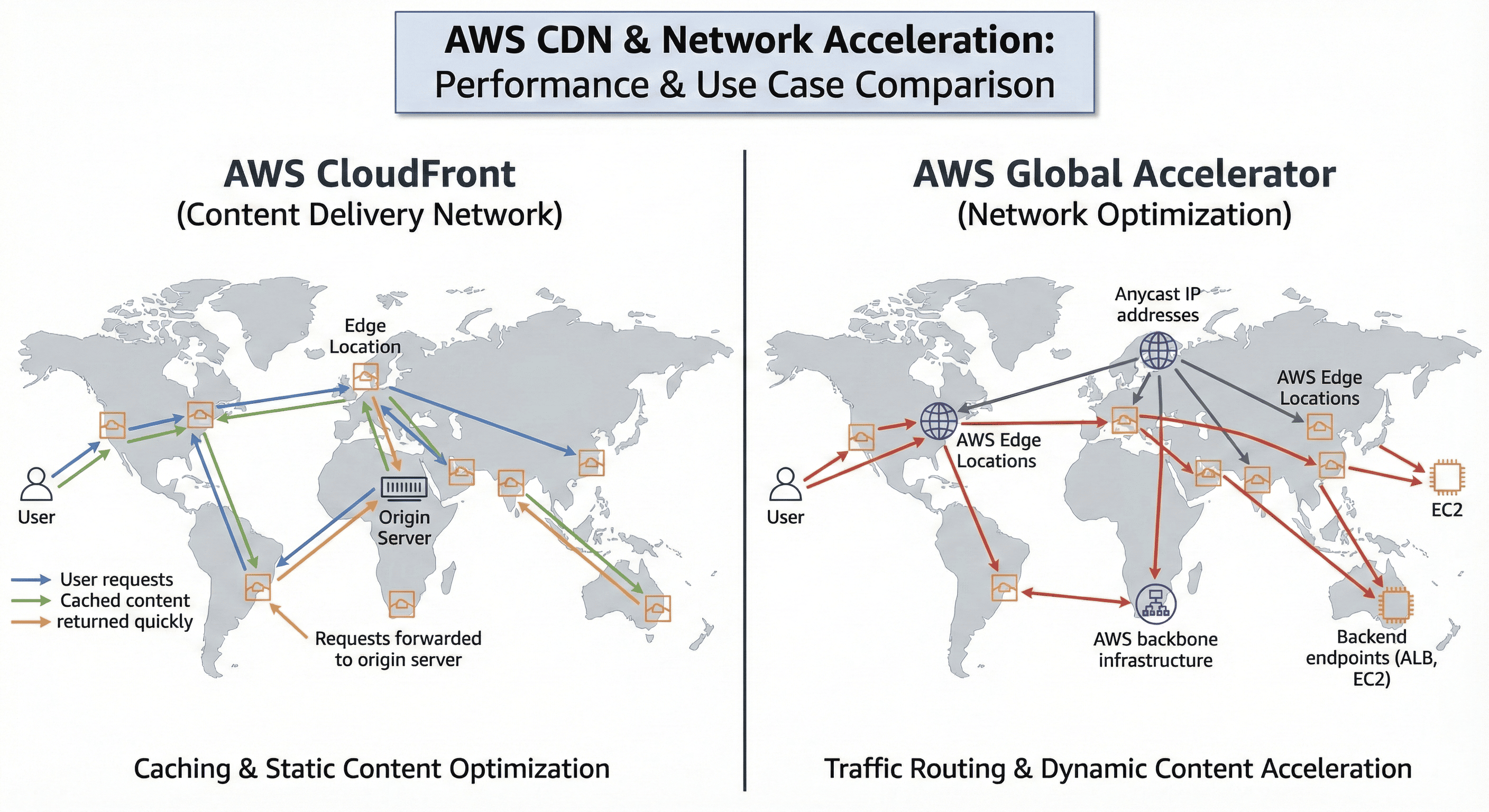
Both services leverage AWS’s global network infrastructure to improve performance, but each serves different purposes and offers distinct advantages. CloudFront operates as a traditional Content Delivery Network (CDN), caching static and dynamic content at edge locations worldwide to serve users from geographically closer positions.
In contrast, Global Accelerator functions at the network layer, routing traffic through optimized paths via AWS’s global network infrastructure. This comprehensive analysis examines the technical architecture, performance optimization strategies, and cost efficiency of both services to provide guidance for appropriate use cases.
AWS CDN Architecture Overview
CloudFront: Advanced CDN Service
CloudFront represents the evolution of traditional CDN services, offering sophisticated caching mechanisms and edge computing capabilities.
With over 400 edge locations and 13 regional edge caches worldwide, it provides comprehensive content distribution infrastructure.
Technical Architecture and Core Features
CloudFront operates through a distributed network of edge locations that cache content closer to users. When users request content, CloudFront serves it from the geographically nearest edge location with cached content, or retrieves it from the origin server if not cached.
The service’s core advantage lies in its sophisticated caching mechanisms. It supports fine-grained caching policies based on HTTP headers, cookies, and query strings, enabling significant reduction in origin server load. Additionally, Lambda@Edge integration allows direct code execution at edge locations, enabling advanced features like personalized content delivery and real-time image resizing.
Key Capabilities
- Global Edge Network: 400+ edge locations with regional edge caches
- Advanced Caching: Sophisticated caching policies with TTL control
- Edge Computing: Lambda@Edge for serverless edge processing
- Security Integration: AWS WAF, Shield, and SSL/TLS support
- Origin Flexibility: Support for S3, ALB, EC2, and custom origins
Content Delivery Flow
Performance Optimization Strategies
Maximizing CloudFront performance requires strategic caching configuration. Time To Live (TTL) settings should be differentiated by content type - long TTL for static assets and shorter TTL for dynamic content to ensure optimal balance between performance and content freshness.
Compression activation significantly reduces data transfer size, optimizing bandwidth usage and improving loading speeds. Text-based content particularly benefits from Gzip compression, achieving 70-80% size reduction.
Origin Request Policy and Cache Policy provide granular caching control, enabling personalized caching strategies based on user location, device type, and language preferences.
Terraform Implementation
# CloudFront Distribution Configuration
resource "aws_cloudfront_distribution" "main_distribution" {
  origin {
    domain_name = aws_lb.main_alb.dns_name
    origin_id   = "main-origin"

    custom_origin_config {
      http_port              = 80
      https_port             = 443
      origin_protocol_policy = "https-only"
      origin_ssl_protocols   = ["TLSv1.2"]
    }
  }

  enabled             = true
  is_ipv6_enabled     = true
  comment             = "Main CloudFront Distribution"
  default_root_object = "index.html"

  # Default caching behavior
  default_cache_behavior {
    allowed_methods        = ["DELETE", "GET", "HEAD", "OPTIONS", "PATCH", "POST", "PUT"]
    cached_methods         = ["GET", "HEAD"]
    target_origin_id       = "main-origin"
    compress               = true
    viewer_protocol_policy = "redirect-to-https"

    forwarded_values {
      query_string = false
      cookies {
        forward = "none"
      }
    }

    min_ttl     = 0
    default_ttl = 3600
    max_ttl     = 86400
  }

  # API endpoint caching behavior
  ordered_cache_behavior {
    path_pattern           = "/api/*"
    allowed_methods        = ["DELETE", "GET", "HEAD", "OPTIONS", "PATCH", "POST", "PUT"]
    cached_methods         = ["GET", "HEAD", "OPTIONS"]
    target_origin_id       = "main-origin"
    compress               = true
    viewer_protocol_policy = "redirect-to-https"

    forwarded_values {
      query_string = true
      headers      = ["Authorization", "CloudFront-Forwarded-Proto"]
      cookies {
        forward = "all"
      }
    }

    min_ttl     = 0
    default_ttl = 0
    max_ttl     = 0
  }

  # Geographic restrictions
  restrictions {
    geo_restriction {
      restriction_type = "none"
    }
  }

  # SSL certificate configuration
  viewer_certificate {
    cloudfront_default_certificate = true
  }

  # Logging configuration
  logging_config {
    include_cookies = false
    bucket          = aws_s3_bucket.cloudfront_logs.bucket_domain_name
    prefix          = "cloudfront-logs/"
  }

  tags = {
    Name        = "main-cloudfront"
    Environment = "production"
  }
}

# Lambda@Edge function for advanced processing
resource "aws_lambda_function" "edge_function" {
  filename         = "edge_function.zip"
  function_name    = "cloudfront-edge-function"
  role            = aws_iam_role.lambda_edge_role.arn
  handler         = "index.handler"
  source_code_hash = filebase64sha256("edge_function.zip")
  runtime         = "nodejs18.x"
  publish         = true

  tags = {
    Environment = "production"
  }
}
Global Accelerator: Network-Layer Optimization
Global Accelerator provides a new approach to network optimization by leveraging AWS's global network infrastructure.
It accelerates application performance by routing user traffic through AWS's optimized network paths, bypassing public internet congestion.
Core Functionality and Operation Mechanism
Global Accelerator is a network service that improves application performance by utilizing AWS’s global network infrastructure. It rapidly channels user traffic into AWS’s global backbone network, bypassing public internet congestion and latency issues.
The service provides two static Anycast IP addresses accessible from anywhere worldwide, automatically routing users to the closest AWS edge location. Traffic then travels through AWS’s high-performance network to reach the final destination: Application Load Balancer, Network Load Balancer, or EC2 instances.
Global Accelerator is particularly optimized for real-time applications and TCP/UDP-based services, delivering exceptional performance for latency-sensitive applications like gaming, VoIP, and streaming.
Key Performance Features
- Static Anycast IPs: Two global IP addresses for consistent routing
- AWS Network Optimization: Traffic routing through AWS backbone
- Protocol Support: TCP and UDP traffic optimization
- Health Checking: Automatic endpoint health monitoring and failover
- Traffic Control: Fine-grained traffic distribution with dial percentages
Network Acceleration Flow
Performance Optimization Elements
Global Accelerator’s primary advantage lies in the consistent performance of AWS’s global network. While public internet routing can experience unpredictable latency and packet loss through multiple ISPs, Global Accelerator provides stable and predictable performance through AWS’s private network infrastructure.
Health check and failover capabilities ensure high availability. When one endpoint encounters issues, traffic automatically reroutes to healthy endpoints, minimizing service interruptions.
The traffic dial feature enables fine-grained traffic distribution control between endpoints, allowing safe implementation of advanced deployment strategies like blue-green or canary deployments.
Terraform Implementation
# Global Accelerator Configuration
resource "aws_globalaccelerator_accelerator" "main_accelerator" {
  name            = "main-global-accelerator"
  ip_address_type = "IPV4"
  enabled         = true

  attributes {
    flow_logs_enabled   = true
    flow_logs_s3_bucket = aws_s3_bucket.accelerator_logs.bucket
    flow_logs_s3_prefix = "flow-logs/"
  }

  tags = {
    Name        = "main-accelerator"
    Environment = "production"
  }
}

# Global Accelerator Listener Configuration
resource "aws_globalaccelerator_listener" "main_listener" {
  accelerator_arn = aws_globalaccelerator_accelerator.main_accelerator.id
  client_affinity = "SOURCE_IP"
  protocol        = "TCP"

  port_range {
    from = 80
    to   = 80
  }

  port_range {
    from = 443
    to   = 443
  }
}

# Primary region endpoint group
resource "aws_globalaccelerator_endpoint_group" "main_endpoint_group" {
  listener_arn = aws_globalaccelerator_listener.main_listener.id

  endpoint_group_region = "us-west-2"
  traffic_dial_percentage = 100

  health_check_interval_seconds = 30
  health_check_path            = "/health"
  health_check_protocol        = "HTTP"
  health_check_port            = 80
  healthy_threshold_count      = 3
  unhealthy_threshold_count    = 3

  endpoint_configuration {
    endpoint_id = aws_lb.main_alb.arn
    weight      = 100
  }
}

# Backup region endpoint group
resource "aws_globalaccelerator_endpoint_group" "backup_endpoint_group" {
  listener_arn = aws_globalaccelerator_listener.main_listener.id

  endpoint_group_region = "us-east-1"
  traffic_dial_percentage = 0  # Initially inactive

  health_check_interval_seconds = 30
  health_check_path            = "/health"
  health_check_protocol        = "HTTP"
  health_check_port            = 80
  healthy_threshold_count      = 3
  unhealthy_threshold_count    = 3

  endpoint_configuration {
    endpoint_id = aws_lb.backup_alb.arn
    weight      = 100
  }
}
Performance Comparison Analysis
Latency Optimization
CloudFront specializes in latency reduction through caching mechanisms. Content with high cache hit rates achieves very low latency by serving directly from edge locations. However, cache misses require round trips to origin servers, potentially resulting in higher latency.
Global Accelerator provides consistent performance by routing all requests through AWS’s global network. While it lacks caching capabilities, requiring all requests to reach backend services, it typically achieves 15-60% performance improvement over public internet routing through optimized network paths.
| Performance Metric | CloudFront | Global Accelerator | Use Case Impact |
|---|---|---|---|
| Cache Hit Latency | 10-50ms | N/A | Static content delivery |
| Cache Miss Latency | 200-500ms | 100-200ms | Dynamic content access |
| Consistency | Variable | Consistent | Real-time applications |
| Protocol Support | HTTP/HTTPS | TCP/UDP | Application compatibility |
Throughput and Concurrent Connections
CloudFront optimizes HTTP/HTTPS traffic and significantly reduces origin server load through caching. This becomes a critical stability factor during traffic spikes.
Global Accelerator supports both TCP and UDP traffic, improving network efficiency through connection reuse and multiplexing. It demonstrates superior performance particularly in real-time communication and gaming applications.
Cost Analysis Deep Dive
CloudFront Cost Structure
CloudFront billing is primarily based on data transfer volume and request count. Higher cache hit rates reduce origin requests, increasing cost efficiency. Services with substantial static content can achieve very economical operations.
Regional pricing tiers enable cost optimization based on primary user base. For example, services primarily serving North American and European users can activate only those regions to reduce costs.
| Cost Component | Price (USD) | Unit | Notes |
|---|---|---|---|
| Data Transfer Out | $0.085 - $0.170 | Per GB | Varies by region and volume |
| HTTP Requests | $0.0075 | Per 10,000 requests | HTTPS slightly higher |
| Origin Requests | $0.0200 | Per 10,000 requests | Cache miss impact |
Global Accelerator Cost Model
Global Accelerator consists of fixed hourly charges and data transfer fees. Hourly charges apply regardless of usage, potentially creating higher cost burden for low-traffic services.
However, for high-traffic services, stable performance and availability can provide business value that offsets costs. This is particularly valuable for real-time services and mission-critical applications.
| Cost Component | Price (USD) | Unit | Notes |
|---|---|---|---|
| Fixed Fee | $0.025 | Per hour | Per accelerator |
| Data Transfer Premium | $0.015 | Per GB | Additional to standard transfer |
Cost Optimization Strategies
Hybrid approaches combining both services often prove most efficient. Static content delivery through CloudFront with dynamic APIs or real-time communication via Global Accelerator maximizes each service’s advantages.
Reserved Capacity commitments for predictable usage patterns can provide significant discounts, making this a valuable strategy for services with stable traffic patterns.
Use Case Analysis and Selection Guide
CloudFront Optimal Use Cases
CloudFront excels for websites, image galleries, and video streaming services with substantial cacheable content. When static assets comprise a significant portion of total traffic, it provides exceptional cost efficiency.
Lambda@Edge capabilities make CloudFront the only choice when edge computing is required. Image resizing, A/B testing, and security header addition can be processed at edge locations, reducing origin server load while improving response times.
Ideal Scenarios:
- Static Websites: HTML, CSS, JavaScript, and image-heavy sites
- Media Streaming: Video and audio content distribution
- API Response Caching: Cacheable API responses and data
- Edge Computing: Lambda@Edge processing requirements
Global Accelerator Optimal Use Cases
Global Accelerator suits game servers, VoIP applications, and IoT data collection requiring real-time performance and TCP/UDP protocol support. It also excels in global services requiring complex regional failover scenarios.
For API services with predominantly dynamic, uncacheable content, Global Accelerator’s network optimization proves more effective than caching approaches. Database queries and complex business logic particularly benefit from stable performance improvements.
Ideal Scenarios:
- Gaming Applications: Real-time multiplayer games requiring low latency
- VoIP Services: Voice and video communication applications
- IoT Data Collection: Real-time sensor data aggregation
- Financial Trading: Low-latency transaction processing
Hybrid Architecture Benefits
Many real-world scenarios achieve optimal results by combining both services. Web applications can serve static assets (CSS, JavaScript, images) through CloudFront while optimizing API endpoints through Global Accelerator.
This approach leverages each service’s strengths while maintaining overall cost efficiency, providing a balanced solution.
Security Considerations
CloudFront Security Features
CloudFront provides comprehensive security features for content and application protection. AWS WAF integration blocks SQL injection and XSS attacks, while geographic restrictions control access from specific countries or regions.
Origin Access Control (OAC) blocks direct S3 bucket access, ensuring content accessibility only through CloudFront. Signed URLs and Signed Cookies enable access control for premium content.
Global Accelerator Security Implications
Global Accelerator operates at the network layer, providing basic DDoS attack protection. AWS Shield Standard applies automatically, with Shield Advanced available for enhanced DDoS protection when needed.
Security group configuration for Load Balancers and EC2 instances used as endpoints enables additional network-level security. Specifically allowing only Global Accelerator IP address ranges can enhance security posture.
Security Best Practices
# WAF Web ACL for CloudFront
resource "aws_wafv2_web_acl" "cloudfront_waf" {
  name  = "cloudfront-security"
  scope = "CLOUDFRONT"

  default_action {
    allow {}
  }

  rule {
    name     = "AWS-AWSManagedRulesCommonRuleSet"
    priority = 1

    override_action {
      none {}
    }

    statement {
      managed_rule_group_statement {
        name        = "AWSManagedRulesCommonRuleSet"
        vendor_name = "AWS"
      }
    }

    visibility_config {
      cloudwatch_metrics_enabled = true
      metric_name                = "CommonRuleSetMetric"
      sampled_requests_enabled   = true
    }
  }
}
Performance Monitoring and Optimization
CloudFront Performance Metrics
Key CloudFront performance indicators include cache hit rate, origin response time, and edge response time. Higher cache hit rates improve both user experience and cost efficiency, requiring continuous monitoring and optimization.
Real User Monitoring (RUM) enables measurement of actual user-experienced performance. CloudWatch RUM provides detailed analysis of page loading times, JavaScript errors, and user interactions.
Global Accelerator Performance Metrics
Global Accelerator performance measurement focuses on network latency, packet loss rate, and connection success rate. CloudWatch enables real-time monitoring of these metrics, with regional performance analysis helping identify optimization opportunities.
Flow Logs activation enables detailed traffic pattern and endpoint performance analysis, supporting traffic distribution policy adjustments and failover scenario improvements.
Integrated Monitoring Strategy
When using both services together, unified monitoring dashboards provide comprehensive performance trend visibility. CloudWatch dashboards can display key CloudFront and Global Accelerator metrics in one location, enabling rapid response to issues.
# CloudWatch Dashboard for CDN Performance
resource "aws_cloudwatch_dashboard" "cdn_performance" {
  dashboard_name = "CDN-Performance-Dashboard"

  dashboard_body = jsonencode({
    widgets = [
      {
        type   = "metric"
        x      = 0
        y      = 0
        width  = 12
        height = 6

        properties = {
          metrics = [
            ["AWS/CloudFront", "Requests", "DistributionId", aws_cloudfront_distribution.main_distribution.id],
            ["AWS/CloudFront", "BytesDownloaded", "DistributionId", aws_cloudfront_distribution.main_distribution.id],
            ["AWS/CloudFront", "CacheHitRate", "DistributionId", aws_cloudfront_distribution.main_distribution.id]
          ]
          period = 300
          stat   = "Sum"
          region = "us-east-1"
          title  = "CloudFront Performance Metrics"
        }
      },
      {
        type   = "metric"
        x      = 0
        y      = 6
        width  = 12
        height = 6

        properties = {
          metrics = [
            ["AWS/GlobalAccelerator", "ProcessedBytesIn", "Accelerator", aws_globalaccelerator_accelerator.main_accelerator.id],
            ["AWS/GlobalAccelerator", "ProcessedBytesOut", "Accelerator", aws_globalaccelerator_accelerator.main_accelerator.id]
          ]
          period = 300
          stat   = "Sum"
          region = "us-west-2"
          title  = "Global Accelerator Traffic Metrics"
        }
      }
    ]
  })
}
Migration and Implementation Strategy
Phased Migration Approach
When migrating existing infrastructure to CloudFront or Global Accelerator, phased approaches ensure safety. Initially routing only a portion of traffic to new services, then gradually increasing ratios after confirming performance and stability is recommended.
DNS weighted routing enables gradual traffic migration with rapid rollback capabilities when issues occur. Integration with Route 53 health checks enables automatic failover implementation.
Performance Testing and Validation
Comprehensive performance testing before migration is essential. Testing from various regions, load testing, and failure simulation help verify expected performance and identify potential issues.
Caching policies and TTL settings particularly require careful validation in production-like environments, as their behavior in real operational environments can be difficult to predict accurately.
Future Trends and Technology Evolution
Edge Computing Expansion
CloudFront’s Lambda@Edge and CloudFront Functions open new possibilities for edge computing. Future developments will likely enable more complex business logic processing at edge locations, reducing latency while improving user experience.
Personalization services, real-time image processing, and A/B testing will become more efficient at edge locations, significantly reducing central server load while improving response speeds.
5G and IoT Environment Applications
5G network expansion and IoT device proliferation present new requirements for CDN and network acceleration services. Applications requiring ultra-low latency like autonomous vehicles, augmented reality, and remote surgery will increasingly rely on CloudFront and Global Accelerator.
Global Accelerator’s TCP and UDP traffic optimization capabilities can efficiently support real-time IoT device communication, playing a crucial role in large-scale IoT ecosystems like smart cities and Industry 4.0.
Best Practices and Optimization Tips
CloudFront Optimization Strategies
Activating HTTP/2 and HTTP/3 protocols significantly improves performance through multiplexing and header compression. Web applications with many small files experience particularly noticeable performance improvements.
Using Origin Request Policy to remove unnecessary headers and cookies improves caching efficiency. For static assets, removing authentication-related headers can enhance cache hit rates.
Key Optimization Areas:
- Cache Policy Configuration: Optimize TTL settings by content type
- Compression Settings: Enable Gzip/Brotli for text-based content
- Origin Shield: Add additional caching layer for improved cache hit rates
- HTTP/3 Support: Enable latest protocol for performance improvements
Global Accelerator Optimization Methods
Endpoint group traffic dial settings enable safe phased deployments and A/B testing. This allows gradual application of new features or performance improvements while minimizing risk.
Proper client affinity configuration can improve session maintenance and cache efficiency. SOURCE_IP settings enable consistent endpoint routing for requests from the same user.
Key Optimization Areas:
- Traffic Distribution: Configure optimal traffic dial percentages
- Health Check Tuning: Adjust intervals and thresholds for reliability
- Client Affinity: Configure based on application session requirements
- Endpoint Weighting: Optimize load distribution across endpoints
Conclusion
CloudFront and Global Accelerator are complementary services, each with unique strengths and application areas. CloudFront excels in content delivery optimization through caching, delivering exceptional performance for websites, media streaming, and API response caching.
Global Accelerator provides network-layer optimization, offering stable and predictable performance for real-time applications, gaming, and IoT services through AWS’s global network infrastructure.
Service selection should be based on comprehensive evaluation of application characteristics, traffic patterns, and cost considerations. Many organizations achieve optimal results through hybrid approaches combining both services, maximizing user experience improvements and cost efficiency simultaneously.
Success in global service delivery requires more than simple technology adoption - it demands continuous monitoring, optimization, and user feedback incorporation. CloudFront and Global Accelerator provide powerful tools to meet these requirements, enabling world-class service quality through proper configuration and operation.
The key lies in understanding workload patterns, implementing appropriate monitoring and cost controls, and designing architectures that can evolve with changing requirements.
Industry Case Studies
Large-Scale Service Examples
Netflix leverages a combination of CloudFront and custom CDN infrastructure to deliver high-quality streaming services to global users. Their implementation particularly focuses on caching optimization and Lambda@Edge-powered personalized recommendation systems to efficiently deliver user-customized content.
Gaming industry adoption of Global Accelerator continues growing due to its impact on user experience. Real-time multiplayer games require minimal latency for optimal gameplay, making AWS’s global network optimization through Global Accelerator a key competitive advantage.
Small and Medium Enterprise Applications
For small and medium enterprises, cost efficiency remains a critical factor. CloudFront’s free tier offers 1TB monthly data transfer and 10 million HTTP requests, enabling startups and smaller companies to implement CDN services without significant upfront costs.
Pay-as-you-go pricing models allow predictable cost management even for services with highly variable traffic patterns, through billing only for actual usage.
Advanced Configuration Examples
Multi-Origin CloudFront Setup
# Advanced CloudFront with multiple origins
resource "aws_cloudfront_distribution" "advanced_distribution" {
  # API origin
  origin {
    domain_name = "api.example.com"
    origin_id   = "api-origin"

    custom_origin_config {
      http_port              = 80
      https_port             = 443
      origin_protocol_policy = "https-only"
      origin_ssl_protocols   = ["TLSv1.2"]
    }
  }

  # Static assets origin (S3)
  origin {
    domain_name = aws_s3_bucket.static_assets.bucket_regional_domain_name
    origin_id   = "s3-origin"

    origin_access_control_id = aws_cloudfront_origin_access_control.s3_oac.id
  }

  # Image processing origin
  origin {
    domain_name = "images.example.com"
    origin_id   = "images-origin"

    custom_origin_config {
      http_port              = 80
      https_port             = 443
      origin_protocol_policy = "https-only"
      origin_ssl_protocols   = ["TLSv1.2"]
    }
  }

  enabled             = true
  is_ipv6_enabled     = true
  comment             = "Advanced Multi-Origin Distribution"

  # Static assets behavior
  ordered_cache_behavior {
    path_pattern           = "/static/*"
    target_origin_id       = "s3-origin"
    viewer_protocol_policy = "redirect-to-https"
    allowed_methods        = ["GET", "HEAD"]
    cached_methods         = ["GET", "HEAD"]
    compress               = true

    forwarded_values {
      query_string = false
      cookies {
        forward = "none"
      }
    }

    min_ttl     = 86400
    default_ttl = 2592000  # 30 days
    max_ttl     = 31536000 # 1 year
  }

  # API behavior
  ordered_cache_behavior {
    path_pattern           = "/api/v1/*"
    target_origin_id       = "api-origin"
    viewer_protocol_policy = "redirect-to-https"
    allowed_methods        = ["DELETE", "GET", "HEAD", "OPTIONS", "PATCH", "POST", "PUT"]
    cached_methods         = ["GET", "HEAD"]
    compress               = true

    cache_policy_id          = aws_cloudfront_cache_policy.api_cache_policy.id
    origin_request_policy_id = aws_cloudfront_origin_request_policy.api_request_policy.id

    lambda_function_association {
      event_type   = "viewer-request"
      lambda_arn   = aws_lambda_function.auth_function.qualified_arn
      include_body = false
    }
  }

  # Image processing behavior
  ordered_cache_behavior {
    path_pattern           = "/images/*"
    target_origin_id       = "images-origin"
    viewer_protocol_policy = "redirect-to-https"
    allowed_methods        = ["GET", "HEAD"]
    cached_methods         = ["GET", "HEAD"]
    compress               = true

    forwarded_values {
      query_string = true  # For image transformation parameters
      cookies {
        forward = "none"
      }
    }

    min_ttl     = 3600
    default_ttl = 86400
    max_ttl     = 2592000
  }

  # Default behavior
  default_cache_behavior {
    target_origin_id       = "api-origin"
    viewer_protocol_policy = "redirect-to-https"
    allowed_methods        = ["DELETE", "GET", "HEAD", "OPTIONS", "PATCH", "POST", "PUT"]
    cached_methods         = ["GET", "HEAD"]
    compress               = true

    forwarded_values {
      query_string = true
      headers      = ["Host", "Authorization"]
      cookies {
        forward = "all"
      }
    }

    min_ttl     = 0
    default_ttl = 0
    max_ttl     = 0
  }

  price_class = "PriceClass_100"  # US, Canada, Europe only

  restrictions {
    geo_restriction {
      restriction_type = "whitelist"
      locations        = ["US", "CA", "GB", "DE", "FR"]
    }
  }

  viewer_certificate {
    acm_certificate_arn      = aws_acm_certificate.ssl_cert.arn
    ssl_support_method       = "sni-only"
    minimum_protocol_version = "TLSv1.2_2021"
  }

  tags = {
    Name        = "advanced-cloudfront"
    Environment = "production"
  }
}

# Custom cache policy for API responses
resource "aws_cloudfront_cache_policy" "api_cache_policy" {
  name        = "api-cache-policy"
  comment     = "Cache policy for API responses"
  default_ttl = 300
  max_ttl     = 3600
  min_ttl     = 0

  parameters_in_cache_key_and_forwarded_to_origin {
    enable_accept_encoding_gzip   = true
    enable_accept_encoding_brotli = true

    query_strings_config {
      query_string_behavior = "whitelist"
      query_strings {
        items = ["version", "format", "lang"]
      }
    }

    headers_config {
      header_behavior = "whitelist"
      headers {
        items = ["Authorization", "Accept-Language", "User-Agent"]
      }
    }

    cookies_config {
      cookie_behavior = "none"
    }
  }
}
Global Accelerator with Advanced Endpoint Management
# Advanced Global Accelerator with multiple regions
resource "aws_globalaccelerator_accelerator" "advanced_accelerator" {
  name            = "advanced-global-accelerator"
  ip_address_type = "IPV4"
  enabled         = true

  attributes {
    flow_logs_enabled   = true
    flow_logs_s3_bucket = aws_s3_bucket.accelerator_logs.bucket
    flow_logs_s3_prefix = "advanced-flow-logs/"
  }

  tags = {
    Name        = "advanced-accelerator"
    Environment = "production"
    Service     = "global-api"
  }
}

# HTTP/HTTPS listener
resource "aws_globalaccelerator_listener" "http_listener" {
  accelerator_arn = aws_globalaccelerator_accelerator.advanced_accelerator.id
  client_affinity = "SOURCE_IP"
  protocol        = "TCP"

  port_range {
    from = 80
    to   = 80
  }

  port_range {
    from = 443
    to   = 443
  }
}

# WebSocket listener
resource "aws_globalaccelerator_listener" "websocket_listener" {
  accelerator_arn = aws_globalaccelerator_accelerator.advanced_accelerator.id
  client_affinity = "SOURCE_IP"
  protocol        = "TCP"

  port_range {
    from = 8080
    to   = 8080
  }
}

# Primary region endpoint group (US West)
resource "aws_globalaccelerator_endpoint_group" "us_west_group" {
  listener_arn = aws_globalaccelerator_listener.http_listener.id

  endpoint_group_region = "us-west-2"
  traffic_dial_percentage = 70

  health_check_interval_seconds = 10
  health_check_path            = "/health/detailed"
  health_check_protocol        = "HTTPS"
  health_check_port            = 443
  healthy_threshold_count      = 2
  unhealthy_threshold_count    = 2

  endpoint_configuration {
    endpoint_id = aws_lb.us_west_alb.arn
    weight      = 100
    client_ip_preservation_enabled = true
  }

  endpoint_configuration {
    endpoint_id = aws_lb.us_west_backup_alb.arn
    weight      = 50
    client_ip_preservation_enabled = true
  }
}

# Secondary region endpoint group (US East)
resource "aws_globalaccelerator_endpoint_group" "us_east_group" {
  listener_arn = aws_globalaccelerator_listener.http_listener.id

  endpoint_group_region = "us-east-1"
  traffic_dial_percentage = 20

  health_check_interval_seconds = 10
  health_check_path            = "/health/detailed"
  health_check_protocol        = "HTTPS"
  health_check_port            = 443
  healthy_threshold_count      = 2
  unhealthy_threshold_count    = 2

  endpoint_configuration {
    endpoint_id = aws_lb.us_east_alb.arn
    weight      = 100
    client_ip_preservation_enabled = true
  }
}

# Europe region endpoint group
resource "aws_globalaccelerator_endpoint_group" "eu_west_group" {
  listener_arn = aws_globalaccelerator_listener.http_listener.id

  endpoint_group_region = "eu-west-1"
  traffic_dial_percentage = 10

  health_check_interval_seconds = 10
  health_check_path            = "/health/detailed"
  health_check_protocol        = "HTTPS"
  health_check_port            = 443
  healthy_threshold_count      = 2
  unhealthy_threshold_count    = 2

  endpoint_configuration {
    endpoint_id = aws_lb.eu_west_alb.arn
    weight      = 100
    client_ip_preservation_enabled = true
  }
}

# WebSocket endpoint group
resource "aws_globalaccelerator_endpoint_group" "websocket_group" {
  listener_arn = aws_globalaccelerator_listener.websocket_listener.id

  endpoint_group_region = "us-west-2"
  traffic_dial_percentage = 100

  health_check_interval_seconds = 30
  health_check_path            = "/ws/health"
  health_check_protocol        = "HTTP"
  health_check_port            = 8080
  healthy_threshold_count      = 3
  unhealthy_threshold_count    = 3

  endpoint_configuration {
    endpoint_id = aws_lb.websocket_nlb.arn
    weight      = 100
  }
}
Troubleshooting and Common Issues
CloudFront Common Problems
Cache Invalidation Issues:
- Problem: Content not updating despite origin changes
- Solution: Implement proper cache invalidation strategies and TTL management
Origin Request Loops:
- Problem: CloudFront requests creating loops with origin
- Solution: Configure proper origin request policies and avoid forwarding CloudFront headers to origin
Lambda@Edge Timeout Issues:
- Problem: Edge functions timing out or consuming too much memory
- Solution: Optimize function code and implement proper error handling
Global Accelerator Troubleshooting
Health Check Failures:
- Problem: Endpoints marked unhealthy despite being accessible
- Solution: Review health check configuration, firewall rules, and response requirements
Uneven Traffic Distribution:
- Problem: Traffic not distributing as expected across endpoints
- Solution: Verify traffic dial percentages, endpoint weights, and client affinity settings
Performance Benchmarking
Testing Methodologies
Comprehensive performance testing should include:
- Geographic Distribution Testing: Test from multiple global locations
- Load Pattern Simulation: Simulate realistic traffic patterns and spikes
- Failover Scenario Testing: Test automatic failover and recovery
- Cache Behavior Validation: Verify caching policies work as expected
Benchmarking Tools and Scripts
#!/bin/bash
# CloudFront performance testing script

DISTRIBUTION_DOMAIN="d123456abcdef8.cloudfront.net"
TEST_ENDPOINTS=(
    "https://$DISTRIBUTION_DOMAIN/"
    "https://$DISTRIBUTION_DOMAIN/api/v1/status"
    "https://$DISTRIBUTION_DOMAIN/static/large-image.jpg"
)

echo "CloudFront Performance Test Results"
echo "=================================="

for endpoint in "${TEST_ENDPOINTS[@]}"; do
    echo "Testing: $endpoint"

    # Test cache performance
    curl -w "DNS: %{time_namelookup}s | Connect: %{time_connect}s | Total: %{time_total}s | Size: %{size_download} bytes\n" \
         -H "Cache-Control: no-cache" \
         -s -o /dev/null "$endpoint"

    # Test cached response
    curl -w "Cached - DNS: %{time_namelookup}s | Connect: %{time_connect}s | Total: %{time_total}s\n" \
         -s -o /dev/null "$endpoint"

    echo "---"
done

# Global Accelerator testing
GA_ENDPOINT="a1234567890abcdef.awsglobalaccelerator.com"

echo "Global Accelerator Performance Test"
echo "=================================="

curl -w "GA - DNS: %{time_namelookup}s | Connect: %{time_connect}s | Total: %{time_total}s\n" \
     -s -o /dev/null "https://$GA_ENDPOINT/api/v1/status"
Conclusion
CloudFront and Global Accelerator represent AWS’s comprehensive approach to global content delivery and network optimization. CloudFront excels as a sophisticated CDN service with advanced caching mechanisms, edge computing capabilities, and extensive customization options. Its strength lies in optimizing cacheable content delivery while reducing origin server load and improving global user experience.
Global Accelerator provides network-layer acceleration through AWS’s global infrastructure, delivering consistent performance improvements for applications requiring low latency and real-time communication. Its particular value lies in optimizing dynamic content and protocol-agnostic traffic routing.
The optimal approach for most organizations involves strategic combination of both services based on specific workload characteristics. Static content delivery through CloudFront combined with dynamic API optimization via Global Accelerator creates a comprehensive global delivery architecture that maximizes performance while controlling costs.
Success in implementing these services requires thorough understanding of application traffic patterns, proper monitoring and alerting configuration, and ongoing optimization based on real-world performance data. With proper planning and implementation, CloudFront and Global Accelerator enable organizations to deliver world-class global services that meet user expectations for performance, reliability, and availability.
References
- AWS CloudFront Developer Guide
- AWS Global Accelerator Developer Guide
- AWS Well-Architected Framework - Performance Efficiency Pillar
- CloudFront Pricing
- Global Accelerator Pricing
- AWS CDN Performance Best Practices Whitepaper
- Terraform AWS Provider Documentation
- AWS re:Invent 2023 - NET301: Accelerate your applications with AWS Global Accelerator
- High Performance Browser Networking - Ilya Grigorik, O’Reilly Media
- Content Delivery Networks: Web Caching and Beyond - IEEE Internet Computing

Comments